


Voice activation workarounds?


Senior Member


Joined: Feb 2017
Posts: 315
Likes: 61
From: Palm Beach Gardens, FL

Unhinged - thanks for your help on both my posts, however I'm still looking for the microphone icon on my touch screen! I've tried searching the on-line manual as well as tried a few screens. Yesterday I did finally hookup with the incontrol folks to setup the car with a new ID for me (they have a problem emailing to xxx.bellsouth.net - too funny). We got around that with a GMail ID. Now I'll try and figure the apps/phone out working together.
Senior Member
Joined: Feb 2017
Posts: 315
Likes: 61
From: Palm Beach Gardens, FL
OK - found the microphone button (main phone panel with dial pad for those of you not found it yet) - of course sitting in my garage it's disabled. I'll give it a try later on the road.

Junior Member
Joined: May 2011
Posts: 11
Likes: 0
From: dallas
Would you mind posting a screen shot?





Senior Member
Joined: Dec 2009
Posts: 811
Likes: 301
From: SW England
Not sure if I'm following the problem but this is how JustDrive works for me.
FB Account and iPhone
Touch JustDrive and this screen is next

Touch Talk and the white Mic symbol makes a circular blue

Then it turns blue

Then green
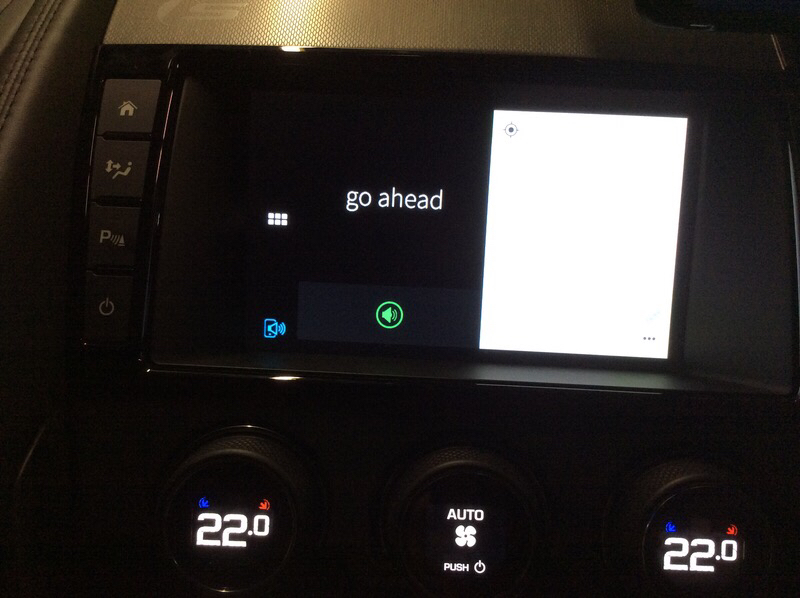
But for an iPhone for phone calls it's quicker and totally hands free to use Hey Siri instead of JustDrive.
FB Account and iPhone
Touch JustDrive and this screen is next
Touch Talk and the white Mic symbol makes a circular blue
Then it turns blue
Then green
But for an iPhone for phone calls it's quicker and totally hands free to use Hey Siri instead of JustDrive.
Last edited by malbec; Feb 25, 2017 at 10:59 AM.

Senior Member
Joined: Feb 2017
Posts: 315
Likes: 61
From: Palm Beach Gardens, FL
OK - gets interesting.
Since my last post I actually called Jag (New Jersey) to "enable" the incontrol on the car (supposedly). The nice lady I spoke with said that the "rumor" is incorrect - YES, there is in fact the same functionality on an Android as on an iPhone (I now believe she was in error - read on...)
Prior to then I had downloaded the only 2 Jaguar apps I could find to my Android phone - "Jaguar Apps" and "Jaguar Remote". At that time I launched "Jaguar Apps on my phone and it has Contacts, Calendar, and Music - there are also numerous other apps listed below - none of which are JustDrive. No phone or dialing app was inferred so I assumed at that time I could not do voice dialing. Those apps did nothing for me so I simply assumed I'd use the firmware apps of the car going forward.
Right after speaking to New Jersey, since my car was registered and linked (via satellite) to their system - I launched the "Jaguar Remote" app and it worked - when I went to start my car it advised me the doors were unlocked, blah, blah. At this point in time, I figured I'd have everything available to me since I had not done that before.
Now, this morning after reading your posts - I think I'm getting closer (to an end that is the same!)...
to the questions above - YES - before I was trying the phone microphone (on my son's iPhone AND my Android) - NOT the microphone in "just drive". In his and my phone, the car's firmware apps have the microphone grayed out.
So... this morning I connected my phone, and after plugging into the correct USB (one was not responsive) - the car connects to my phone and simply displays the same 3 Jag apps that are in "Jaguar Apps". I was not able to find "just drive" anywhere already in the phone or car. When I try and take a screen shot from my phone, it immediately disconnects the app and the Jag screen goes back to the normal car screens - so no pictures now, sorry.
I have searched for more Jag apps via my phone and tablet to no avail. At this point I don't think there is, in fact (as stated earlier) a "just drive" app for Android. When I see my son next we'll try and find it for his iphone and test. If I learn I missed something, we'll try and replicate on my Android. No matter what, however I'll call Jag New Jersey again tomorrow and try and get to the bottom of this.
Sorry for the diatribe - but I wanted all of y'all to see exactly what I've done. If photos are still required I can use a camera separate from the phone and upload.
If I'm still missing something, please advise.
thanks again.
Since my last post I actually called Jag (New Jersey) to "enable" the incontrol on the car (supposedly). The nice lady I spoke with said that the "rumor" is incorrect - YES, there is in fact the same functionality on an Android as on an iPhone (I now believe she was in error - read on...)
Prior to then I had downloaded the only 2 Jaguar apps I could find to my Android phone - "Jaguar Apps" and "Jaguar Remote". At that time I launched "Jaguar Apps on my phone and it has Contacts, Calendar, and Music - there are also numerous other apps listed below - none of which are JustDrive. No phone or dialing app was inferred so I assumed at that time I could not do voice dialing. Those apps did nothing for me so I simply assumed I'd use the firmware apps of the car going forward.
Right after speaking to New Jersey, since my car was registered and linked (via satellite) to their system - I launched the "Jaguar Remote" app and it worked - when I went to start my car it advised me the doors were unlocked, blah, blah. At this point in time, I figured I'd have everything available to me since I had not done that before.
Now, this morning after reading your posts - I think I'm getting closer (to an end that is the same!)...
to the questions above - YES - before I was trying the phone microphone (on my son's iPhone AND my Android) - NOT the microphone in "just drive". In his and my phone, the car's firmware apps have the microphone grayed out.
So... this morning I connected my phone, and after plugging into the correct USB (one was not responsive) - the car connects to my phone and simply displays the same 3 Jag apps that are in "Jaguar Apps". I was not able to find "just drive" anywhere already in the phone or car. When I try and take a screen shot from my phone, it immediately disconnects the app and the Jag screen goes back to the normal car screens - so no pictures now, sorry.
I have searched for more Jag apps via my phone and tablet to no avail. At this point I don't think there is, in fact (as stated earlier) a "just drive" app for Android. When I see my son next we'll try and find it for his iphone and test. If I learn I missed something, we'll try and replicate on my Android. No matter what, however I'll call Jag New Jersey again tomorrow and try and get to the bottom of this.
Sorry for the diatribe - but I wanted all of y'all to see exactly what I've done. If photos are still required I can use a camera separate from the phone and upload.
If I'm still missing something, please advise.
thanks again.
Senior Member
Joined: Dec 2009
Posts: 811
Likes: 301
From: SW England
justDrive developer is CloudCar | Driving Innovation
I can't see it on the Google PlayStore.
On my iPhone you can see which apps are available ...

Where it says "more apps" you can scroll through the list of available apps.
Presume it's the same on Android. If app not there, then not available.
I can't see it on the Google PlayStore.
On my iPhone you can see which apps are available ...
Where it says "more apps" you can scroll through the list of available apps.
Presume it's the same on Android. If app not there, then not available.
Senior Member
Joined: Feb 2017
Posts: 315
Likes: 61
From: Palm Beach Gardens, FL
That makes it pretty conclusive - the default apps came up as contacts, calendar and music. When I scroll down on "more apps" - yes there are more to choose from, however not justDrive. My guess is that Jag has not written justDrive for Android contrary to what the lady told me last week. I'll call them again tomorrow and get someone in the know to help me find out for sure. Thanks!
Last edited by inmanlanier; Feb 26, 2017 at 08:28 AM. Reason: add a thank you
Senior Member
Joined: Feb 2017
Posts: 315
Likes: 61
From: Palm Beach Gardens, FL
Validated one more time by searching all over from my Desktop (hate computing on 4" telephone screens!). Even at the cloudcar.com website they are silent on the platforms. A couple of internet articles mention "will be ... Android" - but none have yet stated we're there yet. I sent an inquiry in the contact us window on the cloudcar.com website. We'll see what they say. Disappointed.
Senior Member
Joined: Dec 2009
Posts: 811
Likes: 301
From: SW England
Here's your answer..
Supported Smartphones | justDrive
It also works on my iPad mini which is what I use for InControl. That way it leaves my phone completely free to do other things.
Mini has sim port so has GPS.
I plan to get another old iPhone to replace the iPad which can't be stored in the armrest. I'd get an iPod touch but no GPS and I'm assuming InControl is not using the vehicle's GPS.
Supported Smartphones | justDrive
It also works on my iPad mini which is what I use for InControl. That way it leaves my phone completely free to do other things.
Mini has sim port so has GPS.
I plan to get another old iPhone to replace the iPad which can't be stored in the armrest. I'd get an iPod touch but no GPS and I'm assuming InControl is not using the vehicle's GPS.
Last edited by malbec; Feb 26, 2017 at 11:41 AM.
Senior Member
Joined: Feb 2017
Posts: 315
Likes: 61
From: Palm Beach Gardens, FL
Pretty poor IMHO. If they program one operating system, they can code others. It's only money. Part of the other thing that seems pretty dumb if you ask me is that it forces you to plug in each time. As I said earlier, every other car I own I simply get it and drive. I push a single button and talk. Very simple. The whole idea behind bluetooth is exactly that - remove driver distractions. As sophisticated as this vehicle is, I'm amazed they missed that basic functionality. Oh, well.

Senior Member
Joined: Dec 2016
Posts: 258
Likes: 46
From: Chicago
Pretty poor IMHO. If they program one operating system, they can code others. It's only money. Part of the other thing that seems pretty dumb if you ask me is that it forces you to plug in each time. As I said earlier, every other car I own I simply get it and drive. I push a single button and talk. Very simple. The whole idea behind bluetooth is exactly that - remove driver distractions. As sophisticated as this vehicle is, I'm amazed they missed that basic functionality. Oh, well.
Junior Member
Joined: May 2011
Posts: 11
Likes: 0
From: dallas
Pretty poor IMHO. If they program one operating system, they can code others. It's only money. Part of the other thing that seems pretty dumb if you ask me is that it forces you to plug in each time. As I said earlier, every other car I own I simply get it and drive. I push a single button and talk. Very simple. The whole idea behind bluetooth is exactly that - remove driver distractions. As sophisticated as this vehicle is, I'm amazed they missed that basic functionality. Oh, well.
Welcome to the 1990s.
I hope someone can develop a hack that will allow this to work over bluetooth.
Last edited by dlleon; Mar 12, 2017 at 12:27 AM. Reason: hit save too soon

Thread
Thread Starter
Forum
Replies
Last Post
08292
XF and XFR ( X250 )
26
Jul 9, 2018 01:44 AM
Currently Active Users Viewing This Thread: 1 (0 members and 1 guests)