


a little help please


Thread Starter
|
Senior Member
Joined: Nov 2012
Posts: 265
Likes: 7
From: southampton UK
 a little help please
Hi all
sorry if this upsets anybody but im new and still learning and trying my best to do so without asking too many questions,
ive downloaded the JTIS and i would just like a little run down on how to use it,
ie search for fault codes etc, there seems to be a massive amount of info in there.
Thanks
Darren
sorry if this upsets anybody but im new and still learning and trying my best to do so without asking too many questions,
ive downloaded the JTIS and i would just like a little run down on how to use it,
ie search for fault codes etc, there seems to be a massive amount of info in there.
Thanks
Darren

Veteran member


Joined: May 2008
Posts: 14,803
Likes: 4,104
From: Great Mills, MD
darren, the best advice that I can tell you is to simply get in there and start looking up random stuff. You will quickly learn what it takes to find information there.
One side thing that I will tell you is that I have found that access in the DTC codes and the wiring diagrams is actually easier by going into the folder that has the CD stored in it and then looking under the "DATA" folder. Inside there, you will see a folder marked "DTC Summaries". From there, look up your car based on the manufacturer number (an X followed by 3 numbers, in your case X206, but the JTIS only has X202 which is going to have the same information). There you can also look up the DTCs based on the type of code (B, C, P, or X). Once you get in there, you will find tons of information.
Kinda like with the electrical diagrams. I go straight into the "DATA" folder and then scroll down till I find the model I am after (using X206 in your case for the 2002 S-Type). Then you can open up the PDF file near the bottom of the list of files and that will be the complete wiring diagram for your car. From there, look on the left to find the section you are after and it will take you to the section you need. Much easier than trying to figure out where you need to be in the JTIS to get the same information.
Unfortunately, if you are looking for "how-to's", then getting into the JTIS is the only way. The how-to files are in a Jaguar specific language and I have not found a program that will allow me to access the individual files.
One side thing that I will tell you is that I have found that access in the DTC codes and the wiring diagrams is actually easier by going into the folder that has the CD stored in it and then looking under the "DATA" folder. Inside there, you will see a folder marked "DTC Summaries". From there, look up your car based on the manufacturer number (an X followed by 3 numbers, in your case X206, but the JTIS only has X202 which is going to have the same information). There you can also look up the DTCs based on the type of code (B, C, P, or X). Once you get in there, you will find tons of information.
Kinda like with the electrical diagrams. I go straight into the "DATA" folder and then scroll down till I find the model I am after (using X206 in your case for the 2002 S-Type). Then you can open up the PDF file near the bottom of the list of files and that will be the complete wiring diagram for your car. From there, look on the left to find the section you are after and it will take you to the section you need. Much easier than trying to figure out where you need to be in the JTIS to get the same information.
Unfortunately, if you are looking for "how-to's", then getting into the JTIS is the only way. The how-to files are in a Jaguar specific language and I have not found a program that will allow me to access the individual files.




Joined: Dec 2011
Posts: 120,439
Likes: 17,018
From: Durham, UK
Darren,
Once you've learned to navigate to the DTC fault codes, you'll be able to find your way around JTIS using the same procedure.
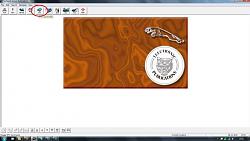
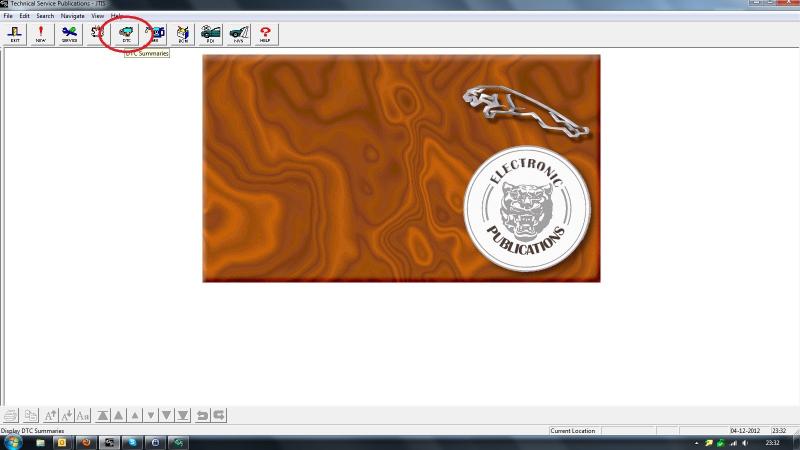
1. open JTIS and click on the DTC button (arrowed in red)
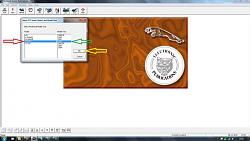
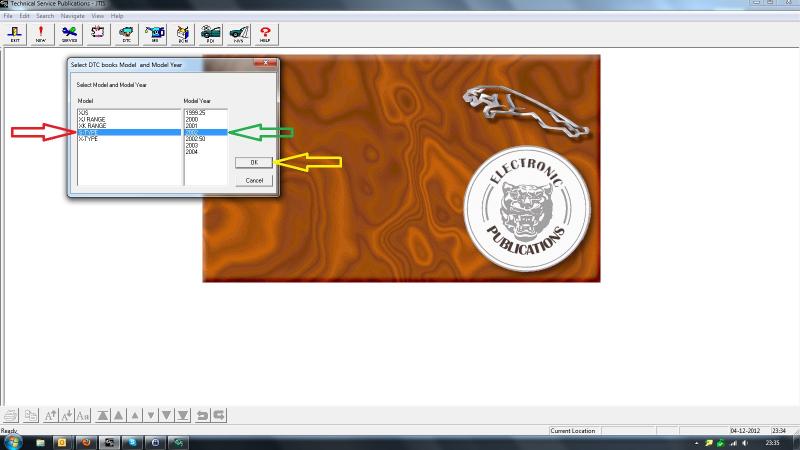
2. in the Select DTC books Model & Model Year dialogue box, click on your Model in the left hand box (arrowed in red), the Model Year in the right hand box (arrowed in green) and then on the OK button (arrowed in yellow)
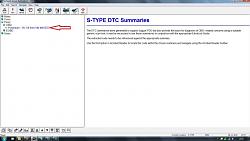
3. the types of codes available are listed in the left hand box.
B = Body
C = Chassis
P = Powertrain
U = Network

Unless you are using something like AutoEnginuity, you will only be able to read Powertrain codes with your scanner. To navigate to these, click on the + sign to the left of Pxxxx (arrowed in red) to open the options.
4. double click on Powertrain - V6, V8 from VIN M45255 (arrowed in red) to open the fault code list.
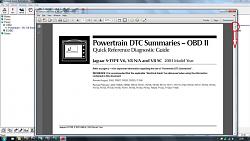
5. use the "grab handle" (circled in red) or the up and down arrows to navigate through the document
6. when you're finished, just click on the Exit button (top left on the menu
bar) to close JTIS from wherever you happen to be.
The HELP button at the top right of the menu bar explains navigating and printing in much greater detail.
Graham
Once you've learned to navigate to the DTC fault codes, you'll be able to find your way around JTIS using the same procedure.
1. open JTIS and click on the DTC button (arrowed in red)
2. in the Select DTC books Model & Model Year dialogue box, click on your Model in the left hand box (arrowed in red), the Model Year in the right hand box (arrowed in green) and then on the OK button (arrowed in yellow)
3. the types of codes available are listed in the left hand box.
B = Body
C = Chassis
P = Powertrain
U = Network
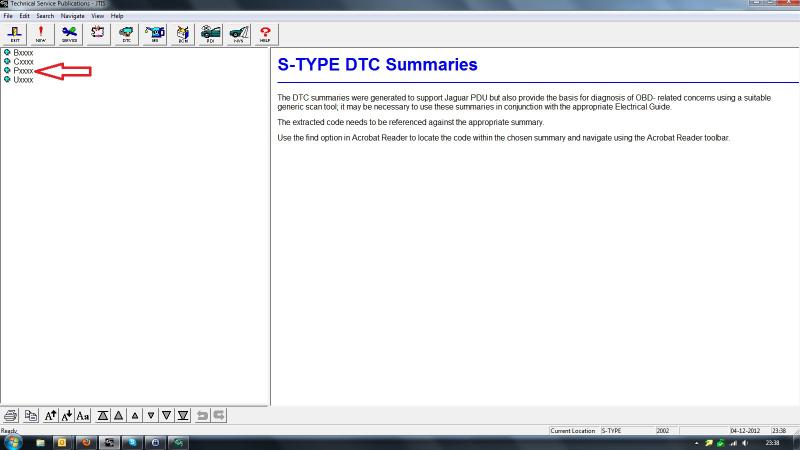
Unless you are using something like AutoEnginuity, you will only be able to read Powertrain codes with your scanner. To navigate to these, click on the + sign to the left of Pxxxx (arrowed in red) to open the options.
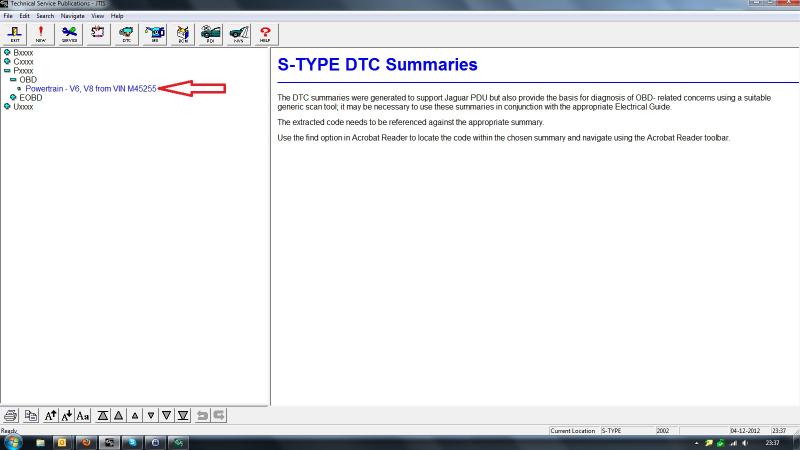
4. double click on Powertrain - V6, V8 from VIN M45255 (arrowed in red) to open the fault code list.
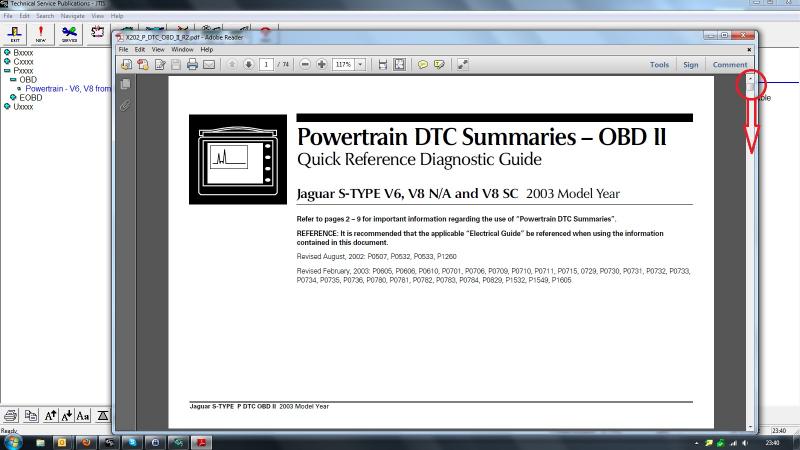
5. use the "grab handle" (circled in red) or the up and down arrows to navigate through the document
6. when you're finished, just click on the Exit button (top left on the menu
bar) to close JTIS from wherever you happen to be.
The HELP button at the top right of the menu bar explains navigating and printing in much greater detail.
Graham