


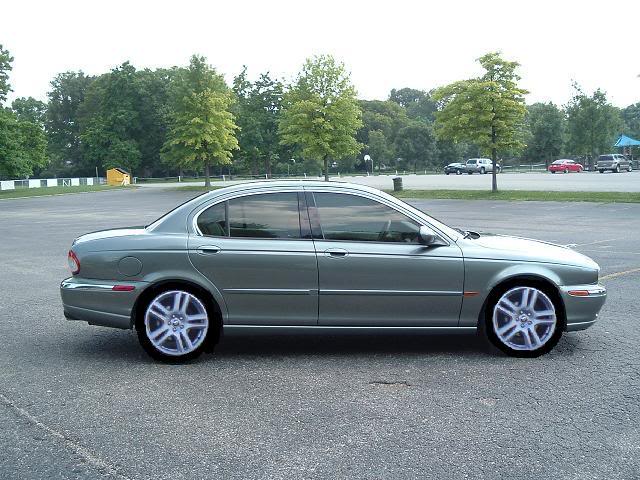
Wheel possibilities, photoshopped..


Veteran Member
Joined: Sep 2006
Posts: 5,671
Likes: 4
 RE: Wheel possibilities, photoshopped..
I pretty much have to...here's my list to do...tires, shocks, front end noise and hids....but in this order to fix first....
front end noise and minor steering movement
tires
shocks
hids...
Been working with my dad last 2 weeks doing a tile job and the car audio stuff so I should have enough to do all of it! Have to get it done by around Oct. 18th though for our second trip to wife's brothers house in Wisconsin...
front end noise and minor steering movement
tires
shocks
hids...
Been working with my dad last 2 weeks doing a tile job and the car audio stuff so I should have enough to do all of it! Have to get it done by around Oct. 18th though for our second trip to wife's brothers house in Wisconsin...
 RE: Wheel possibilities, photoshopped..
Nice one Aquill.............sounds like your X is gonna get the treatment

I'm just commin to the end of mine for the moment thank god...Its been XXX for the last 2-3 weeks
Jim

Joined: Aug 2007
Posts: 114
Likes: 1
From:
RE: Wheel possibilities, photoshopped..
You see how those wheels look completely out of place and undeniably photoshoped?
It is because you did not adjust the 'white balance'. Those pictures of the wheels are harboring too much 'blue' on the (r,g,b) color spectrum. If you goto into Photoshop, mask out the wheels, and use the hotkey "Ctrl + B" you will be able to adjust the white balance and add more green to them.
Aside from 'white balance' you can also adjust the 'contrast' which is referred to as 'level adjustment'. You can access this feature by using hotkey "Ctrl + L". Slide around the 3 arrows to adjust contrast and exposure.
If you need to 'skew' your wheels to fit a different angle then simple use the hotkey "Ctrl T" which will allow you to transform your image. When in the transform mode hold down the control button and click one of the 4 corners with your black arrow. You can also hold "Shift" you can transform to scale.
These simple steps will really make a difference when trying to make conceptual descisions.
It is because you did not adjust the 'white balance'. Those pictures of the wheels are harboring too much 'blue' on the (r,g,b) color spectrum. If you goto into Photoshop, mask out the wheels, and use the hotkey "Ctrl + B" you will be able to adjust the white balance and add more green to them.
Aside from 'white balance' you can also adjust the 'contrast' which is referred to as 'level adjustment'. You can access this feature by using hotkey "Ctrl + L". Slide around the 3 arrows to adjust contrast and exposure.
If you need to 'skew' your wheels to fit a different angle then simple use the hotkey "Ctrl T" which will allow you to transform your image. When in the transform mode hold down the control button and click one of the 4 corners with your black arrow. You can also hold "Shift" you can transform to scale.
These simple steps will really make a difference when trying to make conceptual descisions.
Joined: Aug 2007
Posts: 114
Likes: 1
From:
RE: Wheel possibilities, photoshopped..
Ok, well you definitely used the words "Photoshopped" in the title of this thread.
Anyhow, that is pretty valuable information that I have supplied you with so try it out if you ever get a copy of Photoshop.
Anyhow, that is pretty valuable information that I have supplied you with so try it out if you ever get a copy of Photoshop.

Thread Starter
|
Senior Member
Joined: May 2007
Posts: 351
Likes: 72
From: Louisville, KY
RE: Wheel possibilities, photoshopped..
I'm aware of what I said. "Photoshopping" can refer to the act of editing photos, not just the use of that specific program.
Thanks for the information.
Thanks for the information.
 RE: Wheel possibilities, photoshopped..
Lol.....calm down ........jeeesh
Who gives a ????
The Jag looks good, the wheels look good and the wheels look good on the Jag
Aint that all that matters?

Now, can we all play nicely together? Please!.....lol
Jim
Joined: Aug 2007
Posts: 114
Likes: 1
From:
RE: Wheel possibilities, photoshopped..
I am not sure that anyone is upset JimC64. I'm passing on information for those who choose to appreciate it, not to offend anyone who doesn't. I don't believe there are any altercations.

Veteran Member
Joined: Feb 2007
Posts: 3,780
Likes: 45
RE: Wheel possibilities, photoshopped..
Didn't really feel there was too much hostility, but now I think that 310 is VERY smart. Instead of doing all the photoshop stuff, he manipulated arden into doing it himself LOL Just kidding guys!
LOL Just kidding guys!
RE: Wheel possibilities, photoshopped..
See thats how nice n friendly this forum is.........even the slightest touch of sarcasm can be misconstued as " very slight hostility ".....lol
Jim
Veteran Member
Joined: Sep 2006
Posts: 5,671
Likes: 4
RE: Wheel possibilities, photoshopped..
Yeah I didn't measure too much hostility on that one but too bad you don't have a copy of photoshop...man is the program awesome...I wouldn't be able to any of the altering I do without it...

Veteran Member
Joined: Feb 2007
Posts: 3,780
Likes: 45
RE: Wheel possibilities, photoshopped..
No sarcasm arden. Believe me, no sarcasm. He really only does his photoshopping with the program, because the things he does is incredible. I always wondered how he did such good jobs. We called him the photoshop king. He apparently has competition now.

Veteran Member
Joined: Sep 2006
Posts: 5,671
Likes: 4
RE: Wheel possibilities, photoshopped..
No, no sarcasm here that program is awesome...I apparently have nothing on you as far as photoshopping but I really don't tinker with it that much just a few things...here are some of my quick easy ones...

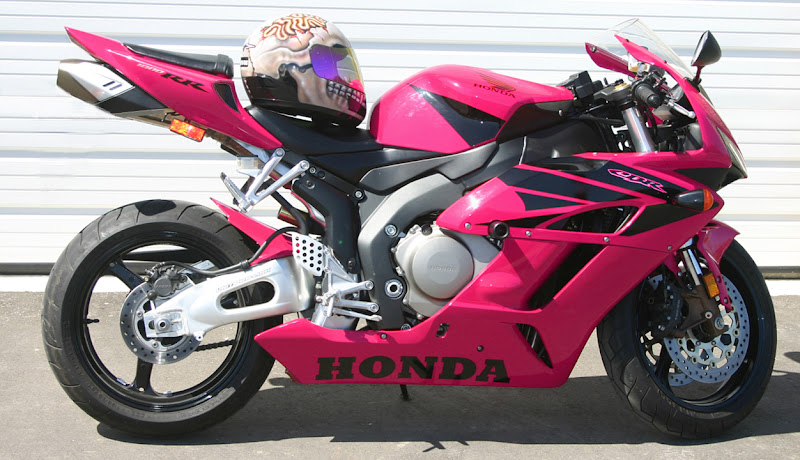
Didn't do a very good job on the rear tail but the pics are a few years old...
BTW how in the world did you do that with the lambo any explanation...short explanation I wouldn't have the time to do the full on work you did with that thing as I have no time to get on here anymore let alone screw around on photoshop...I have adobe photoshop cs version 8.0...little old but I also didn't pay the 600+ dollars for it either...I couldn't do anything with pics without it other than the usual stuff...
Didn't do a very good job on the rear tail but the pics are a few years old...
BTW how in the world did you do that with the lambo any explanation...short explanation I wouldn't have the time to do the full on work you did with that thing as I have no time to get on here anymore let alone screw around on photoshop...I have adobe photoshop cs version 8.0...little old but I also didn't pay the 600+ dollars for it either...I couldn't do anything with pics without it other than the usual stuff...



