did you now the xf xk has a built in code reader



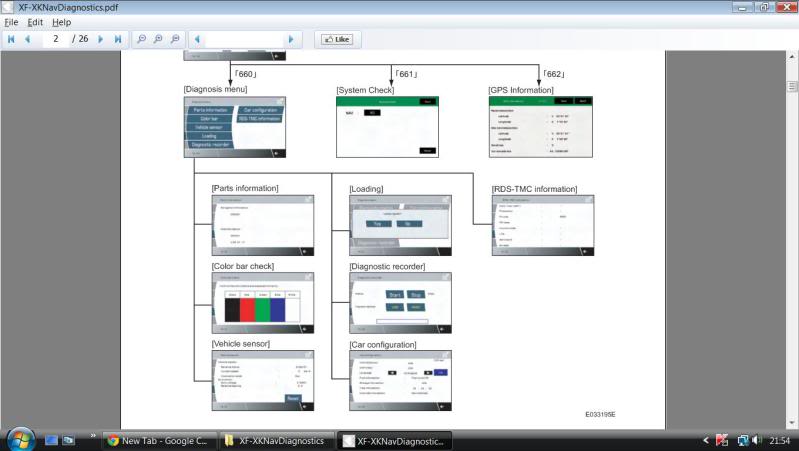
[Diagnostic Screen Access]
1.With the vehicle at rest, place the ignition switch in either
"ACC", "ON", or start the engine.
2.On the "Menu" screen, press the top center of the screen
(circled portion in the image to the left) for more than three
seconds.
3.Enter the PIN code, and then touch "OK".
660: Diagnosis Menu screen
661: System Check screen (DTC code verification screen)
662: GPS Information screen
4.The diagnostics screen will be displayed.2. DIAGNOSIS SCREEN
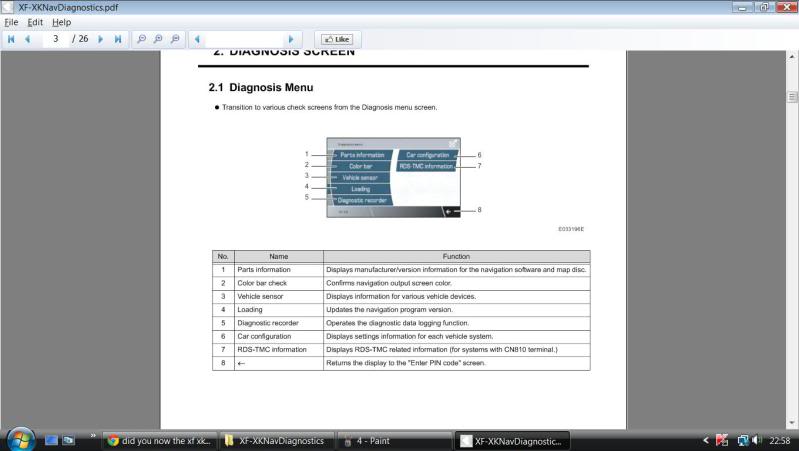
2.1 Diagnosis Menu
? Transition to various check screens from the Diagnosis menu screen.
this will access screen i wouldn't reset anything you don't understand
1.With the vehicle at rest, place the ignition switch in either
"ACC", "ON", or start the engine.
2.On the "Menu" screen, press the top center of the screen
(circled portion in the image to the left) for more than three
seconds.
3.Enter the PIN code, and then touch "OK".
660: Diagnosis Menu screen
661: System Check screen (DTC code verification screen)
662: GPS Information screen
4.The diagnostics screen will be displayed.2. DIAGNOSIS SCREEN
2.1 Diagnosis Menu
? Transition to various check screens from the Diagnosis menu screen.
this will access screen i wouldn't reset anything you don't understand
Yeah, and what's the PIN code??? Sheesh, does this have to be this hard to get the info???





Thread Starter
|
Senior Member
Joined: Jul 2008
Posts: 107
Likes: 15
From: robin hood country
Trending Topics

Senior Member
Joined: Jun 2011
Posts: 331
Likes: 35
From: Aurora Ontario
I can't figure out where on the screen and which screen to hold for 3 seconds.....it refers to a diagram showing the area to touch but there is no picture. Can someone describe where to touch for 3 secs?


Senior Member
Joined: Mar 2009
Posts: 103
Likes: 10
this was amazing- BUT I NEED HELP FINDING CERTAIN CODE
JAG 2009 XF /53K MILES OF COURSE over warranty- premium luxury non turbo -
Here is the situation-
a few times - while starting engine -
engine cranks over - catches then sputters dies.
this happened a few times in last 1-2 years- i would wait a minute or two and it would fix itself- this time it took 30 min then now its fine for a week.
I called jag- they said my local place code reader no hep they need theirs and it sounds like 1000$ fuel sensor or something
(if u are old enough to remember like when we had carbs- we would flutter the gas pedal till it caught.)
My Local Place has a Code Reader - error code P0232
"FUEL PUMP A HIGH-SECONDARY CIRCUIT HIGH"
I have no problem getting the menu u showed but is there a code to enter to walk me through "xxx" check for trouble - trouble shoot etc???
I am in NY and all 3 jag service areas are inept-
truly- one guy told me change antifreeze every 25k /jag says 100k or as "tested"
tks
I also called all 3 to see where the fuel filter is located and not one could tell me over phone
if u want to reach me - jwmciti@yahoo.com
Here is the situation-
a few times - while starting engine -
engine cranks over - catches then sputters dies.
this happened a few times in last 1-2 years- i would wait a minute or two and it would fix itself- this time it took 30 min then now its fine for a week.
I called jag- they said my local place code reader no hep they need theirs and it sounds like 1000$ fuel sensor or something
(if u are old enough to remember like when we had carbs- we would flutter the gas pedal till it caught.)
My Local Place has a Code Reader - error code P0232
"FUEL PUMP A HIGH-SECONDARY CIRCUIT HIGH"
I have no problem getting the menu u showed but is there a code to enter to walk me through "xxx" check for trouble - trouble shoot etc???
I am in NY and all 3 jag service areas are inept-
truly- one guy told me change antifreeze every 25k /jag says 100k or as "tested"
tks
I also called all 3 to see where the fuel filter is located and not one could tell me over phone
if u want to reach me - jwmciti@yahoo.com

Veteran Member
Joined: Nov 2011
Posts: 1,053
Likes: 362
From: Orlando, Florida
I have a PIE Fault code stored in my ecu. Anyone know the Jaguar lingo for what PIE means? Safety restraint related maybe?
XF 10MY- Safety Module - Restraints Classification Impact Bosch ICS (PIE)
XF 10MY- Safety Module - Restraints Classification Impact Bosch ICS (PIE)
Last edited by BigCat09; Dec 18, 2012 at 09:44 AM.

Senior Member
Joined: Aug 2012
Posts: 379
Likes: 98
From: FORT WORTH TX
JWMCITI..................read the following Ford P0232 OBD/DLC Error Code - Fuel Pump Secondary Circuit High
I know it ain't no Ford your working on, but read it anyway. Seems you might just try another fuel pump relay as a shot in the dark.
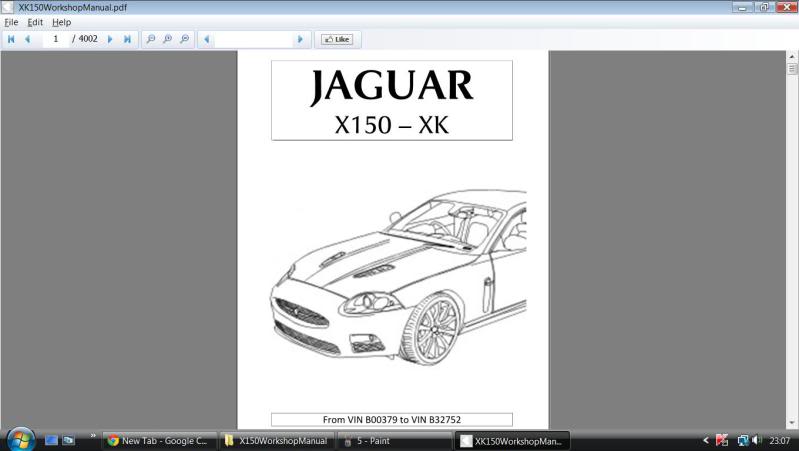
Another way is to download from EBAY the factory service manual to your computor and read it. Make a copy of it on a flash drive and keep that in your car in case your far from home and need to look at it.
I own a XK and not your type Jaguar. Just making a suggestion til someone comes along with a definite answer.
On a XK the fuel filter is under the car infront of the l/h side of the fuel tank. Yours? I know not but I doubt the filter is your problem at all.
I know it ain't no Ford your working on, but read it anyway. Seems you might just try another fuel pump relay as a shot in the dark.
Another way is to download from EBAY the factory service manual to your computor and read it. Make a copy of it on a flash drive and keep that in your car in case your far from home and need to look at it.
I own a XK and not your type Jaguar. Just making a suggestion til someone comes along with a definite answer.
On a XK the fuel filter is under the car infront of the l/h side of the fuel tank. Yours? I know not but I doubt the filter is your problem at all.

Junior Member
Joined: Jun 2013
Posts: 3
Likes: 0
From: Walnut Creek, CA
I'm having trouble getting into the diagnostics menu. On my 2007 XKR, I can't seem to get any touch management to work to access the menu. I'm guessing I'm not touching the correct area. This is in the home menu when I put the car in ACC mode, right before holding the start button would engage the start process.
Any help?
Thanks...
Any help?
Thanks...