When you click on links to various merchants on this site and make a purchase, this can result in this site earning a commission. Affiliate programs and affiliations include, but are not limited to, the eBay Partner Network.
I'm having trouble getting my XJ8L radiator fans to come on. The car is overheating as a result; the temperature indicator reflects that and I can also get temperature readings using the OBD reader so I'm guessing the sensor works. I checked and the fans are running when powered off the battery. I also tested the fan fuses and relays and measured the voltages on the fan connectors. The connectors show 12 volts, but this drops to 0 when the fans are connected and they are not coming on.
Any ideas what the issue could be or what I could try? Any help would be highly appreciated
Welcome. Go introduce yourself in the new member section of this forum. Its required.
With the engine running, do the radiator fans turn on when the A/C is on?
If you know your engine is overheating, turn the heater on full blast and make sure the A/C button is off. Another idea is to turn the engine off and after it cools down, check the coolant level. If it’s only a little bit low, it could also have a stuck closed thermostat.
Originally Posted by Addicted2boost;[url=tel:2578038
2578038[/url]]Welcome. Go introduce yourself in the new member section of this forum. Its required.
With the engine running, do the radiator fans turn on when the A/C is on?
If you know your engine is overheating, turn the heater on full blast and make sure the A/C button is off. Another idea is to turn the engine off and after it cools down, check the coolant level. If it’s only a little bit low, it could also have a stuck closed thermostat.
Hi Addicted2boost!
Thanks for the quick reply and the heads up! I just introduced myself there.
I tested turning the AC on, still no fans :/
Thanks for the tip with the heater! Is there a way to test if the thermostat is stuck? I’ve been regularly refilling the coolant and made sure there’s enough before trying to debug this issue.
How did you check the fan relays? It is not easy as there are 3 relays in one housing (module) that control operation of the fans. The module is somewhere in the front left corner of the engine compartment, lower down. It looks like this:
Originally Posted by M. Stojanovic;[url=tel:2578178
2578178[/url]]How did you check the fan relays? It is not easy as there are 3 relays in one housing (module) that control operation of the fans. The module is somewhere in the front left corner of the engine compartment, lower down. It looks like this:
My roommate and I jacked up the car, took out the module, found the wiring diagram and applied 12V from the battery to activate the separate relays. It made a click and we measured the resistance with a multimeter to confirm they’re closing the circuit.
Key off, try turning both fan motors by hand. If one of them spins a little bit slower than the other, it’s likely that fan motor is no good. However, don’t throw parts at it if you aren’t sure. Unplug both fans and ohm out both of the motors. It’s also possible that if you have your engine running and A/C on and **carefully** tap on each motor (on the metal housing) to see if they move afterwards. Don’t beat on them real hard but with a long screwdriver or better yet a 1”x1” long piece of wood. I know it’s not **thee** right thing to do but, if it’ll help you diagnose it, do what works.
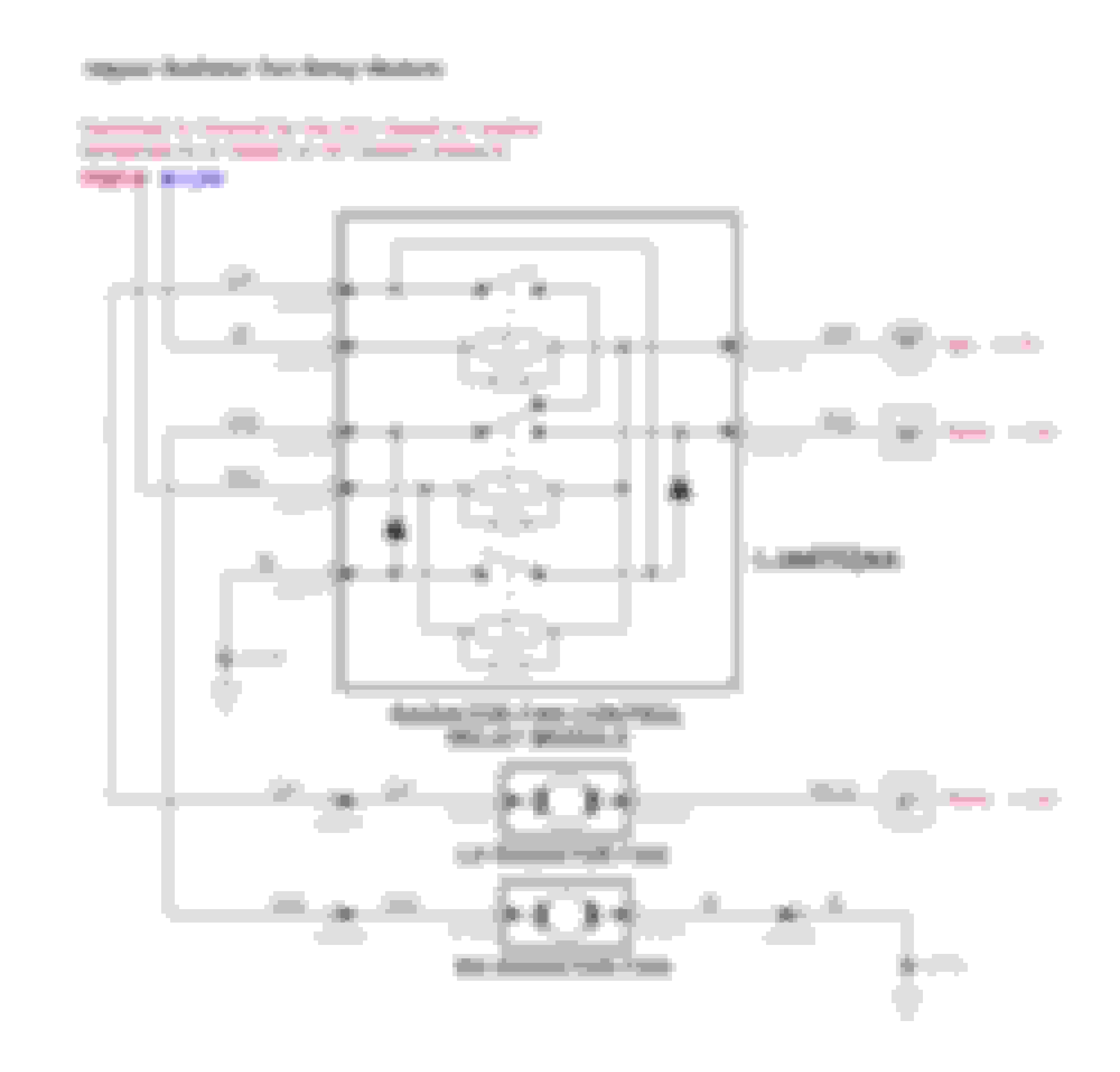
The relays clicking and providing contacts when energised does not necessarily mean that the module is good. The contacts that are closed in the "off" position of the second (middle) relay have to be good in order that the fans can be started at the low speed. To check this pair of contacts, you would need to keep the first relay energised then check the continuity through the "off" contacts. Hope the diagram below helps. Ideally, you should get access to the "Low" and "High" wires and test the module in-situ by grounding these two wires.
Key off, try turning both fan motors by hand. If one of them spins a little bit slower than the other, it’s likely that fan motor is no good. However, don’t throw parts at it if you aren’t sure. Unplug both fans and ohm out both of the motors. It’s also possible that if you have your engine running and A/C on and **carefully** tap on each motor (on the metal housing) to see if they move afterwards. Don’t beat on them real hard but with a long screwdriver or better yet a 1”x1” long piece of wood. I know it’s not **thee** right thing to do but, if it’ll help you diagnose it, do what works.
The fans seem to spin at the same speed. I measured the resistance on the motors; it's about 1 ohm on each. Tapping the motors also doesn't seem to do anything. I would expect them to be good since they run when connected straight to the battery?
I had right side fan dead this summer. Looked in to the fan relay and there was quite amount of contact dust and little bit of spiking result in the relay contacts. Cleaned all of them off while I was in there. Eventually earth pin in the fan connector were melted.
Originally Posted by Addicted2boost;[url=tel:2578660
2578660[/url]]
The wiring diagram that M.S. provided, check this ground with your ohm meter.
Thanks for the tip! It looks like I do not have a connection to ground here… The connecting cable looks good/the pins on both sides are actually connected so I guess it’s something deeper down?
I had right side fan dead this summer. Looked in to the fan relay and there was quite amount of contact dust and little bit of spiking result in the relay contacts. Cleaned all of them off while I was in there. Eventually earth pin in the fan connector were melted.
Did you find the earth pin melted in the fan itself? What was the other fan doing at that point?
You can remove the fan assembly and connect them to the battery terminal directly to check if they actually work. I had one that would not spin fast when directly connected and was the problem on my car.
Originally Posted by David N. Warner;[url=tel:2580740
2580740[/url]]You can remove the fan assembly and connect them to the battery terminal directly to check if they actually work. I had one that would not spin fast when directly connected and was the problem on my car.
Did you find the earth pin melted in the fan itself? What was the other fan doing at that point?
Yes ground pin from the fan 2 was melted. Fan one worked fine at the same time.Luckily basically only the connector at the wire were melted and it did only heated up slightly the fan pin connector housing.
Point of my reply was to look in to the relay itself and thoroly check fan connectors.
That is interesting. I am trying to help a fellow XJ8 owner chase down an
issue with one fan staying on even with no key in the ignition. My first
thought was the cooling fan relay, but it may be the fan that isn't running.
That is interesting. I am trying to help a fellow XJ8 owner chase down an
issue with one fan staying on even with no key in the ignition. My first
thought was the cooling fan relay, but it may be the fan that isn't running.
Sounds like the relay is stuck closed is one problem. Maybe that's all there is to it and a replacement fan relay could stop the problem. You'll know if you unplug the relay. It's located under the front lower cowl cover and behind the driver side inner fender. It just plugs in from the bottom.
Thanks David. Yes...I thought so too. I have a fan relay ordered and will
report back once that's installed. That is a completely off-the-wall place to
install a fan relay and not very easy to get to. The shielding under the front
bumper and radiator are nice until you have to get behind it.
Thanks David. Yes...I thought so too. I have a fan relay ordered and will
report back once that's installed. That is a completely off-the-wall place to
install a fan relay and not very easy to get to. The shielding under the front
bumper and radiator are nice until you have to get behind it.
I recently relocated my fan relay to behind the lh headlight. The stock location is ……. perplexing.



 1998 Xj8L radiator fans not comning on