


programming remote - xj40 - another thread...


Thread Starter
|
Junior Member
Joined: Jan 2010
Posts: 15
Likes: 0
 programming remote - xj40 - another thread...
Hi guys. After I have finally managed to sort my other problems with my Jag, I thought about a remote, as the car never came with it.
I went to the local Jaguar specialist who is a very nice guy and always helps me when in need. He said that he has an old key fob for XJ40 and gave it to me The plastic bit that holds the button was broken off but I have glued it together and it holds/ works fine.
First thing is: how to tell if the remote is operating? There is no light on it so I cant tell. I have put in the new battery but not sure if it works at all.
Second thing:
My jag is an XJ6 1993, 3.2, I have followed the procedure with the ingition switch/ignition key but I cant get it to work. Question - what does the security switch actually do? When I press it on or off noting happns really. Also the light t the radio (security light) flashes no matter if the button is in ON or OFF position. I have never heard the car making any 'alarm' sounds, even if I reconnect the battery. I only hear 'tick tick' when I do that. Would that mean there is some problem with the alarm system?
Also - the two redish 'bulbs' on the top fo the dash. I ave seen it flasing once but now it doesnt. Is it connected with the alarm? Is it for Infra red key fob?
Thanks for answering my questions
P.S. I have not tried connecting positive lead to negative yet.
Cheers
Tom
I went to the local Jaguar specialist who is a very nice guy and always helps me when in need. He said that he has an old key fob for XJ40 and gave it to me
The plastic bit that holds the button was broken off but I have glued it together and it holds/ works fine.First thing is: how to tell if the remote is operating? There is no light on it so I cant tell. I have put in the new battery but not sure if it works at all.
Second thing:
My jag is an XJ6 1993, 3.2, I have followed the procedure with the ingition switch/ignition key but I cant get it to work. Question - what does the security switch actually do? When I press it on or off noting happns really. Also the light t the radio (security light) flashes no matter if the button is in ON or OFF position. I have never heard the car making any 'alarm' sounds, even if I reconnect the battery. I only hear 'tick tick' when I do that. Would that mean there is some problem with the alarm system?
Also - the two redish 'bulbs' on the top fo the dash. I ave seen it flasing once but now it doesnt. Is it connected with the alarm? Is it for Infra red key fob?
Thanks for answering my questions
P.S. I have not tried connecting positive lead to negative yet.
Cheers
Tom

Veteran Member


Joined: Mar 2007
Posts: 11,393
Likes: 649
From: Planetarium
Hello,
To understand if your key fob is working or not :
Press the button once and if you see your door locks is moving up or down then it's ok .So is the exterior lights
Two reddish lamps are to do with the alarm/ security system .
Security switch is related to alarm system .You should leave it in ON and see the two reddish lamps flash
If you deactivate the alarm then the lights go off
Keyfob has only 1 button I mean only .However there are many other functions assicoated with that button as well. It's like I-Drive .
In some models if you press it a few times next 3 secs or 5 (I can't remember the exact number) your headlamps also come on
To understand if your key fob is working or not :
Press the button once and if you see your door locks is moving up or down then it's ok .So is the exterior lights
Two reddish lamps are to do with the alarm/ security system .
Security switch is related to alarm system .You should leave it in ON and see the two reddish lamps flash
If you deactivate the alarm then the lights go off
Keyfob has only 1 button I mean only .However there are many other functions assicoated with that button as well. It's like I-Drive .
In some models if you press it a few times next 3 secs or 5 (I can't remember the exact number) your headlamps also come on
Thread Starter
|
Junior Member
Joined: Jan 2010
Posts: 15
Likes: 0
I am trying to follow the programming guide but it does not do anything thats why I thought that maybe the keyfob is broken.
Cheers,
Tom

Veteran Member
Joined: Jul 2009
Posts: 12,704
Likes: 1,236
From: Brittany France
First off you need to be sure to have your Radio code (if your car has the original Radio).
Now you need to get the car into learning mode.
This works for me; disconnect battery +ve lead and touch lead to -ve batt post.
Reconnect battery and the car should, maybe, perhaps start to give a regular beep. (its a Jag)
Now follow the programming procedure for your model year.
Now in my experience, others may want to disagree here, the used fob will only synchronise with its corresponding alarm module.
I don't know of any way of testing to see if the fob is giving any output I would think that you would need to go to a specialist alarm shop or Jag dealer to have it tested?
Experience gained from having two cars to play with.
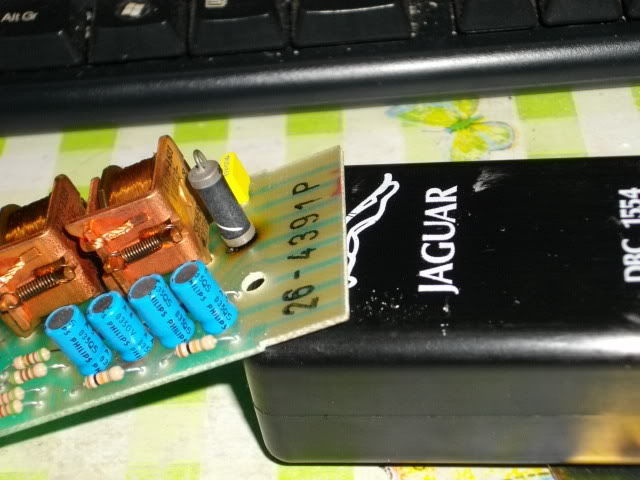
The clicking chattering noise you are hearing from under the dashboard are the relays inside the central locking module, not to be confused with the alarm module.
For your info, here is a pic of the inside of a locking module. The two gold coloured relays are the ones that give you the chattering sound.
All the best,
Now you need to get the car into learning mode.
This works for me; disconnect battery +ve lead and touch lead to -ve batt post.
Reconnect battery and the car should, maybe, perhaps start to give a regular beep. (its a Jag)
Now follow the programming procedure for your model year.
Now in my experience, others may want to disagree here, the used fob will only synchronise with its corresponding alarm module.
I don't know of any way of testing to see if the fob is giving any output I would think that you would need to go to a specialist alarm shop or Jag dealer to have it tested?
Experience gained from having two cars to play with.
The clicking chattering noise you are hearing from under the dashboard are the relays inside the central locking module, not to be confused with the alarm module.
For your info, here is a pic of the inside of a locking module. The two gold coloured relays are the ones that give you the chattering sound.
All the best,
Thread Starter
|
Junior Member
Joined: Jan 2010
Posts: 15
Likes: 0
Thanks for the answer
I have tried your suggestion and disconnected the battery (+) wire and connected it to the (-) source and reconnected back but that did not give me any sound of alarm. Maybe it is disabled somehow? How can I check it? Any fuses or anything?
Regards,
Tom
I have tried your suggestion and disconnected the battery (+) wire and connected it to the (-) source and reconnected back but that did not give me any sound of alarm. Maybe it is disabled somehow? How can I check it? Any fuses or anything?
Regards,
Tom
Veteran Member
Joined: Jul 2009
Posts: 12,704
Likes: 1,236
From: Brittany France
This might sound a bit obvious, but your Alarm trumpet is still connected up and working? The reason for the question is that you say that the lock module is doing its clickety thing. This normally corresponds with the beep sequence. Somthing like this.
Clickety-beep-beep-clickety-beep-beep-clickety..... you get the idea. So I am thinking that your car is going into learning mode but you don't know because your trumpet is not working. Also the learning sequence stops when you fire up the car or go to position 111 on the ignition key. (I just pulled the battery on the 92 to check).
On my cars down at the front right hand corner of the engine bay when looking from the inside to outside. A black fog horn type thing.
I've just noticed, in post 1 you mention no beeps when you reconnect the battery. Did you have the +ve side connected and then disconnect + wait + reconnect -ve side?
You also mention old XJ40 key fob. Did he give you the alarm module that goes with it?
The 93/94 cars have a slightly different programming sequence.
See below.
1990-92 XJ6 cars:
1. Record radio security code (if so equipped).
2. Disconnect negative battery terminal/cable.
3. Reconnect negative battery terminal/cable; "beeping" should be heard.
4. Press each transmitter so a total of 5 confirmations are heard.
5. Test operation. Enter radio code (if needed). Set clock.
1993-94 XJ6 cars:
1. Turn ignition key ON.
2. Turn security switch OFF (located in center console).
3. Turn ignition key OFF.
4. Turn security switch ON.
5. Cycle security system switch ON/OFF rapidly 4 times (within 5 seconds).
6. Press each transmitter so a total of 5 confirmations are heard.
There is another little trick you might try, if the above doesn't help but this is to reset the alarms, stop them sounding and get out of learning mode. I may be a bit paranoid, but I won't post details here.
PM me if required.
Cheers,
Clickety-beep-beep-clickety-beep-beep-clickety..... you get the idea. So I am thinking that your car is going into learning mode but you don't know because your trumpet is not working. Also the learning sequence stops when you fire up the car or go to position 111 on the ignition key. (I just pulled the battery on the 92 to check).
On my cars down at the front right hand corner of the engine bay when looking from the inside to outside. A black fog horn type thing.
I've just noticed, in post 1 you mention no beeps when you reconnect the battery. Did you have the +ve side connected and then disconnect + wait + reconnect -ve side?
You also mention old XJ40 key fob. Did he give you the alarm module that goes with it?
The 93/94 cars have a slightly different programming sequence.
See below.
1990-92 XJ6 cars:
1. Record radio security code (if so equipped).
2. Disconnect negative battery terminal/cable.
3. Reconnect negative battery terminal/cable; "beeping" should be heard.
4. Press each transmitter so a total of 5 confirmations are heard.
5. Test operation. Enter radio code (if needed). Set clock.
1993-94 XJ6 cars:
1. Turn ignition key ON.
2. Turn security switch OFF (located in center console).
3. Turn ignition key OFF.
4. Turn security switch ON.
5. Cycle security system switch ON/OFF rapidly 4 times (within 5 seconds).
6. Press each transmitter so a total of 5 confirmations are heard.
There is another little trick you might try, if the above doesn't help but this is to reset the alarms, stop them sounding and get out of learning mode. I may be a bit paranoid, but I won't post details here.
PM me if required.
Cheers,
Last edited by Translator; Feb 17, 2010 at 10:33 AM. Reason: Word formating
Trending Topics
Senior Member
Joined: Oct 2009
Posts: 230
Likes: 19
From: North Dakota
Hi. I don't really know about the orginal remotes, but I bought a new one off ebay that is a universal remote. Could never get anything to happen UNTIL I had the car rebooted (touching the pos. lead to the neg. on the battery) - that resets the cars computer systems. You will need your radio code after this to get the radio going again, but that has nothing to do with your alarm functioning.
After you do the reboot, follow the insructions above this post EXACTLY for the 93-94 Jag. It worked perfectley for me then :-)
peace out,
daddy
After you do the reboot, follow the insructions above this post EXACTLY for the 93-94 Jag. It worked perfectley for me then :-)
peace out,
daddy

Junior Member
Joined: Apr 2010
Posts: 3
Likes: 0
From: Edinburgh, Scotland
Hi. I don't really know about the orginal remotes, but I bought a new one off ebay that is a universal remote. Could never get anything to happen UNTIL I had the car rebooted (touching the pos. lead to the neg. on the battery) - that resets the cars computer systems. You will need your radio code after this to get the radio going again, but that has nothing to do with your alarm functioning.
I've just acquired a 1993 XJ40 without an alarm keyfob. Could I ask which universal remote you obtained off ebay? There seem to be several types available......
Cheers
Scott

Junior Member
Joined: Apr 2010
Posts: 6
Likes: 0
1993-94 XJ6 cars:
1. Turn ignition key ON.
2. Turn security switch OFF (located in center console).
3. Turn ignition key OFF.
4. Turn security switch ON.
5. Cycle security system switch ON/OFF rapidly 4 times (within 5 seconds).
6. Press each transmitter so a total of 5 confirmations are heard.
Thanks in advance.
Veteran Member
Joined: Jul 2009
Posts: 12,704
Likes: 1,236
From: Brittany France
Hi Mickten. Bizzarly on my 92 it is to be found on the underside of the steering column.
I guess it is a Jag thing, to move them around a bit. (It is a small rocker type switch and there maybe a flashing LED also).
I guess it is a Jag thing, to move them around a bit. (It is a small rocker type switch and there maybe a flashing LED also).
Junior Member
Joined: Apr 2010
Posts: 6
Likes: 0
Thanks for the quick response.
Just to be sure, it's not the rocker switch that controls the locks on all doors? Cause that switch is located with all the other controls on my dashboard. I've tried that, but I can't hit it four times within 5 seconds because of the built in delay.
Is there any symbol on the switch?
Just to be sure, it's not the rocker switch that controls the locks on all doors? Cause that switch is located with all the other controls on my dashboard. I've tried that, but I can't hit it four times within 5 seconds because of the built in delay.
Is there any symbol on the switch?
Senior Member
Joined: Oct 2009
Posts: 230
Likes: 19
From: North Dakota
My switch is located inside the center console. Lift the lid and look to the back side where the hindge is. It should be labeled but the label might be missing because they do peel off. The switch should move from east to west, not up and down. My model is a 94 XJ12 which is technically a 93 XJ40, so I hope this helps.
Here is the ebay remote I bought that worked:
http://cgi.ebay.com/ebaymotors/94-XJ...item1c11b79d1c
peace out,
daddylogan
Here is the ebay remote I bought that worked:
http://cgi.ebay.com/ebaymotors/94-XJ...item1c11b79d1c
peace out,
daddylogan
Junior Member
Joined: Apr 2010
Posts: 6
Likes: 0
Thanks for the respons, daddylogan. Next to the hinge is an empty slot - I made a picture of it for more convience: http://nl.tinypic.com/r/n4cwok/5. I suppose that's where the 'security system' button should be located?
There's also a loose connector in the space under the ashtray when I open the console, could it be the connector that is supposed to link to the dreaded switch? If so, I guess I'm up for the task of finding a new switch + additional wiring. Or is there some alternative for reprogramming, i.e. at a local jaguar dealership?
Again, thanks for the help.
There's also a loose connector in the space under the ashtray when I open the console, could it be the connector that is supposed to link to the dreaded switch? If so, I guess I'm up for the task of finding a new switch + additional wiring. Or is there some alternative for reprogramming, i.e. at a local jaguar dealership?
Again, thanks for the help.
Veteran Member
Joined: Jul 2009
Posts: 12,704
Likes: 1,236
From: Brittany France
Good pic. My UK spec car looks exactly the same, exept that both blanking plates are in place and have never been removed from new.
My valet switch is under the center of the steering column and to answer your earlier question it simply says 'ON...OFF'.
It is not the locking switch on your dashboard.
From your pic, if you remove the remaining visible screws and the 2 black bung type fastners, and the fuse box cover you will be able to see what you have under the black insert.
Re your connector under the ashtray, does your cigar lighter work?
My valet switch is under the center of the steering column and to answer your earlier question it simply says 'ON...OFF'.
It is not the locking switch on your dashboard.
From your pic, if you remove the remaining visible screws and the 2 black bung type fastners, and the fuse box cover you will be able to see what you have under the black insert.
Re your connector under the ashtray, does your cigar lighter work?
Senior Member
Joined: Oct 2009
Posts: 230
Likes: 19
From: North Dakota
Thanks for the respons, daddylogan. Next to the hinge is an empty slot - I made a picture of it for more convience: http://nl.tinypic.com/r/n4cwok/5. I suppose that's where the 'security system' button should be located?
There's also a loose connector in the space under the ashtray when I open the console, could it be the connector that is supposed to link to the dreaded switch? If so, I guess I'm up for the task of finding a new switch + additional wiring. Or is there some alternative for reprogramming, i.e. at a local jaguar dealership?
Again, thanks for the help.
There's also a loose connector in the space under the ashtray when I open the console, could it be the connector that is supposed to link to the dreaded switch? If so, I guess I'm up for the task of finding a new switch + additional wiring. Or is there some alternative for reprogramming, i.e. at a local jaguar dealership?
Again, thanks for the help.
Good Luck my friend :-)
peace out,
daddylogan

Junior Member
Joined: Aug 2010
Posts: 11
Likes: 1
From: ENGLAND
 immobiliser
This might sound a bit obvious, but your Alarm trumpet is still connected up and working? The reason for the question is that you say that the lock module is doing its clickety thing. This normally corresponds with the beep sequence. Somthing like this.
Clickety-beep-beep-clickety-beep-beep-clickety..... you get the idea. So I am thinking that your car is going into learning mode but you don't know because your trumpet is not working. Also the learning sequence stops when you fire up the car or go to position 111 on the ignition key. (I just pulled the battery on the 92 to check).
On my cars down at the front right hand corner of the engine bay when looking from the inside to outside. A black fog horn type thing.
I've just noticed, in post 1 you mention no beeps when you reconnect the battery. Did you have the +ve side connected and then disconnect + wait + reconnect -ve side?
You also mention old XJ40 key fob. Did he give you the alarm module that goes with it?
The 93/94 cars have a slightly different programming sequence.
See below.
1990-92 XJ6 cars:
1. Record radio security code (if so equipped).
2. Disconnect negative battery terminal/cable.
3. Reconnect negative battery terminal/cable; "beeping" should be heard.
4. Press each transmitter so a total of 5 confirmations are heard.
5. Test operation. Enter radio code (if needed). Set clock.
1993-94 XJ6 cars:
1. Turn ignition key ON.
2. Turn security switch OFF (located in center console).
3. Turn ignition key OFF.
4. Turn security switch ON.
5. Cycle security system switch ON/OFF rapidly 4 times (within 5 seconds).
6. Press each transmitter so a total of 5 confirmations are heard.
There is another little trick you might try, if the above doesn't help but this is to reset the alarms, stop them sounding and get out of learning mode. I may be a bit paranoid, but I won't post details here.
PM me if required. hi i bought a new key fob off ebay, & tried to programme it, i toggled the switch in centre console & beeps sounded but key fob doesn't work i think it is the wrong fob, the problem now is the car won;t start now, it seems the immobiliser has activated what can ido ? please help
Cheers,
Clickety-beep-beep-clickety-beep-beep-clickety..... you get the idea. So I am thinking that your car is going into learning mode but you don't know because your trumpet is not working. Also the learning sequence stops when you fire up the car or go to position 111 on the ignition key. (I just pulled the battery on the 92 to check).
On my cars down at the front right hand corner of the engine bay when looking from the inside to outside. A black fog horn type thing.
I've just noticed, in post 1 you mention no beeps when you reconnect the battery. Did you have the +ve side connected and then disconnect + wait + reconnect -ve side?
You also mention old XJ40 key fob. Did he give you the alarm module that goes with it?
The 93/94 cars have a slightly different programming sequence.
See below.
1990-92 XJ6 cars:
1. Record radio security code (if so equipped).
2. Disconnect negative battery terminal/cable.
3. Reconnect negative battery terminal/cable; "beeping" should be heard.
4. Press each transmitter so a total of 5 confirmations are heard.
5. Test operation. Enter radio code (if needed). Set clock.
1993-94 XJ6 cars:
1. Turn ignition key ON.
2. Turn security switch OFF (located in center console).
3. Turn ignition key OFF.
4. Turn security switch ON.
5. Cycle security system switch ON/OFF rapidly 4 times (within 5 seconds).
6. Press each transmitter so a total of 5 confirmations are heard.
There is another little trick you might try, if the above doesn't help but this is to reset the alarms, stop them sounding and get out of learning mode. I may be a bit paranoid, but I won't post details here.
PM me if required. hi i bought a new key fob off ebay, & tried to programme it, i toggled the switch in centre console & beeps sounded but key fob doesn't work i think it is the wrong fob, the problem now is the car won;t start now, it seems the immobiliser has activated what can ido ? please help
Cheers,

Thread
Thread Starter
Forum
Replies
Last Post
zdrapec
PRIVATE For Sale / Trade or Buy Classifieds
0
Sep 25, 2015 05:49 AM

Currently Active Users Viewing This Thread: 1 (0 members and 1 guests)