Jaguar Forums - Jaguar Enthusiasts Forum
  • LOG IN
  • REGISTER
  • Forums
    • General Jaguar Forums
      • New Member Area - Intro a MUST
      • Jaguar Forums Feedback & Suggestion Center
      • General Tech Help
    • Jaguar Models ( Current )
      • XF (X260)
      • F-Type ( X152 )
      • XE ( X760 )
      • E-Pace
      • F-Pace (X761) / C-X17
      • I-Pace EV
    • Jaguar Models ( Modern )
      • XF and XFR ( X250 )
      • XJ ( X351 )
      • X-Type ( X400 )
      • S-Type / S type R Supercharged V8 ( X200 )
      • XJ XJ6 / XJ8 / XJR ( X350 & X358 )
      • XJ XJ8 / XJR ( X308 )
      • XJ XJ12 ( X305 )
      • XJ XJ6 / XJR6 ( X300 )
      • XK8 / XKR ( X100 )
      • XK / XKR ( X150 )
    • Jaguar Models ( Classics )
      • Mark V - X 420G
      • MKI / MKII S type 240 340 & Daimler
      • XK120 XK140 XK150
      • E type ( XK-E )
      • XJ6 & XJ12 Series I, II & III
      • XJS ( X27 )
      • XJ40 ( XJ81 )
      • XKSS
      • XJ220
    • Other Jaguars
      • Other Jaguar Models / Concepts / Replicas
    • Diesel variants
      • Diesel variants - All models
    • Non Jaguar vehicles
      • Non-Jaguar Vehicles
    • Brand Review
      • Jaguar Press release
      • Jaguar Customer Relationship Centre
      • Jaguar Engines & transmissions
      • Wheels / Tires, Suspension & handling
      • Interior
      • Exterior
      • Audio/Visual Electronics
      • Detailing / Car care
      • Motorsports
    • Jaguar Classifieds
      • Marketplace
      • PRIVATE For Sale / Trade or Buy Classifieds
      • VENDOR 'For Sale' Classifieds
    • Regional
      • US Northeast
      • US Central
      • US Southwest
      • US Western
      • US Northwest
      • US Midwest
      • US Mid Atlantic
      • US Lower Atlantic
      • US Southern Midwest
      • Canada
      • Mexico, South America
      • UK & Eire
      • Europe
      • Australia - Queensland
      • Australia - New South Wales / ACT
      • Australia - Victoria / Tasmania
      • Australia - Western
      • Australia - South / NT
      • New Zealand
      • Other Areas
    • Official Site Sponsors
      • VENDOR Threads
    • General Interest / History
      • Sights N Sounds
      • Photography
      • Forum announcement archives / Forum History
      • Jaguarforums Merchandise
      • Memorial Section
  • News
  • Marketplace
    • Vendor Directory
    • Become a Vendor
    • Member Marketplace
    • Vendor Marketplace
    • Site Store
  • New Posts
  • Tools
    • Car Payment Calculator
    • Tire Rim Calculator
    • Vin Decoder
    • Recalls
    • Technical Service Bulletins (TSBs)
    • Members List
    • Live Feed
  • Gallery
  • View Dark Mode
    • Please register or login to enable Dark Mode.
  • Log In
  • Register
Jaguar Forums - Jaguar Enthusiasts Forum
    • Threads
      • Advanced
Dark Mode

Please register or login to enable Dark Mode.

Log In

Forgot your Password?

By logging into your account, you agree to our Terms of Use and Privacy Policy, and to the use of cookies as described therein.
or
 
  • Recent
  • Commented
  • Albums
  • My Pictures

My Post Pictures

wwr
May 1, 2019
 41
 0
Sort:
Most Recent
  • Default
  • Most Recent
0 2021/09/26 19:49:17 wwr
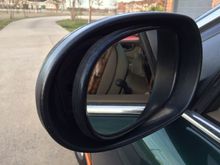
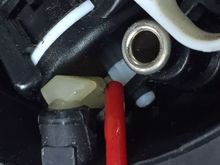
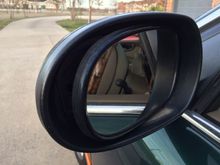
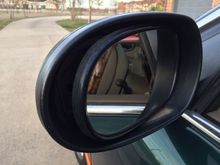
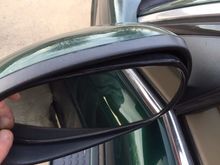
Tilt mirror to expose outer edge.  Pull outer edge sideways to clear retaining clip and then pull slightly forward to release.
Tilt mirror to expose outer edge. Pull outer edge sideways to clear retaining clip and then pull slightly forward to release.
0 2020/02/03 15:54:51 wwr
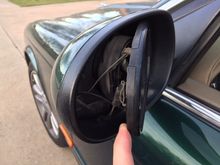
Here the outer side of the mirror is released.  The inner side is still secured.
Here the outer side of the mirror is released. The inner side is still secured.
0 2020/02/03 15:54:49 wwr
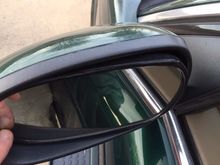
Tilt mirror to expose the inner edge.
0 2020/02/03 15:54:48 wwr
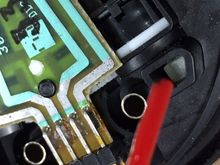
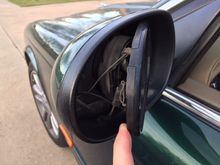
Slide mirror (to right in this image) to clear the retaining clip and pull slightly forward to release the mirror.  Be careful not to strain the three electrical connectors to the mirror (heater & electro chromatic).  Disconnect the electrical connectors.
Slide mirror (to right in this image) to clear the retaining clip and pull slightly forward to release the mirror. Be careful not to strain the three electrical connectors to the mirror (heater & electro chromatic). Disconnect the electrical connectors.
0 2020/02/03 15:54:46 wwr
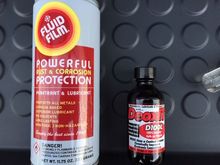
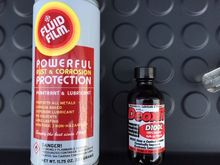
Fluid Film for lubrication (Thank you Blairware!), DeoxIT to clean and protect electrical connectors. Fluid film is lanolin (not petrolium) based.
0 2020/02/03 15:54:45 wwr
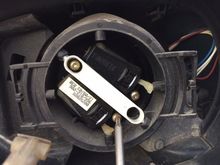
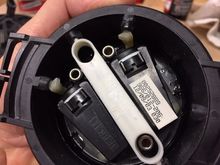
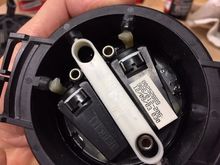
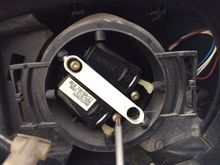
The motor assembly is secured with three T10 screws.  Note the plastic spring clips on the left and right sides of the motor assembly.  There are the clips you had to pull against to release the mirror glass.
The motor assembly is secured with three T10 screws. Note the plastic spring clips on the left and right sides of the motor assembly. There are the clips you had to pull against to release the mirror glass.
0 2020/02/03 15:54:44 wwr
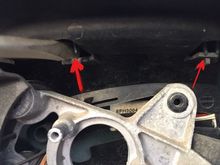
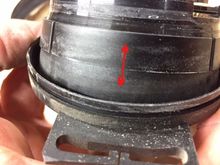
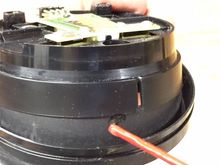
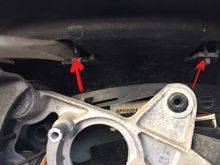
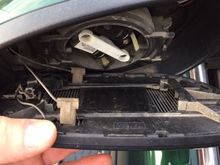
The decorative back cover of the mirror assembly is secured by three clips at the top and three or four tabs at the bottom.  Pry the two exposed clips (illustrated here) releasing the top of the cover.  Gently pull the TOP of the cover back continuing to rotate it back pivoting on the bottom tabs to release the back cover.

The decorative back cover of the mirror assembly is secured by three clips at the top and three or four tabs at the bottom. Pry the two exposed clips (illustrated here) releasing the top of the cover. Gently pull the TOP of the cover back continuing to rotate it back pivoting on the bottom tabs to release the back cover.
0 2020/02/03 15:54:43 wwr
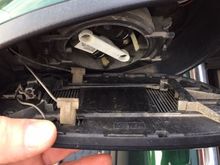
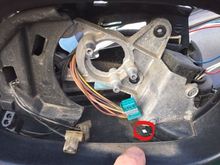
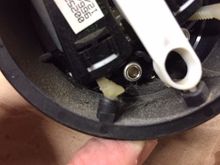
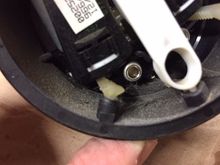
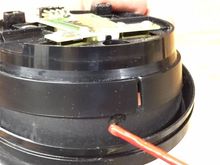
Notice all the dust & dirt inside the assembly.  Note the drain hole above the end of my finger.  Now is your opportunity to clean all this out.
Notice all the dust & dirt inside the assembly. Note the drain hole above the end of my finger. Now is your opportunity to clean all this out.
0 2020/02/03 15:54:41 wwr
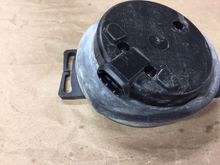
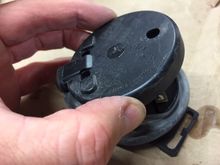
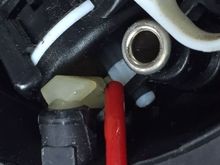
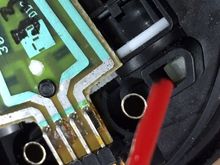
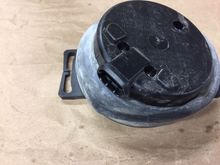
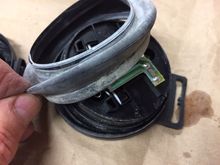
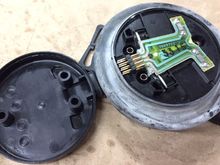
On the bench: the back side of the motor assembly.  The back cover secures the back of the dust cover by friction.  Pry it up carefully mindfil of the electrical connector wires in the opening.
On the bench: the back side of the motor assembly. The back cover secures the back of the dust cover by friction. Pry it up carefully mindfil of the electrical connector wires in the opening.
0 2020/02/03 15:54:39 wwr
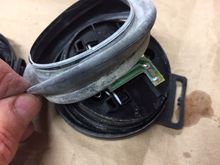
Freeing the dust cover.
0 2020/02/03 15:54:37 wwr
Remove the dust cover being careful not to stretch it out allowing for reuse.  The front edge of the dust cover registers with a groove in the front half of the motor assembly.
Remove the dust cover being careful not to stretch it out allowing for reuse. The front edge of the dust cover registers with a groove in the front half of the motor assembly.
0 2020/02/03 15:54:31 wwr
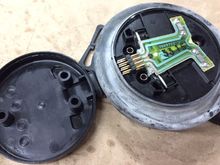
Note all the dirt inside the motor assembly.  The assemblies are almost entirely plastic.  Clean with caution to avoid breaking anything.  I used a rag or swab dampened with mineral spirits to clean stuff out.  You don't want puddles of anything getting in here while you are cleaning.
Note all the dirt inside the motor assembly. The assemblies are almost entirely plastic. Clean with caution to avoid breaking anything. I used a rag or swab dampened with mineral spirits to clean stuff out. You don't want puddles of anything getting in here while you are cleaning.
0 2020/02/03 15:54:29 wwr
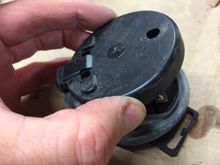
The motor assembly is in two halves that rotate back and forth over each other as the motor racks push/pull the front half.  The back half (shown upper here) fits over the front half (shown below here).  This is a plastic-plastic bearing surface trapping and grinding dirt over the years.  The more scratches and dirt the greater the friction when adjusting the mirror position.  Clean all this up with a damp rag or swab (I used mineral spirits).
The motor assembly is in two halves that rotate back and forth over each other as the motor racks push/pull the front half. The back half (shown upper here) fits over the front half (shown below here). This is a plastic-plastic bearing surface trapping and grinding dirt over the years. The more scratches and dirt the greater the friction when adjusting the mirror position. Clean all this up with a damp rag or swab (I used mineral spirits).
0 2020/02/03 15:54:27 wwr
Apply the fluid film sparingly.  Only a drop or two.  Then reconnect the motor assembly to the car and operate it back and forth to disperse the lubricant.  Any excess lubricant will tend to trap dirt in the future so go lightly and remove any excess.
Apply the fluid film sparingly. Only a drop or two. Then reconnect the motor assembly to the car and operate it back and forth to disperse the lubricant. Any excess lubricant will tend to trap dirt in the future so go lightly and remove any excess.
0 2020/02/03 15:54:25 wwr
0 2020/02/03 15:54:24 wwr
Lubricate the bearing surfaces.  Operate the motors exposing all the sides of the bearing surfaces for lubrication.   Operate the motors to work the lube between the two surfaces.  Remove all excess lube from the outer surface of the back assembly (upper portion here) as this is not a bearing surface.
Lubricate the bearing surfaces. Operate the motors exposing all the sides of the bearing surfaces for lubrication. Operate the motors to work the lube between the two surfaces. Remove all excess lube from the outer surface of the back assembly (upper portion here) as this is not a bearing surface.
0 2020/02/03 15:54:22 wwr
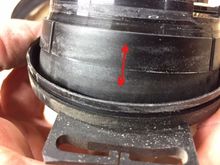
I also place a little lube on the top and bottom edges of the dust cover before reassembling it.  Make sure the front of the dust cover engages the groove.  Make sure the back cover secures the back of the dust cover.
I also place a little lube on the top and bottom edges of the dust cover before reassembling it. Make sure the front of the dust cover engages the groove. Make sure the back cover secures the back of the dust cover.
0 2020/02/03 15:54:20 wwr
Cleaned & lubed assembly ready to be reinstalled.
0 2020/02/03 15:54:18 wwr
0 2020/02/03 15:23:27 wwr
0 2020/02/03 15:23:26 wwr
0 2020/02/03 15:23:24 wwr
0 2020/02/03 15:23:23 wwr
0 2020/02/03 15:23:21 wwr
0 2020/02/03 15:23:19 wwr
0 2020/02/03 15:23:18 wwr
0 2020/02/03 15:23:16 wwr
0 2020/02/03 15:23:14 wwr
0 2020/02/03 15:23:13 wwr
0 2020/02/03 15:17:12 wwr
0 2020/02/03 15:15:41 wwr
0 2020/02/03 15:14:26 wwr
0 2020/02/03 15:10:12 wwr
0 2020/02/03 15:08:17 wwr
0 2020/02/03 15:06:02 wwr
0 2020/02/03 15:04:57 wwr
0 2020/02/03 15:02:51 wwr
0 2019/11/12 14:34:36 wwr
0 2019/11/12 14:34:19 wwr
0 2019/09/20 15:55:23 wwr
First
Page
1 of 2
Last
Go To
Page
  • 1
  • 2
1 of 2
Go To GO
Go to page of 2 pages
  • 1
  • 2

Top
Jaguar Forums - Jaguar Enthusiasts Forum
  • Contact Us
  • FAQ
  • Archive
  • Advertising
  • Cookie Policy
  • Privacy Statement
  • Terms of Service
  • Your Privacy Choices
  • Manage Preferences

© 2026 MH Sub I, LLC dba Internet Brands

Follow Us        


When you click on links to various merchants on this site and make a purchase, this can result in this site earning a commission. Affiliate programs and affiliations include, but are not limited to, the eBay Partner Network.