


ACM in XJR can't get to work


Thread Starter
|
Senior Member
Joined: Mar 2012
Posts: 605
Likes: 27
From: Cary NC
 ACM in XJR can't get to work
My new 2004 XJR has an ACM fitted, but indie not receive a manual with the car and when I connect my iPod it will not play. Does anyone know where I can get an instruction manual or does anyone have any tips to get it working. My car does have a factory Serius radio that plays through the FM on the head unit does this have something to do with the ACM as well. Any help would be good.

Veteran Member
Joined: Dec 2006
Posts: 2,964
Likes: 507
From: Hamilton, NJ
Rob,
Does your CD changer work (I believe you told me it did)? If so the ACM is in the wrong mode.....
You need to flip a switch on the box with the RCA's - see attached.
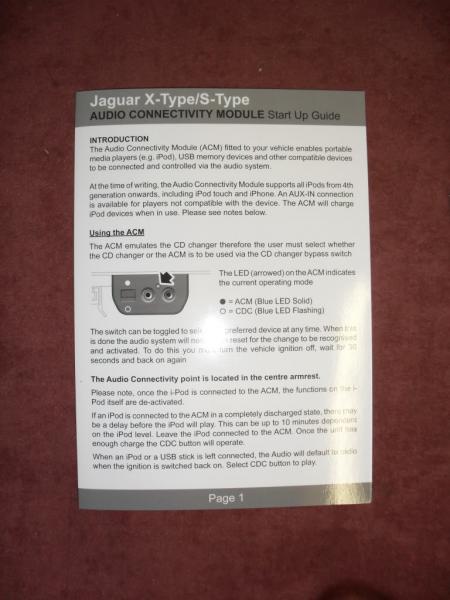
Let's try that for starters.
Take care,
George
Does your CD changer work (I believe you told me it did)? If so the ACM is in the wrong mode.....
You need to flip a switch on the box with the RCA's - see attached.
Let's try that for starters.
Take care,
George
Thread Starter
|
Senior Member
Joined: Mar 2012
Posts: 605
Likes: 27
From: Cary NC
Think maybe it's not a factory ACM, the iPod cable comes out in the center console and the RCA and USB are cables too in the glove box I cannot find the module itself with the switch. Either it has been modified to hide he ACM or it's after market.
Veteran Member
Joined: Dec 2006
Posts: 2,964
Likes: 507
From: Hamilton, NJ
Take care,
George
Thread Starter
|
Senior Member
Joined: Mar 2012
Posts: 605
Likes: 27
From: Cary NC
Ok so sorted the problem. Previous owner must of taken off or broke the housing for the ACM where the switch is and the RCA as found the small switch by the RCA connector. So now I will try to make a box to protect the wires and switch from further damage. Thanks George for the instructions.
Veteran Member
Joined: Dec 2006
Posts: 2,964
Likes: 507
From: Hamilton, NJ
Ok so sorted the problem. Previous owner must of taken off or broke the housing for the ACM where the switch is and the RCA as found the small switch by the RCA connector. So now I will try to make a box to protect the wires and switch from further damage. Thanks George for the instructions.
That should do it. It's soft enough plastic where you can cut out an edge for wires to pass with an x-acto knife. It will make more sense when you get it in your hands
Take care,
George

Thread
Thread Starter
Forum
Replies
Last Post

Currently Active Users Viewing This Thread: 1 (0 members and 1 guests)