When you click on links to various merchants on this site and make a purchase, this can result in this site earning a commission. Affiliate programs and affiliations include, but are not limited to, the eBay Partner Network.
Have managed just now to have my audio supplier fess up with regards to where it comes from as he says before long it'll be common knowledge anyway. https://ewaygps.com/product/optical-...t-description/
Remember you saw it here first! Those Chinese huh, who knows what they know? Reminds me of an 80's tune
Last edited by Dale Melton; Oct 26, 2023 at 03:49 AM.
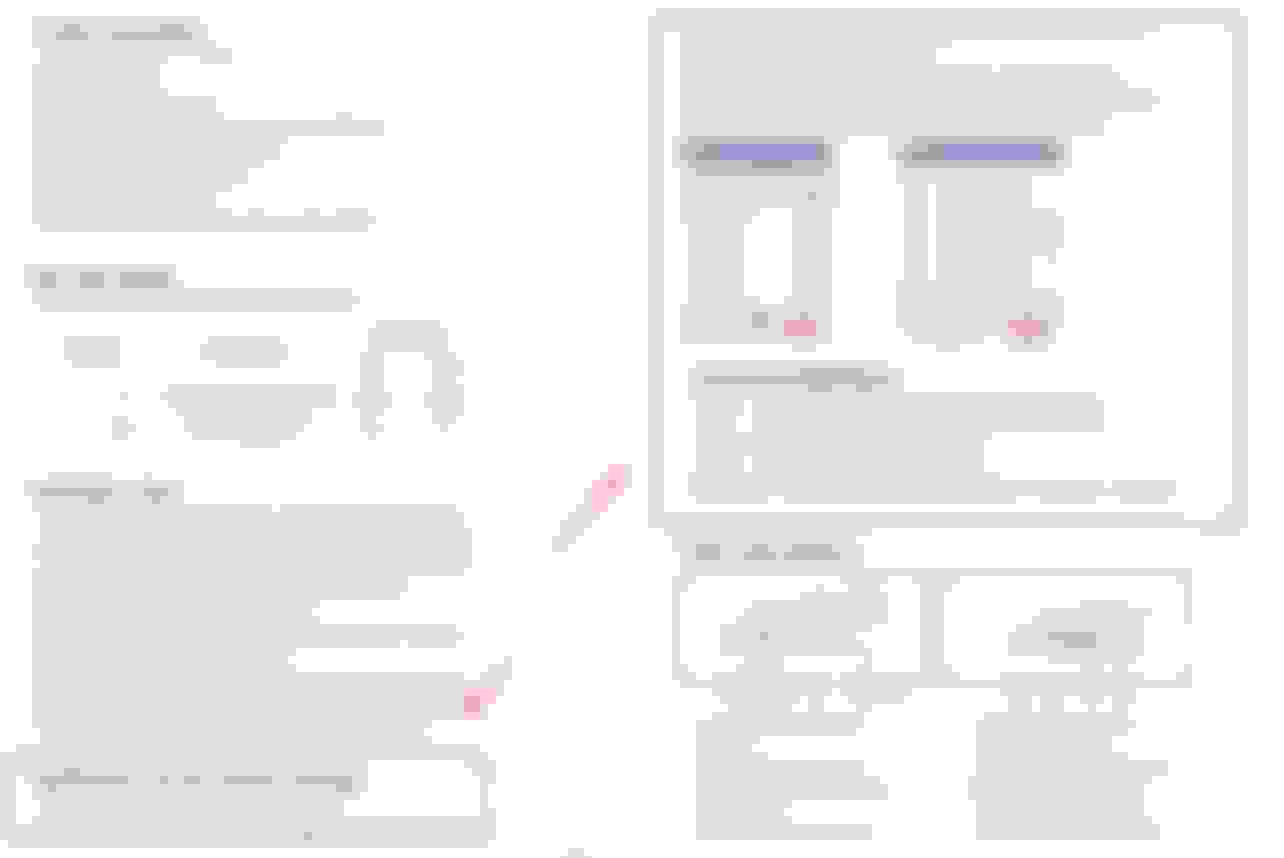
All, DED instructions are here. If you download on android a BT Controller App and you can't connect to your DED by Bluetooth then it is the wrong App so PM me for the correct one with Whatsapp number as I only have it on there. More info on the DED can be found here:
Dale, I'm about to do the same to my 2021 F-type. What was your experience with this box? Was it worth it? Did you try to use the line outputs of the factory amp first? I've got a couple of DSP amps but they don't have an optical input so I'll have to use a digital to analog converter between the interface box and my amps. I'm debating if it will be worth it to have 5 different devices to get a quality signal.
Dale, I'm about to do the same to my 2021 F-type. What was your experience with this box? Was it worth it? Did you try to use the line outputs of the factory amp first? I've got a couple of DSP amps but they don't have an optical input so I'll have to use a digital to analog converter between the interface box and my amps. I'm debating if it will be worth it to have 5 different devices to get a quality signal.
I can say it was very worth it for me because I wanted a pure unprocessed signal from the jaguar IAM. Also the digital decoder has digital coax as another signal output option. System sounded ok before and maybe acceptable for alot of people but if you want the best you can get, you need to start with a pure unprocessed signal before your DSP. If neither the optical or digital coax are able to be utilized, a module such as a topping D10 between the Daead and your DSP is an excellent affordable interface to get you rca outputs after the DED.
Topping D10s Mini USB DAC CSS XMOS XU208 ES9038Q2M OPA2134 Audio Amplifier Decoder Black https://a.co/d/7p8YzZg
There are NO instructions in the box - I see there are 4 configuration tabs but have no idea what they do. Since tab #1 is the only one in the down position I assume that it is in "Optical Fiber Output Mode" per the instructions above?
What's the best way to get the "btcontroller" app? I can't seem to find it on the Android Google Play Store.
There are NO instructions in the box - I see there are 4 configuration tabs but have no idea what they do. Since tab #1 is the only one in the down position I assume that it is in "Optical Fiber Output Mode" per the instructions above?
What's the best way to get the "btcontroller" app? I can't seem to find it on the Android Google Play Store.
Pic please, I didn't touch any of the switches on the DED.
As far as BT setup I use Bluetooth Terminal edebugger available in the Android Play Store. The first controller app was all in Chinese and not sure they ever sent out an english version.
Thanks @Jag Bass - the switches are left of the ethernet port (item 4 in "Panel descriptions" in the instructions benevolently provided by @Dale Melton above).
I will leave them as is per your recs, although my plan is to use both the Front and Rear coax (items 10, 11) outputs to 2 different DSPs. So I am hoping not to have to fiddle with those.
I will try and sort out the alarm and BT settings with the app you recommend. Appreciate your help!
All, DED instructions are here. If you download on android a BT Controller App and you can't connect to your DED by Bluetooth then it is the wrong App so PM me for the correct one with Whatsapp number as I only have it on there. More info on the DED can be found here:
I would be really interested in finding out which BT app you were using for this DED, but as I am a newbie to this forum, PM is not available to me !
I recently had the Tuning Solutions ethernet to optical box like yours fitted to my 2021 F-type as part of a significant audio upgrade but the parking sensors volume is ear splittingly loud since this install and the volume control does not seem to reduce volume as it should.
In case my installer is unable to sort this out, can you advise which BT app you used to make this adjustment so I can have a try myself ?
Many thanks,
@RWiddecombe Sadly @Dale Melton hasn't been here for over a year. @Jag Bass and @Gasman2 also have this unit and can help. Thanks for sharing the great install video. However your door speakers will be ruined by rain and washing unless you have covered the rear upper half with a waterproof sleeve:
Use the app "eDebugger" and select "wisetrip" for BT
Choose "UTF-8" then "GBK"
Then you can use the "warn1 -" and "warn2 -" commands to decrease the volume. You will need to hit the "send" button many times to decrease the volume to a tolerable level.
@RWiddecombe Sadly @Dale Melton hasn't been here for over a year. @Jag Bass and @Gasman2 also have this unit and can help. Thanks for sharing the great install video. However your door speakers will be ruined by rain and washing unless you have covered the rear upper half with a waterproof sleeve:
Use the app "eDebugger" and select "wisetrip" for BT
Choose "UTF-8" then "GBK"
Then you can use the "warn1 -" and "warn2 -" commands to decrease the volume. You will need to hit the "send" button many times to decrease the volume to a tolerable level.
Thanks @JagCode3 I found this BT Edebugger on Google play store, is this the right app?
I cannot see any mention of wisetrip ?
Thanks @JagCode3 I found this BT Edebugger on Google play store, is this the right app?
I cannot see any mention of wisetrip ?
wisetrip is what the DED Bluetooth is identifying as when it is powered up, that you will connect debugger to after scanning for available Bluetooth devices.
I find the audio threads on F-types confusing....the exhaust is so loud that I simply don't see the point at audio volumes that will not cause hearing loss.
@RWiddecombe Sadly @Dale Melton hasn't been here for over a year. @Jag Bass and @Gasman2 also have this unit and can help. Thanks for sharing the great install video. However your door speakers will be ruined by rain and washing unless you have covered the rear upper half with a waterproof sleeve:
Use the app "eDebugger" and select "wisetrip" for BT
Choose "UTF-8" then "GBK"
Then you can use the "warn1 -" and "warn2 -" commands to decrease the volume. You will need to hit the "send" button many times to decrease the volume to a tolerable level.
Yep haven’t been here for ages. Had to in fact replace my Decoder with another as the front channel failed. On the new one the parking sensors were at a reasonable volume out of the box so didn’t need to adjust them via any blue tooth app. Did I say the install featured in Four Car Audio’s 2023 annual magazine? They don’t normally publish a self install but they were happy to as my Audison Forza DSP was one of the first installed in the country.
Last edited by Dale Melton; Jun 21, 2025 at 01:46 PM.





 And here be the Digital Ethernet Decoder!!!!