


JTIS - Help, Won't download


Thread Starter
|
Member
Joined: Jan 2013
Posts: 44
Likes: 2
From: Maryland
 JTIS - Help, Won't download
I am trying with Zero success to download a JTIS for SType and I am ready to take a sledge to the computer. How do I do this? I am trying to put it on a pc which I suck at using anyway. I typically use Mac and even better, just iPad. I went to Christo's download link and it took me to something called Mediafire and I saw JTIS in a 'tree' along with other files. I click the box of item I want to download and I get a popup about signing in and subscribing to be a pro member (or something like that). Anyone know where I am going wrong?




Joined: Oct 2007
Posts: 121,184
Likes: 6,658
From: PHX some of the time
Mark, try downloading from the forum mediafire site My Files also read this thread https://www.jaguarforums.com/forum/g...rchives-65926/
Good Luck.
Good Luck.
Thread Starter
|
Member
Joined: Jan 2013
Posts: 44
Likes: 2
From: Maryland
Norrie,
I followed your directions and took me to page that said 'upgrade to media Pro" I have no idea what mediafire is - is it something I have to subscribe to? I am strictly Mac - pc's are the death of me. Thanks
I followed your directions and took me to page that said 'upgrade to media Pro" I have no idea what mediafire is - is it something I have to subscribe to? I am strictly Mac - pc's are the death of me. Thanks
Joined: Oct 2007
Posts: 121,184
Likes: 6,658
From: PHX some of the time
Not really, you can buy cd's on ebay or use alldata but it's the same info you should be able to get for free here.
You shouldn't need to sign up for the pay option on mediafire, but I don't know why you are being asked to, sorry.
You shouldn't need to sign up for the pay option on mediafire, but I don't know why you are being asked to, sorry.

Veteran member


Joined: Mar 2007
Posts: 11,345
Likes: 1,165
From: Oak Ridge, TN
Its only giving you that 'upgrade' screen when you try to download more than one file at a time (or in your case, perhaps that entire JTIS folder titled JTIS 21 ALL PARTS? Go into the folder, and just download one of the files at a time, no upgrade required to do that.
Trending Topics




Joined: Dec 2011
Posts: 120,439
Likes: 17,016
From: Durham, UK
MediaFire have made downloading more complicated recently in an effort to encourage paid accounts but a free account is still available. However, registration is now required to use the service.
If trying to download JTIS, use Norri's link in Post #2. This opens the following MediaFire window:
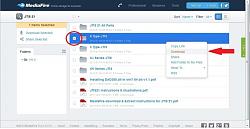
1. check the the box for the file you want to download (circled in red) and click on Download (arrowed in red). This open the Upgrade to MediaPro window:
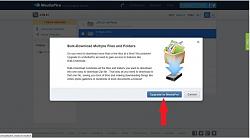
2. the only option here is to click on Update to MediaPro. Anything else closes MediaFire down! This opens the options for Plans:
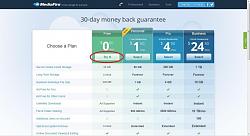
3. click on Try it in the Free Plan (circled in red). This allows zero cost registration and opens the following page:
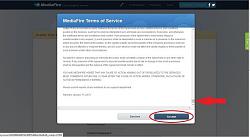
4. use the scroll Bar (arrowed in red) to scroll to the bottom of MediaFire Terms of Service and click on Accept (circled in red). This opens the Create Your Account page:
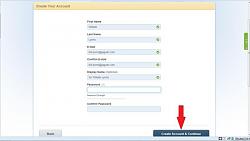
5. complete all boxes and then click on Create Account & Continue. This opens the new account welcome screen:
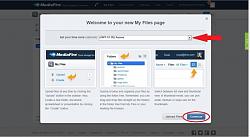
6. select your Time Zone from the drop down box (arrowed in red) and click on Continue. You can then verify by entering the PIN eMailed by MediaFire or click on Remind me Later (circled in red) to proceed to your download:
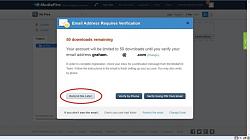
Although this may appear a complicated process, it takes less time to complete than it does to read these instructions.
Graham
If trying to download JTIS, use Norri's link in Post #2. This opens the following MediaFire window:
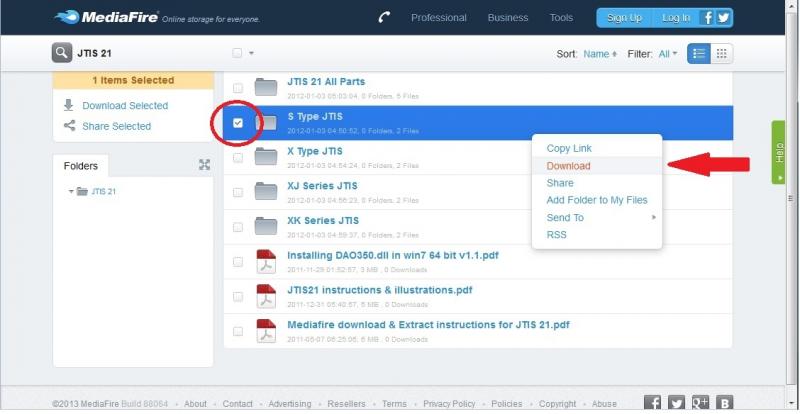
1. check the the box for the file you want to download (circled in red) and click on Download (arrowed in red). This open the Upgrade to MediaPro window:
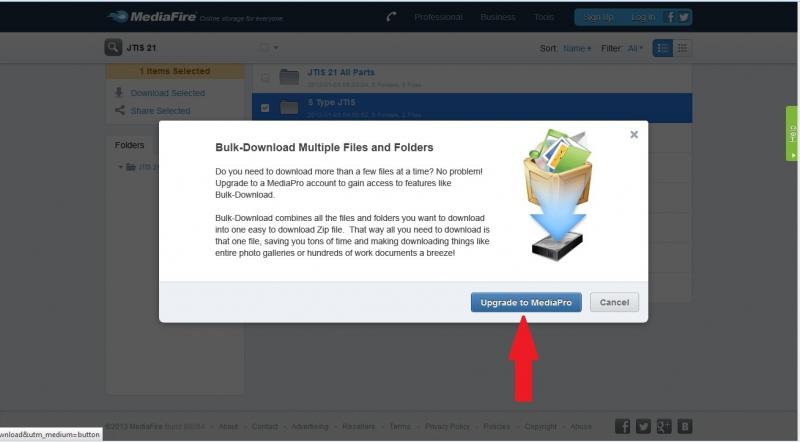
2. the only option here is to click on Update to MediaPro. Anything else closes MediaFire down! This opens the options for Plans:
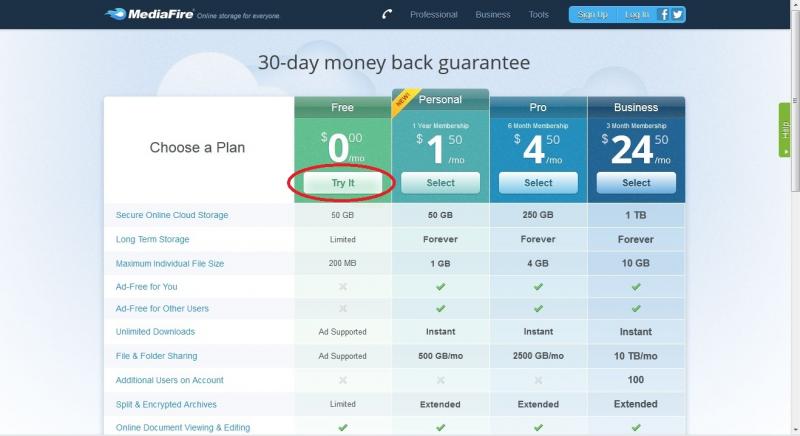
3. click on Try it in the Free Plan (circled in red). This allows zero cost registration and opens the following page:

4. use the scroll Bar (arrowed in red) to scroll to the bottom of MediaFire Terms of Service and click on Accept (circled in red). This opens the Create Your Account page:

5. complete all boxes and then click on Create Account & Continue. This opens the new account welcome screen:
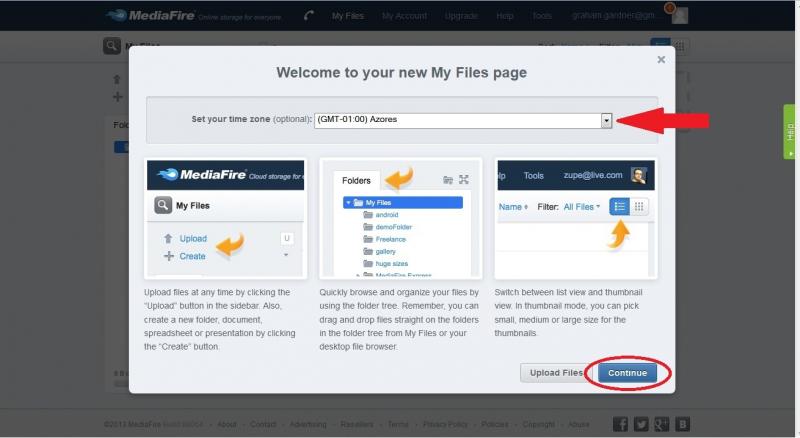
6. select your Time Zone from the drop down box (arrowed in red) and click on Continue. You can then verify by entering the PIN eMailed by MediaFire or click on Remind me Later (circled in red) to proceed to your download:
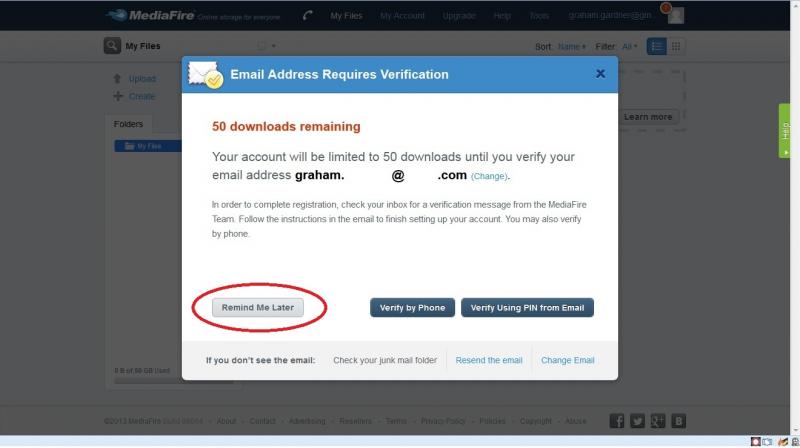
Although this may appear a complicated process, it takes less time to complete than it does to read these instructions.
Graham
Last edited by GGG; Jan 22, 2013 at 05:54 PM.

Veteran Member
Joined: Jul 2009
Posts: 12,704
Likes: 1,236
From: Brittany France
You don't need to sign up in order to download files.
But without a 'Pro' account you can't download entire folders.
Follow Norri's link then drill into the S Type folder (as you would with Win Explorer) and download the file you want, either the .exe or the .RAR.
You do not need a mediafire account to do this.
For even more downloads, follow the link in my signature (and with 130,000 downloads I know things work).
But without a 'Pro' account you can't download entire folders.
Follow Norri's link then drill into the S Type folder (as you would with Win Explorer) and download the file you want, either the .exe or the .RAR.
You do not need a mediafire account to do this.
For even more downloads, follow the link in my signature (and with 130,000 downloads I know things work).

Thread
Thread Starter
Forum
Replies
Last Post
UKnFor-dluv-expat
X-Type ( X400 )
1
Sep 26, 2015 08:40 PM

Currently Active Users Viewing This Thread: 1 (0 members and 1 guests)