


New Member


 New Member
Greetings from Arkansas !! I work part time with a used car dealer and we picked up a 2004 X type. I took it home for my wife to drive, but she prefers her Chevy Suburban, so I am driving it for a while. The radio will not work, by that I mean no sound, nothing in the display but a light. It will accept a cd and eject the cd but no sound. I've checked both fuses in the car and the one under the hood ( bonnet for you folks overseas ). Before I buy a replacement unit, any other suggestions on what to check or try? Thanks SO MUCH for any help anyone could offer.




Joined: Dec 2011
Posts: 120,439
Likes: 17,016
From: Durham, UK
Welcome to the forum Jayrope,
Good to have you with us at Jaguar forums.
Is it PUSH button 1 on that model to power ON/OFF and ROTATE to adjust the volume?
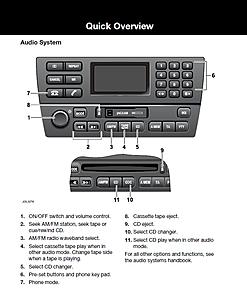
(double click on the image to enlarge it)
I haven't had an X-Type but it does work that way on several other Jaguar models.
Follow this link https://www.jaguarforums.com/forum/x-type-x400-14/ to the X-Type forum for help, advice and information. The 'HOW TO' thread at the top is a good place to start for information on regular issues.
Please remember to add vehicle details to your Signature to help others to give relevant advice. Go to the User CP button on the left of the top menu bar, then Settings & Options under Your Control Panel. Select Edit Signature and enter the details.
You can also visit the US Southern Midwest Region forum by following this link https://www.jaguarforums.com/forum/u...rn-midwest-67/ to find other members in your region.
Enjoy the forums.
Graham
Good to have you with us at Jaguar forums.
Is it PUSH button 1 on that model to power ON/OFF and ROTATE to adjust the volume?

(double click on the image to enlarge it)
I haven't had an X-Type but it does work that way on several other Jaguar models.
Follow this link https://www.jaguarforums.com/forum/x-type-x400-14/ to the X-Type forum for help, advice and information. The 'HOW TO' thread at the top is a good place to start for information on regular issues.
Please remember to add vehicle details to your Signature to help others to give relevant advice. Go to the User CP button on the left of the top menu bar, then Settings & Options under Your Control Panel. Select Edit Signature and enter the details.
You can also visit the US Southern Midwest Region forum by following this link https://www.jaguarforums.com/forum/u...rn-midwest-67/ to find other members in your region.
Enjoy the forums.
Graham
Graham, Thanks for the reply. Yes, the knob pushes for power and rotates for volumn. Nothing happens. I believe there is power to unit because it will accept cd and spit it back out when eject is pressed. Very puzzeling.I will continue to post and ask for help. THANKS again. James







Joined: Feb 2010
Posts: 28,844
Likes: 11,293
From: Adelaide Stralia
Trending Topics




Joined: Oct 2007
Posts: 121,184
Likes: 6,658
From: PHX some of the time
Welcome to Jaguar Forums James,
Good to have you with us.
Enjoy the forum.
If you haven't done so already you should add your car details to your signature to help others to help you.
If you need help with getting around and using the forum follow this link for some help Forum Help
Good to have you with us.
Enjoy the forum.
If you haven't done so already you should add your car details to your signature to help others to help you.
If you need help with getting around and using the forum follow this link for some help Forum Help




Thread
Thread Starter
Forum
Replies
Last Post
Currently Active Users Viewing This Thread: 1 (0 members and 1 guests)