


Abusive mobile ads


Thread Starter
|
Veteran Member


Joined: Mar 2016
Posts: 1,333
Likes: 583
From: North Carolina
 Abusive mobile ads
Hello, I assume that the site operators are aware, but just to be sure, there are some advertisers on the forums whose ads are abusing the system. I assume that someone is aware of this because they eventually do stop.
The ads produce false claims of viral infection and suggest you run the offered software to repair them.
They usually automatically activate. Requiring no click to run and then go theough a chain of dozens of IP addresses which attempt to prevent using your history to return the the forums.
Super annoying while they they are active and once they are gone they usually reappear within a day or so.
I understand the need for advertising, and the difficulty of using ad services to provide them but it's a danger to the users systems and potentially financially if anyone is foolish enough to act on the ads.
I hope youre way way ahead of me here and are not just aware of them but also are working to prevent them in the future!
thanks!
The ads produce false claims of viral infection and suggest you run the offered software to repair them.
They usually automatically activate. Requiring no click to run and then go theough a chain of dozens of IP addresses which attempt to prevent using your history to return the the forums.
Super annoying while they they are active and once they are gone they usually reappear within a day or so.
I understand the need for advertising, and the difficulty of using ad services to provide them but it's a danger to the users systems and potentially financially if anyone is foolish enough to act on the ads.
I hope youre way way ahead of me here and are not just aware of them but also are working to prevent them in the future!
thanks!


Thread Starter
|
Veteran Member
Joined: Mar 2016
Posts: 1,333
Likes: 583
From: North Carolina
Wow. I'm usually bothered by this a bit in the XJS forum, but browsing this section this morning I can't read a single thread, even a short one, without this happening multiple times.
If if I can be of any help by providing info please let me know.
If if I can be of any help by providing info please let me know.

Veteran Member
Joined: Mar 2016
Posts: 6,986
Likes: 2,157
From: Canada, eh
The underlying issue is that you are browsing without blocking. It is not unlike swimming in a sewer. Not something you should be doing on a regular basis.
Advertising networks = modern age floppy disks with viruses.
Advertising networks = modern age floppy disks with viruses.
Thread Starter
|
Veteran Member
Joined: Mar 2016
Posts: 1,333
Likes: 583
From: North Carolina
No Adblock. As it is detrimental to the sites income I'd prefer not to block all the lovely Jaguar advertisers.
Im running Safari and or Google Chrome on iOS 10.x
I understand Ad blocking applications. But this is not something that should be required to use the site. And likely something the owners would prefer I not do to resolve this. Or so I would think.
Im running Safari and or Google Chrome on iOS 10.x
I understand Ad blocking applications. But this is not something that should be required to use the site. And likely something the owners would prefer I not do to resolve this. Or so I would think.


Joined: Oct 2009
Posts: 11,057
Likes: 2,271
From: Perth Ontario Canada
Trending Topics



Joined: Dec 2011
Posts: 120,439
Likes: 17,004
From: Durham, UK
This is not something caused by forum owner Internet Brands. It is a scam designed in this instance to get you to buy Applock. Similar scams try to get you to phone the scammer. Your phone is neither damaged nor infected.
A few changes to Safari settings should stop it:
1. open Settings and scroll down to Safari. Tap on Safari and scroll down to Advanced.
2. tap on Advanced and go to JavaScript.
3. turn off JavaScript (make sure it is NOT green) and then double-click the home button to show your recently used Apps.
4. if Safari is not the first App listed, scroll over until you see it. Tap on Safari to open it. You will need to click OK on the fake warning message once or twice more. The warning should now go away and you should be left with the underlying scam webpage.
5. tap the tabs icon at the bottom right corner of the Safari window . This will bring up a screen of all your open web pages.
6. the scam page should be at the bottom of all your open web pages. Tap the small “x” icon on the left side of the scam page to close it.
7. double-click the home button again, go to the Settings app and tap it. Tap on Advanced and go to JavaScript to turn JavaScript back on (make it green).
Now you can start Safari browsing again.
This works on my iPhone SE and should therefore apply to other current models.
Graham
A few changes to Safari settings should stop it:
1. open Settings and scroll down to Safari. Tap on Safari and scroll down to Advanced.
2. tap on Advanced and go to JavaScript.
3. turn off JavaScript (make sure it is NOT green) and then double-click the home button to show your recently used Apps.
4. if Safari is not the first App listed, scroll over until you see it. Tap on Safari to open it. You will need to click OK on the fake warning message once or twice more. The warning should now go away and you should be left with the underlying scam webpage.
5. tap the tabs icon at the bottom right corner of the Safari window . This will bring up a screen of all your open web pages.
6. the scam page should be at the bottom of all your open web pages. Tap the small “x” icon on the left side of the scam page to close it.
7. double-click the home button again, go to the Settings app and tap it. Tap on Advanced and go to JavaScript to turn JavaScript back on (make it green).
Now you can start Safari browsing again.
This works on my iPhone SE and should therefore apply to other current models.
Graham

Senior Member
Joined: Feb 2014
Posts: 772
Likes: 183
From: CT
Mobile website was almost unusable tonight, as soon as clicked on a thread a scam advertisement for Amazon etc popped up a few seconds later. This site is by far the worst for receiving these scam adverts.

Senior Member
Joined: Oct 2014
Posts: 854
Likes: 694
From: Middle Tn. near Hsv. Al
Same JUNK appearing on my Android phone. Only from this site and still trying to find a blocker to eliminate it. Any suggestions? SIC: No Adult Sites visited on phone. If so inclined, I'd use PC :-)


Joined: Dec 2011
Posts: 120,439
Likes: 17,004
From: Durham, UK
I find the lightweight Mobile Site unusable because most of the screen is taken up with advertising. However, there is the option at the bottom of the page to View Full Site which then gives the same view as my PC:
On the occasions I use a smartphone to view the forum, this is my preferred option.
Only forum owner Internet Brands technical staff can effect the appearance and content of the Mobile Site.
Graham
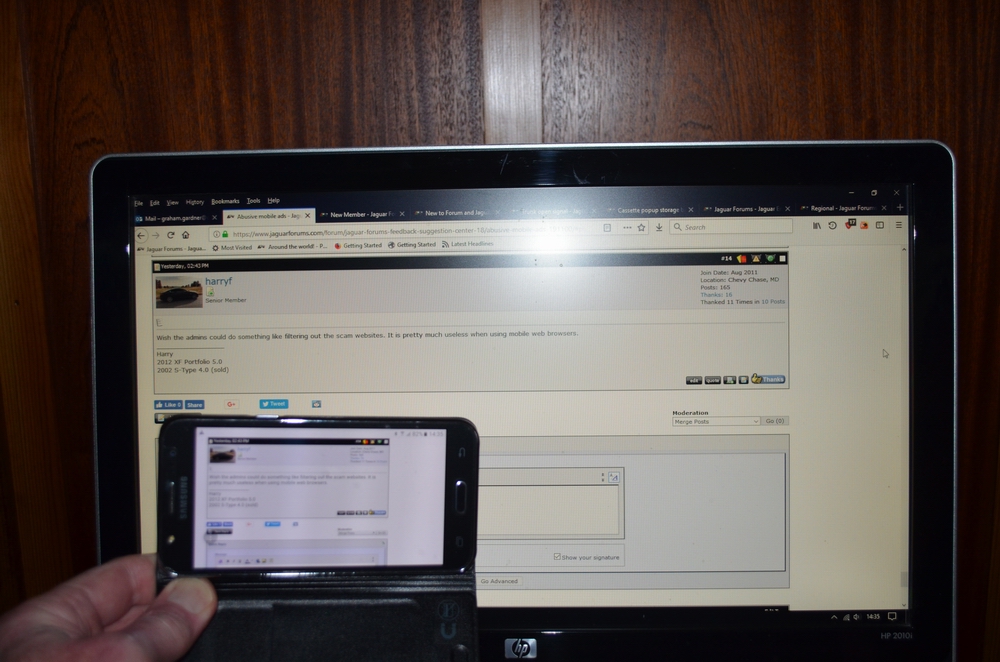
On the occasions I use a smartphone to view the forum, this is my preferred option.
Only forum owner Internet Brands technical staff can effect the appearance and content of the Mobile Site.
Graham




Joined: Oct 2007
Posts: 120,984
Likes: 6,648
From: PHX some of the time
I rarely look at the forum on my phone when I do I use the full view, the last couple of times when I'm in the middle of logging in I've got a warning that my device was infected with something I didn't bother to read about. Closing everything out and starting again seemed to help.
If I was using the phone regularly this would **** me off no end.
If I was using the phone regularly this would **** me off no end.


