


Full Jaguar EPC for download - Merry Belated Xmas!


Veteran member


Joined: Mar 2007
Posts: 11,344
Likes: 1,163
From: Oak Ridge, TN

Goerge, you're being a HUGE help in not only providing the unrestricted file download, but the advice on setup, 64-bit vs 32-bit OS questions from you and Buck both...it is appreciated.
If I get a chance, or if you want to do it, quote yourself and get all of your 'install help' instructions and tips in one post...either in your first one, or the last one here...it'll help out.
If I get a chance, or if you want to do it, quote yourself and get all of your 'install help' instructions and tips in one post...either in your first one, or the last one here...it'll help out.



Joined: Oct 2009
Posts: 11,057
Likes: 2,271
From: Perth Ontario Canada
Yes, that's exactly how it MUST be done (no deviations). Works great. Some of the Jag prices for spares are just shocking though..........

Thread Starter
|
Veteran Member
Joined: Dec 2006
Posts: 2,964
Likes: 507
From: Hamilton, NJ
Goerge, you're being a HUGE help in not only providing the unrestricted file download, but the advice on setup, 64-bit vs 32-bit OS questions from you and Buck both...it is appreciated.
If I get a chance, or if you want to do it, quote yourself and get all of your 'install help' instructions and tips in one post...either in your first one, or the last one here...it'll help out.
If I get a chance, or if you want to do it, quote yourself and get all of your 'install help' instructions and tips in one post...either in your first one, or the last one here...it'll help out.
George

Junior Member
Joined: Jan 2011
Posts: 4
Likes: 0
From: Derbyshire, UK
Androulakis - thanks for your suggestion but the login screen only displays caps when I enter the 'Admin' - whether or not I type upper, lower or mixed case.
Tot - what do you mean my 'real' install location? I followed the instructions and have the two folders in C:\ so that is my install location. As default that .js var points to C:\\jepcv3\\EPC\\Data\\Files. Changing it to C:\\ made no difference.
Tot - what do you mean my 'real' install location? I followed the instructions and have the two folders in C:\ so that is my install location. As default that .js var points to C:\\jepcv3\\EPC\\Data\\Files. Changing it to C:\\ made no difference.

Member
Joined: Jan 2011
Posts: 70
Likes: 14
From: Cote d'Azur
I mean that login will not work if you did not install it directly into C: drive, but changing the rootFolder to place where you did fixes that. I didn't install it into C: and thus had to troubleshoot why login failed (I used a virtual machine with virtual network drive).
Thread Starter
|
Veteran Member
Joined: Dec 2006
Posts: 2,964
Likes: 507
From: Hamilton, NJ
Androulakis - thanks for your suggestion but the login screen only displays caps when I enter the 'Admin' - whether or not I type upper, lower or mixed case.
Tot - what do you mean my 'real' install location? I followed the instructions and have the two folders in C:\ so that is my install location. As default that .js var points to C:\\jepcv3\\EPC\\Data\\Files. Changing it to C:\\ made no difference.
Tot - what do you mean my 'real' install location? I followed the instructions and have the two folders in C:\ so that is my install location. As default that .js var points to C:\\jepcv3\\EPC\\Data\\Files. Changing it to C:\\ made no difference.
What operating system ( and how many bits), default internet browser, and version of adobe flash do you have?
George

Member
Joined: Feb 2010
Posts: 98
Likes: 3
From: Clearwater Beach, Florida
Thanks, George!
Thread Starter
|
Veteran Member
Joined: Dec 2006
Posts: 2,964
Likes: 507
From: Hamilton, NJ
It's snowing again here... So I may have some time to put together an install guide for people, since my car maintenance plans were ruined.
Take care
George
Thread Starter
|
Veteran Member
Joined: Dec 2006
Posts: 2,964
Likes: 507
From: Hamilton, NJ
H20 - I have a full guide with screenshots ready to post. Is there ANY way to insert a post at the top of this thread for me (or by me).
Or should I start a new thread we can sticky?
I'll PM you as well.
George
Or should I start a new thread we can sticky?
I'll PM you as well.
George
Veteran member
Joined: Mar 2007
Posts: 11,344
Likes: 1,163
From: Oak Ridge, TN
Great writeup George, and I'm going to be moving this thread in the next few days to a single location the General Tech Help forum, and hoping all model sections get a link added to their FAQ thread, I'll be taking care of the XK8-XKR myself.
If the RAR file ever gets taken down George, please let a mod know, and we'll find another place to host it and get the link updated. As Buck mentioned previously, the file is too large to host as one file on our jaguarforum Mediafire account, but perhaps the two folders separately may be possible...I may give it a try.
If the RAR file ever gets taken down George, please let a mod know, and we'll find another place to host it and get the link updated. As Buck mentioned previously, the file is too large to host as one file on our jaguarforum Mediafire account, but perhaps the two folders separately may be possible...I may give it a try.
Veteran member
Joined: Mar 2007
Posts: 11,344
Likes: 1,163
From: Oak Ridge, TN
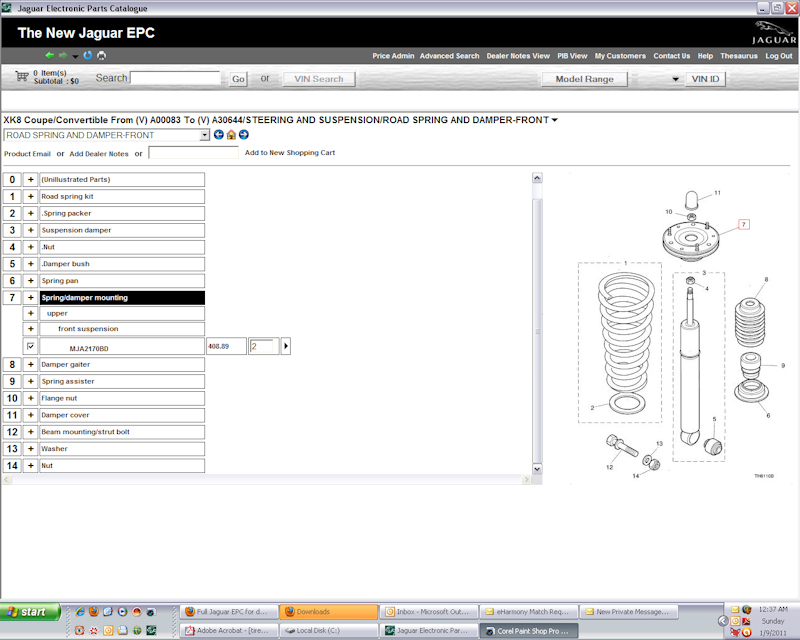
Works like a charm! But why are my frame sizes so much larger than yours?...its not tied to the width of the window either, anything smaller than 1028 wide starts chopping off my graphics? I couldn't see any 'settings', but maybe its in the flashplayer thing. I'll try an update.
Thread Starter
|
Veteran Member
Joined: Dec 2006
Posts: 2,964
Likes: 507
From: Hamilton, NJ
Works like a charm! But why are my frame sizes so much larger than yours?...its not tied to the width of the window either, anything smaller than 1028 wide starts chopping off my graphics? I couldn't see any 'settings', but maybe its in the flashplayer thing. I'll try an update.
George
Junior Member
Joined: Jan 2011
Posts: 4
Likes: 0
From: Derbyshire, UK
George,
You asked about my setup...
OS : Win XP 32 bit
Default browser : Normally Chrome, but have tried with IE v7
Flash version : 10.1.103
This is frustrating as I cannot think why I should be having problems when others are using the same downloads fine with the same set up!
Thanks for your help.
You asked about my setup...
OS : Win XP 32 bit
Default browser : Normally Chrome, but have tried with IE v7
Flash version : 10.1.103
This is frustrating as I cannot think why I should be having problems when others are using the same downloads fine with the same set up!
Thanks for your help.

Senior Member
Joined: May 2010
Posts: 115
Likes: 7
From: UK
Fantastic. Works perfectly. Many thanks guys.
Had a problem at first but once I'd done it exactly as described (i.e. to drag the two files to c:\ and the shortcut to the desktop) it all logged on ok.
You must have the folders in the correct place for this to work.
Thanks again.
BTW, the log on is "ADMIN" in upper case. This would fail until I put the two folders in c:\
Had a problem at first but once I'd done it exactly as described (i.e. to drag the two files to c:\ and the shortcut to the desktop) it all logged on ok.
You must have the folders in the correct place for this to work.
Thanks again.
BTW, the log on is "ADMIN" in upper case. This would fail until I put the two folders in c:\
Last edited by GrahamS; Jan 9, 2011 at 08:14 AM.


Veteran Member
Joined: Jul 2009
Posts: 12,704
Likes: 1,236
From: Brittany France
Well try as I might I still don't seem to be able to manage to get it running.
The downloaded file is 273 mb and win rar keeps giving the message 'unexpected end of archive'
When I double click the desktop unpacked EPC file I see JPEC and seem to be missing the other three files per the screen shot. No short cut, no Read me, and no jpecv3.
If I then double click the JPEC I go straight to Applications.
OS, Win 7 64 bit Premium Family (IN FRENCH).
I have tried 4 or 5 downloads to see if that made a difference, but am still missing the same 3 files/folders.
I'll fire up an XP laptop and try again.
The downloaded file is 273 mb and win rar keeps giving the message 'unexpected end of archive'
When I double click the desktop unpacked EPC file I see JPEC and seem to be missing the other three files per the screen shot. No short cut, no Read me, and no jpecv3.
If I then double click the JPEC I go straight to Applications.
OS, Win 7 64 bit Premium Family (IN FRENCH).
I have tried 4 or 5 downloads to see if that made a difference, but am still missing the same 3 files/folders.
I'll fire up an XP laptop and try again.
Thread Starter
|
Veteran Member
Joined: Dec 2006
Posts: 2,964
Likes: 507
From: Hamilton, NJ
Well try as I might I still don't seem to be able to manage to get it running.
The downloaded file is 273 mb and win rar keeps giving the message 'unexpected end of archive'
When I double click the desktop unpacked EPC file I see JPEC and seem to be missing the other three files per the screen shot. No short cut, no Read me, and no jpecv3.
If I then double click the JPEC I go straight to Applications.
OS, Win 7 64 bit Premium Family (IN FRENCH).
I have tried 4 or 5 downloads to see if that made a difference, but am still missing the same 3 files/folders.
I'll fire up an XP laptop and try again.
The downloaded file is 273 mb and win rar keeps giving the message 'unexpected end of archive'
When I double click the desktop unpacked EPC file I see JPEC and seem to be missing the other three files per the screen shot. No short cut, no Read me, and no jpecv3.
If I then double click the JPEC I go straight to Applications.
OS, Win 7 64 bit Premium Family (IN FRENCH).
I have tried 4 or 5 downloads to see if that made a difference, but am still missing the same 3 files/folders.
I'll fire up an XP laptop and try again.
IF you cant get a clean download with an xp machine, let me know if you have an ftp client, I'll setup an FTP account for you to download it with.
George


