X-Type ( X400 ) 2001 - 2009
Sponsored by:
Sponsored by:

smartphone bluetooth connectivity with Jaguar

Thread Tools
 
Search this Thread
 
Old Oct 29, 2015 | 05:27 AM
  #1  
sklimii's Avatar
Thread Starter
|
Veteran: Navy
10 Year Member
Liked
Community Favorite
Joined: Apr 2012
Posts: 25,845
Likes: 4,707
From: Summerville, South Carolina
Default smartphone bluetooth connectivity with Jaguar

Originally Posted by sklimii
Thanks to Stuart S for great info below:

"Will my smartphone connect with the Bluetooth in my Jaguar?"[/I]

Here is THE DEFINITIVE SOURCE: Vehicles - Jaguar Click the link and you can search (1) by model and year or (2) you can enter your VIN.


If this was helpful, please press at the bottom right.

Stuart
[/QUOTE]
 
Reply
Old Nov 6, 2015 | 10:32 PM
  #2  
Choptank's Avatar
Member
Joined: Nov 2013
Posts: 52
Likes: 5
From: Morgantown, WV USA
Default

Posted elsewhere - Repeat

Really should make no difference. Bluetooth is upward and downward compatible. Whether it is BT from an Android, or iPhone(y) or tablet or whatever should not matter. Making a device discoverable is relatively the same on any device. The only difference could be what the acceptance code might be, and one of the devices should prompt you with a suggested code. If all else fails, try 1111
 
Reply
Old Feb 17, 2016 | 06:14 AM
  #3  
chiefM's Avatar
Member
Joined: Feb 2016
Posts: 69
Likes: 6
From: North West Georgia
Default

Thanks for the great info !!!
 
Reply
Old Feb 18, 2016 | 05:32 AM
  #4  
newbee's Avatar
Junior Member
Joined: Feb 2016
Posts: 14
Likes: 2
From: sussex
Default

Hi Just got my first x type yesterday

I have tried connecting phone to Jag via bluetooth but does not accept the code tried 1111 and 1234 - Anyway of finding out or resting the code?

***Scrub that! - Just found out a generic code was 3131***
 

Last edited by newbee; Feb 18, 2016 at 10:33 AM.
Reply
Old Mar 5, 2016 | 03:33 AM
  #5  
Remote x type's Avatar
Junior Member
Joined: Feb 2016
Posts: 9
Likes: 0
Default

I had my x type connected to my iPhone 6 but after using with my wife's newer Nissan suv the jag won't connect anymore.
See my post on the subject under my name
 
Reply
Old Mar 6, 2016 | 09:07 AM
  #6  
Choptank's Avatar
Member
Joined: Nov 2013
Posts: 52
Likes: 5
From: Morgantown, WV USA
Default

Remote x type - you may have to remove/delete the Nissan from your list of Discovered devices. While most of them are not used on my Galaxy, my list has a mouse, keyboard, 3 different headphones [that I renamed for identification], 2 laptops, a desktop and 4 separate vehicles that have been discovered. Sometimes I have to go into Bluetooth and turn it off and then turn it back on for the connection to be successful - particularly if I have been using the handsfree in the Jag before I go into the gym to workout while listening to music on my headphones.
 
Reply
Old Mar 8, 2016 | 04:29 AM
  #7  
Remote x type's Avatar
Junior Member
Joined: Feb 2016
Posts: 9
Likes: 0
Default

Thanks Choptank
I don't have any discoverable Bluetooth items on my phone so that rules that out unfortunately.
Thinking of digging out the Bluetooth module in the luggage area / boot ( in OZ) disconnecting it and see if that resets it.
 
Reply
Old Mar 9, 2016 | 08:06 PM
  #8  
TR64ever's Avatar
Senior Member
Joined: Apr 2015
Posts: 433
Likes: 89
From: Westfield, NJ USA
Default

My X-Type didn't have Bluetooth on the invoice when I bought it in 2006. A year after purchase my phone showed "Jaguar" and there began my quest to connect to it. 3131 was the code and it works great for a week or so, then it starts to get wonky: wife calls and gets what I'm listening to on the radio head-unit (and I have no idea I have a call). Half the audio fails, so I can hear but not speak, or vice. versa. Now I just ignore it. My other 2008 vintage Acura MDX has similar issues... Bluetooth in the car head unit is better today than it was before 2012... Sorry but I just gave up...
 
Reply
Old Aug 1, 2016 | 09:00 AM
  #9  
rowtrak098's Avatar
Junior Member
Joined: Jun 2012
Posts: 4
Likes: 0
From: Cork ireland
Default

Attempt cd mod (audio in ) all rigged up on bench tried every Ave, I have the unit apart, with disc playing silent disc with ribbon cable placed cd unit out head unit. The chip you tap into only allows digital to be processed, on the other hand a tape model allows analog in, but you cannot switch to tape to allow input via cd model!! I'm using schematics for the chip and probed using live ipod for sound I tested with 3.5 Jack in iPod with pin test probes other end , convinced it won't work,, any ideas /?? (what would happen if I put cassette unit in optical loop, would speakers play via cd unit?? I don't have optical lead to try. This what I put UK forum can anybody throw some light here , my American friends ??
 
Reply
Old Aug 26, 2016 | 10:06 AM
  #10  
joe-seattle's Avatar
Junior Member
Joined: Aug 2016
Posts: 3
Likes: 0
From: Seattle, WA
Default

Sounds too complicated. will stick with my Costco earpiece Plantronics thingy.
 
Reply
Old Oct 6, 2016 | 11:42 PM
  #11  
carcster's Avatar
Member
Joined: Sep 2013
Posts: 90
Likes: 11
From: Colorado
Default

I think you can get the OEM bluetooth Jag module, but way to expensive to buy it used. Best bet is getting just a cheap bluetooth speaker on the visor. Will save you a ton of money. To retrofit a car over 10 years old with new tech costs more money than you want to spend on the tech. Save the money for upkeep and maintenance. Just my 2 cents. If you replace the stereo and face plate for a double din aftermarket, that might be your best bet to get a nicer stereo and bluetooth.
 
Reply
Old Oct 6, 2016 | 11:44 PM
  #12  
carcster's Avatar
Member
Joined: Sep 2013
Posts: 90
Likes: 11
From: Colorado
Default

Dynavin

I had good luck with a Dynavin in my BMW. Had great navigation, better than stock and bluetooth. Just throwing that out there as a suggestion
 
Reply
Old Jan 1, 2017 | 08:55 AM
  #13  
OriginalCaruso's Avatar
Junior Member
Joined: Nov 2012
Posts: 10
Likes: 5
From: Camberley, UK
Default

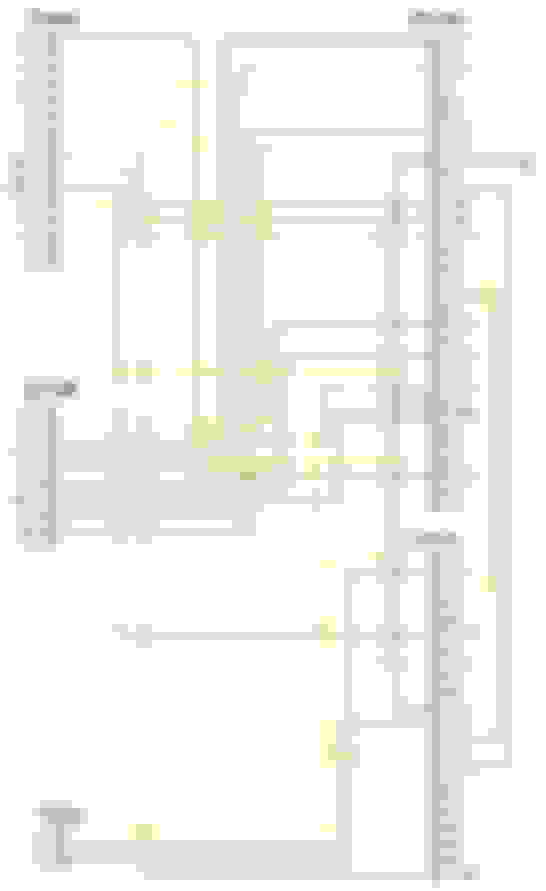
Wiring schematic for GSM


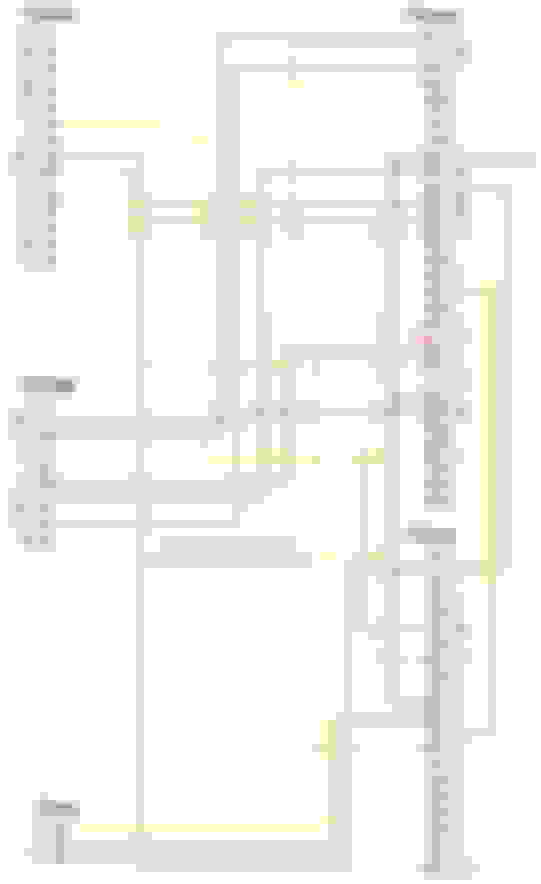
Wiring schematic for Bluetooth


Green and Grey plugs are under passenger side rear seat (RHD car)

Note with the above information it is possible to derive two things

1) GSM can be converted to Bluetooth
2) Voice can be added to a non-voice loom
 
Reply
Old Feb 27, 2017 | 02:21 PM
  #14  
cwlwch's Avatar
Junior Member
Joined: Jul 2014
Posts: 7
Likes: 5
From: UK
Default

For touchy screen equipped. In Jag's phone screen Try ##3#*# then press green phone button. Discover me then comes up Go to your phone's bluetooth, make sure bluetooth is turned on. Make sure phone's bluetooth visibility is on. Select search. Jaguar should appear in bluetooth devices on phone. Select this. You should be asked for Jag's pairing code which in UK is 1313 (not 3131). Your phone should now be paired. You may get other requests on phone to make phonebook available
 
Reply
Old Mar 1, 2017 | 02:11 PM
  #15  
Nicole Corse's Avatar
Junior Member
Joined: Mar 2017
Posts: 1
Likes: 0
From: wigan
Default

Hi,

You guys seem to know about the phone system so hopefully can help.

My 2.2D SE has the phone option on the dash but when pressed displays 'No phone system installed'

I'm thinking eBay but not sure about all parts neededplease could you advise what parts I'd need to get it up and running?

Thanks ����
 
Reply
Old Jun 9, 2017 | 03:42 PM
  #16  
Jagisbest's Avatar
Member
Joined: Apr 2017
Posts: 41
Likes: 4
Default

Originally Posted by newbee
Hi Just got my first x type yesterday

I have tried connecting phone to Jag via bluetooth but does not accept the code tried 1111 and 1234 - Anyway of finding out or resting the code?

***Scrub that! - Just found out a generic code was 3131***
1313 works on europe spec x types
 
Reply
Old Jun 12, 2017 | 01:16 PM
  #17  
Jagisbest's Avatar
Member
Joined: Apr 2017
Posts: 41
Likes: 4
Default

Originally Posted by newbee
Hi Just got my first x type yesterday

I have tried connecting phone to Jag via bluetooth but does not accept the code tried 1111 and 1234 - Anyway of finding out or resting the code?

***Scrub that! - Just found out a generic code was 3131***
x type code is 1313 on mine for blue tooth
 
Reply
Old Sep 29, 2017 | 09:38 PM
  #18  
ian20x's Avatar
Member
Joined: Feb 2017
Posts: 72
Likes: 1
From: Cambridge, MA
Default

So I just bought a 2005 X-type with touch screen GPS, but I see no mention of Bluetooth or how to connect a phone in the instruction book. Was Bluetooth standard or what was it included with?
 
Reply
Old Sep 30, 2017 | 12:54 AM
  #19  
Jagisbest's Avatar
Member
Joined: Apr 2017
Posts: 41
Likes: 4
Default

Originally Posted by ian20x
So I just bought a 2005 X-type with touch screen GPS, but I see no mention of Bluetooth or how to connect a phone in the instruction book. Was Bluetooth standard or what was it included with?
on that year the jag had a star tac phone fitted in the center console if memory serves. When you press the phone logo it comes up no phone i would guess as the prewire for the onboard phone was an optional extra for that year i believe .

 
Reply
Old Jun 29, 2019 | 01:07 PM
  #20  
budo warrior's Avatar
Junior Member
Joined: Apr 2019
Posts: 4
Likes: 0
From: port saint lucie
Default

I have Bluetooth installed, it says phone, and sig, not sig***. Im trying to connect my Iphone 8. Any suggestions.
 
Reply


All times are GMT -5. The time now is 12:37 AM.