When you click on links to various merchants on this site and make a purchase, this can result in this site earning a commission. Affiliate programs and affiliations include, but are not limited to, the eBay Partner Network.
About 10 years ago I replaced the factory Navi HU with a JVC single din. The JVC was a big improvement but has also become dated.
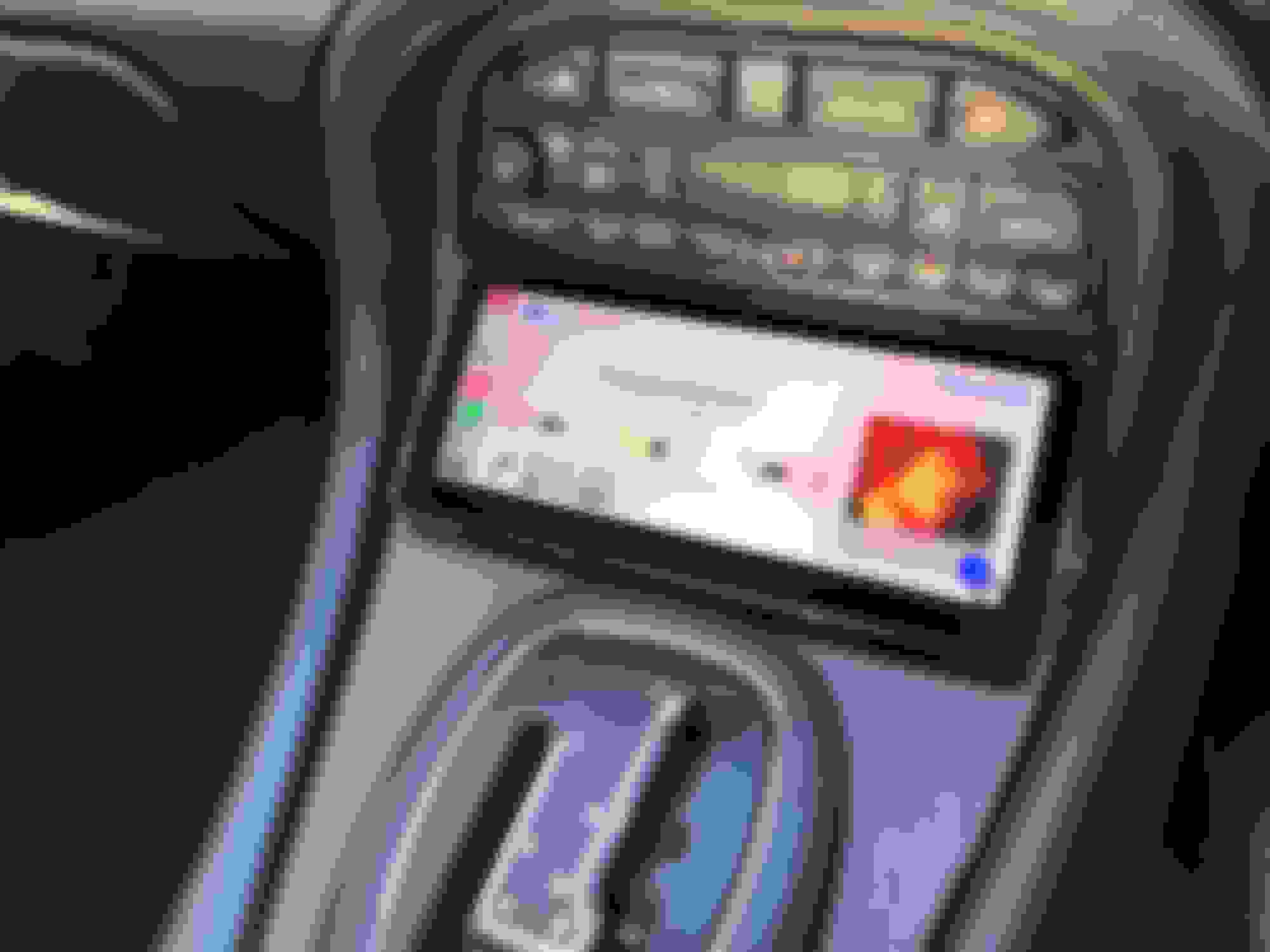
Today I installed a Joying android unit with a 6.x inch screen. I now have a modern HU with bluetooth, 4G wireless, Waze, Sirius app, etc. I skipped the rear camera.
Install was not to bad. I was able to toss the access steering controller as this is built in. Quite pleased with the results.
Yes, it works with the steering wheel controls. The sw wire (or may be 2 wires) from the HU tapped directly into a wire on the Jag harness. Unfortunately, I do not remember which wire although pretty sure it was same one that the since removed PAC tapped into.
Btw, it continues to work great.
great. Only issue I have had is one which I experienced in a similar unit, in another vehicle, although only one time on each. The GPS was drifting by a few yards. The fix was as simple as power cycling the unit.
Yes, it works with the steering wheel controls. The sw wire (or may be 2 wires) from the HU tapped directly into a wire on the Jag harness. Unfortunately, I do not remember which wire although pretty sure it was same one that the since removed PAC tapped into.
That’s good news, I had doubts that I would need to get a canbus unit and seeing as I couldn’t find a harness I was doubting that I’d find a canbus too. I’ll give it a try this weekend and let you know how it goes.
Yes, it works with the steering wheel controls. The sw wire (or may be 2 wires) from the HU tapped directly into a wire on the Jag harness. Unfortunately, I do not remember which wire although pretty sure it was same one that the since removed PAC tapped into.
That’s good news, I had doubts that I would need to get a canbus unit and seeing as I couldn’t find a harness I was doubting that I’d find a canbus too. I’ll give it a try this weekend and let you know how it goes.
All sorted, simply connected the KEY1 wire to the steering wheel wire and voila. Nice and easy. Got the front facing camera and microphone installed too. Just waiting on a relay for the rear camera. Took it out for a run today and the head unit worked flawlessly.
5 months later and I remain quite pleased with the Chinesium HU. I did discover one quirk today.
There really is no "off" button. You can reboot or go into standby mode. Not a big deal except ...
I rarely go through a commercial car wash. Today, the XJR was covered in pollen so I was going to run through the touch less car wash. Well, antenna raises when HU is on. Since you can't turn off the HU, there is no way to lower the antenna short of turning off the ignition.
I imagine this is a common issue with these. Perhaps there is an app to raise/lower the antenna. Alternatively, I may need to put a switch in line. For now, I will just avoid the carwash.
To address the antenna issue, I just wired a Google switch into the switched wire at the antenna. Now, should I need to lower antenna with engine running, I just open the trunk and flip it.
I almost never go through car wash so trunk location works for me. Alternatively, you could Put switch closer to the dash.
You could of done that from behind your head unit (not that you still can't) using the antenna activation there and mounted say in the ashtray area.. This way you can stay in your seat and do it.
You could of done that from behind your head unit (not that you still can't) using the antenna activation there and mounted say in the ashtray area.. This way you can stay in your seat and do it.
Certainly true but, I did not feel like pulling the HU back out. For the 2x a year that I might need to lower the antenna, this serves the purpose.
Even when you turn off the car, the android HU waits a few minutes before signalling antenna to lower. Pulling fuse only helps once it is already lowered.
@King Charles awesome install! What fascia did you use with that to fit the double din unit in?
J
Originally Posted by King Charles
My Kenwood DPX501BT does everything w/o a screen, BT hands free calling w/ mic installed by sun visor,phone & WAZE navigation syncs over audio system when in use. USB, seamless Sirius XM radio interface in the head unit with or w/o remote. Most importantly, I can go back to OEM if I choose, as it didn't have to hack up the dash internals for install. It's about 6 years old now but still offers everything I want in a cohesive package.
It will be the usual single din fascia adaptor, just modified to fit the double din. A quick google or ebay search for X308 facia adaptor should find it
3 years later and it is still going strong. Recently it could no longer connect to any Google services. That required a firmware update via USB stick. Thus, I had to pull it out to get to the USB port. Other than that inconvenience, all well.