


Garmin Nav Backup Cam

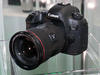

 Garmin Nav Backup Cam
Yet another thread on retrofitting a backup cam to pre '13 Xk/Xkr. I'm still waiting for "WhiteXKR" to finish his work on camera integration for the early models but in the mean time added the feature via a Garmin GPS. Garmin offers a wireless cameras as an option for some of their Nav models. My particular model is the Nuvi 2699 which I picked up on eBay for just $120.
I mounted the Nav using a CD slot universal phone mount that I again found on eBay. The Garmin mount system uses a 1" swivel ball while the universal mount uses the same system. As a result the Garmin fit directly onto the ball which gives it a clean look.
A Garmin BC30 wireless backup camera w/transmitter is required to complete the system. The BC30 is proprietary so, to my knowledge, no other camera will work with the wireless transmitter. I picked it up too on eBay for under $130.
The hardest part of the installtion was getting the trunk lid inner panel off. No need for a relay because the backup LED supply voltage is pulsed. The Garmin triggers well below 12v. I was able to connect directly to the backup light's + and - wires, stick the wirelss transmitter to the inside surface of the trunk lid easily. I regret I didn't take photos of the install but sufice it to say anyone half way handy can complete installation with a minimum of tools and wire ties.
Mounting the camera on the other hand was a bit more trying. I wound up clipping the license plate mount prongs off of the BC30 camera bracket. That allowed the camera to not stick out as much. The next step was to drill three holes under the chrome plastic "jaguar" fascia on the trunk lid next to the trunk release button.
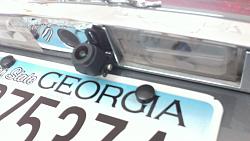
The three holes are for the supplied BC30 mounting screws and the center for the camera's cable. The center hole is large enough for the connector to fit through. I fished the cable through the hole then right to the license plate light and into the trunk opening for that light. It was tough getting the license plate light back in place but kept working with it until it snaped in place.
Plugged the Nuvi into the cigar lighter in the glove box and that was it! After starting the car the Garmin boots automatically then displays the backup cam when in reverse. Later, I'll hard wire the Nuvi's power cord to the back side of the cigar lighter for a more finished look.
Yes, it is redundant to have an added Nav but it has great features not available on the TSD. Things like pinch zoom and voice activation are nice. Additionally, the TSD can be left on it's home screen without nav interuption.
I hope this is helpful and understandable for anyone thinking of trying this stop gap for "WhiteXKR's" future mod.
My apolgies for the contrast, it was hard to show the screen without washing it out.
I mounted the Nav using a CD slot universal phone mount that I again found on eBay. The Garmin mount system uses a 1" swivel ball while the universal mount uses the same system. As a result the Garmin fit directly onto the ball which gives it a clean look.
A Garmin BC30 wireless backup camera w/transmitter is required to complete the system. The BC30 is proprietary so, to my knowledge, no other camera will work with the wireless transmitter. I picked it up too on eBay for under $130.
The hardest part of the installtion was getting the trunk lid inner panel off. No need for a relay because the backup LED supply voltage is pulsed. The Garmin triggers well below 12v. I was able to connect directly to the backup light's + and - wires, stick the wirelss transmitter to the inside surface of the trunk lid easily. I regret I didn't take photos of the install but sufice it to say anyone half way handy can complete installation with a minimum of tools and wire ties.
Mounting the camera on the other hand was a bit more trying. I wound up clipping the license plate mount prongs off of the BC30 camera bracket. That allowed the camera to not stick out as much. The next step was to drill three holes under the chrome plastic "jaguar" fascia on the trunk lid next to the trunk release button.

The three holes are for the supplied BC30 mounting screws and the center for the camera's cable. The center hole is large enough for the connector to fit through. I fished the cable through the hole then right to the license plate light and into the trunk opening for that light. It was tough getting the license plate light back in place but kept working with it until it snaped in place.
Plugged the Nuvi into the cigar lighter in the glove box and that was it! After starting the car the Garmin boots automatically then displays the backup cam when in reverse. Later, I'll hard wire the Nuvi's power cord to the back side of the cigar lighter for a more finished look.
Yes, it is redundant to have an added Nav but it has great features not available on the TSD. Things like pinch zoom and voice activation are nice. Additionally, the TSD can be left on it's home screen without nav interuption.
I hope this is helpful and understandable for anyone thinking of trying this stop gap for "WhiteXKR's" future mod.
My apolgies for the contrast, it was hard to show the screen without washing it out.


I agree Cee Jay. However, this one is easily removed and seems to not be too cluttered. Still, I'm hoping for WhiteXKR's mod to happen soon then it all will be right with my Xk world.
Veteran Member


Joined: May 2013
Posts: 1,368
Likes: 636
From: tampa, fl
My '12 has a backup camera obviously. If it did not I wouldn't add dash clutter, I personally don't see the need in a two door car. I would simply use the archaic analog method of looking back, which I still do anyways.
I don't have a backup camera in my company car or my Jeep and somehow I successfully navigate my vehicles in reverse on a daily basis...


Veteran Member
Joined: May 2013
Posts: 1,368
Likes: 636
From: tampa, fl
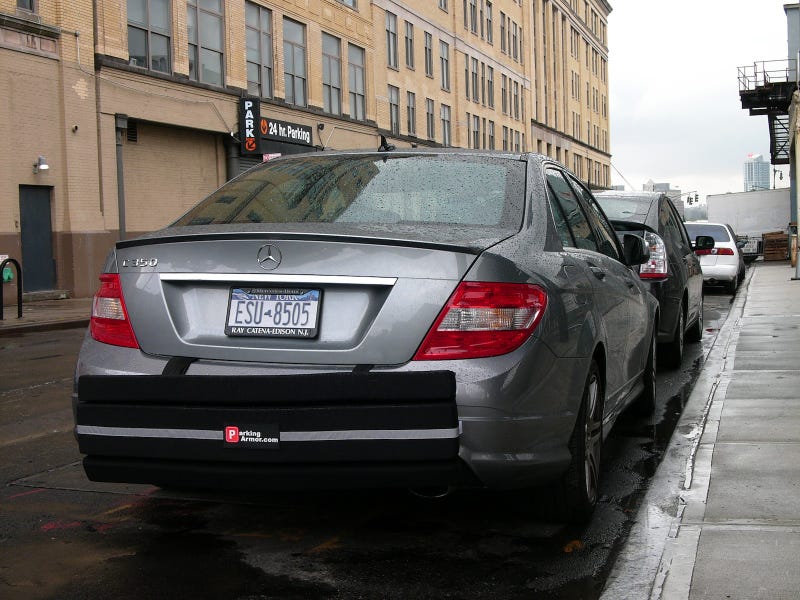
Ha, when I lived in Chicago this was the only way to park, both front and back, you couldn't fit into a street space without nudges. That is the reason my buddy paid $50,000 for two parking spots in his condo. Can't have people bumping your 911 or Range Rover on a daily basis!
Trending Topics


Veteran Member
Joined: Apr 2013
Posts: 11,862
Likes: 6,367
From: Kaysville, Utah, US
Nah, the Jaguar system really isn't that bad once you use it a few times. Having to buy an updated DVD and not having traffic updates are about the only downfalls.

Veteran Member
Joined: May 2013
Posts: 1,368
Likes: 636
From: tampa, fl
Garmin sucks! At least in my usage. My company car is barebones with no nav, so I use an aftermarket GPS. After having TomTom for years it died and I gave the new Garmin a shot. I tested it with routes I know between my dad's house and mine (around 25 miles). The Garmin consistently routed me on the least efficient path. I called them and they stated that the Garmin needed time to "learn" my patterns. Yeah, it was a load of crap, it never learned anything and peformed terribly when I put it to simple tests. I dumped it and went back to TomTom which works awesome for efficient routing.

Veteran Member


Joined: Aug 2010
Posts: 10,105
Likes: 7,106
From: Atlanta suburbs
I learned to drive in New Jersey, where all cars had audible backup warning systems. You stopped after you heard glass.