When you click on links to various merchants on this site and make a purchase, this can result in this site earning a commission. Affiliate programs and affiliations include, but are not limited to, the eBay Partner Network.
Sean W you mention the OEM microphone wires "...are right behind the unit...". Where exactly are the wires located and what color are those wires? I'm thinking of tying into the grey OEM harness for MIC4, MIC5, and MIC6. These aren't tied into new unit's harness, so I don't know if it'll work or not, but then again, it's for microphone input, which is "audio out" to the caller and not audio coming into the new unit, so it doesn't necessarily have to connected to the new unit. That's my thought anyway. I'll try it and if I have any luck, I'll make a post in this forum.
Behind the Facia - you will see it on the upper left side of the unit. There is a mic with black and red wires along with a power switch. You need to loosen a few screws to pull more wire out and give your self access. See tmich;s post here: https://www.jaguarforums.com/forum/x...4/#post2454007
I was going to try the same thing. I see no reason why the OEM mic won't work when I look at the wiring diagram but instead of coming off the integrated audio module, you would connect to the new head unit. Give it a go and let us know how it works.
Sean W.
once again I want to thank you for the insight on installing the “Tesla style” head unit. I reinstalled it noting the OEM chassis wires that are defunct. Made the change to the mic. Made sure the settings were for a XKR. All is right in the world!! Love the system.
All this seems quite a fiddle when you also lose options. I once contemplated installing one of these, but after reading this entire thread a few times, I'll keep what I have.
quick question to tesla screen users - I know that cooling seats does not work. But I wanted to confirm with other users that heat seats work with a Tesla screen. Moded my luxury seats to performance seats. Harness is there. But heat seats just don't work for me.
Yes. I have heated seats and they work as well as heated steering.
Do you have to enable in SDD?
Yeah, that is also my hypothesis (most likely I still have cooling seats in CCF and need to switch).
But just to confirm - which seats do you have (cooling + heating or only heating) and do you recall what setting of seats (which parameter) do you have in CCF?
Thanks Sean! Will change CCF and hopefully they will start working.
Anyone with Tesla screen + OEM luxury seats (cooling)? Do you have heated seats working on it?
Hello All, After following this post for a long time I finally took the courage to buy one of these units and installed it this morning. I bought from AOSTAR and the whole experience has been quite frustrating, but everything looks it's working now, and I intend to write about the whole thing here later - I also had the problem with the shrinking leather on the dashboard, so I'll kill two birds with one stone here.
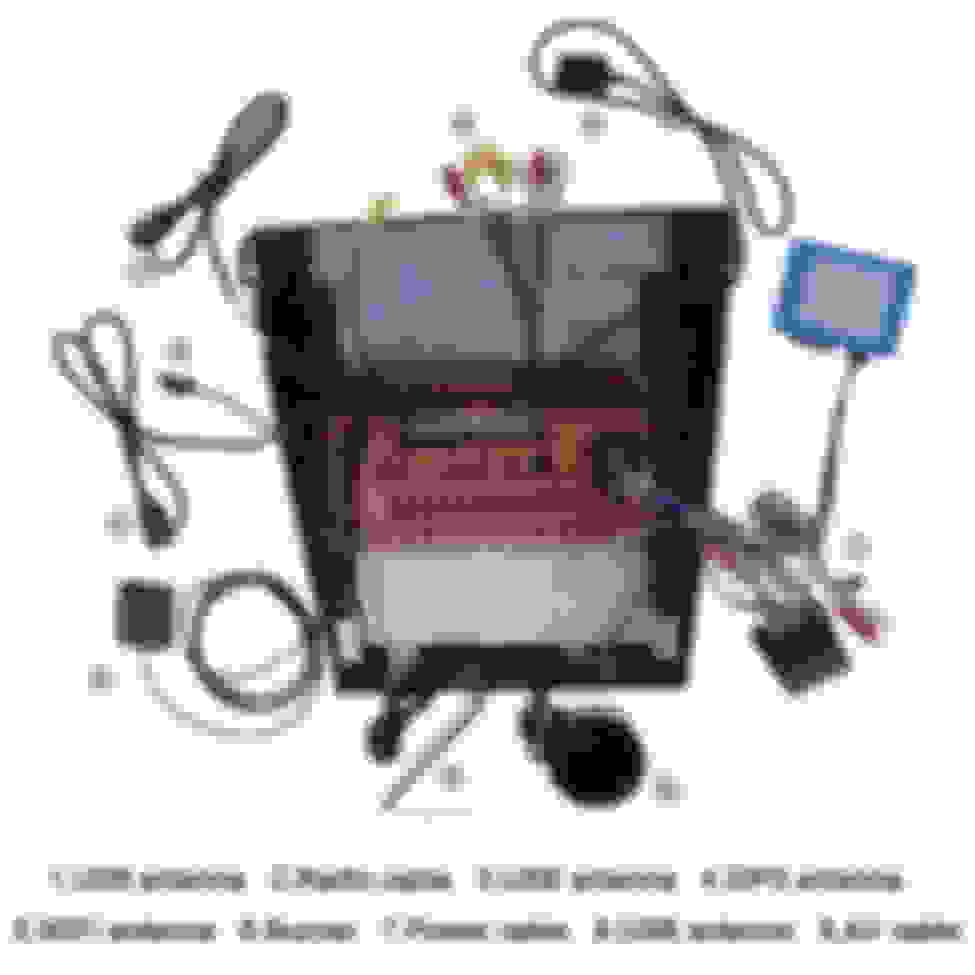
I have a few questions about the display, can you guys help here? I have the picture with the parts I'm talking about below.
1- The IOS/Android car white dongle stopped working, but I assume I accidentally broke it because the USB jack was too tight. Has anyone seen this?
2- What's the speaker for? Is this supposed to be for parking sensors? where do I connect it?
3- What's the WiFi antenna for? I don't see a jack for it other than the GPS antenna. Is it one or the other?
4- the extra RCA looks is an extra one for the radio antenna, is that it? Have you used it?
1- The IOS/Android car white dongle stopped working, but I assume I accidentally broke it because the USB jack was too tight. Has anyone seen this? Mine didn't have a dongle so can't help you there. 2- What's the speaker for? Is this supposed to be for parking sensors? where do I connect it? It's an alarm speaker. Connects to a black and red wire coming out of the brown can bus box
3- What's the WiFi antenna for? wifi reception I don't see a jack for it other than the GPS antenna. Is it one or the other? see # 5 below for connection
4- the extra RCA looks is an extra one for the radio antenna, is that it? Have you used it? yes the radio cable is for the conversion from FAKRA connector to RCA on the unit. #2 below in the pic. Then it connects to the antenna wire that was connected to the CD player which is your OEM antenna.
1- The IOS/Android car white dongle stopped working, but I assume I accidentally broke it because the USB jack was too tight. Has anyone seen this? Mine didn't have a dongle so can't help you there. 2- What's the speaker for? Is this supposed to be for parking sensors? where do I connect it? It's an alarm speaker. Connects to a black and red wire coming out of the brown can bus box
3- What's the WiFi antenna for? wifi reception I don't see a jack for it other than the GPS antenna. Is it one or the other? see # 5 below for connection
4- the extra RCA looks is an extra one for the radio antenna, is that it? Have you used it? yes the radio cable is for the conversion from FAKRA connector to RCA on the unit. #2 below in the pic. Then it connects to the antenna wire that was connected to the CD player which is your OEM antenna.
it looks like mine didn't get place for an external wifi antena.
thanks for the other answers, tho... waiting for my contact cement to cure and will try to put dashboard back in and assembly everything! quite excited so far!
Hello everybody. I've had this new head-unit installed for quite a while now. There are some quirks about it that I'm slowly over-coming, so thought I'd throw out this tid-bit of information.
If you're having trouble connecting to Apple CarPlay try using Apple "Shortcuts". I didn't notice this feature until the IOS-15 update but it could've been there the whole time. Shortcuts is also an app in the App Store. It has a pre-set "automation" for connecting to Apple CarPlay, and it works really fast. There may be something similar with Samsung/Android phones, but I don't have one to try.
Would any of you who have done this conversion be interested in selling me your original button panel? I tried to clean my sticky buttons today and it did not go well.
Would any of you who have done this conversion be interested in selling me your original button panel? I tried to clean my sticky buttons today and it did not go well.
I've seen them several times on ebay. Check breaker's sites
Would any of you who have done this conversion be interested in selling me your original button panel? I tried to clean my sticky buttons today and it did not go well.
As I have researched this more, I have come to realize there are a few variables in this panel and buttons. Most of the ones I found on ebay are silver buttons, but I need black. Also, most don't have both the front and rear defroster buttons that I need. I think this is a later model year thing.
okay guys, I'm back trying to install a unit here. the previous one did not work well so I'll return. and here's a new 6GB unit that looks like what y'alls picture. I'll update here later, but for the time, here's a question: Did you have problems with the OEM mic close to the steering wheel?
it has some sort of fan that seems to never stops.
Hello y'all! I'm half way through my second shot at the tesla-ish unit at my 07XK and this unit has a better feel... I have two problems at the moment, tho:
If I connect my backup camera supply yo the rear supply box with the add-a-fuse (used slot F14) it stays constantly ON, even when the car is not running. The camera always ON when car is running would be OK, but the camera and those leds would drain the batery this way (not to mention the aesthetics of those leds). Also try to tap the backup lights wire at the rear fuse box, but no luck... everything will stop working,... luckly it gets back to work when the tap is removed. How did you guys made it work?
The second problem came out with the previous unit, when I was fixing my dashboard. What it seems to be the OEM mic to the right of the steereing wheel is constantly ON now, there is some sort of FAN on it. did anyone have issues with this before? Here's the pic of the *******:
Finally, I've tried the dashboard camera that connects to the unit via USB, but it seems to be always on as well... is that the case?
Last edited by MScatolin; May 21, 2022 at 11:52 AM.