Air bag light-code 22: RESOLVED


Thread Starter
|
Veteran Member


Joined: Mar 2017
Posts: 1,481
Likes: 37
 Air bag light-code 22: RESOLVED
I know this has been beaten to death(well, my air bag light has beaten me) but I need a set of fresh minds. I have searched this forum and have what I believe is a fairly complete file of fixes, none of which have worked. Latest attempt was to work on driver side seat belt tensioner. It is still a bit sloppy but if I talk nice it retract. Seat has been out(driver) cleaned, Inc stuff. I still have code 22.
I am open to starting all over again if someone(ones, or as we say"ya'll) has a suggestion on the the most logical critical path.
As always thank ya'll for the help.
I am open to starting all over again if someone(ones, or as we say"ya'll) has a suggestion on the the most logical critical path.
As always thank ya'll for the help.
Last edited by GGG; May 1, 2019 at 08:14 AM. Reason: Add "RESOLVED" to thread title

Veteran Member

Joined: Jan 2009
Posts: 13,082
Likes: 4,736
From: Raleigh, NC
If you have not yet cleaned the seat belt buckle latch innards with something like electrical contact cleaner, give that a shot....
Also, if you have not removed the seats, disconnected their wiring harnesses, and cleaned their connector innards with electrical contact cleaner, do that as well....
Also, if you have not removed the seats, disconnected their wiring harnesses, and cleaned their connector innards with electrical contact cleaner, do that as well....
Senior Member
Joined: Aug 2012
Posts: 552
Likes: 228
From: Tauranga, New Zealand



Joined: Dec 2011
Posts: 120,439
Likes: 17,015
From: Durham, UK
Here's the relevant extract from Supplemental Restraint System (SRS) Flash Code and PID Code Definitions TSB for Code 22:
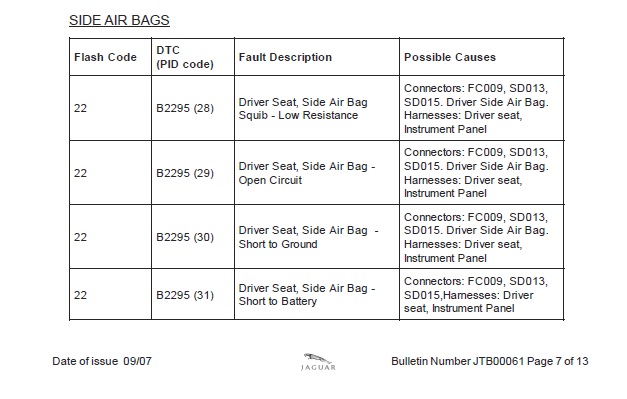
It's the same DTC for all of them and it will need Jaguar diagnostics to determine the relevant PID (Parameter Identification) shown in brackets.
Graham
It's the same DTC for all of them and it will need Jaguar diagnostics to determine the relevant PID (Parameter Identification) shown in brackets.
Graham
 I had this code.
I had this code off and on in my 2004 XK8. I finally solved it after having removed the drivers seat several time and cleaning all the connectors with contact cleaner. Finally went all the way and peeled the seat back cover all the way to get at the side air bag connection. Cleaned all the terminals and it worked. It has been a year now and no code.

Trending Topics
Joined: Dec 2011
Posts: 120,439
Likes: 17,015
From: Durham, UK
NOTE: one side of the RCM (Restraints Control Module) circuit goes to the SENSORS but on the other side it goes to the IGNITERS!
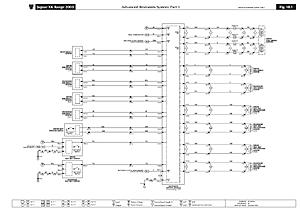
(click on the image to enlarge it)
Be sure to disconnect the battery and give the capacitors time to discharge before diving in to the seat airbag harness connections.
Graham

(click on the image to enlarge it)
Be sure to disconnect the battery and give the capacitors time to discharge before diving in to the seat airbag harness connections.
Graham