


Navigation Audio doesn't work.


Veteran Member


Joined: Aug 2007
Posts: 3,431
Likes: 573
From: Los Angeles

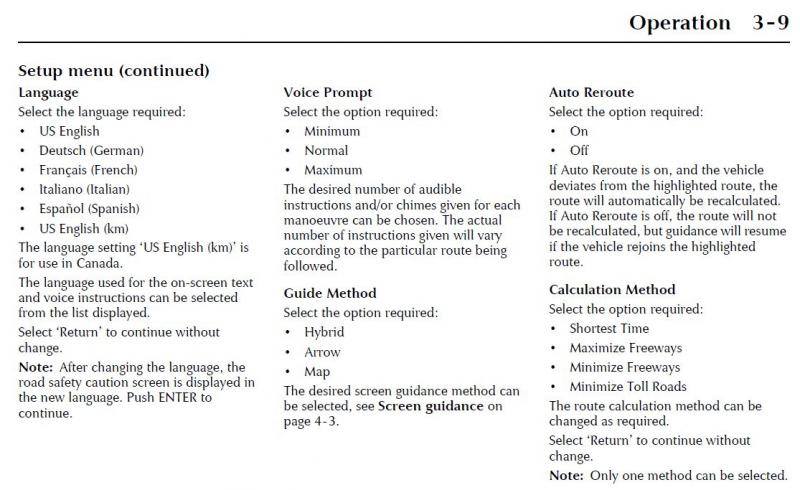
This is probably overly simplistic but isn't there something in the setup/option menu of the NAV that sets volume of the route narrator with respect to radio audio?
With my 2005 with the latest NAV disk, the system seems to work fine 99% of the time but there are those odd times when the NAV narration suddenly is quite low. I have not been able to pinpoint a pattern as to when this happens.
Doug
With my 2005 with the latest NAV disk, the system seems to work fine 99% of the time but there are those odd times when the NAV narration suddenly is quite low. I have not been able to pinpoint a pattern as to when this happens.
Doug
Junior Member
Joined: Oct 2011
Posts: 13
Likes: 0
From: England
I've got exactly the same problem with my Sat Nav so I'llbe interested to see where this leads you to.
The roads around home haven't changed much since 2003 so mine does get some use but the lack of voice except via the repeat button is somewhat annoying!
The roads around home haven't changed much since 2003 so mine does get some use but the lack of voice except via the repeat button is somewhat annoying!

Thread Starter
|
Senior Member
Joined: Nov 2011
Posts: 198
Likes: 47
From: MD
In response to SeismicGuy and H2OBoy comments above, I have the GPS voice prompts set to maximum, as well as the NAV relative volume set high in the radio head unit. I've also play with all possibilities of both setting as well.

Member
Joined: Mar 2012
Posts: 45
Likes: 4
From: Redondo Beach
This a little off the subject but do you guys know where I can download the navigation system manual. I just bought a nice 2006 XK8 but it dosent have any manuals. I downloaded all the ones off the Jag website but cant find the nav manual.
Russ
Russ



Joined: Dec 2011
Posts: 120,439
Likes: 17,014
From: Durham, UK
Did you get the manual? If not, the link to download the Navigation Handbook and the Quick Guide is in the FAQ's:
https://www.jaguarforums.com/forum/x...-2003-a-67827/
They are PDF's set to allow full or section printing.
Graham
Thread Starter
|
Senior Member
Joined: Nov 2011
Posts: 198
Likes: 47
From: MD
Update, and still no audio from Nav.
Okay, I have tried 2 more things to no avail:
1. I had gotten a hold of a 1998/99 Alpine / Jaguar DVD disc. I loaded it (it took much longer to initially load. Once the DVD started working it was still without sound (except when touching the repeat button). So now I've tried 3 different discs going forwards, backwards, and forwards in versions; so I'm pretty sure it's not the DVD discs as they all are different versions coming from different sources.
2. I also bought a used Alpine Navigation DVD player of the same part number (I think it came out of a 99 or 2000 XJ). Upon hooking everything up and putting a disc in it would show the "please don't turn engine off" screen with about 15 boxes gradually filling up until they were all filled up. Then the screen went black....and stayed black.....for 20 minutes. At this point I tried one of the other discs, and whenever I switched discs it would load them up with the same updating screen and then go black. Does this most likely mean it is a broken DVD player...if it is I can still return it (or maybe exchange it). I just don't want to return something if it isn't broke. Does anyone have any ideas or has anyone actually switched out their DVD navigation player???
1. I had gotten a hold of a 1998/99 Alpine / Jaguar DVD disc. I loaded it (it took much longer to initially load. Once the DVD started working it was still without sound (except when touching the repeat button). So now I've tried 3 different discs going forwards, backwards, and forwards in versions; so I'm pretty sure it's not the DVD discs as they all are different versions coming from different sources.
2. I also bought a used Alpine Navigation DVD player of the same part number (I think it came out of a 99 or 2000 XJ). Upon hooking everything up and putting a disc in it would show the "please don't turn engine off" screen with about 15 boxes gradually filling up until they were all filled up. Then the screen went black....and stayed black.....for 20 minutes. At this point I tried one of the other discs, and whenever I switched discs it would load them up with the same updating screen and then go black. Does this most likely mean it is a broken DVD player...if it is I can still return it (or maybe exchange it). I just don't want to return something if it isn't broke. Does anyone have any ideas or has anyone actually switched out their DVD navigation player???

Veteran member

Joined: Mar 2007
Posts: 11,345
Likes: 1,165
From: Oak Ridge, TN
I tried a replacement navigation drive in the boot, i think the part number was identical too, and instead of a 'unable to read disc' error, the screen just remained blank, and it also was from an XJ...so I sent it back for a refund. I'm not sure if yours is also not working, as the older alpine units should be interchangeable but there may be something to the xj to xk system compatibility.
Thread Starter
|
Senior Member
Joined: Nov 2011
Posts: 198
Likes: 47
From: MD
Navigation setup disc.
Does anyone have the Jaguar navigation setup disc (I believe Jaguar part# JTP824 or Alpine part# WD112)? It's my understanding this is generally only something the Jaguar dealers have. I think this is what I need to reset my current system based on the no-talk scenario, or to boot up the XJ navigation system I had bought on eBay which is the same part number as mine). Thanks.
Veteran member
Joined: Mar 2007
Posts: 11,345
Likes: 1,165
From: Oak Ridge, TN
hmmm, I've heard of the fabled 'setup' disc, something separate than the navigation map/software dvd, but never actually put eyes on one...similar to the unicorn and Bigfoot, which I think is more probable. 

Senior Member
Joined: Jan 2012
Posts: 261
Likes: 20
From: Los Angeles
wow I didn't even know there was supposed to be audio with that thing. I rarely use it though and I have the older software i.e. no clock.
There are sticky's on this forum which have links to downloads of the nav dvd I think. Or look out for it on Ebay.
There are sticky's on this forum which have links to downloads of the nav dvd I think. Or look out for it on Ebay.
Thread Starter
|
Senior Member
Joined: Nov 2011
Posts: 198
Likes: 47
From: MD
JTP824 - Jaguar wipe disc
I just noticed today that JTP824 - Jaguar wipe disc, is also mentioned in Jaguar Tech Bulletin 419-11, issued August 2002. So while fabled, and spotted by people I don't know, there is at least proof to the same level of both unicorns and bigfoot combined.
Thread Starter
|
Senior Member
Joined: Nov 2011
Posts: 198
Likes: 47
From: MD
Problem Solved....and TV / Navigation question.
Jaguar wipe disc fixed the problem - most Jaguar dealers should have this. Took about 60 seconds, then the Navigation Display (when turned on) read "X100." At this point I inserted my DVD with the map data (the newest 2003/2004 era one) and it loaded up in about 90 seconds. All worked fine, and my Jaguar talked to me on its own for the first time - of course I had to reload all my addresses and preferences / settings.
Now this wipe disc was for XK's and XJ's. So building on what waterboy said earlier, and other posts on other threads, and my experience, it appears that this disc will know the difference between the navigation system being in an XK or an XJ, and load appropriate software / firmware. This makes sense because while the Navigation system is the same part number for both vehicles it's firmware is clearly different, and this disc is needed to switch the navigation from an XK to an XJ or vice versa. Also, the connecting hardware is different on XK's and XJ's and my navigation system showed X100 on the screen - something that I doubt would be displayed on the XJ's screen.
Question: In the electrical diagram in JTIS, 2003 and up, it shows a TV system (for I believe the Japan market along with VICS - their broadcast traffic system). There is a TV module with 4 antennas. It appears that this is most likely an Alpine component that works with Ai-net on our XKs. I've also seen sold, separate Alpine units in the US, with four antenna's and Ai-net connections. While I understand the Japanese over-the-air broadcast is probably different from the US, and that these US Alpine systems (that may not even work with Jaguar) are for the older US analog waves which are not longer broadcast (and whose spectrum has already been auctioned off); would these systems work on our Jaguars? If only all they do is allow seamless switching from GPS to another video input in a very simple plug and play method (since we don't have VICS or a Japanese broadcast or an analog US broadcast anymore). If anyone has any knowledge on this matter, please share. I would think this could be the easiest way to feed a video signal to the navigation system in the most stock-like way possible, and the module would probably fit nicely in the car as well. Thanks.
Now this wipe disc was for XK's and XJ's. So building on what waterboy said earlier, and other posts on other threads, and my experience, it appears that this disc will know the difference between the navigation system being in an XK or an XJ, and load appropriate software / firmware. This makes sense because while the Navigation system is the same part number for both vehicles it's firmware is clearly different, and this disc is needed to switch the navigation from an XK to an XJ or vice versa. Also, the connecting hardware is different on XK's and XJ's and my navigation system showed X100 on the screen - something that I doubt would be displayed on the XJ's screen.
Question: In the electrical diagram in JTIS, 2003 and up, it shows a TV system (for I believe the Japan market along with VICS - their broadcast traffic system). There is a TV module with 4 antennas. It appears that this is most likely an Alpine component that works with Ai-net on our XKs. I've also seen sold, separate Alpine units in the US, with four antenna's and Ai-net connections. While I understand the Japanese over-the-air broadcast is probably different from the US, and that these US Alpine systems (that may not even work with Jaguar) are for the older US analog waves which are not longer broadcast (and whose spectrum has already been auctioned off); would these systems work on our Jaguars? If only all they do is allow seamless switching from GPS to another video input in a very simple plug and play method (since we don't have VICS or a Japanese broadcast or an analog US broadcast anymore). If anyone has any knowledge on this matter, please share. I would think this could be the easiest way to feed a video signal to the navigation system in the most stock-like way possible, and the module would probably fit nicely in the car as well. Thanks.

Veteran Member
Joined: Apr 2010
Posts: 7,657
Likes: 3,020
From: Arlington VA USA
Thanks for closing the loop on this puzzling issue.
I do not know than answer to your question regarding the original TV system, but I do sell a plug and play cable that works with a PAC VCI-X video converter unit that allows two channels of NTSC video along with the original navigation video all on the origiinal screen.
It is all easily hidden. The only evidence is a neatly placed switch and even this is optional depending on what your application is.
I do not know than answer to your question regarding the original TV system, but I do sell a plug and play cable that works with a PAC VCI-X video converter unit that allows two channels of NTSC video along with the original navigation video all on the origiinal screen.
It is all easily hidden. The only evidence is a neatly placed switch and even this is optional depending on what your application is.
Thread Starter
|
Senior Member
Joined: Nov 2011
Posts: 198
Likes: 47
From: MD
I don't really have a relationship with the dealer. I never used them before, and will probably never use them in the future simply because I like doing everything myself on the Jag - not to mention they are not physically close. My parts I order online through Gaudin, eBay, or anywhere-if generics; and the work I do myself. The only things I don't do is mount tires (Tire Kingdom). I think that's all part of the experience and why I love my jag. Now if I bought mine new for 90K, and had all these standard problems under warranty; I'd probably hate jags; but have a great relationship with the dealer.
In fact, I now have a FORD WDS being shipped to me. Once I get it and play with it some I will have to figure out how to acquire or buy the Jaguar software because I haven't found the software or machines pre-loaded for sale anywhere.
Also, the other issue, is even if I could; I'm unable to copy the GPS navigation discs (some of my posts earlier on this thread talk to this); so I think I'd have the same problem. I'm pretty computer literate, have built my own CPU's from scratch, have had multiple monitors as early as the mid-90's when the MS operating system didn't even support them; yet I can't even copy those jag nav discs. I put quite a lot of effort in that, and am not willing to try again any time soon. While I used the same programs as others, I suspect there was some issue with the exact brand of disc / disc reader combo; even though I tired many types of disc it seems and multiple writers.
At least others, with the exact same issue, now know the fix. Thanks to all, especially WhiteXKR and H20boy, as your responses are always quick, helpful, and many of your older posts have been extremely helpful and relevant to me.
In fact, I now have a FORD WDS being shipped to me. Once I get it and play with it some I will have to figure out how to acquire or buy the Jaguar software because I haven't found the software or machines pre-loaded for sale anywhere.
Also, the other issue, is even if I could; I'm unable to copy the GPS navigation discs (some of my posts earlier on this thread talk to this); so I think I'd have the same problem. I'm pretty computer literate, have built my own CPU's from scratch, have had multiple monitors as early as the mid-90's when the MS operating system didn't even support them; yet I can't even copy those jag nav discs. I put quite a lot of effort in that, and am not willing to try again any time soon. While I used the same programs as others, I suspect there was some issue with the exact brand of disc / disc reader combo; even though I tired many types of disc it seems and multiple writers.
At least others, with the exact same issue, now know the fix. Thanks to all, especially WhiteXKR and H20boy, as your responses are always quick, helpful, and many of your older posts have been extremely helpful and relevant to me.

Veteran Member
Joined: Jan 2012
Posts: 2,953
Likes: 1,120
From: Phoenix, AZ USA

I do not know than answer to your question regarding the original TV system, but I do sell a plug and play cable that works with a PAC VCI-X video converter unit that allows two channels of NTSC video along with the original navigation video all on the origiinal screen.
It is all easily hidden. The only evidence is a neatly placed switch and even this is optional depending on what your application is.
It is all easily hidden. The only evidence is a neatly placed switch and even this is optional depending on what your application is.
Veteran Member
Joined: Apr 2010
Posts: 7,657
Likes: 3,020
From: Arlington VA USA
Thanks Charlie. After doing the mod originally by cutting, soldering and heat shrinking wires inside the dash, I knew there had to be an easier way.