


Connecting Bluetooth


Veteran member
Joined: Jan 2009
Posts: 3,390
Likes: 195
From: Akron, Ohio USA

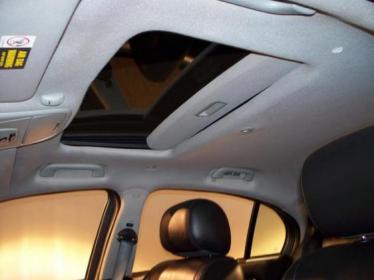
The picture above shows where the microphone is located. See the little box next to the sunglass holder on the overhead console? That is it....
Last edited by JOsworth; Oct 22, 2010 at 05:05 AM.


Junior Member
Joined: Mar 2017
Posts: 4
Likes: 0
From: Warwickshire
Phone connected
Hi
I have the same problem, Jag shows phone not fitted, but my phone see the car. I have microphone and I've checked few phones and all of them connect normally but no car response.
I have the same problem, Jag shows phone not fitted, but my phone see the car. I have microphone and I've checked few phones and all of them connect normally but no car response.
Junior Member
Joined: Mar 2017
Posts: 4
Likes: 0
From: Warwickshire
If I have no bluetooth, why I can connect phone with Jag via bluetooth? 100% it is there.
 Connecting a BTUM
Hello friends, Hope all of you are keeping safe from the terrible situation all over. I own a 2005 S Type R. It originally came with a hand held phone module, and it works perfectly well. But to a step further, I bought a BTUM. Is it possible to disconnect the phone hand unit in the center console plug and connect the BTUM plug to the same plug, and pair the BTUM with my phone (its a Samsung M31)? Thanks in Advance

This is for my car (2005 S-Type) and my phone (Blackberry 8330). If it doesn't work for you, it will give you an idea.
*************
Car:
Enter ##3#*# using the keypad and press the green Send/End icon (“Discover me” appears on the screen)
Phone:
Select "Options"
Select "Settings"
Select "Bluetooth"
Select "Add device"
Highlight Jaguar
Enter PIN 1313 and press "OK"
NOTE: During pairing please use the PIN 1313.
I also have the option of using ##1#*# as the pairing commend. This one won't time out whereas the one using the "3" times-out after about 5 minutes.
*************
Once you've paired the two, they should link up automatically when you get in the car and turn on the ignition. There's a book available. Check:
http://www.jaguar.com/us/en/#/owner_...ent_literature
Eric
*************
Car:
Enter ##3#*# using the keypad and press the green Send/End icon (“Discover me” appears on the screen)
Phone:
Select "Options"
Select "Settings"
Select "Bluetooth"
Select "Add device"
Highlight Jaguar
Enter PIN 1313 and press "OK"
NOTE: During pairing please use the PIN 1313.
I also have the option of using ##1#*# as the pairing commend. This one won't time out whereas the one using the "3" times-out after about 5 minutes.
*************
Once you've paired the two, they should link up automatically when you get in the car and turn on the ignition. There's a book available. Check:
http://www.jaguar.com/us/en/#/owner_...ent_literature
Eric
Thank you for this. Connected my iPhone 13 Pro Max to my newly purchased 2006 S Type R. Now to just get a bluetooth music aux module or something of the sort and I'll be able to play music better than the FM transmitter that I currently have.

Thread
Thread Starter
Forum
Replies
Last Post
kosta013
S-Type / S type R Supercharged V8 ( X200 )
12
Dec 6, 2019 10:27 AM
42Ajd
PRIVATE For Sale / Trade or Buy Classifieds
2
Dec 30, 2015 09:45 AM
FS[MidAtlantic]: 1997 XJ6 VDP - Very RARE Black on Black
42Ajd
PRIVATE For Sale / Trade or Buy Classifieds
2
Sep 21, 2015 07:37 PM

Currently Active Users Viewing This Thread: 1 (0 members and 1 guests)