

Hey Guys,
For some reason my Base 2003 S-Type was not equipped with Homelink. I really missed that feature, as my X-Type had it, and my craftstman garage door openers were always really picky with the 12+ year old remote, yet worked fine with homelink.
So I decided to see if I could add it to my S. I did some searching and found an overhead console from a 2004 S-Type that had homelink in it on ebay for $54 delivered. I wondered if that was only part of the story.
I have to give a big thank you to Jeff Osworth (Josworth) for confirming that the homelink electronics are self contained in the overhead console and that they were plug and play, no additional electronics or wiring were required. So I ordered the overhead console from ebay.
This is the tag that was on the console: It's from a 2004 S-Type and even included the vin.

Here's pics of the console on my desk.

The underside of the console:

Notice there are 4 clips around the dome light area, and two further back.
Now onto the swap:
First open your sunglasses holder and look up, there will be a single t15 torx screw, remove it.

Now take a pry tool and slowly start prying at the front of the console by the rear view mirror. You have to release the 4 clips around the dome light. You do not want to release the 2 rearward clips (actually you really can't. This may require more force than you are initially comfortable with. It may feel like it's going to break, those clips are TIGHT. As you release the front of the console the dome / map lights will go out. That's normal and by design.
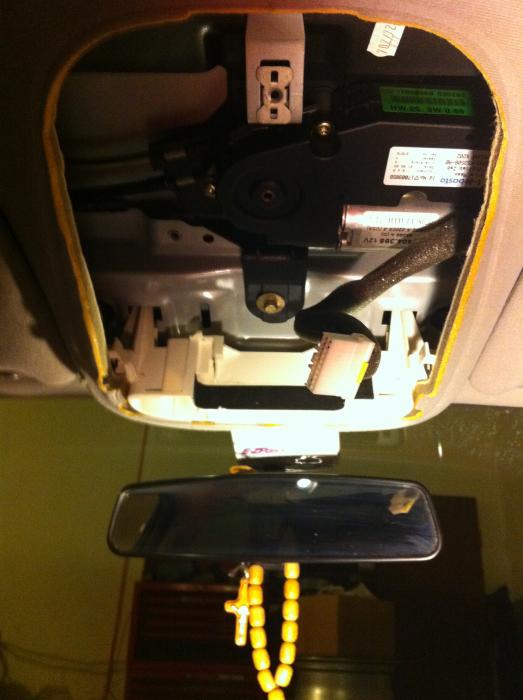
Once you have the 4 clips off, SLIDE the console forward and down. Basically there is a black plastic piece seen in this pic, that attaches to the two rear clips. What you want to do is slide the console forward so the back edge and sides of the black plastic piece clear free of the headliner. This will make more sense when you do it.

Disconnect the electrical connector by pushing the tab in and then pulling the plug out. At this point the console should be completely removed from the car.

Now take a flat blade screwdriver and push in sides of the the two metal clips in the back and take off the black plastic piece, there are also two smaller clips holding the outer grey shell onto the inner black plastic, they are just tabs pull them back a bit and they will come off. Once you have the black plastic piece off, set the old console aside.
Now time for reassembly. It's a bit different than removal.
First, take the black plastic piece and put it back in the roof underneath the headliner. Line up the screw hole and put the t15 screw back in place.
Then plug the electrical connector in. At this point you may want to turn the key on and test the switches. My sunroof switch, etc all worked fine. Press a button on the homelink. You will see a red LED come on.
The dome / map lights will NOT work until you have the console back in the roof.
Once you have confirmed that you have power, line the front clips up, and slowly but firmly push all the clips into place and snap the console back up into the roof. (The rear clips will once again attach to that black plastic piece that is now screwed to the roof).

That's it, your car now has homelink.
For my car / garage door programming it was easy:
First press the two outer buttons at the same time. Keep both pressed until the light goes from solid to blinking. This takes a while, the manual says 30 seconds but it feels like a lot longer.
Then get your existing garage door opener. Hold the opener 6" or closer to the overhead console. At the same time press the button on your garage door opener and the corresponding homelink button you want to learn that code. Keep both pressed till the homelink button changes it's flashing. Repeat for additional buttons if you want to add more doors. Test the homelink buttons and see if they operate your doors. If they do, you're done. If not you may have to teach your opener the homelink remote.
This is a slightly different procedure. You have to do the first part and hold both buttons until it starts flashing. That puts the homelink in learning mode and clears the code.
Then you have to (preferably with the help of a friend), press the learning button on the opener. Then press the homelink button you want to use to control the opener until the opener responds.
Any questions feel free to ask.
Take care,
George
For some reason my Base 2003 S-Type was not equipped with Homelink. I really missed that feature, as my X-Type had it, and my craftstman garage door openers were always really picky with the 12+ year old remote, yet worked fine with homelink.
So I decided to see if I could add it to my S. I did some searching and found an overhead console from a 2004 S-Type that had homelink in it on ebay for $54 delivered. I wondered if that was only part of the story.
I have to give a big thank you to Jeff Osworth (Josworth) for confirming that the homelink electronics are self contained in the overhead console and that they were plug and play, no additional electronics or wiring were required. So I ordered the overhead console from ebay.
This is the tag that was on the console: It's from a 2004 S-Type and even included the vin.
Here's pics of the console on my desk.
The underside of the console:
Notice there are 4 clips around the dome light area, and two further back.
Now onto the swap:
First open your sunglasses holder and look up, there will be a single t15 torx screw, remove it.
Now take a pry tool and slowly start prying at the front of the console by the rear view mirror. You have to release the 4 clips around the dome light. You do not want to release the 2 rearward clips (actually you really can't. This may require more force than you are initially comfortable with. It may feel like it's going to break, those clips are TIGHT. As you release the front of the console the dome / map lights will go out. That's normal and by design.
Once you have the 4 clips off, SLIDE the console forward and down. Basically there is a black plastic piece seen in this pic, that attaches to the two rear clips. What you want to do is slide the console forward so the back edge and sides of the black plastic piece clear free of the headliner. This will make more sense when you do it.
Disconnect the electrical connector by pushing the tab in and then pulling the plug out. At this point the console should be completely removed from the car.
Now take a flat blade screwdriver and push in sides of the the two metal clips in the back and take off the black plastic piece, there are also two smaller clips holding the outer grey shell onto the inner black plastic, they are just tabs pull them back a bit and they will come off. Once you have the black plastic piece off, set the old console aside.
Now time for reassembly. It's a bit different than removal.
First, take the black plastic piece and put it back in the roof underneath the headliner. Line up the screw hole and put the t15 screw back in place.
Then plug the electrical connector in. At this point you may want to turn the key on and test the switches. My sunroof switch, etc all worked fine. Press a button on the homelink. You will see a red LED come on.
The dome / map lights will NOT work until you have the console back in the roof.
Once you have confirmed that you have power, line the front clips up, and slowly but firmly push all the clips into place and snap the console back up into the roof. (The rear clips will once again attach to that black plastic piece that is now screwed to the roof).
That's it, your car now has homelink.
For my car / garage door programming it was easy:
First press the two outer buttons at the same time. Keep both pressed until the light goes from solid to blinking. This takes a while, the manual says 30 seconds but it feels like a lot longer.
Then get your existing garage door opener. Hold the opener 6" or closer to the overhead console. At the same time press the button on your garage door opener and the corresponding homelink button you want to learn that code. Keep both pressed till the homelink button changes it's flashing. Repeat for additional buttons if you want to add more doors. Test the homelink buttons and see if they operate your doors. If they do, you're done. If not you may have to teach your opener the homelink remote.
This is a slightly different procedure. You have to do the first part and hold both buttons until it starts flashing. That puts the homelink in learning mode and clears the code.
Then you have to (preferably with the help of a friend), press the learning button on the opener. Then press the homelink button you want to use to control the opener until the opener responds.
Any questions feel free to ask.
Take care,
George




aholbro1
Veteran Member
close


Apr 20, 2026
- Join DateAug 2010
- LocationDecatur, TX
- Posts:4,618
-
Likes:927
-
Liked:1,656 Times in 1,071 Posts
Nice piece of work, George.

Veteran Member
jag79
Veteran Member
close
May 16, 2018
- Join DateJul 2010
- LocationOrlando, Florida
- Posts:1,178
-
Likes:195
-
Liked:86 Times in 61 Posts
Finally now I can program my homelink buttons with my garage door! lolz....you always seem to amaze me George 
Fanatastic job on the write up!
Fanatastic job on the write up!


Norri

close


Today
- Join DateOct 2007
- LocationPHX some of the time
- Posts:121,060
-
Likes:3,304
-
Liked:6,652 Times in 5,788 Posts
Good write up George, finding the clips is always key to this type of job, so this will be useful for anyone wanting to access the console for any reason.

Jayt2
Veteran Member
close

Today
- Join DateMar 2009
- LocationUpland, CA.
- Posts:20,188
-
Likes:2,718
-
Liked:31,745 Times in 12,845 Posts
Then you have to (preferably with the help of a friend), press the learning button on the opener. Then press the homelink button you want to use to control the opener until the opener responds.
Any questions feel free to ask.
One question..I've wanted to use the Jag's homelink, but I've been hesitant to do so. Would pressing the learn button on the opener screw up the remote in my wife's car? The preliminary setup is no problem, but when it get's to the opener learn button, I stopped at that point.
Any questions feel free to ask.
One question..I've wanted to use the Jag's homelink, but I've been hesitant to do so. Would pressing the learn button on the opener screw up the remote in my wife's car? The preliminary setup is no problem, but when it get's to the opener learn button, I stopped at that point.
Norri
close
Today
- Join DateOct 2007
- LocationPHX some of the time
- Posts:121,060
-
Likes:3,304
-
Liked:6,652 Times in 5,788 Posts
No it won't, I use the homelink and my wife uses the original button set in her car.
aholbro1
Veteran Member
close
Apr 20, 2026
- Join DateAug 2010
- LocationDecatur, TX
- Posts:4,618
-
Likes:927
-
Liked:1,656 Times in 1,071 Posts
I've got the original remote and three homelinks programmed at different times. Wish my x300 would do "rolling code!"
You'll be fine
You'll be fine
Quote:
Any questions feel free to ask.
One question..I've wanted to use the Jag's homelink, but I've been hesitant to do so. Would pressing the learn button on the opener screw up the remote in my wife's car? The preliminary setup is no problem, but when it get's to the opener learn button, I stopped at that point.
No, the homelink can be added to the opener. On SOME openers (genie i think), you may have to program all the transmitters you want to use at the same time, so you may need to have your car and hers (or her remote) all there when you decide to do this. Originally Posted by Jayt2
Then you have to (preferably with the help of a friend), press the learning button on the opener. Then press the homelink button you want to use to control the opener until the opener responds.Any questions feel free to ask.
One question..I've wanted to use the Jag's homelink, but I've been hesitant to do so. Would pressing the learn button on the opener screw up the remote in my wife's car? The preliminary setup is no problem, but when it get's to the opener learn button, I stopped at that point.
You need to refer to your specific opener's documentation for exact programming procedures to program a new remote to it.
Hope this helps,
George

Senior Member
Quote:
Any questions feel free to ask.
One question..I've wanted to use the Jag's homelink, but I've been hesitant to do so. Would pressing the learn button on the opener screw up the remote in my wife's car? The preliminary setup is no problem, but when it get's to the opener learn button, I stopped at that point.
I've reprogrammed several of my cars over the past three years and it has never affected the stand alone clickers. This is a new opener with rolling codes.Originally Posted by Jayt2
Then you have to (preferably with the help of a friend), press the learning button on the opener. Then press the homelink button you want to use to control the opener until the opener responds.Any questions feel free to ask.
One question..I've wanted to use the Jag's homelink, but I've been hesitant to do so. Would pressing the learn button on the opener screw up the remote in my wife's car? The preliminary setup is no problem, but when it get's to the opener learn button, I stopped at that point.


Veteran Member
The Chris X
Veteran Member
close
Apr 26, 2016
- Join DateOct 2008
- LocationPittsburgh, PA
- Posts:2,475
-
Likes:101
-
Liked:129 Times in 123 Posts
What do you mean your buttons broke off? Can you give us more detail? The surround just pull off if I remember correctly. Maybe post a pic?
Oh - I also highly suggest you add the year and engine of your S-Type to your sig, it will help us help you if we know what year your S-Type is, since there were changes over the years.
Oh - I also highly suggest you add the year and engine of your S-Type to your sig, it will help us help you if we know what year your S-Type is, since there were changes over the years.

Junior Member
I just replaced the overhead console in my car. Got a used one with Homelink for $55
This thread was very helpful. Many thanks to Androulakis
This thread was very helpful. Many thanks to Androulakis
Junior Member
I don't think it can be removed. The tabs are hot melted on the backside. So it is part of the overhead console. I don't see why you want to remove it. If it's not working, you may need to replace the whole console.

Junior Member
Thank you for your response.
I would like to exchange only the homelink section because I have overhead console without this feature but I have parking sensors button which is not included in the part I'm gonna buy on ebay so I would like to, let say, connect two worlds
I would like to exchange only the homelink section because I have overhead console without this feature but I have parking sensors button which is not included in the part I'm gonna buy on ebay so I would like to, let say, connect two worlds
Junior Member
Now I don't think that I got everything right. I've been asking if there is a possibility to remove the inner part of the homelink module and also the outer part where buttons are placed.


Member
You can completely disassemble the complete Overhead Console and use the parts you want. The heat fused support posts can be drilled out carefully with a countsunk bit and then you can get at all the bits and pieces. You can later reassemble the Console with parts from you existing and purchased Console if you wish by using small screws in the former fused support posts. I am well into a similar project and just waiting on a suitable module from a European spec car that operates on the same 433Mhz as we have in Aust. I will post when completed.