


Updated nav map DVD sources?


Senior Member


Joined: Sep 2011
Posts: 477
Likes: 152
From: South Carolina
 Navigation
I bought the $50 disk from ioffer sometime back as well. I have an 04 XJR and while moving I can select Memory Points or Previous Destinations only if they are on the first page. I cannot scroll. I can also select home.
I have to be stopped, but not in Park, to enter an address. Don't know of many lights long enough to allow the input of a complete address. Not that Jaguar's system is slow or anything.................
I have to be stopped, but not in Park, to enter an address. Don't know of many lights long enough to allow the input of a complete address. Not that Jaguar's system is slow or anything.................

Senior Member
Joined: May 2012
Posts: 737
Likes: 255
From: Wisconsin
I am with you luv2fly, either Hustle Hyde or PigletJohn found the extreemly rare copy CD that allows changing and adding naviagtion routes, scrolling and selecting the home destination thus giving all funcunality while driving like the 2011/2012 UK version does or they are really only able to change Memory Points or Previous Destinations thinking that is giving them full functionality. I am also not sure what year of maps the have. Maybe they could make a copy and bless us with this CD because I have been trying to find a way for over two years now. 
Senior Member
Joined: May 2012
Posts: 737
Likes: 255
From: Wisconsin
Ok I see now, PigletJohn lives in the UK and is using a 2011/2012 UK navigation CD that now allows for full functionality while driving. PigletJohn, is your CD an origional or a copy and can you let us know all the information that is exactly printed on the front of the CD?
My question now for those in the USA, has anyone tried to load a 2011/2012 UK disk to update the "loading.kwi" operating system file in the navigation unit and then reloaded their USA disk to keep the USA maps. My understanding is that the navigation unit pulls the "loading.kwi" opearating system file off the CD and puts it into the navigation unit and will only overwrite this if a newer nav CD is loaded that has an updated "loading.kwi" file. As for the maps, they are accessed from the CD each time the Navigation system is used.
I had read on a toyota website that used the Denso system that one could trick the system by burning a CD with say the USA maps but not the USA "loading.kwi" file and than burn the UK version of the "loading.kwi" file on the CD.
All of us in the USA are looking forward to a solution here and we are getting close it seems.
My question now for those in the USA, has anyone tried to load a 2011/2012 UK disk to update the "loading.kwi" operating system file in the navigation unit and then reloaded their USA disk to keep the USA maps. My understanding is that the navigation unit pulls the "loading.kwi" opearating system file off the CD and puts it into the navigation unit and will only overwrite this if a newer nav CD is loaded that has an updated "loading.kwi" file. As for the maps, they are accessed from the CD each time the Navigation system is used.
I had read on a toyota website that used the Denso system that one could trick the system by burning a CD with say the USA maps but not the USA "loading.kwi" file and than burn the UK version of the "loading.kwi" file on the CD.
All of us in the USA are looking forward to a solution here and we are getting close it seems.
Last edited by lcmjaguar; Jul 31, 2014 at 07:34 AM.
Senior Member
Joined: Sep 2011
Posts: 477
Likes: 152
From: South Carolina
Nav disk info
The Ioffer disk I bought of course looks like a true Jaguar disk. Jaguar pn 1X43-10E898-BJ Denso pn 464110-9250 2011-2012 USA and Canada.
I can't scroll through Memory Points or Previous Destinations but I can select them if they are on the first page. I can also select home. I can do this while moving. When stopped, but not in Park, I have access to everything. Hope this helps.
Dale
I can't scroll through Memory Points or Previous Destinations but I can select them if they are on the first page. I can also select home. I can do this while moving. When stopped, but not in Park, I have access to everything. Hope this helps.
Dale
Senior Member
Joined: May 2012
Posts: 737
Likes: 255
From: Wisconsin
Thanks luv2fly,
But, I am trying to take this to the next level of gaining full functionality of the entire Navigation system while driving. For the Europe/UK disk the 2011-2012 update version gives them full functionality (and some claim even back to the 2007 update). I am hoping someone could send me the "loading.kwi" file from their Europe/UK 2011-2012 disk which is 7meg only in size so I can do some experimenting. The files on the disk can be viewed on your computers DVD drive, the files are not protected and somtimes people even make full DVD back up copies to use in the car so they have the origional protected in a safe place in case the copy gets scratched. On the Toyota forum they were successful in accomplishing this by replacing the "loading.kwi" file.
But, I am trying to take this to the next level of gaining full functionality of the entire Navigation system while driving. For the Europe/UK disk the 2011-2012 update version gives them full functionality (and some claim even back to the 2007 update). I am hoping someone could send me the "loading.kwi" file from their Europe/UK 2011-2012 disk which is 7meg only in size so I can do some experimenting. The files on the disk can be viewed on your computers DVD drive, the files are not protected and somtimes people even make full DVD back up copies to use in the car so they have the origional protected in a safe place in case the copy gets scratched. On the Toyota forum they were successful in accomplishing this by replacing the "loading.kwi" file.
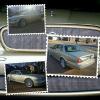
Just an update about the iOffer disk; I ended up contacting the guy directly @tcmartinATgmailDotcom, & he got me the $50 disc very quickly; it's definitely the OEM DVD, just copied for anyone interested in wanting one; as for entering info whilst driving, I hadn't been able to do that on any of my vehicles when moving...


I am down in Chesapeake and have been through Mechanicsville A LOT when I was in the army and stationed in Newport News (15 years there) and we went to Fort A.P. hill all the time via 17. I live off of 17 now and still ride the Harley up that way a for the nice ride.
With that being said, I'm curious to know how the new NAV disc is? I have a couple of the older discs and am curious to know if the newest version is worth it. Thanks!!!
Rags

Senior Member
Joined: Nov 2011
Posts: 817
Likes: 258
From: Saint Robert, MO
iOffer disk
My iOffer disk has been functioning fine till last week, it now only displays the main roads and highways. I have ejected and reloaded several times with no success. Any ideas? Simple ideas? 


Senior Member
Joined: Jun 2013
Posts: 375
Likes: 51
From: Sunny South
It might be that the map is displaying in small-scale. You can zoom in. As I recall it is a touch setting, and you run your finger up (down?) a slider to zoom in and out.
Mine will also display a "picture in picture" of where you are, large-scale, which can be handy if you have zoomed out. I have the "2012" disk but it is Europe.
Mine will also display a "picture in picture" of where you are, large-scale, which can be handy if you have zoomed out. I have the "2012" disk but it is Europe.

Senior Member
Joined: Sep 2014
Posts: 721
Likes: 277
From: Dayton, Ohio USA
I think you may have the same problem I experienced. I was able to see the map but not add any destination address. In the trunk I could hear the dvd spinning/searching so thought it was likely not fully reading the disk. So I adjusted the laser sensitivity and now it works like a dream.
[IMG]\\Dell\My Documents\Images\Car\XJ8\manuals\Service manuals\Maintenance\Navigation\Denso DVD repair\Tutorial\14.jpg[/IMG]
[IMG]\\Dell\My Documents\Images\Car\XJ8\manuals\Service manuals\Maintenance\Navigation\Denso DVD repair\Tutorial\14.jpg[/IMG]
Senior Member
Joined: Sep 2014
Posts: 721
Likes: 277
From: Dayton, Ohio USA
Reysl
Sorry for duplicate post - still learning how to attach an image
I think you may have the same problem I experienced. I was able to see the map but not add any destination address. In the trunk I could hear the dvd spinning/searching so thought it was likely not fully reading the disk. So I adjusted the laser sensitivity and now it works like a dream
Sorry for duplicate post - still learning how to attach an image
I think you may have the same problem I experienced. I was able to see the map but not add any destination address. In the trunk I could hear the dvd spinning/searching so thought it was likely not fully reading the disk. So I adjusted the laser sensitivity and now it works like a dream
Senior Member
Joined: Nov 2011
Posts: 817
Likes: 258
From: Saint Robert, MO
Reysl
Sorry for duplicate post - still learning how to attach an image
I think you may have the same problem I experienced. I was able to see the map but not add any destination address. In the trunk I could hear the dvd spinning/searching so thought it was likely not fully reading the disk. So I adjusted the laser sensitivity and now it works like a dream
Sorry for duplicate post - still learning how to attach an image
I think you may have the same problem I experienced. I was able to see the map but not add any destination address. In the trunk I could hear the dvd spinning/searching so thought it was likely not fully reading the disk. So I adjusted the laser sensitivity and now it works like a dream
Thanks, I might try that this weekend. I have all functions, just no secondary roads.
The first thing I did was to zoom-out thinking that it was zoomed in to the max (I live in the country so it shows green where I live when zoomed in). No change with any screen setting.
Last edited by reyesl; Oct 15, 2014 at 05:09 PM.
Senior Member
Joined: Nov 2011
Posts: 817
Likes: 258
From: Saint Robert, MO
After I clicked on the "Submit" button, a wondered if swapping the new dvd with the old dvd would display the same results? I did and the problem is currently fixed....my screen shows all secondary roads.


Member
Joined: Mar 2014
Posts: 43
Likes: 1
From: Pershore, UK
I'll admit to knowing nothing about this subject and can't give any answers, my car is an '04 with what looks like the original satnav disc in it, it can't even find my Mums house and that was built in 1929, 'address not listed' comes up when the post code was input. (I am in the UK BTW) Even weirder is she lives in Coventry where the car was built, wonder if it could find Browns Lane?
I asked the question on another forum about new discs and was told that a new disc also updates the software and it has been known that using pirate discs can screw up the whole system, there are some on ebay over here for around $60.
I was thinking about going to a breakers yard and seeing if they had a more up to date disc than the one I have.
Dave
I asked the question on another forum about new discs and was told that a new disc also updates the software and it has been known that using pirate discs can screw up the whole system, there are some on ebay over here for around $60.
I was thinking about going to a breakers yard and seeing if they had a more up to date disc than the one I have.
Dave
 Updated my satnav
I have just updated my satnav using this supplier http://satnavdisc.co.uk/index.php?ro...egory&path=173
At £24.99 I thought it worth a punt. Loaded disc, 10 minuets later all done set uk as the map and away I went, full functionality. Will have to wait and see if there are any problems with it. Keith
At £24.99 I thought it worth a punt. Loaded disc, 10 minuets later all done set uk as the map and away I went,
full functionality. Will have to wait and see if there are any problems with it. Keith
Member
Joined: Mar 2014
Posts: 43
Likes: 1
From: Pershore, UK
I have just updated my satnav using this supplier http://satnavdisc.co.uk/index.php?ro...egory&path=173
At £24.99 I thought it worth a punt. Loaded disc, 10 minuets later all done set uk as the map and away I went, full functionality. Will have to wait and see if there are any problems with it. Keith
At £24.99 I thought it worth a punt. Loaded disc, 10 minuets later all done set uk as the map and away I went,
full functionality. Will have to wait and see if there are any problems with it. KeithThanks
Dave


Senior Member
Joined: Oct 2014
Posts: 285
Likes: 54
From: Virginia
I wonder if lcmjaguar ever found the UK version of *.kwi and "married" it with the US maps so that we can get a disk that allows input of a new address or scrolling though previous destinations and memory points while the car is in motion. THAT's the disk I'd really like.
I need updated versions for my 2006 XJ and 2007 XK (two different systems) and would like the "in motion" versions of both.
I need updated versions for my 2006 XJ and 2007 XK (two different systems) and would like the "in motion" versions of both.