


Recharging X150 AC


Thread Starter
|
Veteran Member
Joined: May 2010
Posts: 6,290
Likes: 485
From: Arlington, VA USA
 Recharging X150 AC
Since I have the occasional high pitched whining sound and also a weird whirring sound on hot days when the A/C is on coming from the A/C compressor.
So I thought I'd try to recharge the A/C myself with one of those R134a kits. One catch, I can't get the goddamn nozzle of the recharge kit to fit over the schraeder valve fitting of the low pressure port.
What the heck am I doing wrong? Is the Jaguar's A/C port not a standard size? I am trying to connect to #9.


So I thought I'd try to recharge the A/C myself with one of those R134a kits. One catch, I can't get the goddamn nozzle of the recharge kit to fit over the schraeder valve fitting of the low pressure port.
What the heck am I doing wrong? Is the Jaguar's A/C port not a standard size? I am trying to connect to #9.

Veteran Member


Joined: Dec 2011
Posts: 3,453
Likes: 880
From: Pacific Northwest
Looks to me like your trying to attach to the high pressure line (viewing diagram, not photos).... Bad mojo... You should be on the low pressure side, and fittings may be different between the two...
Vince
Vince


Joined: Dec 2011
Posts: 120,439
Likes: 17,005
From: Durham, UK

(click on the image to enlarge it)
I hope the XKR is easier to reach than the XK8. I had to buy an extension for the type of kit you have to be able to reach the LP connection on my XK8.
Graham
Thread Starter
|
Veteran Member
Joined: May 2010
Posts: 6,290
Likes: 485
From: Arlington, VA USA
Item 9 is the High Pressure servicing connection. Item 10 is the Low Pressure servicing connection.
Attachment 49867
(click on the image to enlarge it)
I hope the XKR is easier to reach than the XK8. I had to buy an extension for the type of kit you have to be able to reach the LP connection on my XK8.
Graham
Attachment 49867
(click on the image to enlarge it)
I hope the XKR is easier to reach than the XK8. I had to buy an extension for the type of kit you have to be able to reach the LP connection on my XK8.
Graham
I did think it was strange that in the diameter, the low pressure side appeared to have a bigger diameter than the high pressure side.
Thread Starter
|
Veteran Member
Joined: May 2010
Posts: 6,290
Likes: 485
From: Arlington, VA USA
BTW, is the high pressure servicing port behind the firewall under the dash? Or is it under the hood? I took that little plastic trim piece off under the hood and I didn't immediately see any A/C servicing port.
Joined: Dec 2011
Posts: 120,439
Likes: 17,005
From: Durham, UK
Can't help with the precise location of the LP port on the XK/XKR as I have the previous model (the XK/XKR will be my next). However, they are a standard size and shape so this is what you are looking for:
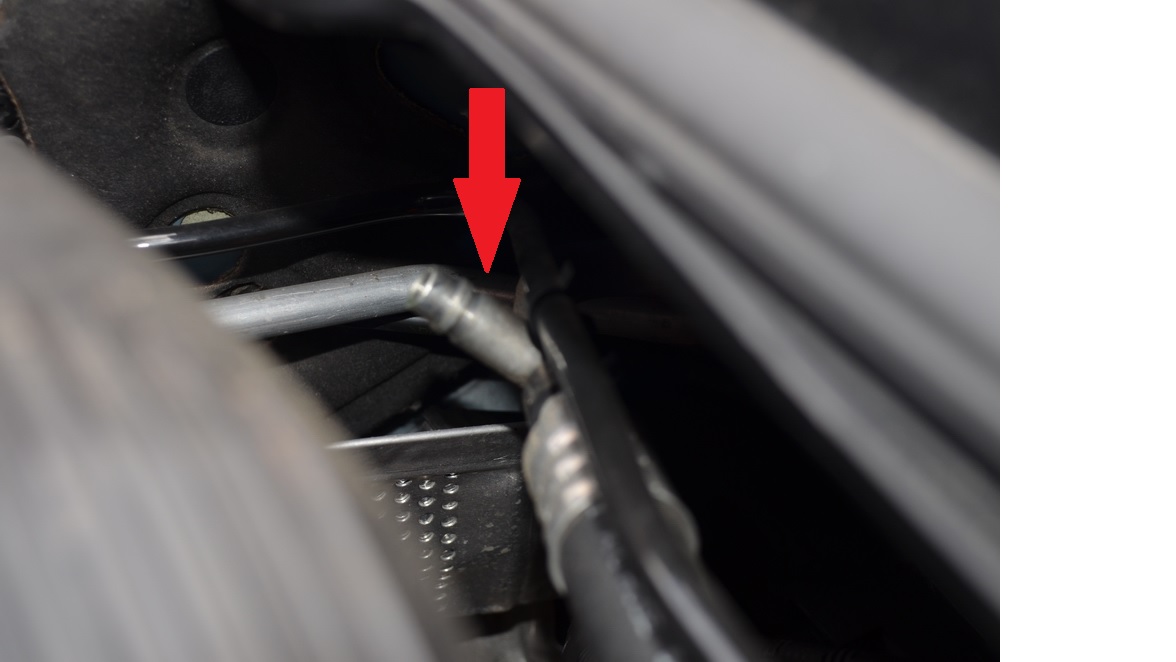
My last three Jaguars have all had the LP ports protected with this type of black plastic screw on cap:
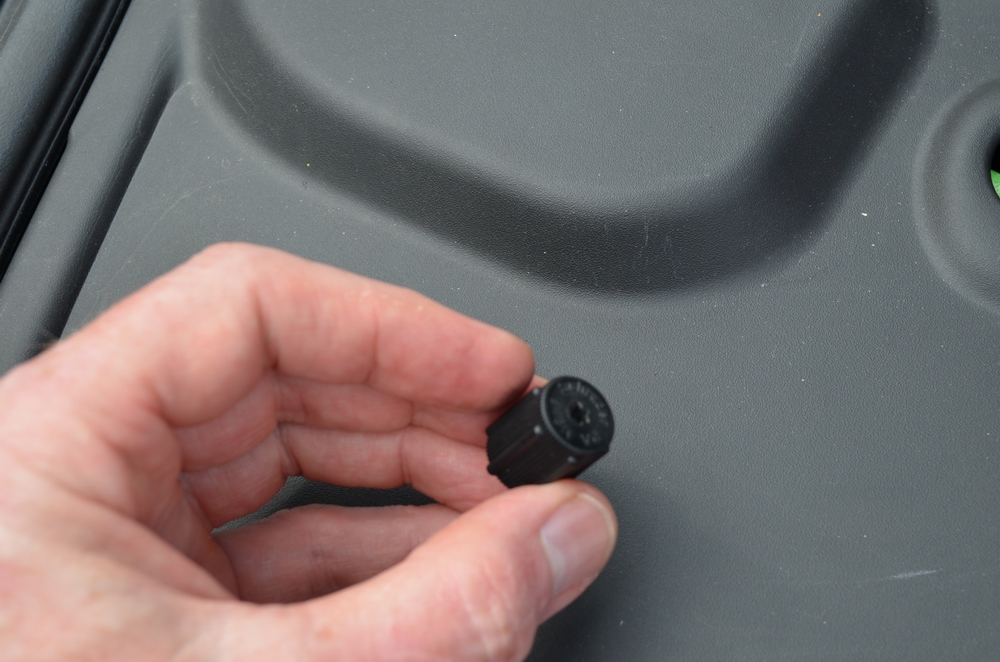
Graham

Senior Member
Joined: Aug 2012
Posts: 379
Likes: 98
From: FORT WORTH TX
On my 2007 XK the low pressure fittine seems to be located b/t the aft end of the engine and the firewall. Just a bit to the left of centerline of the car. Low pressure lines are almost always the larger diameter line vs the high pressure line.
On my XK the fitting seems to be pretty much out in the open. I figure you have found it by now, if not I could attach a picture. Just say so if needed.
On my XK the fitting seems to be pretty much out in the open. I figure you have found it by now, if not I could attach a picture. Just say so if needed.
Trending Topics
Thread Starter
|
Veteran Member
Joined: May 2010
Posts: 6,290
Likes: 485
From: Arlington, VA USA
I did the recharge. All you really have to do is remove a small section of the intake (one bolt, and two of those screw-clamp things), then hook up your recharge kit to the low pressure service port. Then put the intake back on, start the engine and do the recharging. Finally, you remove the intake again, disconnect the recharge kit, and put the intake back together. Probably took me about an hour, realistically.
Unfortunately, my A/C kit's gauge didn't seem to work, but I didn't realize it until I had already put the whole bottle in. It read 100 psi with the engine A/C off, which is normal. But when I turned the A/C on, it went down to about 35 psi or so, which would indicate that it was undercharged very much. However, as I was filling it, I stopped to check the gauge every 5-10 seconds (while shaking) and it never budged from 35 psi, even after I had already filled in the whole can.
After doing this, I immediately noticed that the A/C was blowing much colder, although maybe this had to do with the ambient temperatures. Blowing the A/C on my hands with the top down would make my hands freezing cold (almost like frostbite), and the whining/whirring sounds coming from the engine have gone down about 50%. Also, I don't hear the high pitched whistling anymore.
Do you think I overcharged it? Or did I not charge it enough? I filled it with about 500 grams of refrigerant, and I believe the system takes 750 grams, so I would think I probably overcharged it unless it was down to 250 grams...
Unfortunately, my A/C kit's gauge didn't seem to work, but I didn't realize it until I had already put the whole bottle in. It read 100 psi with the engine A/C off, which is normal. But when I turned the A/C on, it went down to about 35 psi or so, which would indicate that it was undercharged very much. However, as I was filling it, I stopped to check the gauge every 5-10 seconds (while shaking) and it never budged from 35 psi, even after I had already filled in the whole can.
After doing this, I immediately noticed that the A/C was blowing much colder, although maybe this had to do with the ambient temperatures. Blowing the A/C on my hands with the top down would make my hands freezing cold (almost like frostbite), and the whining/whirring sounds coming from the engine have gone down about 50%. Also, I don't hear the high pitched whistling anymore.
Do you think I overcharged it? Or did I not charge it enough? I filled it with about 500 grams of refrigerant, and I believe the system takes 750 grams, so I would think I probably overcharged it unless it was down to 250 grams...
Thread Starter
|
Veteran Member
Joined: May 2010
Posts: 6,290
Likes: 485
From: Arlington, VA USA
Following up here. A year ago I had the AC professionally refilled and checked and it made no impact on the noise.
Last week I had the belt, belt tensioner and idler pulleys replaced and the noise has gone away completely. FYI my XKR only has about 60k miles so if you have that many miles, it might be something to start thinking about!
Last week I had the belt, belt tensioner and idler pulleys replaced and the noise has gone away completely. FYI my XKR only has about 60k miles so if you have that many miles, it might be something to start thinking about!

Veteran Member
Joined: Sep 2013
Posts: 5,209
Likes: 1,846
From: NY
I did the recharge. All you really have to do is remove a small section of the intake (one bolt, and two of those screw-clamp things), then hook up your recharge kit to the low pressure service port. Then put the intake back on, start the engine and do the recharging. Finally, you remove the intake again, disconnect the recharge kit, and put the intake back together. Probably took me about an hour, realistically.
Unfortunately, my A/C kit's gauge didn't seem to work, but I didn't realize it until I had already put the whole bottle in. It read 100 psi with the engine A/C off, which is normal. But when I turned the A/C on, it went down to about 35 psi or so, which would indicate that it was undercharged very much. However, as I was filling it, I stopped to check the gauge every 5-10 seconds (while shaking) and it never budged from 35 psi, even after I had already filled in the whole can.
After doing this, I immediately noticed that the A/C was blowing much colder, although maybe this had to do with the ambient temperatures. Blowing the A/C on my hands with the top down would make my hands freezing cold (almost like frostbite), and the whining/whirring sounds coming from the engine have gone down about 50%. Also, I don't hear the high pitched whistling anymore.
Do you think I overcharged it? Or did I not charge it enough? I filled it with about 500 grams of refrigerant, and I believe the system takes 750 grams, so I would think I probably overcharged it unless it was down to 250 grams...
Unfortunately, my A/C kit's gauge didn't seem to work, but I didn't realize it until I had already put the whole bottle in. It read 100 psi with the engine A/C off, which is normal. But when I turned the A/C on, it went down to about 35 psi or so, which would indicate that it was undercharged very much. However, as I was filling it, I stopped to check the gauge every 5-10 seconds (while shaking) and it never budged from 35 psi, even after I had already filled in the whole can.
After doing this, I immediately noticed that the A/C was blowing much colder, although maybe this had to do with the ambient temperatures. Blowing the A/C on my hands with the top down would make my hands freezing cold (almost like frostbite), and the whining/whirring sounds coming from the engine have gone down about 50%. Also, I don't hear the high pitched whistling anymore.
Do you think I overcharged it? Or did I not charge it enough? I filled it with about 500 grams of refrigerant, and I believe the system takes 750 grams, so I would think I probably overcharged it unless it was down to 250 grams...
https://www.google.com/search?q=134a...ml%3B600%3B391
Thread Starter
|
Veteran Member
Joined: May 2010
Posts: 6,290
Likes: 485
From: Arlington, VA USA
Yep, in the end I did overcharge it (I put in way over 1 can's worth). I blame it on the cheap manifold gauges I bought--they were inaccurate and read the same thing.
Either way, my issue had nothing to do with the charge. My pulleys/tensioners were bad.
Either way, my issue had nothing to do with the charge. My pulleys/tensioners were bad.

Junior Member
Joined: May 2018
Posts: 4
Likes: 0
From: Bridgend Wales UK
 Recharging XKR X150
Hi, just reading with interest the above old thread on a Jaguar XKR (X150) air con DIY recharge. Amcdonal86 said that to reach the low pressure connector he had to remove a small section of the air intake. Looking at the car this doesn't look so easy as there is a support bar from the bulk head to the front shock absorber mount, very close to the intake pipe. I was wonder if this was a real problem making it tricky to remove the air intake. I am planning to have a go at this in the next few weeks, any help or advice would be much appreciated.
Thanks
Dave
-----------------
Jaguar XKR (X150) 2006 (new shape)
Thanks
Dave
-----------------
Jaguar XKR (X150) 2006 (new shape)

Wowser, I just recharged mine last week and the LP connection wasn't hard to get to at all. It wasn't convenient mind you. I was able to snake my hand in between the engine and firewall to remove the plastic cap and stick on the freon connector. Maybe the 5.0 engine bay is roomier?
Junior Member
Joined: May 2018
Posts: 4
Likes: 0
From: Bridgend Wales UK
Recharging XKR X150
Thanks for your quick reply, things are a little tighter on my Jag 4.2L X150 (2006~). Have a look at the attached pictures!. I wonder if anyone has tried removing the plastic body work under the windscreen wipers to gain access to the connector from the windscreen side. The plastic cover seams loose but I cant see how to remove it, even after removing the left and right covers with cross fixing screws. Any help much appreciated.

Senior Member
Joined: Mar 2011
Posts: 225
Likes: 31
From: Texas
Following up here. A year ago I had the AC professionally refilled and checked and it made no impact on the noise.
Last week I had the belt, belt tensioner and idler pulleys replaced and the noise has gone away completely. FYI my XKR only has about 60k miles so if you have that many miles, it might be something to start thinking about!
Last week I had the belt, belt tensioner and idler pulleys replaced and the noise has gone away completely. FYI my XKR only has about 60k miles so if you have that many miles, it might be something to start thinking about!
can anybody hear share the part numbers to the belt tensioner, idler pulley’s and belts amcdonal86 is speaking of?
I have a 2008 Xk150 that’s squealing like a piggie down here in the south Texas heat! Hit 106 today!
no but seriously if anybody could share the part numbers i’d really appreciate it I need to change these parts ASAP.
thanks in advance
dag

Veteran Member
Joined: Jan 2015
Posts: 5,301
Likes: 2,570
From: Naperville, Illinois USA
There is a thread startrd by Patrick Wong, for replacing the rubber coolant hoses in his 2007. He also listed the tensioner and belt, IIRC. Should be the same for your 2008, but you can check the application of those part mibers to be sure. I’m on vacation with a slow cellular data connection, so I can’t look it up, but you should be able to search for it.
Last edited by kj07xk; May 28, 2018 at 05:12 PM.

Veteran Member
Joined: Jun 2013
Posts: 8,926
Likes: 4,736
From: USA
There is a thread startrd by Patrick Wong, for replacing the rubber coolant hoses in his 2007. He also listed the tensioner and belt, IIRC. Should be the same for your 2008, but you can check the application of those part mibers to be sure. I’m on vacation with a slow cellular data connection, so I can’t look it up, but you should be able to search for it.
https://www.jaguarforums.com/forum/x...ervice-186165/

Thread
Thread Starter
Forum
Replies
Last Post
Jaguar Forums Editor
Jaguar Press release
0
Aug 26, 2015 05:08 PM

Currently Active Users Viewing This Thread: 1 (0 members and 1 guests)