


XM Radio Install


Thread Starter
|
Member
Joined: Apr 2010
Posts: 36
Likes: 4
From: Hoover, Alabama
 XM Radio Install
Does anyone know if the factory radio for the 2001 XJ8 has a AUX IN jack on the back? If so I can run the FM Direct Adapter to it for better performance.
If not any good ideas other than the wireless way?
Thanks,
Thomas
If not any good ideas other than the wireless way?
Thanks,
Thomas

Senior Member
Joined: Oct 2009
Posts: 908
Likes: 89
From: San Diego, CA
There is no dedicated AUX in. However, there are several threads in here descibing the process of adding an AUX input for Sirius, XM, iPod or other mp3 players by hijacking the audio signals coming from the CD changer.
I've done it for my '00 XJ8 with a Sirius rado and it works and sounds great - it's not terribly difficult, especially if you can wield a soldering iron with a bit of confidence (or have a friend that can).
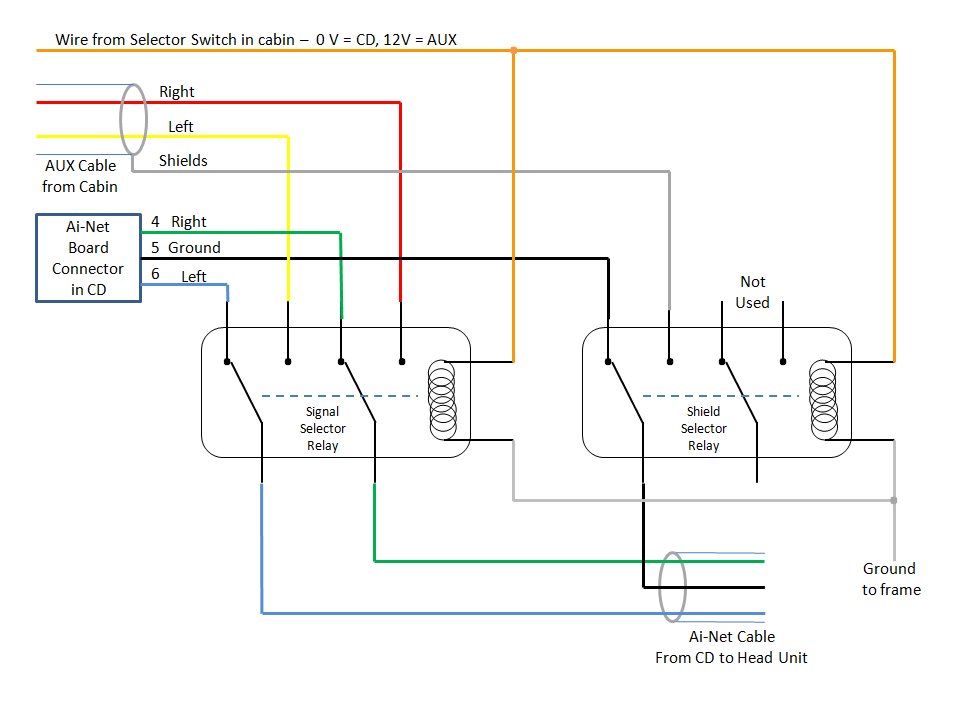
It simply requires removing the CD changer (easy) taking the top off (easy) and soldering some new cables to a small circuit board that is at the back of the changer (easy if you can solder); and running a long stereo audio cable from the cabin where your'e XM is going to be back to the changer in the trunk (probably the most time consuming part).
Here's one of the threads, for example: https://www.jaguarforums.com/forum/sh...ad.php?t=11943
I've done it for my '00 XJ8 with a Sirius rado and it works and sounds great - it's not terribly difficult, especially if you can wield a soldering iron with a bit of confidence (or have a friend that can).
It simply requires removing the CD changer (easy) taking the top off (easy) and soldering some new cables to a small circuit board that is at the back of the changer (easy if you can solder); and running a long stereo audio cable from the cabin where your'e XM is going to be back to the changer in the trunk (probably the most time consuming part).
Here's one of the threads, for example: https://www.jaguarforums.com/forum/sh...ad.php?t=11943
Last edited by QuadManiac; Apr 26, 2010 at 03:27 PM.
Thread Starter
|
Member
Joined: Apr 2010
Posts: 36
Likes: 4
From: Hoover, Alabama
Another question QuadManiac XM Radio
Thank you, it sounds like we are doing the exact same thing. I will also be installing the Parrot.
I have another question, could you just remove the CD changer completely and use the wiring that feeds it to do what you did assuming I was doing away completely with the CD changer? Where do the CD changer feeds originate from and how far would they be from the ashtray where you installed the satellite radio? You said ("and soldering some new cables to a small circuit board that is at the back of the changer") what other component or adapter would I have to use besides the CD changer if I was going to capture the audio signal for a AUX/in jack for my Satellite radio?
Thanks,
Thomas
I have another question, could you just remove the CD changer completely and use the wiring that feeds it to do what you did assuming I was doing away completely with the CD changer? Where do the CD changer feeds originate from and how far would they be from the ashtray where you installed the satellite radio? You said ("and soldering some new cables to a small circuit board that is at the back of the changer") what other component or adapter would I have to use besides the CD changer if I was going to capture the audio signal for a AUX/in jack for my Satellite radio?
Thanks,
Thomas
Thread Starter
|
Member
Joined: Apr 2010
Posts: 36
Likes: 4
From: Hoover, Alabama
Another Solution FYI
Talk hands-free with this sweet CD receiver
The JVC Arsenal KD-A815 is the perfect companion for the open road — built-in Bluetooth® lets you make and receive calls while you keep your hands on the wheel, and you'll enjoy awesome sound from all your sources. Plus, you'll appreciate the ability to adjust the receiver's display lighting to match the lights on your dash, or to set up different colors for the display and the controls.

Hands-free calling
JVC includes a tiny Bluetooth adapter that lets you talk hands-free with a compatible phone. When a call comes in, the KD-A815 mutes your tunes and lets you answer the call by tapping the phone button on the stereo. You'll hear your caller over the speakers, and best of all you can talk freely while you pay attention to your driving.
Made for your iPod® or iPhone®
Plug your iPod or iPhone into the handy front-panel USB input, and you'll be able to speed through your music library with the KD-A815's controls. You can also activate the iPod's controls if your passengers want to pick the tunes. All song and artist info will appear in bright characters on the receiver's 2-line display. JVC also includes a handy remote for on-the-fly changes.
Play all your digital music files
This versatile stereo will handle all your CDs and recordable discs, even discs or thumb drives you've loaded with MP3 and WMA files. A premium digital-to-analog converter, made by industry leader Burr-Brown, reveals new details in your CDs and music files, and this receiver will even handle uncompressed WAV files — an audiophile's delight.
Looking to add on?
You can permanently install a JVC satellite radio tuner, or just connect a portable satellite radio to the auxiliary input. JVC's HD Radio™ tuner allows you to access the superior sound quality and extra programming offered by participating AM and FM stations.
You'll find three sets of preamp outputs for connecting amps and subs, and their 5-volt output keeps the noise out of your system. You can activate a selectable low-pass filter on the subwoofer outputs, and use the subwoofer level control to dial in the right amount of bass.
The JVC Arsenal KD-A815 is the perfect companion for the open road — built-in Bluetooth® lets you make and receive calls while you keep your hands on the wheel, and you'll enjoy awesome sound from all your sources. Plus, you'll appreciate the ability to adjust the receiver's display lighting to match the lights on your dash, or to set up different colors for the display and the controls.
Hands-free calling
JVC includes a tiny Bluetooth adapter that lets you talk hands-free with a compatible phone. When a call comes in, the KD-A815 mutes your tunes and lets you answer the call by tapping the phone button on the stereo. You'll hear your caller over the speakers, and best of all you can talk freely while you pay attention to your driving.
Made for your iPod® or iPhone®
Plug your iPod or iPhone into the handy front-panel USB input, and you'll be able to speed through your music library with the KD-A815's controls. You can also activate the iPod's controls if your passengers want to pick the tunes. All song and artist info will appear in bright characters on the receiver's 2-line display. JVC also includes a handy remote for on-the-fly changes.
Play all your digital music files
This versatile stereo will handle all your CDs and recordable discs, even discs or thumb drives you've loaded with MP3 and WMA files. A premium digital-to-analog converter, made by industry leader Burr-Brown, reveals new details in your CDs and music files, and this receiver will even handle uncompressed WAV files — an audiophile's delight.
Looking to add on?
You can permanently install a JVC satellite radio tuner, or just connect a portable satellite radio to the auxiliary input. JVC's HD Radio™ tuner allows you to access the superior sound quality and extra programming offered by participating AM and FM stations.
You'll find three sets of preamp outputs for connecting amps and subs, and their 5-volt output keeps the noise out of your system. You can activate a selectable low-pass filter on the subwoofer outputs, and use the subwoofer level control to dial in the right amount of bass.
Last edited by xj8vdp; Apr 27, 2010 at 10:36 PM.

Senior Member
Joined: Mar 2010
Posts: 590
Likes: 18
From: Snohomish, WA
XJ8VDP,
It is my understanding from the threads I have read on the subject, that the head unit requires the CD Changer to be connected to be able to select it for the playing of the aux device.
It is my understanding from the threads I have read on the subject, that the head unit requires the CD Changer to be connected to be able to select it for the playing of the aux device.
Thread Starter
|
Member
Joined: Apr 2010
Posts: 36
Likes: 4
From: Hoover, Alabama
Con't XM Radio Install
The JVC has a CD Player. Plus all of the six CD's that where in the CD unit in the trunk are on my iPod that I plug in to the USB port on the front of the JVC.
Thanks
Thanks
Senior Member
Joined: Oct 2009
Posts: 908
Likes: 89
From: San Diego, CA
Good looking stereo (the JVC), but how do you make it fit/look like it belongs? Don't know.
The CD changer needs to be left connected - the head unit talks to it via the AInet connections at power up, and if it isn't there, the head does not offer the CD as a selection. Same for the Amplifier - it talks with the head unit. Replacing the head with aftermarket requires new amps also.
The Changer is in the trunk, and the easiest place to intecept the signals is in the changer... all you need is a long cable (stereo shielded) run from your XM back to the changer; and to modify the changer as shown in the links.
The CD changer needs to be left connected - the head unit talks to it via the AInet connections at power up, and if it isn't there, the head does not offer the CD as a selection. Same for the Amplifier - it talks with the head unit. Replacing the head with aftermarket requires new amps also.
The Changer is in the trunk, and the easiest place to intecept the signals is in the changer... all you need is a long cable (stereo shielded) run from your XM back to the changer; and to modify the changer as shown in the links.
Trending Topics

Junior Member
Joined: Aug 2010
Posts: 10
Likes: 2
From: New Olreans, LA
QuadManiac could you please send this picture to me since I don't have the ability to view it. Jag AUX selector.jpg I'm going to install a Sirus unit with a mini jack through the CD changer and a pair of relays with a micro switch in the ash tray compartment in a 2004 XJ8 keeping the ash try cover functional and lighter socket functional. This way I'll have both the CD changer and hide the Sirus. I'll document the entire process and post it in the forum.
pritchard@***.net
Does anyone know about resetting error codes? I have an airbag fault.
pritchard@***.net
Does anyone know about resetting error codes? I have an airbag fault.



Junior Member
Joined: Aug 2010
Posts: 10
Likes: 2
From: New Olreans, LA
2004 XJ modification to CD changer for Sirius Radio
After reading about modifing the CD changer and adding relays to allow the Sirius Radio a input port into the Stereo system. I pulled out the CD changer and found that instead of one cable there is a 2 wire cable that easliy unplugs and a 3 wire cable that does nor easily unplug. Before I go further I want to see if anyone has some knowledge about the 2004 XJ radio. Is it possible to get audio wiring diagrams some where?
Many Thanks
Bill
Many Thanks
Bill
Senior Member
Joined: Oct 2009
Posts: 908
Likes: 89
From: San Diego, CA
04 uses fiber optic for audio signals, so the CD butcher method described eslewhere won't work... there may be a way to get to copper audio signals inside, but haven't seen it described as of yet.

Thread
Thread Starter
Forum
Replies
Last Post

Currently Active Users Viewing This Thread: 1 (0 members and 1 guests)