


How To Add Pictures In Your Messages


Thread Starter
|
Veteran Member


Joined: Mar 2007
Posts: 11,393
Likes: 649
From: Planetarium
 How To Add Pictures In Your Messages
If you are experiencing some difficulties when you want to upload pics this is the very thread for you .
I have just done the job step by step .If you look at the pics in order you can easily figure out as well.
Anyway, explanations to come on shortly
I have just done the job step by step .If you look at the pics in order you can easily figure out as well.
Anyway, explanations to come on shortly
Thread Starter
|
Veteran Member
Joined: Mar 2007
Posts: 11,393
Likes: 649
From: Planetarium
Correct Steps are left to right
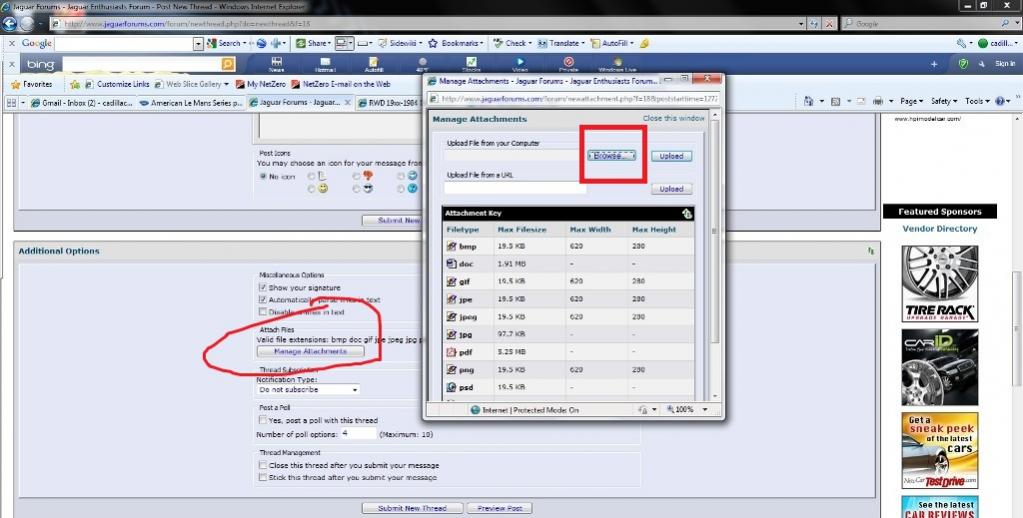
1- Hit "New Reply" Button and you wil be redirected to the main page .Just scroll down and see the Manage Attachment (circled ) .Click on it and see a new pop up window . Just hit the Browse Button and pick up the pic you want to upload .
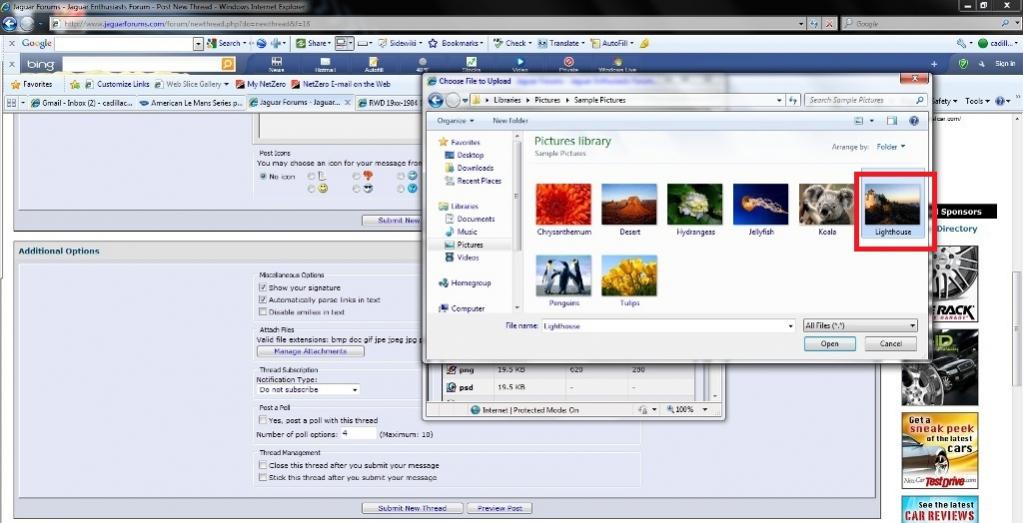
2-Once you selected the pic ,click open the wait it upload .
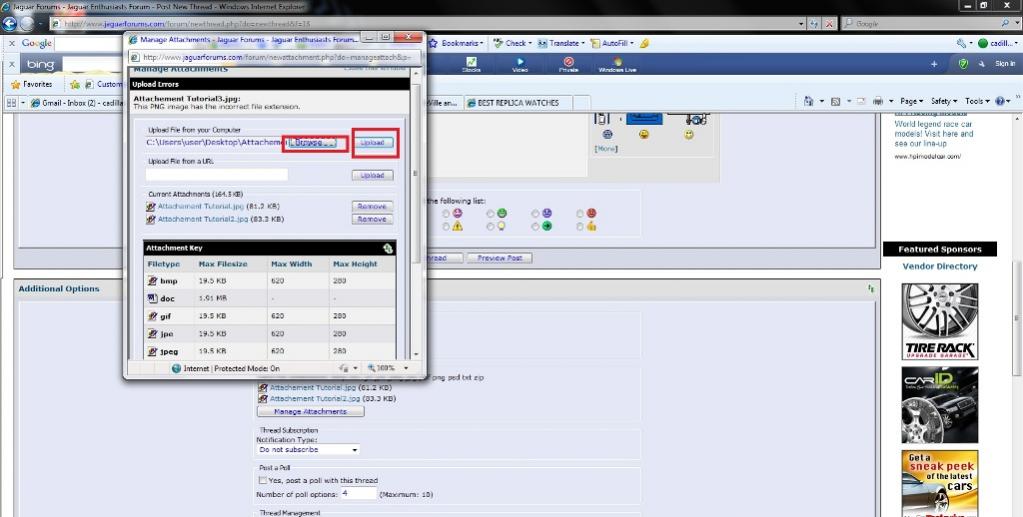
3- As you will the #3 pic , we already uploaded 2 pictures .Don't forget each time after you decided the picture you want to upload, you must hit Upload Button (Rectangular mark )
First Browse and Upload
4-After uploading the pics are done , all you have to do is to click on CLOSE WINDOW as marked in rectangular .
That's it , you have maximum 5 pics at a time
1- Hit "New Reply" Button and you wil be redirected to the main page .Just scroll down and see the Manage Attachment (circled ) .Click on it and see a new pop up window . Just hit the Browse Button and pick up the pic you want to upload .
2-Once you selected the pic ,click open the wait it upload .
3- As you will the #3 pic , we already uploaded 2 pictures .Don't forget each time after you decided the picture you want to upload, you must hit Upload Button (Rectangular mark )
First Browse and Upload
4-After uploading the pics are done , all you have to do is to click on CLOSE WINDOW as marked in rectangular .
That's it , you have maximum 5 pics at a time

Member
Joined: Mar 2010
Posts: 99
Likes: 10
From: MA
Hello,
Thanks for the instructions. However, I think the problem was with corrupted photos...I couldn't upload several and the message I received was "error in upload". After the first few failed, I thought that perhaps there was a file size maximum per post so I thought sending them one at a time could solve it.
Regards,
Steve
Thanks for the instructions. However, I think the problem was with corrupted photos...I couldn't upload several and the message I received was "error in upload". After the first few failed, I thought that perhaps there was a file size maximum per post so I thought sending them one at a time could solve it.
Regards,
Steve
Thread Starter
|
Veteran Member
Joined: Mar 2007
Posts: 11,393
Likes: 649
From: Planetarium
Youre welcome, besides size limit the most paramount thing is format .
For ex: You can't upload a picture in PNP but can upload very same pic in JPG .
1024 x 780 was what I used in this thread .
For ex: You can't upload a picture in PNP but can upload very same pic in JPG .
1024 x 780 was what I used in this thread .
Thread Starter
|
Veteran Member
Joined: Mar 2007
Posts: 11,393
Likes: 649
From: Planetarium
Trending Topics


Veteran Member

Joined: Aug 2010
Posts: 2,636
Likes: 1,636
From: Southington CT
Problem with saving a uploaded word document to PC
Here is the file I am uploading as an attachment:
98 Jaguar xj8 front door trim panel 76.34.01.doc
When I click on the document file listed in this post and get the file download screen, I click on the save button. I get the Save AS screen and choose desktop as destination folder. Then the download hangs (no progress to completion).
98 Jaguar xj8 front door trim panel 76.34.01.doc
When I click on the document file listed in this post and get the file download screen, I click on the save button. I get the Save AS screen and choose desktop as destination folder. Then the download hangs (no progress to completion).

Veteran member

Joined: Mar 2007
Posts: 11,344
Likes: 1,163
From: Oak Ridge, TN
just tried that link in your above post, didn't 'save as' just opened it (after a brief download) and it worked fine. If you still can't get it, PM me your email address and i'll forward what I just downloaded.
Veteran Member
Joined: Aug 2010
Posts: 2,636
Likes: 1,636
From: Southington CT
I am now able to download files from jaguarforums.com using internet explorer 8.
I had to add https://www.jaguarforums.com on Tools menu list item - Internet Options - Security - Trusted sites - then Sites button. Note you have to uncheck the box entitled "Require server verification (https for all sites in this zone" before you can add this website (it is http: not a https to the trusted sites list. The websites that have server verification status start with https:.
I had to add https://www.jaguarforums.com on Tools menu list item - Internet Options - Security - Trusted sites - then Sites button. Note you have to uncheck the box entitled "Require server verification (https
for all sites in this zone" before you can add this website (it is http: not a https to the trusted sites list. The websites that have server verification status start with https:.
Thread
Thread Starter
Forum
Replies
Last Post
trosty
XJ XJ6 / XJ8 / XJR ( X350 & X358 )
26
Dec 18, 2022 06:40 PM
Chuck Schexnayder
XJ XJ6 / XJ8 / XJR ( X350 & X358 )
5
Sep 12, 2015 10:30 AM
Currently Active Users Viewing This Thread: 1 (0 members and 1 guests)