


2005 XJ8L, Engine System Fault, Dsc Not Available & Parking Break Fault


Thread Starter
|
Junior Member
Joined: Apr 2014
Posts: 1
Likes: 0
From: California
 2005 XJ8L, Engine System Fault, Dsc Not Available & Parking Break Fault
I need help.... I was out driving by myself and my car went into Limp Mode. I called my boyfriend and he came bye, we looked on your form and cleaned my Throttle Body and MAS..
He started the car and it drove it to the house. He said it drove fine, no Engine System etc codes show up. We thought we had it all figured out.
The next morning, I jumped in the car with my 13 year old to take him to school and I was back in Limp Mode with the same Engine System Fault, Dsc Not Available and Parking Brake Fault. We decided to order a new MAS and install it... No change.
Then we decided to pick up a new Throttle Body (I had paid to have a used one installed in December 2012). Could not believe it, after installing the new Throttle Body, I am still in Limp Mode, same three Engine System Fault, etc.
I am a single mom (13 year old son and 3 year old son) and have not had a working car for almost two weeks, including the whole spring break.
Yesterday I had my codes read and they are now P0112, PO102, P1000 Please please help I am really struggling.... I want my wheels back......
Any Ideas what to do next would greatly be appreciated......
He started the car and it drove it to the house. He said it drove fine, no Engine System etc codes show up. We thought we had it all figured out.
The next morning, I jumped in the car with my 13 year old to take him to school and I was back in Limp Mode with the same Engine System Fault, Dsc Not Available and Parking Brake Fault. We decided to order a new MAS and install it... No change.
Then we decided to pick up a new Throttle Body (I had paid to have a used one installed in December 2012). Could not believe it, after installing the new Throttle Body, I am still in Limp Mode, same three Engine System Fault, etc.
I am a single mom (13 year old son and 3 year old son) and have not had a working car for almost two weeks, including the whole spring break.
Yesterday I had my codes read and they are now P0112, PO102, P1000 Please please help I am really struggling.... I want my wheels back......
Any Ideas what to do next would greatly be appreciated......
Last edited by JimC64; Apr 20, 2014 at 05:43 PM. Reason: PLZ ADD LINE BREAKS




Joined: Dec 2011
Posts: 120,439
Likes: 17,014
From: Durham, UK
Welcome to the forum capitolexchange,
Good to have you with us at Jaguar forums.
Sorry to hear about the issues with your 2005 XJ8. Code P1000 means OnBoard Tests not completed since last memory clear so nothing to worry about there. Here are the possible causes for P0102 and P0112 (see right hand column):
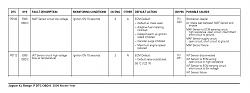
(click on the image to enlarge it)
The IAT is the Intake Air Temperature sensor.
Follow this link XJ ( X350 & X358 ) XJ6 / XJ8 / XJR - Jaguar Forums - Jaguar Enthusiasts Forum to the X350 forum for help, advice and information. The 'HOW TO' thread at the top is a good place to start for info on regular issues.
Please remember to add vehicle details to your Signature to help others to give relevant advice. Go to the User CP button on the left of the top menu bar, then Settings & Options under Your Control Panel. Select Edit Signature and enter the details.
You can also visit the US Western Region forum by following this link https://www.jaguarforums.com/forum/western-us-ak-ca-nv-ut-hi-wa-id-38/ to find other members in your region.
Enjoy the forums.
Graham
Good to have you with us at Jaguar forums.
Sorry to hear about the issues with your 2005 XJ8. Code P1000 means OnBoard Tests not completed since last memory clear so nothing to worry about there. Here are the possible causes for P0102 and P0112 (see right hand column):
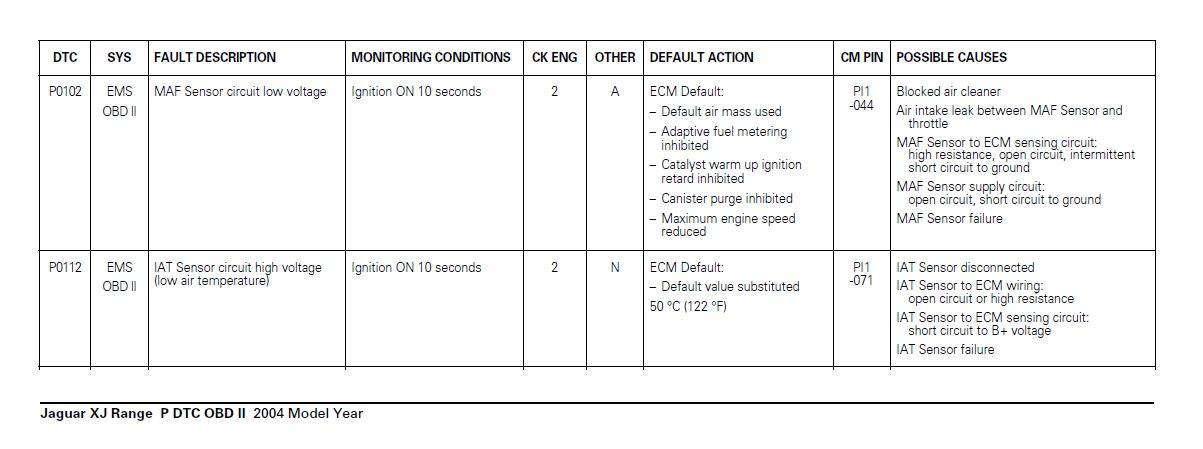
(click on the image to enlarge it)
The IAT is the Intake Air Temperature sensor.
Follow this link XJ ( X350 & X358 ) XJ6 / XJ8 / XJR - Jaguar Forums - Jaguar Enthusiasts Forum to the X350 forum for help, advice and information. The 'HOW TO' thread at the top is a good place to start for info on regular issues.
Please remember to add vehicle details to your Signature to help others to give relevant advice. Go to the User CP button on the left of the top menu bar, then Settings & Options under Your Control Panel. Select Edit Signature and enter the details.
You can also visit the US Western Region forum by following this link https://www.jaguarforums.com/forum/western-us-ak-ca-nv-ut-hi-wa-id-38/ to find other members in your region.
Enjoy the forums.
Graham









Joined: Oct 2007
Posts: 121,143
Likes: 6,654
From: PHX some of the time
Welcome to Jaguar Forums capitolexchange,
Good to have you with us.
Enjoy the forum.
If you haven't done so already you should add your car details to your signature to help others to help you.
If you need help with getting around and using the forum follow this link for some help Forum Help
Good to have you with us.
Enjoy the forum.
If you haven't done so already you should add your car details to your signature to help others to help you.
If you need help with getting around and using the forum follow this link for some help Forum Help

Hi and welcome aboard, its good to have you here with us here at Jaguarforums
If you need any further help with the site moving forward, please just ask any moderator, veteran member and we'll be glad to assist.
In the meantime, any useful site information you may need such as how to post pictures, edit signatures, add videos, using the
search facility etc, can be found here within the following link Helpful_information
There are lots of members local to you with the same interests with info on local dealers and possible meets.
Regional - Jaguar Forums - Jaguar Enthusiasts ForumNeed a Manual, a TSB, or General Info' about your Jag? Check out our >> DOWNLOAD AREA <<
I've manually upgraded you to Full forum access so you can better view the site and all its features.
Please Jump on in and enjoy the site........
If you need any further help with the site moving forward, please just ask any moderator, veteran member and we'll be glad to assist.
In the meantime, any useful site information you may need such as how to post pictures, edit signatures, add videos, using the
search facility etc, can be found here within the following link Helpful_information
There are lots of members local to you with the same interests with info on local dealers and possible meets.
Regional - Jaguar Forums - Jaguar Enthusiasts ForumNeed a Manual, a TSB, or General Info' about your Jag? Check out our >> DOWNLOAD AREA <<
I've manually upgraded you to Full forum access so you can better view the site and all its features.
Please Jump on in and enjoy the site........


Thread
Thread Starter
Forum
Replies
Last Post
BrentGardner
XJ XJ6 / XJ8 / XJR ( X350 & X358 )
29
Dec 16, 2024 12:13 AM
philwarner
XJ XJ6 / XJ8 / XJR ( X350 & X358 )
13
Dec 6, 2021 07:13 AM
Robert1968
S-Type / S type R Supercharged V8 ( X200 )
7
Jun 24, 2017 11:16 AM
rudelover2
XJ XJ6 / XJ8 / XJR ( X350 & X358 )
4
Sep 11, 2015 08:53 PM
NinoGrimace
S-Type / S type R Supercharged V8 ( X200 )
1
Aug 26, 2015 05:15 AM
Currently Active Users Viewing This Thread: 1 (0 members and 1 guests)