


Navigation no longer displaying speed limit.


Thread Starter
|
Junior Member
Joined: Nov 2020
Posts: 14
Likes: 1
From: Nevada
 Navigation no longer displaying speed limit.
2020 Jaguar XE P250S
When I first bought this car, the navigation would display the speed limit. For some reason it has stopped doing this.
Does anyone know how to get it going again? I've done everything I can think of and read the owners manual looking for the answer.
I understand that the car does have a feature that uses a camera to read speed limit signs and then display the speed limit in between the speedometer and Odometer, but it should also display in the navigation.
When I first bought this car, the navigation would display the speed limit. For some reason it has stopped doing this.
Does anyone know how to get it going again? I've done everything I can think of and read the owners manual looking for the answer.
I understand that the car does have a feature that uses a camera to read speed limit signs and then display the speed limit in between the speedometer and Odometer, but it should also display in the navigation.

Member
Joined: Feb 2009
Posts: 87
Likes: 4
From: Wisconsin
That's a good question, I bought my car used, and it says it should display the speed, even enabling that functionality in the nav settings it never has / won't display the road speed limit. Ill be interested in the insights you get on this.
Thread Starter
|
Junior Member
Joined: Nov 2020
Posts: 14
Likes: 1
From: Nevada
I'm taking this car to the dealership on December 11th for an unrelated issue. I'll have them solve this nav problem as well.

Senior Member
Joined: May 2019
Posts: 329
Likes: 102
From: CT
From everything i know on the redesign, its shows in HUD and Cluster and not in navi screen itself
TRAFFIC SIGN RECOGNITION (TSR)
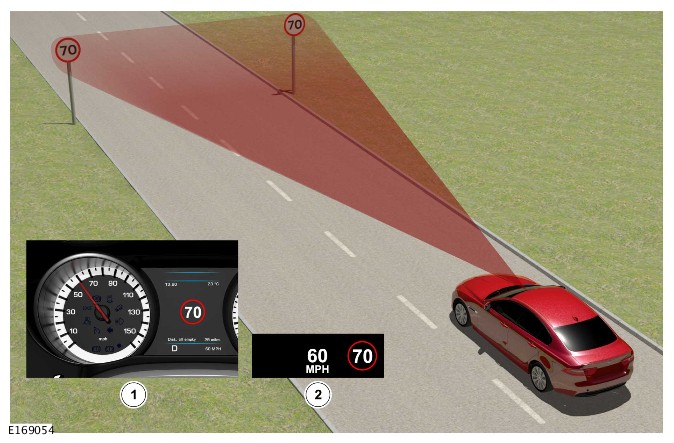
ITEM DESCRIPTION 1 Instrument Cluster (IC) 2 Head Up Display (HUD)Traffic Sign Recognition (TSR) captures image data of the road scene. The Image Processing Module (IPMA), within the camera, infers speed limits implied and read from the scene.
The IPMA also obtains information about the current road from the navigation system through the High Speed (HS) Controller Area Network (CAN) comfort and chassis systems buses via the Body Control Module /Gateway Module (BCM/GWM) assembly. This data includes the current road speed limit, road type and country.
The IPMA combines the available speed limit information from both the navigation and vision systems, to provide a more accurate and consistently available speed limit value.
The speed limit value is sent from the IPMA to the BCM/GWM assembly using the HS CAN chassis systems bus. Then from the BCM/GWM assembly using the HS CAN comfort systems bus the vehicle speed limit value is sent to the Instrument Cluster (IC) and Head Up Display (HUD) which displays the information to the driver.
To indicate how recent the information is, the displayed sign fades away in a series of steps as the distance increases from the location of the sign. The driver can also use the system to provide a warning of speeding, by configuring the system to flash the speed limit sign in the display when the vehicle exceeds the displayed limit by a set amount.
Speed alert can be switched on and off, or the settings can be adjusted by the driver to display three different settings:
- Vehicle speed equals the detected speed limit.
- Vehicle speed is 5 mph (10 km/h) above the detected speed limit.
- Vehicle speed is 10 mph (20 km/h) above the detected speed limit.
If the navigation system is not available, or the off-road navigation is selected, the Traffic Sign Recognition (TSR) system will use the camera only, but cannot perform to full functionality.
The system can be switched on and off via the Instrument Cluster (IC) message center menu. The system will operate up to a maximum speed of 155 mph (250 km/h).
The performance of the Traffic Sign Recognition (TSR) system may also be affected in the following conditions:
- During adverse driving conditions, if the camera has impaired vision (reduced visibility, less than 0.6 miles (1 km), for example heavy fog, rain, snow, or soiled windshield.
- Signs are rotated greater than 15 degrees in pitch, yaw or roll, compared to the road surface.
- Concealed or covered sign information.
- Non-conforming road signs.
- Accuracy and validity of navigation data (i.e. up to date).
- Traveling in an area not covered by the navigation system.
- Driving in direct sunlight, leading to overexposure and reduction in contrast.
- Vehicle not in a supported country.


Thread
Thread Starter
Forum
Replies
Last Post
Currently Active Users Viewing This Thread: 1 (0 members and 1 guests)