


Help required





Thread Starter
|
Junior Member
Joined: Nov 2020
Posts: 8
Likes: 1
From: Dorset
 Thanks
Thank you , I have a 2011 XF 2.2 TD luxury automatic . I got lucky and after watching a utube clip I found that by turning the ignition off , then locking and unlocking the car , the sat nav returned to normal from the dynostic screen when it was restarted.
That said my issue remains , it has a 2011 sat nav program that doesn’t show my street or house, I would like to upgrade to the 2019/20 version. , I checked and there is no cut out in the boot leading to an obvious DVD drive,
Would any owners of a 2011 model know if there is a drive hidden behind the boot lining and is it a DVD or is there a different way to update . I can’t see any DVD or USB port that would seem to solve it.
That said my issue remains , it has a 2011 sat nav program that doesn’t show my street or house, I would like to upgrade to the 2019/20 version. , I checked and there is no cut out in the boot leading to an obvious DVD drive,
Would any owners of a 2011 model know if there is a drive hidden behind the boot lining and is it a DVD or is there a different way to update . I can’t see any DVD or USB port that would seem to solve it.


Thread Starter
|
Junior Member
Joined: Nov 2020
Posts: 8
Likes: 1
From: Dorset
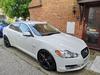
Many thanks guys , my 2011 software now up and running again and from another source on here I have also gleaned that my 2011 XF is likely to be the 2012 build with the hard drive hopefully fed by the USB

Thread
Thread Starter
Forum
Replies
Last Post
Currently Active Users Viewing This Thread: 1 (0 members and 1 guests)