


Alternative JTIS Idea


Thread Starter
|
Member
Joined: Apr 2011
Posts: 47
Likes: 2
From: Tustin, CA
 Alternative JTIS Idea
Ok, I've been noticing TONS of issues getting JTIS to work, going through this and that, and just all sorts of mayhem.
Idea.
I love virtual machines for this sort of thing. Why? Because they are portable! I can create a virtual machine. Load up JTIS on it. Then compress it down, bundle it up in a nice .rar file, and then it can be reopened on ANY computer with virtualbox.
Result:
JTIS with more or less no install needed, that will work on any computer with over a gig of ram.
So, I would normally PM for this, but I am currently still a limited member, if someone wants to arrange to send me a copy of JTIS in whatever fashion is used around here, I'll make a nice bundled package for all to enjoy.
Idea.
I love virtual machines for this sort of thing. Why? Because they are portable! I can create a virtual machine. Load up JTIS on it. Then compress it down, bundle it up in a nice .rar file, and then it can be reopened on ANY computer with virtualbox.
Result:
JTIS with more or less no install needed, that will work on any computer with over a gig of ram.
So, I would normally PM for this, but I am currently still a limited member, if someone wants to arrange to send me a copy of JTIS in whatever fashion is used around here, I'll make a nice bundled package for all to enjoy.

Veteran Member


Joined: Aug 2010
Posts: 2,636
Likes: 1,636
From: Southington CT
I could mail you a copy of the latest JTIS CD
Hi HyperFerno
What would be the size of this compressed file?
The CD is 703 megs.
If it makes sense and if you want to try it then email me your mailing address and I will make a copy of the JTIS CD version 21 (the most recent release). Here are 3 jpeg file images of JTIS information:


Just left click on my username jimlombardi and take the email option.
Jim Lombardi
What would be the size of this compressed file?
The CD is 703 megs.
If it makes sense and if you want to try it then email me your mailing address and I will make a copy of the JTIS CD version 21 (the most recent release). Here are 3 jpeg file images of JTIS information:


Just left click on my username jimlombardi and take the email option.
Jim Lombardi
Last edited by jimlombardi; Apr 6, 2011 at 07:49 PM.
Thread Starter
|
Member
Joined: Apr 2011
Posts: 47
Likes: 2
From: Tustin, CA
Since I would use MicroXP, it would likely be around 1GB, INCLUDING the CD, since microXP itself is only around 221MB. Lets say something like 20% compression. That brings it down to 800MB. Now this is a generous estimate, it could be larger then that depending on how JTIS installs, and if it requires me to restore some of the components that MicroXP removes.
Veteran Member
Joined: Aug 2010
Posts: 2,636
Likes: 1,636
From: Southington CT
I guess I need to know more about virtual machine
Hi HyperInfero
My experience is with windows XP and windows NT. The JTIS installs in like 5 minutes on XP with no problems at all.
If you do the normal install with the CD, then most of the files are still accessed on the CD and only a few files are on the hard drive.
About an hour ago I copied the entire CD to my second hard drive. The CD size is 703 megs, but the new folder where I copied the CD shows a file size only 685 megs but it also says Size On Disk 703 megs. Now the JTIS runs from the data on the Hard drive instead of on the CD. I no longer need to use the JTIS CD on this PC.
How would we handle a 800 meg file downloads on the large download file website?
How many of the members have a PC with more than 1 gig of memory and the diskspace for this virtual machine software plus this 800 gig file?
I think this needs more discussion.
Jim Lombardi
My experience is with windows XP and windows NT. The JTIS installs in like 5 minutes on XP with no problems at all.
If you do the normal install with the CD, then most of the files are still accessed on the CD and only a few files are on the hard drive.
About an hour ago I copied the entire CD to my second hard drive. The CD size is 703 megs, but the new folder where I copied the CD shows a file size only 685 megs but it also says Size On Disk 703 megs. Now the JTIS runs from the data on the Hard drive instead of on the CD. I no longer need to use the JTIS CD on this PC.
How would we handle a 800 meg file downloads on the large download file website?
How many of the members have a PC with more than 1 gig of memory and the diskspace for this virtual machine software plus this 800 gig file?
I think this needs more discussion.
Jim Lombardi

Veteran Member
Joined: Mar 2008
Posts: 5,390
Likes: 1,116
From: Ellijay
I have tried to set JTIS up on a virtual or second drive and all fails. It appears that the startup is hard coded to only go to the CD drive.
Any definitive description of how to change that would be appreciated. The reason that JTIS show up as 703MB is that is beyond the storage capability of a CD making it hard to copy.
Copied it anyway.
Any definitive description of how to change that would be appreciated. The reason that JTIS show up as 703MB is that is beyond the storage capability of a CD making it hard to copy.
Copied it anyway.
Veteran Member
Joined: Aug 2010
Posts: 2,636
Likes: 1,636
From: Southington CT
Hi test point
In windows XP you can copy the entire CD to the hard drive and then remove the CD and do the install from the folder on the hard drive.
Look at my posting #5 just below this posting. And yes I am now running JTIS without the CD in the CD drive. The problem is not with the CD, but the other windows operating systems. They seem to be harder to do with 32 bit software installs. This CD appears to be the professional commerical Edition.
I scanned the CD and here is the CD image:

Jim Lombardi
In windows XP you can copy the entire CD to the hard drive and then remove the CD and do the install from the folder on the hard drive.
Look at my posting #5 just below this posting. And yes I am now running JTIS without the CD in the CD drive. The problem is not with the CD, but the other windows operating systems. They seem to be harder to do with 32 bit software installs. This CD appears to be the professional commerical Edition.
I scanned the CD and here is the CD image:

Jim Lombardi
Last edited by jimlombardi; Apr 6, 2011 at 08:32 PM.
Trending Topics
Thread Starter
|
Member
Joined: Apr 2011
Posts: 47
Likes: 2
From: Tustin, CA
I have tried to set JTIS up on a virtual or second drive and all fails. It appears that the startup is hard coded to only go to the CD drive.
Any definitive description of how to change that would be appreciated. The reason that JTIS show up as 703MB is that is beyond the storage capability of a CD making it hard to copy.
Copied it anyway.
Any definitive description of how to change that would be appreciated. The reason that JTIS show up as 703MB is that is beyond the storage capability of a CD making it hard to copy.
Copied it anyway.
Veteran Member
Joined: Aug 2010
Posts: 2,636
Likes: 1,636
From: Southington CT
We need to know the members PC capabilites
Hi
Maybe we need a new thread asking the members about their PCs (memory size, hard disk size, operating system, etc) and their PC knowledge.
What do you think about this idea?
Jim Lombardi
Maybe we need a new thread asking the members about their PCs (memory size, hard disk size, operating system, etc) and their PC knowledge.
What do you think about this idea?
Jim Lombardi
Veteran Member
Joined: Aug 2010
Posts: 2,636
Likes: 1,636
From: Southington CT
Another idea - any way to create a PDF from JTIS files
Hi
If there is a way to create PDF files from the JTIS CD files, then we could have smaller download files. We could create separate PDF files for each Jaguar model/year. That would be a lot of smaller PDF files and we would not have to do any JTIS installs.
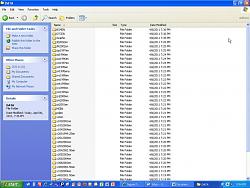
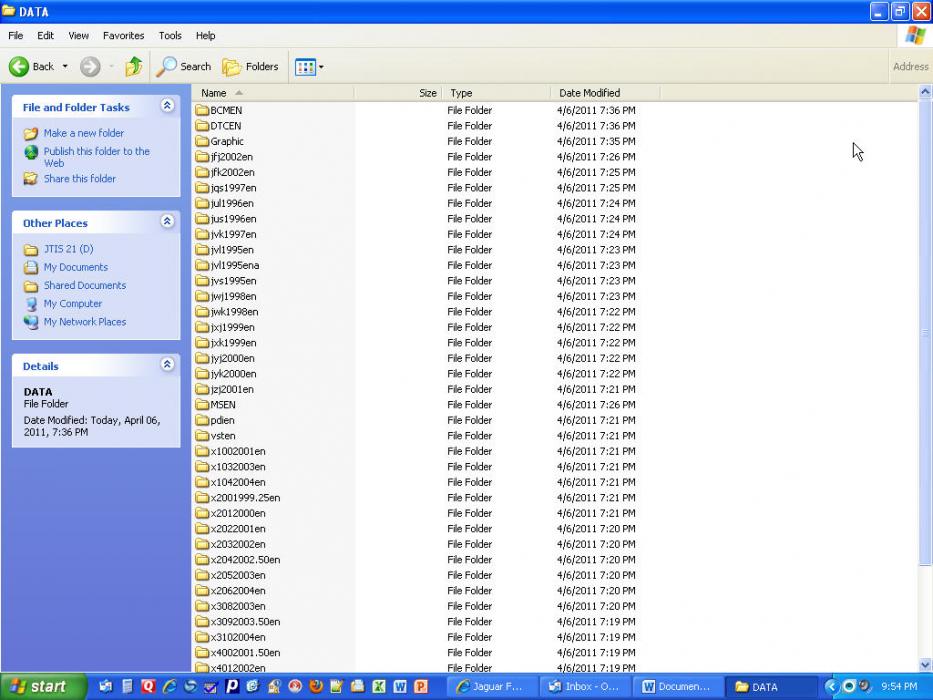
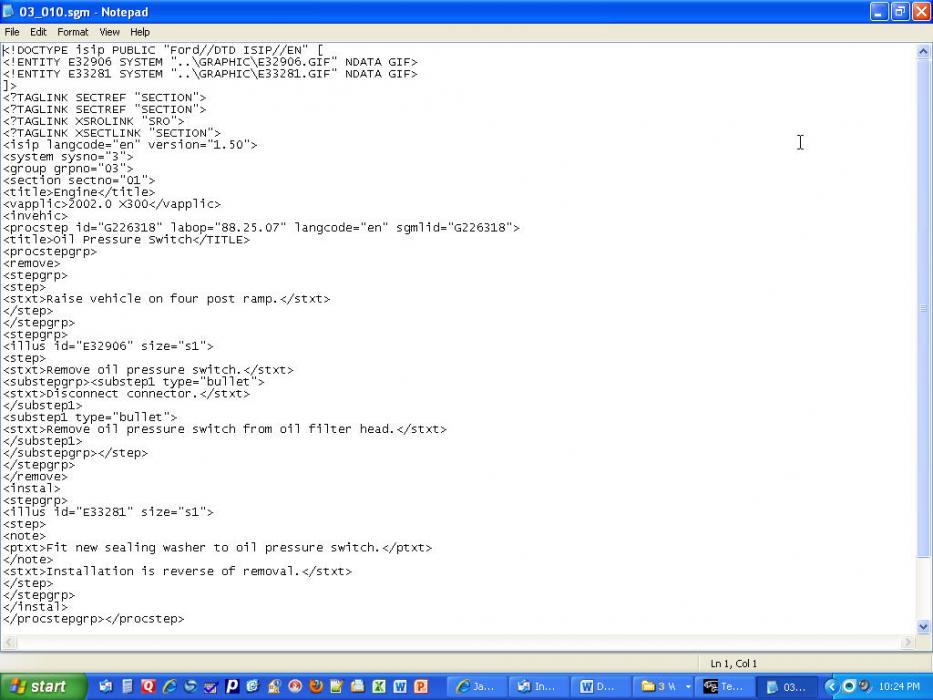
Here are 3 jpeg files showing the listing of the files in the Data folder, the listing of files in the x3082003en folder, and the contents of one of the files with a file type sgm (03_010.sgm). This happens to be listed in the text navigator (XJ 2001) listed as 3.Powertrain - 303-01: Engine - In Vehicle Repair - Oil Pressure Switch (88.25.07).
Here are the JPEG files:


Looks like the JTIS exe file uses these sgm files to get the text and graphics.
Jim Lombardi
If there is a way to create PDF files from the JTIS CD files, then we could have smaller download files. We could create separate PDF files for each Jaguar model/year. That would be a lot of smaller PDF files and we would not have to do any JTIS installs.
Here are 3 jpeg files showing the listing of the files in the Data folder, the listing of files in the x3082003en folder, and the contents of one of the files with a file type sgm (03_010.sgm). This happens to be listed in the text navigator (XJ 2001) listed as 3.Powertrain - 303-01: Engine - In Vehicle Repair - Oil Pressure Switch (88.25.07).
Here are the JPEG files:

Looks like the JTIS exe file uses these sgm files to get the text and graphics.
Jim Lombardi
Last edited by jimlombardi; Apr 6, 2011 at 09:48 PM.
Thread Starter
|
Member
Joined: Apr 2011
Posts: 47
Likes: 2
From: Tustin, CA
Hi
If there is a way to create PDF files from the JTIS CD files, then we could have smaller download files. We could create separate PDF files for each Jaguar model/year. That would be a lot of smaller PDF files and we would not have to do any JTIS installs.
Here are 3 jpeg files showing the listing of the files in the Data folder, the listing of files in the x3082003en folder, and the contents of one of the files with a file type sgm (03_010.sgm). This happens to be listed in the text navigator (XJ 2001) listed as 3.Powertrain - 303-01: Engine - In Vehicle Repair - Oil Pressure Switch (88.25.07).
Here are the JPEG files:
Attachment 9290
Attachment 9291
Attachment 9292
Looks like the JTIS exe file uses these sgm files to get the text and graphics.
Jim Lombardi
If there is a way to create PDF files from the JTIS CD files, then we could have smaller download files. We could create separate PDF files for each Jaguar model/year. That would be a lot of smaller PDF files and we would not have to do any JTIS installs.
Here are 3 jpeg files showing the listing of the files in the Data folder, the listing of files in the x3082003en folder, and the contents of one of the files with a file type sgm (03_010.sgm). This happens to be listed in the text navigator (XJ 2001) listed as 3.Powertrain - 303-01: Engine - In Vehicle Repair - Oil Pressure Switch (88.25.07).
Here are the JPEG files:
Attachment 9290
Attachment 9291
Attachment 9292
Looks like the JTIS exe file uses these sgm files to get the text and graphics.
Jim Lombardi
Veteran Member
Joined: Aug 2010
Posts: 2,636
Likes: 1,636
From: Southington CT
A macro recorder? - record macros to select & create pdfs
Hi HyperInferno
I think that maybe there a way to use a macro recorder application such as Auto Macro Recorder to create PDFs that would cover sections of the JTIS.
A Macro could be created and saved. Then the Macro file could be edited adding variable fields in the various steps that were created during the macro recording. Also a number of indexed variables could be used to turn this macro into a generic macro that could step through the whole text navigator list of documents and create a number of PDF files.
Here is a way we could start the first test of the macro recording:
Open the JTIS then make your Service Selection, use the model type (XJ), then the model year (1998). Use the View menu option and choose text navigator.
Start the Macro Recorder here.
Choose the Powertrain menu item. Choose 303-14 Electronic Engine Controls. Choose Description and Operation. Last step of selection is: Choose Electronic Engine Controls below the Description and Operation.
Now the document is opened and displayed on the screen. Go up to the File menu and select Print Document, use printer selection drop-down and select Adobe PDF (or whatever PDF maker you have) Print Range is ALL, Number of copies is 1. After click OK, the save PDF file as screen opens. Enter the file name and the PDF file is created.
Stop the Macro Recorder here. then save the Macro file.
Let me know if you think this would be easy to do and feasible.
Also if there are any other members in the forum that are PC or Computer Techs or Programmers. Please chime in.
Jim Lombardi
I think that maybe there a way to use a macro recorder application such as Auto Macro Recorder to create PDFs that would cover sections of the JTIS.
A Macro could be created and saved. Then the Macro file could be edited adding variable fields in the various steps that were created during the macro recording. Also a number of indexed variables could be used to turn this macro into a generic macro that could step through the whole text navigator list of documents and create a number of PDF files.
Here is a way we could start the first test of the macro recording:
Open the JTIS then make your Service Selection, use the model type (XJ), then the model year (1998). Use the View menu option and choose text navigator.
Start the Macro Recorder here.
Choose the Powertrain menu item. Choose 303-14 Electronic Engine Controls. Choose Description and Operation. Last step of selection is: Choose Electronic Engine Controls below the Description and Operation.
Now the document is opened and displayed on the screen. Go up to the File menu and select Print Document, use printer selection drop-down and select Adobe PDF (or whatever PDF maker you have) Print Range is ALL, Number of copies is 1. After click OK, the save PDF file as screen opens. Enter the file name and the PDF file is created.
Stop the Macro Recorder here. then save the Macro file.
Let me know if you think this would be easy to do and feasible.
Also if there are any other members in the forum that are PC or Computer Techs or Programmers. Please chime in.
Jim Lombardi
Thread Starter
|
Member
Joined: Apr 2011
Posts: 47
Likes: 2
From: Tustin, CA
Macros like that COULD work, but are sort of a messy way to do things. I would rather find some way to examine and parse the .sgm files, but that could be even harder. I took a closer look at them and noticed that they contain a few special tags, that are unique to them. I'll have to get my hands on the program and fiddle with it to see what could be done. If all else fails, I can make a macro, but I'd likely write my own little one that does it in a cleaner manner. Also, I changed my profile so you can view my e-mail address, e-mail me and i'll reply with my address to send the disks.
(for those techies out there who want to help: the .sgm files appear to be a modified form of xhtml and if the tags could all be catalogued, a hasty bit of scripting could parse it and spit out xml files or something that a pdf writer like adobe or foxit can import en masse)
(for those techies out there who want to help: the .sgm files appear to be a modified form of xhtml and if the tags could all be catalogued, a hasty bit of scripting could parse it and spit out xml files or something that a pdf writer like adobe or foxit can import en masse)
Last edited by HyperInferno; Apr 11, 2011 at 02:22 PM.

Senior Member
Joined: Jan 2010
Posts: 397
Likes: 47
From: The Motor City
For Zero hassle, just buy the all PDF version on EBAY. I did the download today and it works like a charm. It took me about 20 minutes to download all 7 files and another few minutes to combine them all into one big PDF file.
$30.00 for 2600 pages of pdf's and at least on my Apple / Mac it's searchable. Plus you can read it on anything that can read a pdf like smartphones, Ipads, tablet computers....
Now if I could solve some of my other complicated issues for $30 I'd be all set.
$30.00 for 2600 pages of pdf's and at least on my Apple / Mac it's searchable. Plus you can read it on anything that can read a pdf like smartphones, Ipads, tablet computers....
Now if I could solve some of my other complicated issues for $30 I'd be all set.

Senior Member
Joined: Jan 2010
Posts: 397
Likes: 47
From: The Motor City

Thread
Thread Starter
Forum
Replies
Last Post
aholbro1
XJ XJ6 / XJR6 ( X300 )
18
Dec 29, 2024 06:46 PM

Currently Active Users Viewing This Thread: 1 (0 members and 1 guests)