


JTIS for VISTA Instructions, Step-by-Step


Thread Starter
|
Senior Member
Joined: Feb 2011
Posts: 633
Likes: 17
From: CA
 JTIS for VISTA Instructions, Step-by-Step
Hello Gentlemen:
Here's a step-by-step guide to install JTIS on a 32 bit Vista PC.
Good luck...
Sir Jag
Here's a step-by-step guide to install JTIS on a 32 bit Vista PC.
Good luck...
Sir Jag
Last edited by SirJag; Apr 15, 2011 at 07:47 PM.




Member
Joined: Apr 2011
Posts: 55
Likes: 1
From: FL
I'm having trouble locating DAO 3.5 so that I can actually run the program after install. Do you know where I might find this? As of right now the program is installed, but none of the manuals etc will work. They all result in a crashed program.

Veteran Member


Joined: Aug 2010
Posts: 2,636
Likes: 1,636
From: Southington CT
Go to thread "DIY on JTIS install & how to use
Hi
Use this weblink to go to the "Here -diy i-created -jtis-install-how to" thread.
Look at post #1:
https://www.jaguarforums.com/forum/j...how-use-52643/
Jim Lombardi
Use this weblink to go to the "Here -diy i-created -jtis-install-how to" thread.
Look at post #1:
https://www.jaguarforums.com/forum/j...how-use-52643/
Jim Lombardi
Last edited by jimlombardi; Apr 16, 2011 at 10:46 PM.
Veteran Member
Joined: Aug 2010
Posts: 2,636
Likes: 1,636
From: Southington CT
JTIS - Vista -Special info from Forums -X type section
Hi ant17
I found this JTIS workshop manual instruction in the Forum's X type Section:
https://www.jaguarforums.com/forum/x...s-16261/page2/
It is a very long thread and covers the download of JTIS from the file server and installation.
I copied the section on the extra steps needed to get the DAO Jet files installed on Vista 32 bit PC. This is where you are having the problem with your install on your Vista 32 bit PC.
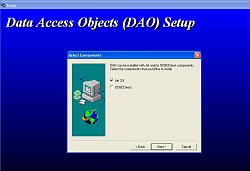
Also these instructions did not include the DAO35 Data Access Objects Setup screen, when it first opens it will have both Jet 3.5 and ODBCDirect boxes checked, make sure you uncheck the ODBCDirect box, screen should look like this before you click next:
On the JTIS CD, you need to go to DAO35/Disk1 folder first and put your mouse pointer on the setup.exe file, then follow the the section I copied below (I had to change the parts that referred to the download references).
Here are the modified instructions from the original posting:
“””"Right Click on this file and a list will appear. Click on (Run as an Administrator). In the next box that appears click on Allow. A box will now appear asking you to remove old data and install new. Click OK. A box now appears about Acrobat Reader, Click OK. The first part of the application will now install.
Once finished a box appears telling you the download is complete. Click OK. You are now asked do you wish to restart, Click Finish and your computer will restart.
Once your computer has restarted, now you need to run the DAO35/disk1/setup. Right click on this file and from the list that appears, click on (Run as an Administrator). In the next box that appears, Click Allow. The next box to appear is the setup box, Click Next. (NOW READ THE NEXT PARAGRAPH BEFORE GOING ANY FURTHER).
IMPORTANT: The next box to appear is the components box which has two selections in it, Jet and ODCB Direct. Both have tick boxes to the left of them. Click in the tick box named ODBC Direct and remove the tick from its box. Now select next. The next screen is for optional components. You can leave them all ticked. Click Next. The dao35 application will now install. Wait a while for the installation to complete. A box will appear telling you the installation are complete. Click OK. Now return back to your desktop screen.””””
It looks like other members were able to install JTIS ODBC JET successfully on their Vista 32 bit PCs using these instructions.
Jim Lombardi
I found this JTIS workshop manual instruction in the Forum's X type Section:
https://www.jaguarforums.com/forum/x...s-16261/page2/
It is a very long thread and covers the download of JTIS from the file server and installation.
I copied the section on the extra steps needed to get the DAO Jet files installed on Vista 32 bit PC. This is where you are having the problem with your install on your Vista 32 bit PC.
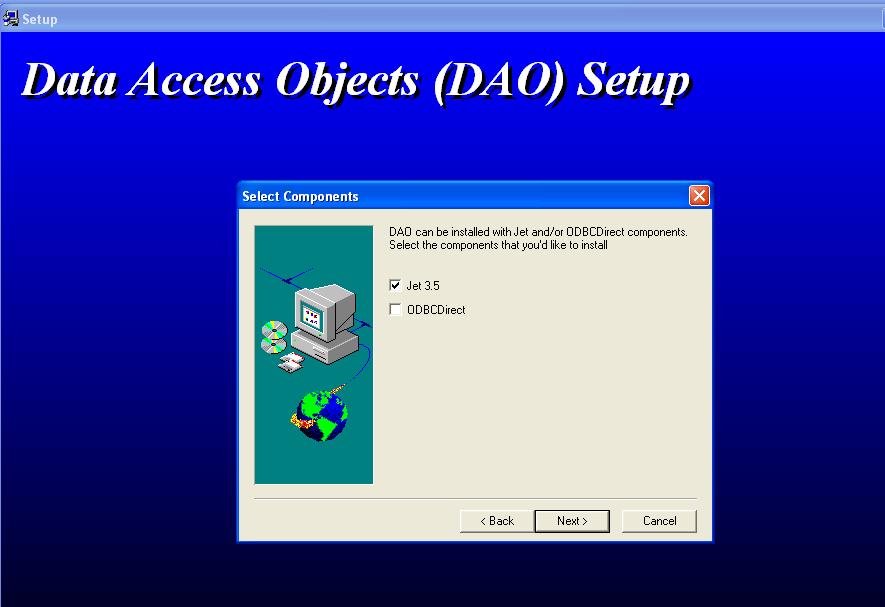
Also these instructions did not include the DAO35 Data Access Objects Setup screen, when it first opens it will have both Jet 3.5 and ODBCDirect boxes checked, make sure you uncheck the ODBCDirect box, screen should look like this before you click next:
On the JTIS CD, you need to go to DAO35/Disk1 folder first and put your mouse pointer on the setup.exe file, then follow the the section I copied below (I had to change the parts that referred to the download references).
Here are the modified instructions from the original posting:
“””"Right Click on this file and a list will appear. Click on (Run as an Administrator). In the next box that appears click on Allow. A box will now appear asking you to remove old data and install new. Click OK. A box now appears about Acrobat Reader, Click OK. The first part of the application will now install.
Once finished a box appears telling you the download is complete. Click OK. You are now asked do you wish to restart, Click Finish and your computer will restart.
Once your computer has restarted, now you need to run the DAO35/disk1/setup. Right click on this file and from the list that appears, click on (Run as an Administrator). In the next box that appears, Click Allow. The next box to appear is the setup box, Click Next. (NOW READ THE NEXT PARAGRAPH BEFORE GOING ANY FURTHER).
IMPORTANT: The next box to appear is the components box which has two selections in it, Jet and ODCB Direct. Both have tick boxes to the left of them. Click in the tick box named ODBC Direct and remove the tick from its box. Now select next. The next screen is for optional components. You can leave them all ticked. Click Next. The dao35 application will now install. Wait a while for the installation to complete. A box will appear telling you the installation are complete. Click OK. Now return back to your desktop screen.””””
It looks like other members were able to install JTIS ODBC JET successfully on their Vista 32 bit PCs using these instructions.
Jim Lombardi
Last edited by jimlombardi; Apr 18, 2011 at 11:01 AM.
Trending Topics

Senior Member
Joined: Mar 2011
Posts: 473
Likes: 17
From: Tucson
After "allow" I go into the loop about a pgm using dao files. Never got past that yet, including now. Don't get a box asking about removing old data, or a box with checks for ODBC. Never seen that stuff yet running as admin, or in compatibility sp2.
Veteran Member
Joined: Aug 2010
Posts: 2,636
Likes: 1,636
From: Southington CT
Hi ant17
I uploaded a copy of the dao350.dll to my personal mediafire.com account.
Read the attached document first (How to fix DAO35 dll).
Here is the webpage to download the dao350.dll file (when asked to open or save - choose save then choose desktop):
dao350.dll
Here is the writeup I found on the internet on fixing dao350.dll trouble (I copied it into Word Document):
JTIS DAO fix.doc
Let me know how this works out. Also have you updated your Vista software with Service Pack 1 and Service Pack 2?
Jim Lombardi
I uploaded a copy of the dao350.dll to my personal mediafire.com account.
Read the attached document first (How to fix DAO35 dll).
Here is the webpage to download the dao350.dll file (when asked to open or save - choose save then choose desktop):
dao350.dll
Here is the writeup I found on the internet on fixing dao350.dll trouble (I copied it into Word Document):
JTIS DAO fix.doc
Let me know how this works out. Also have you updated your Vista software with Service Pack 1 and Service Pack 2?
Jim Lombardi
Last edited by jimlombardi; Jul 15, 2012 at 03:54 AM. Reason: Updated word document to include error message
Senior Member
Joined: Mar 2011
Posts: 473
Likes: 17
From: Tucson
Hi ant17
I uploaded a copy of the dao350.dll to my personal webspace on ***.net
Read the attached document first (How to fix DAO35 dll).
Here is the webpage to download the file ( when asked to open or save - choose save then choose desktop):
http://members.***.net/jimlombardi/dao350.dll
Here is the writeup I found on the internet on fixing dao350.dll trouble (I copied it into Word Document):
Attachment 9692
Let me know how this works out. Also have you updated your Vista software with Service Pack 1 and Service Pack 2?
Jim Lombardi
I uploaded a copy of the dao350.dll to my personal webspace on ***.net
Read the attached document first (How to fix DAO35 dll).
Here is the webpage to download the file ( when asked to open or save - choose save then choose desktop):
http://members.***.net/jimlombardi/dao350.dll
Here is the writeup I found on the internet on fixing dao350.dll trouble (I copied it into Word Document):
Attachment 9692
Let me know how this works out. Also have you updated your Vista software with Service Pack 1 and Service Pack 2?
Jim Lombardi
Veteran Member
Joined: Aug 2010
Posts: 2,636
Likes: 1,636
From: Southington CT
Hi ant17
Were you able to copy the dao35.dll into C:\Program Files\Common Files\Microsoft Shared Folder\DAO folder (that you downloaded from the link I provided to the *** server)?
Was the command to unregister dao350.dll (regsvr32 /u "c:\program files\common files\microsoft shared\dao\dao350.dll") successful?
Did you get this error message when you tried to reregister dao350,dll -
RegSvr32 LoadLibrary (“”c:\program”) failed – The specified module could not be found.
Look at the last 2 private messages I sent out about 10 minutes ago.
Jim Lombardi
Were you able to copy the dao35.dll into C:\Program Files\Common Files\Microsoft Shared Folder\DAO folder (that you downloaded from the link I provided to the *** server)?
Was the command to unregister dao350.dll (regsvr32 /u "c:\program files\common files\microsoft shared\dao\dao350.dll") successful?
Did you get this error message when you tried to reregister dao350,dll -
RegSvr32 LoadLibrary (“”c:\program”) failed – The specified module could not be found.
Look at the last 2 private messages I sent out about 10 minutes ago.
Jim Lombardi
Senior Member
Joined: Mar 2011
Posts: 473
Likes: 17
From: Tucson
Hi ant17
Were you able to copy the dao35.dll into C:\Program Files\Common Files\Microsoft Shared Folder\DAO folder (that you downloaded from the link I provided to the *** server)?
Was the command to unregister dao350.dll (regsvr32 /u "c:\program files\common files\microsoft shared\dao\dao350.dll") successful?
Did you get this error message when you tried to reregister dao350,dll -
RegSvr32 LoadLibrary (“”c:\program”) failed – The specified module could not be found.
Look at the last 2 private messages I sent out about 10 minutes ago.
Jim Lombardi
Were you able to copy the dao35.dll into C:\Program Files\Common Files\Microsoft Shared Folder\DAO folder (that you downloaded from the link I provided to the *** server)?
Was the command to unregister dao350.dll (regsvr32 /u "c:\program files\common files\microsoft shared\dao\dao350.dll") successful?
Did you get this error message when you tried to reregister dao350,dll -
RegSvr32 LoadLibrary (“”c:\program”) failed – The specified module could not be found.
Look at the last 2 private messages I sent out about 10 minutes ago.
Jim Lombardi
Veteran Member
Joined: Aug 2010
Posts: 2,636
Likes: 1,636
From: Southington CT
ant17
Looks like the reregistration of dao350.dll failed. What is the exact debugging error? I need to know the information that was displayed on the screen.
You should be able at this point to run dao/disk1/setup.exe and get the dao installed.
After I unregistered the dao350.dll on my PC (testing the fix) I found that I also could not reregister the dao350.dll. Then I ran the JTIS exe (C:\jaguar\jjtis.exe) and click on service when the screen was displayed there was no models listed on the Select Service Manuals screen.
I reinstalled dao by running the dao/disk1/setup.exe from the JTIS CD. Then I was back in business (JTIS is working properly again).
Jim Lombardi
Looks like the reregistration of dao350.dll failed. What is the exact debugging error? I need to know the information that was displayed on the screen.
You should be able at this point to run dao/disk1/setup.exe and get the dao installed.
After I unregistered the dao350.dll on my PC (testing the fix) I found that I also could not reregister the dao350.dll. Then I ran the JTIS exe (C:\jaguar\jjtis.exe) and click on service when the screen was displayed there was no models listed on the Select Service Manuals screen.
I reinstalled dao by running the dao/disk1/setup.exe from the JTIS CD. Then I was back in business (JTIS is working properly again).
Jim Lombardi
Last edited by jimlombardi; Apr 20, 2011 at 06:00 AM.

Thread
Thread Starter
Forum
Replies
Last Post
Goncalo Proenca
XJ ( X351 )
29
May 3, 2026 01:36 AM

Currently Active Users Viewing This Thread: 1 (0 members and 1 guests)