When you click on links to various merchants on this site and make a purchase, this can result in this site earning a commission. Affiliate programs and affiliations include, but are not limited to, the eBay Partner Network.
Aftermarket wires remain loose. Light gray and blue OEM sockets are not needed too. Brown is a radio I believe (use an aftermarket connector fakra to din) - lucky you (I don't have it in my car - at least visible). But I might be wrong with a brown one as I haven't seen a proper radio cable (but it's a fakra cable for sure). If it's from a top of a OEM radio it might be not needed too.
I guess you are very close!
ps. I did it in 2h having all the posts (except rear camera, which I left for a later stage - retrofitting OEM one). Critical thing is to cut a white plastic socket (aftermarket) connected to a hazard lights - to fit it with a black OEM one. The rest is plug and play with some unused sockets/cables.
Correct - for clarity Ralph, the gray connector is simply power to the OEM touchscreen and no longer used, tuck it away. The Blue connector is GVIF (Gigabyte Video Interface) and it's what gives you the feed from your OEM Navigation to the touchscreen. Tuck it away. Brown cable is either the reverse camera or the radio antenna and I think it's the antenna as tmich noted. It requires that connector we PM'd about (sent you the link in our last PM). If you have the RCS connectors plugged in from the Blue Can Bus Box to the unit, sound should work. If not, you can wire directly using the speaker wires you pictured. Unfortunately, your installer will have to connect test each wire as they aren't labelled. I would do this by stripping the wires and putting them in the female end of the plug to match to the right speaker.
If you have to do that, your OEM speakers are wired as follows:
Pin 9 - white/blue = LH Front positive
Pin 1 - yellow = LH Front negative
These are twisted together and feed both your tweeter and door speaker
Pin 12 -white/blue = LH rear speaker positive
Pin 4 - yellow/blue = LH rear speaker negative
Pin 15 - red - center speaker positive
Pin 7 - white = center speaker negative
Pin 10 - white = Sub woofer positive
Pin 2 - yellow = subwoofer negative
Pin 13 - white/green = RH rear positive
Pin 5 - yellow/red = RH rear negative
Pin 11 - white/green = RH Door Positive
Pin 3 - Red/white = RH door negative
These are twisted together and feed both your tweeter and door speaker
Pin 2 - black = ground
So I think the way this sets up is the wires from the new unit will go to the positive of the OEM plug.
Sean & Tmich - Thanks much for your quick responses. I have sent them on to the installer and will fill everybody in when I know the results. By the way I emailed the manufacturer last night and requested to receipts which have not be sent back to me. I am going to go after Alibaba next. Will keep you advised.
Sean & Tmich - Thanks much for your quick responses. I have sent them on to the installer and will fill everybody in when I know the results. By the way I emailed the manufacturer last night and requested to receipts which have not be sent back to me. I am going to go after Alibaba next. Will keep you advised.
Thanks again,
Ralph
Certainly if you don't like it Ralph, return it if you can. It will work on your model - but like everything, may not be to your liking. I know with mine, I only had 14 days to return it. That was my vendors return policy. Now, I can only get it serviced, which is fine as it's just a toy for me. But in all honesty, even though it has a couple things don't like, it's miles ahead of the OEM which of course one would expect. So in the pic below, to get sound on mine (premium also), I connected the red/white RCA in #7 to one of the sets in #8. I just don't recall which. Kurt did the same and I think did a battery reset and he had sound.
From Kurt in post 117 - "I have SOUND! I disconnected the battery terminals, touched them together and swapped out the red-white RCA audio connections to another input (labeled as audio OUT, not audio IN) and I'm able to get sound from the new Tesla-style video screen. I immediately disconnected the straight settings and reconnected all of my ACM connections and after a brief delay ... SOUND!"
I want to connect my bluetooth OBD adapter but can't find the bluetooth menu? Torque Pro tells me I have to connect it in the bluetooth menu of the device before Torque can find it!?
My unit seems to loose the time and date when I leave it for a day or two? I use my phone as internet provider and setting for time is "use network provider time" but it won't change to my phone's time when connected? Anybody else have this issue?
I want to connect my bluetooth OBD adapter but can't find the bluetooth menu? Torque Pro tells me I have to connect it in the bluetooth menu of the device before Torque can find it!?
My unit seems to loose the time and date when I leave it for a day or two? I use my phone as internet provider and setting for time is "use network provider time" but it won't change to my phone's time when connected? Anybody else have this issue?
I
Regarding time - I have iPhone and set time to automatic and then select a time zone. Sometimes my gauge clock lags when I first start up the car if I haven't run it in awhile but then after a minute or so, it corrects.
On my head unit I have this set:
I have location turned on - not sure if it matters since the phone location is on
Regarding BT - not sure I understand you ask but here is where you go to BT settings:
Select the BT app Select this button Touch Search You will see this - then your OBD adapter should show up. Then select link at the top of the screen or just touch the link next to the adapter.
Thank you for all the support. This Forum is truly a wondrous asset for us X150 enthusiasts/owners. I heard back from the supplier over night Wednesday/Thursday. There response was to ask for their specific order number which I supplied yesterday. No additional response yet. Installer is scheduled to go back at it tomorrow.
Regarding time - I have iPhone and set time to automatic and then select a time zone. Sometimes my gauge clock lags when I first start up the car if I haven't run it in awhile but then after a minute or so, it corrects.
On my head unit I have this set:
I have location turned on - not sure if it matters since the phone location is on
Regarding BT - not sure I understand you ask but here is where you go to BT settings:
Select the BT app
Select this button
Touch Search
You will see this - then your OBD adapter should show up. Then select link at the top of the screen or just touch the link next to the adapter.
The clock was set as yours but time wouldn't correct itself, have set it manual and will see what happens.
I was in that menu but thought it was only for connecting your phone. My cheap OBD2 adapter is now
connected to the unit but in Torque it tells me there is no communication? Think I'll buy a
more expensive one and see if that works.:-)
I suggest OBD2 reader with wifi. I have one - configuration/connection took 1 min. Of course it also works with BT. You can have multiple devices connected at the same time.
heated windshield I think? I haven't had any codes so I don't know if touching the screen will delete them. OEM TPMS isn't part of the head unit. It's a separate add on but don't know if the OEM TPMS is disabled. If I get a wild hair I might test it for you but right now it's 37 degrees out . If you can think of some other simple code I code trigger without much effort I can try it out.
Confirmed and in the fwiw category. The new unit comes with an optional TMPS system. You have to swap out your sensors to the 433mhz which the kit comes with. The OEM TPMS is disabled whether you add the option or not.
Also, this one Kurt actually wrote about very early on during his install and I completely missed it. You cannot use the Tesla style head unit to clear DTC warnings that appear on the gauge cluster. Aside from TPMS, personally, I want to resolve the issue and then clear the codes with software. For me, a non issue.
On another forum, heated windshield and cooled seats do not work - but we'll get Ralph's confirmation. Those appear to be two of the last three outliers.
I don't wear sunglasses so I won't be able to answer DGL's question.
I suggest OBD2 reader with wifi. I have one - configuration/connection took 1 min. Of course it also works with BT. You can have multiple devices connected at the same time.
I know you can connect multiple Bluetooth devices but didn't think you could do that with WiFi?
Well i did it recently in my obd2 scanner. Used it simultaneously on Tesla screen and iPhone. Both were connected at the same time.
I need to go the other way, connect two wifi devices to one unit. I don't think I can connect a wifi OBD2 dongle while the tesla unit is connected to my phones whifi hotspot for internet and use them simultaneously?
Why don't you put a SIM card to Tesla unit and forget about pairing with your phone's hotspot etc.?! I did it this way and recommend.
I'm confused about this. What type of sim card? The only ones I've seen are from cell carriers and that's just adding another data plan. Can you link an example?
Yes, you have to purchase a new data plan from a mobile carrier. I have a prepaid - 2,5USD monthly for 9GB of data (monthly). Entering a car and using all internet available resources without thinking about connecting with a phone etc.
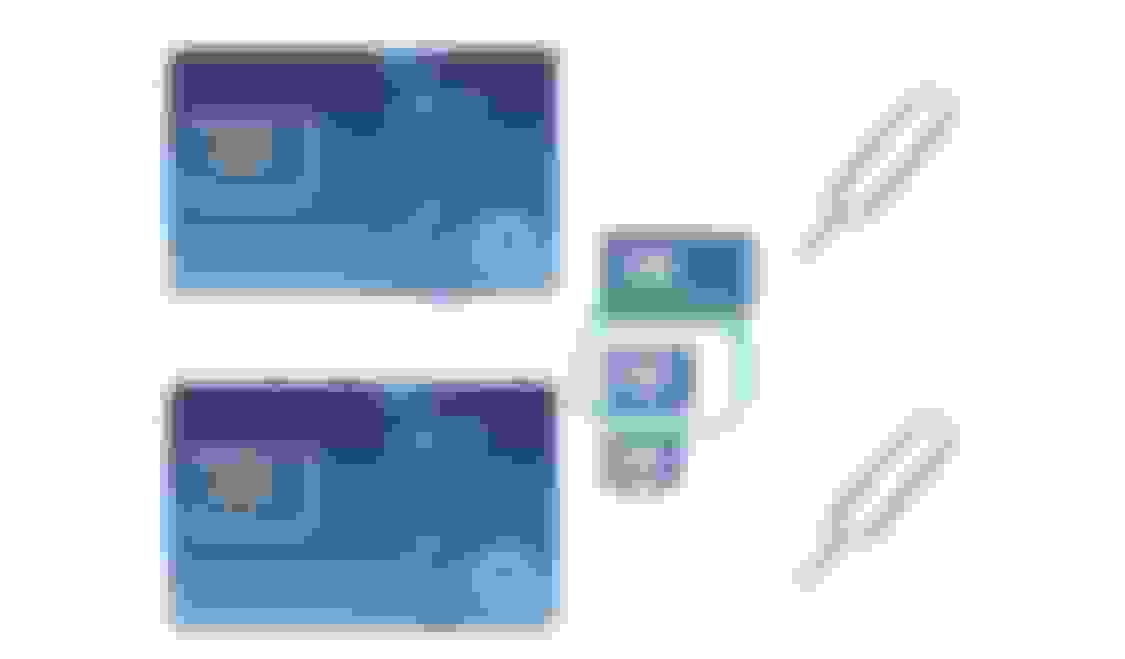
I'm living in Poland, so links will be irrelevant for most of readers. But you have to have a medium size (marked with green) to put it in a mobile modem of a screen.
Why don't you put a SIM card to Tesla unit and forget about pairing with your phone's hotspot etc.?! I did it this way and recommend.
Yeah. I did the same thing with two of my cars. Where I am at, I just pay for an entire year up front, because it is cheaper that way. I get 6GB of data a month, for the equivalent of around $11 a month. However, I can understand people not wanting to maintain another sim card simply for data, especially if they don't offer discount plans that you can pay for by the year.
On another note, I found the screen too reflective for my taste. I bought a screen protector from these guys. (no affiliation).
https://www.photodon.com/c/Screen-Pr...y-Filters.html
I went with the recommended MXH filter. Much better. Adjusted the color on my car launcher (Agama) and I'm happy with it. There's no impact to the touchscreen sensitivity.
On another note, I found the screen too reflective for my taste. I bought a screen protector from these guys. (no affiliation).
https://www.photodon.com/c/Screen-Pr...y-Filters.html
I went with the recommended MXH filter. Much better. Adjusted the color on my car launcher (Agama) and I'm happy with it. There's no impact to the touchscreen sensitivity.
Sean - Did you go with a "custom cut" or find a combo from the available drop down menus that worked with this screen?
Last edited by LoudHogRider; Apr 5, 2021 at 11:41 PM.