


04 xkr nav disc


Thread Starter
|
Junior Member
Joined: Apr 2018
Posts: 26
Likes: 2
From: Grand Haven Mi 49417
 04 xkr nav disc
My Disc is dated 1998. It does not always boot up. I wonder if there is a difference in a newer one that effects the set up ie what is showing on screen Cat. or Big Clock so forth
Can you add a Pic through cd player
Can you add a Pic through cd player
Veteran Member
Joined: Feb 2017
Posts: 2,089
Likes: 922
From: Houston,TX
 Learner is looking for something.....
I'm not the expert but I read somewhere in this Forum that the last disc came out in 2003....so any new roads or Freeways that have been built since then will not show on the screen (Nothing) but the old roads are still there! Still works just not up to date......I still use mine around Houston, as most of the Road changes are outside the City......I use the Clock when I am not trying to find something!
You can not add or change the Disc in any way.......so I've been told and I'm not into that sort of stuff anyway! If you are, and you can figure out a way to update the disc or a new disc......You'll be able to sell a bunch of them....Starting with me!
Billy Clyde in Houston

Veteran Member


Joined: Oct 2010
Posts: 2,041
Likes: 990
From: Spain
The best solution is to replace the sat nav in the dashboard with a modern touch screen 5" Garmin unit. You will then have the latest maps, speed camera locations, backup camera, Bluetooth phone interface etc, while keeping the OEM look.


Veteran Member
Joined: Feb 2017
Posts: 2,089
Likes: 922
From: Houston,TX
 dibbit, The SATNAV Man!
dibbit,
Looks like a super deal! What do I do besides buying a Garmin 5" Unit? I'm sure it doesn't come with directions on "How to replace the Jaguar Sat-Nav"...Could you provide us those details?
You know: like what model Garmin and then what do you do? or what goes where? How do you install it? Are there directions on the Forum?
HELP!
Billy Clyde in Houston
Looks like a super deal! What do I do besides buying a Garmin 5" Unit? I'm sure it doesn't come with directions on "How to replace the Jaguar Sat-Nav"...Could you provide us those details?
You know: like what model Garmin and then what do you do? or what goes where? How do you install it? Are there directions on the Forum?
HELP!
Billy Clyde in Houston




Joined: Oct 2007
Posts: 120,984
Likes: 6,648
From: PHX some of the time
Billy, a few people have gone that route, a search for Garmin will probably yield results.
Here's a couple of threads to start with, dibbit has some more info in those.
https://www.jaguarforums.com/forum/x...pgrade-142028/
https://www.jaguarforums.com/forum/x...7/#post1680230
Here's a couple of threads to start with, dibbit has some more info in those.
https://www.jaguarforums.com/forum/x...pgrade-142028/
https://www.jaguarforums.com/forum/x...7/#post1680230

Veteran Member
Joined: Oct 2010
Posts: 2,041
Likes: 990
From: Spain
I didn't like the YouTube one because he gets rid of the switches so it no longer looks OEM, gets the power from wires in the glovebox rather than from the satnav harness and mounts it by glueing it to the wood dashboard panel.
Other than that it's a neat install.
Other than that it's a neat install.
Trending Topics
Veteran Member
Joined: Oct 2010
Posts: 2,041
Likes: 990
From: Spain
dibbit,
Looks like a super deal! What do I do besides buying a Garmin 5" Unit? I'm sure it doesn't come with directions on "How to replace the Jaguar Sat-Nav"...Could you provide us those details?
You know: like what model Garmin and then what do you do? or what goes where? How do you install it? Are there directions on the Forum?
HELP!
Billy Clyde in Houston
Looks like a super deal! What do I do besides buying a Garmin 5" Unit? I'm sure it doesn't come with directions on "How to replace the Jaguar Sat-Nav"...Could you provide us those details?
You know: like what model Garmin and then what do you do? or what goes where? How do you install it? Are there directions on the Forum?
HELP!
Billy Clyde in Houston
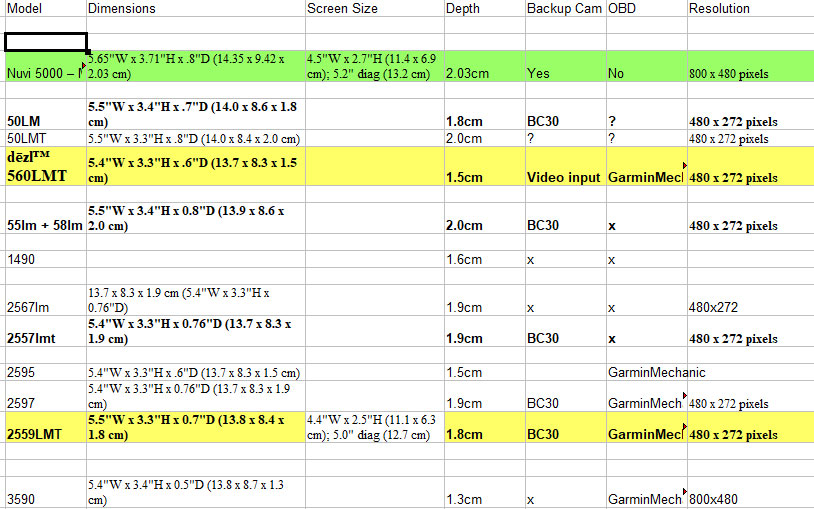
This is a list I compiled of suitable 5" Garmin sat navs when I was looking. The main differences are the external dimensions, the screen resolution and what add ons, such as back up cameras, are supported. The Garmin I used is the first entry on the list for comparison.

Veteran Member
Joined: Feb 2017
Posts: 2,089
Likes: 922
From: Houston,TX
 A Big Thanks goes to dibbit!
dibbit,
I appreciate you for sending this Chart....That must have taken quiet some time to put together...I've printed it out for future reference, as I'm sure I will need to change the darn thing out sooner rather than later.....
I Thank you sir!
Billy Clyde
I appreciate you for sending this Chart....That must have taken quiet some time to put together...I've printed it out for future reference, as I'm sure I will need to change the darn thing out sooner rather than later.....
I Thank you sir!
Billy Clyde
Veteran Member
Joined: Feb 2017
Posts: 2,089
Likes: 922
From: Houston,TX
NUVI 5000 with Back-up Camera!
Looks like you've got me going on this Garmin 5000 but I'm having trouble finding the Back-up Camera attachment......Does it come with the Unit or do you have to order it separately? Sorry, I guess I just don't know what I'm looking for!
Billy Clyde
Veteran Member
Joined: Oct 2010
Posts: 2,041
Likes: 990
From: Spain

My total spend on the second hand sat nav and camera was under £25 - so a very cheap upgrade to turn a completely useless sat nav to one that at least has maps of where I live.
Bear in mind that I compiled the list of sat navs a while back, so the older ones might be hard to find. Garmin have newer 5" units out now with additional features, but the new ones all use the wireless Garmin BC30 camera. This saves on running a cable from the boot to the dashboard, but it is expensive, the camera itself is ugly and the picture quality isn't that good. In my experience its just as easy to run the cable as install the BC30 and its transmitter module.
If you browse Garmin's website you can compare the specs of the latest units to the ones I have listed and compare the size of the units to find one that will be a good fit. Yes, it does take time to research all this, but that is part of the fun.

 dibbit, your the Man!
Veteran Member
Joined: Oct 2010
Posts: 2,041
Likes: 990
From: Spain
Its a fun project to do. If you run into any problems please ask.

Veteran Member

Joined: Feb 2012
Posts: 1,113
Likes: 567
From: Portsmouth, England
The Garmin reversing camera could have been designed to fit inside the trunk finisher in place of the OEM trunk opener button. That button can be easily repositioned to one side, though now with the button on the underside, and it does have to be held there with epoxy adhesive as there's no real possibility of using screws.

Thread
Thread Starter
Forum
Replies
Last Post
cumminsedge
PRIVATE For Sale / Trade or Buy Classifieds
0
Nov 17, 2007 12:16 AM
Currently Active Users Viewing This Thread: 1 (0 members and 1 guests)