


Newbie hello from wolverhampton


Thread Starter
|
Junior Member
Joined: Jan 2015
Posts: 19
Likes: 0
From: Wolverhampton
 Newbie hello from wolverhampton
Hi to all,
Please allow me to introduce myself, I,m Duncan and I have just purchased my first Jag which is a 1998 x308 Xjr I have been looking for a while and I am please with the result.
Got a few issues at the moment which I am trying to go through.
I have tryed to upload a picture.

Please allow me to introduce myself, I,m Duncan and I have just purchased my first Jag which is a 1998 x308 Xjr I have been looking for a while and I am please with the result.
Got a few issues at the moment which I am trying to go through.
I have tryed to upload a picture.
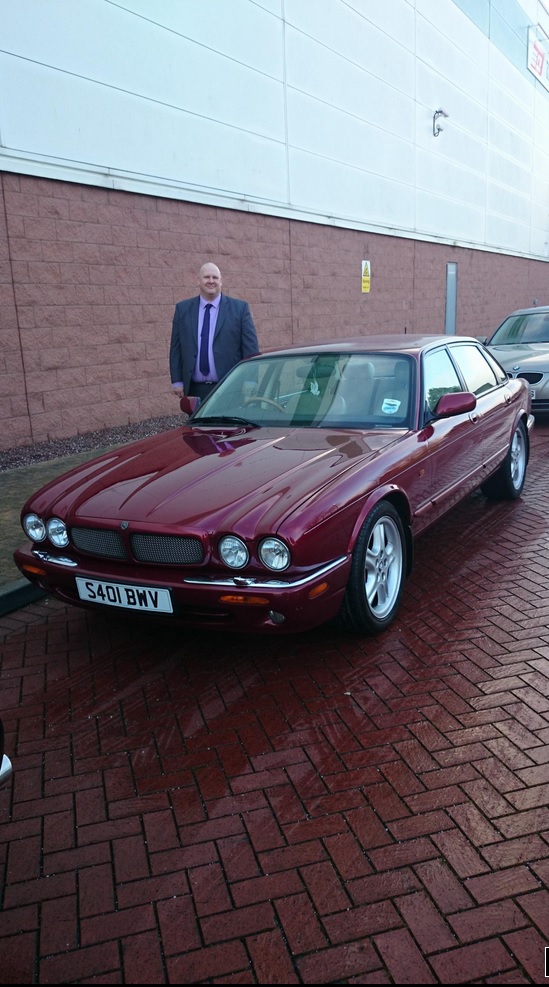
Last edited by GGG; Jan 28, 2015 at 07:15 PM. Reason: rotate photo






Joined: Dec 2011
Posts: 120,439
Likes: 17,014
From: Durham, UK
Welcome to the forum Duncan,
Good to have you with us at Jaguar forums.
Follow this link XJ ( X308 ) XJ8 / XJR - Jaguar Forums - Jaguar Enthusiasts Forum to the X308 forum for help, advice and information. The 'HOW TO' thread at the top is a good place to start for info on regular issues.
Please remember to add vehicle details to your Signature to help others to give relevant advice. Go to the User CP button on the left of the top menu bar, then Settings & Options under Your Control Panel. Select Edit Signature and enter the details.
You can also visit the UK & Eire Region forum by following this link UK & Eire - Jaguar Forums - Jaguar Enthusiasts Forum to find other members in your region.
Enjoy the forums.
Graham
Good to have you with us at Jaguar forums.
Follow this link XJ ( X308 ) XJ8 / XJR - Jaguar Forums - Jaguar Enthusiasts Forum to the X308 forum for help, advice and information. The 'HOW TO' thread at the top is a good place to start for info on regular issues.
Please remember to add vehicle details to your Signature to help others to give relevant advice. Go to the User CP button on the left of the top menu bar, then Settings & Options under Your Control Panel. Select Edit Signature and enter the details.
You can also visit the UK & Eire Region forum by following this link UK & Eire - Jaguar Forums - Jaguar Enthusiasts Forum to find other members in your region.
Enjoy the forums.
Graham









Joined: Oct 2007
Posts: 121,135
Likes: 6,653
From: PHX some of the time
Welcome to Jaguar Forums Duncan,
Good to have you with us.
Enjoy the forum.
If you haven't done so already you should add your car details to your signature to help others to help you.
If you need help with getting around and using the forum follow this link for some help Forum Help
Good to have you with us.
Enjoy the forum.
If you haven't done so already you should add your car details to your signature to help others to help you.
If you need help with getting around and using the forum follow this link for some help Forum Help
Trending Topics
Joined: Dec 2011
Posts: 120,439
Likes: 17,014
From: Durham, UK
Duncan,
I forgot to mention I rotated your photo. Your original is the landscape thumbnail. I added the portrait version in the text.
Smartphones store all photos as landscape regardless of the way they are taken. There's an attribute in the software to make the phone display the photo in the correct orientation. Unfortunately the forum can't process this attribute and all photos appear in landscape!
Graham
I forgot to mention I rotated your photo. Your original is the landscape thumbnail. I added the portrait version in the text.
Smartphones store all photos as landscape regardless of the way they are taken. There's an attribute in the software to make the phone display the photo in the correct orientation. Unfortunately the forum can't process this attribute and all photos appear in landscape!
Graham
Thread Starter
|
Junior Member
Joined: Jan 2015
Posts: 19
Likes: 0
From: Wolverhampton
Duncan,
I forgot to mention I rotated your photo. Your original is the landscape thumbnail. I added the portrait version in the text.
Smartphones store all photos as landscape regardless of the way they are taken. There's an attribute in the software to make the phone display the photo in the correct orientation. Unfortunately the forum can't process this attribute and all photos appear in landscape!
Graham
I forgot to mention I rotated your photo. Your original is the landscape thumbnail. I added the portrait version in the text.
Smartphones store all photos as landscape regardless of the way they are taken. There's an attribute in the software to make the phone display the photo in the correct orientation. Unfortunately the forum can't process this attribute and all photos appear in landscape!
Graham

Hi and welcome aboard, its good to have you here with us here at Jaguarforums
Any useful site information you may need such as how to post pictures, edit signatures, add videos, using the
search facility etc, can be found here within the following link Using JF "How To"
There are lots of members local to you with the same interests with info on local dealers and possible meets.
Regional - Jaguar Forums - Jaguar Enthusiasts Forum
Need a Manual, a TSB, or General Info' about your Jag? Check out our >> DOWNLOAD AREA <<
I've manually upgraded you to Full forum access so you can better view the site and all its features.
Any useful site information you may need such as how to post pictures, edit signatures, add videos, using the
search facility etc, can be found here within the following link Using JF "How To"
There are lots of members local to you with the same interests with info on local dealers and possible meets.
Regional - Jaguar Forums - Jaguar Enthusiasts Forum
Need a Manual, a TSB, or General Info' about your Jag? Check out our >> DOWNLOAD AREA <<
I've manually upgraded you to Full forum access so you can better view the site and all its features.

Thread
Thread Starter
Forum
Replies
Last Post
Marka
S-Type / S type R Supercharged V8 ( X200 )
22
Sep 11, 2016 12:09 AM
Currently Active Users Viewing This Thread: 1 (0 members and 1 guests)