


Key Remote Fob for XJ6 XJR XJ12 X300


I have a 1995 xj6 (x300). I bought the saab 900 key fob from ebay. Put my car in learning mode, and can not get the remote to program to my car. Either button I hold down and nothing. Please help on what I'm doing wrong

Junior Member
Joined: Oct 2014
Posts: 18
Likes: 5
From: Essex, UK
There are two different fob frequencies - 433 MHz and 315 MHz. The fob you use needs to match up with the frequency the car is using. I have a 1995 car and had problems getting the 433MHz fob I bought to work so I am assuming my car is 315 MHz now.

Junior Member
Joined: Apr 2016
Posts: 11
Likes: 0
From: Roswell GA
SLCM location on 95 XJ6
I have a 95 XJ6 and would like to double check my SLCM frequency before I buy a new FOB. My antenna is 315MHz, so should be my SLCM.
Where is the SLCM located in a 95 JX6?
Where is the SLCM located in a 95 JX6?
Junior Member
Joined: Oct 2014
Posts: 18
Likes: 5
From: Essex, UK
If it is in the same place as on my '95 Double Six it will be in the boot/trunk on the left side, up past the fuel filler pipe.
It is a little complicated to get to see the stickers to identify the exact model in situ - I had to remove mine from the car to get a clear view.
On the off chance you live local to me (Essex, UK) I have both a 315MHz and 433MHz fob that you could try which would identify which frequency your car uses without faffing round accessing the SLCM!
It is a little complicated to get to see the stickers to identify the exact model in situ - I had to remove mine from the car to get a clear view.
On the off chance you live local to me (Essex, UK) I have both a 315MHz and 433MHz fob that you could try which would identify which frequency your car uses without faffing round accessing the SLCM!

Junior Member
Joined: Nov 2016
Posts: 7
Likes: 0
From: Long Beach, CA
Key FOB replacement Buttons
Has anyone replaced their Key FOB Buttons on X300 or X305? If yes, how do we open the Key FOB to take it apart? My Buttons are worn out and I have factory Replacement Buttons. Thanks !



Joined: Dec 2011
Posts: 120,439
Likes: 17,014
From: Durham, UK
Welcome to the forum Kayvan9,
The information you need is in the Security System Manual for your model. Here's the relevant page:
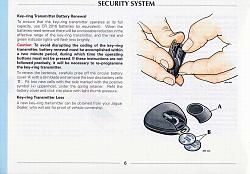
(click on the image to enlarge it)
Please follow this link New Member Area - Intro a MUST - Jaguar Forums - Jaguar Enthusiasts Forum to the New Member Area - Intro a MUST forum and post some info about yourself and your vehicle for all members to see. In return you'll get a proper welcome and some useful advice about posting to the forum.
Graham
The information you need is in the Security System Manual for your model. Here's the relevant page:
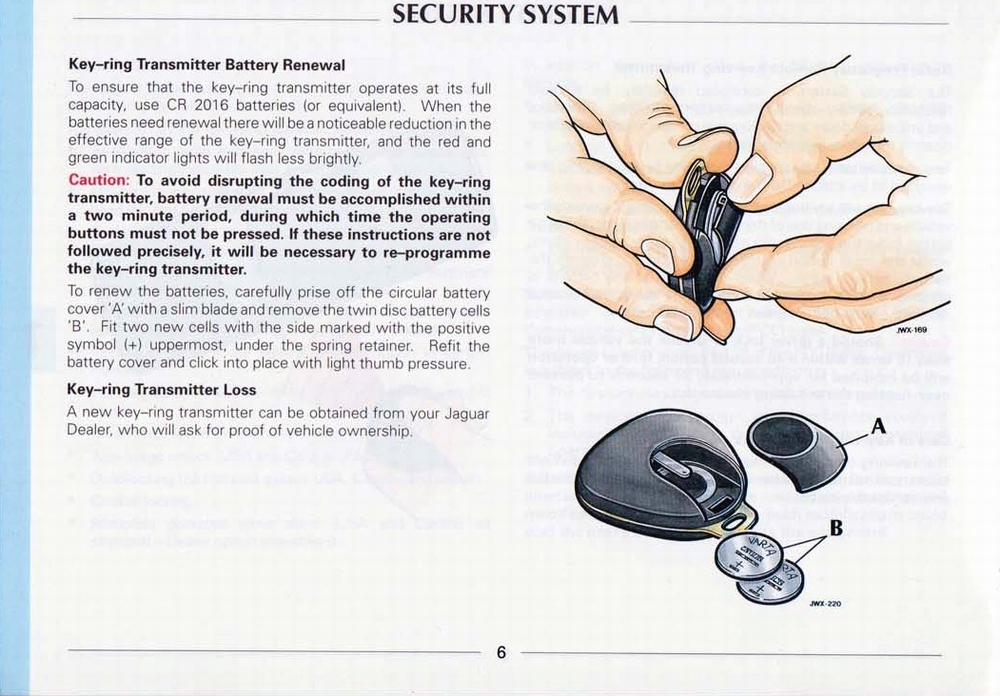
(click on the image to enlarge it)
Please follow this link New Member Area - Intro a MUST - Jaguar Forums - Jaguar Enthusiasts Forum to the New Member Area - Intro a MUST forum and post some info about yourself and your vehicle for all members to see. In return you'll get a proper welcome and some useful advice about posting to the forum.
Graham


Senior Member

Joined: Aug 2016
Posts: 375
Likes: 109
From: Orlando,Florida 32824
If it's the rubber pads on the remote that your talking about then all you do is use something like a small pick or paper clip to remove the old ones and the new ones just get put on by pushing them in place and working the edge with the same small pick or clip until the seat in place.

Senior Member
Joined: Jul 2012
Posts: 232
Likes: 240
From: Peregian Springs Qld 4573
Instead of spending a great deal of time getting nowhere with these 20 yr old remotes, might I suggest you read the attached copy of my article.
I have had this solution working most satisfactorily for over a year.
Thanks
John Herbert
I have had this solution working most satisfactorily for over a year.
Thanks
John Herbert
Junior Member
Joined: Nov 2016
Posts: 7
Likes: 0
From: Long Beach, CA
 Key FOB replacement Buttons
If it's the rubber pads on the remote that your talking about then all you do is use something like a small pick or paper clip to remove the old ones and the new ones just get put on by pushing them in place and working the edge with the same small pick or clip until the seat in place.
Not sure if this info has been posted before, but I could find nothing here about it.
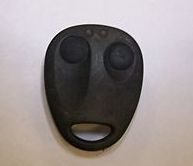
Anyway….I could not bring myself to purchase a replacement remote for my XJ6 when I found info that the Saab 900 remote will work just like Jaguar’s.
Wasn’t sure if it would work, so found one on eBay for $20 (SAAB LTQFM433 Factory OEM KEY FOB) and took a chance, and walla! Received today and just finished programming it to the car and it works just like my old one.
Hope this helps someone else out there, I just purchased two more from the same seller!
Anyway….I could not bring myself to purchase a replacement remote for my XJ6 when I found info that the Saab 900 remote will work just like Jaguar’s.
Wasn’t sure if it would work, so found one on eBay for $20 (SAAB LTQFM433 Factory OEM KEY FOB) and took a chance, and walla! Received today and just finished programming it to the car and it works just like my old one.
Hope this helps someone else out there, I just purchased two more from the same seller!
Have you had any problems with your IAC motor?,


Veteran Member
Joined: Dec 2010
Posts: 2,125
Likes: 279
From: Holly Lake Ranch, Texas
Boy you got a deal my Friend. I just tried that and the one he had was $175 well used and unique to the 95 year. I'll keep using the key.

Veteran Member
Joined: Mar 2013
Posts: 1,027
Likes: 281
From: Hong Kong
Read Post #4 of this thread. There are two frequencies for X300 in the US, 315 and 433 MHz, and the majority has 433 MHz. Mine in Hong Kong uses 314 MHz. The frequency spec is found on a small sticker on the back cover of the original key fob (if you still have one, or if the sticker is still intact), at the back of the rear window, and on the Security Lock Control Module (SLCM). Some former owners might have changed the frequency by replacing the SLCM.



Member
Joined: Jan 2018
Posts: 60
Likes: 10
From: San Diego, CA
Thanks, thought all XJ6's were the same model. I didn't see anything referencing XJ40, so I am assuming this forum (Jaguar Models ( Classics ) > XJ6 & XJ12 Series I, II & III)
Leo
Leo


Veteran Member
Joined: Dec 2019
Posts: 3,695
Likes: 1,223
Good News. I took a chance and purchased one of the following "Code Learning" 433mhz Fobs and it worked like a charm. But this is ONLY for those with at least one currently working Fob. Total cost $13 shipped from UK to US.
Universal Garage Door Cloning Remote Control Key Fob 433MHz Gate Copy Code New | eBay
!~~60_57.JPG)
Universal Garage Door Cloning Remote Control Key Fob 433MHz Gate Copy Code New | eBay