When you click on links to various merchants on this site and make a purchase, this can result in this site earning a commission. Affiliate programs and affiliations include, but are not limited to, the eBay Partner Network.
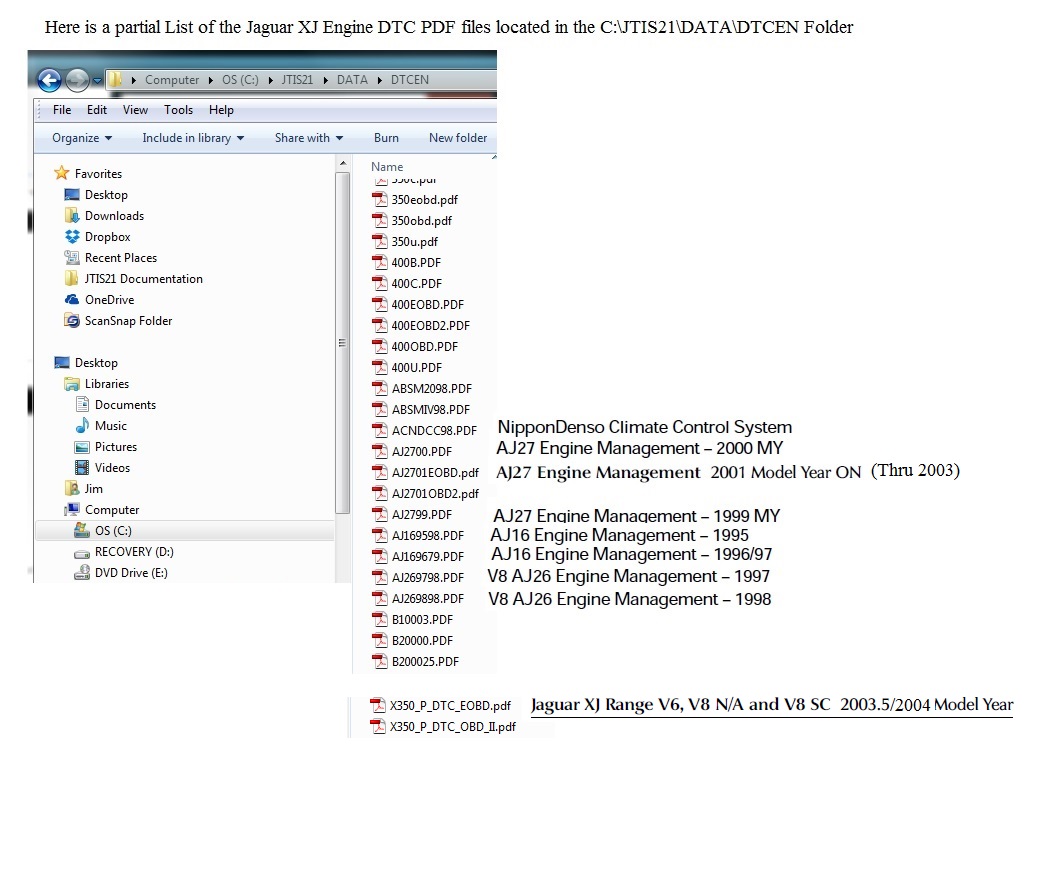
Try opening some of the DTC summary PDF files directly from the C:\JTIS21\DATA\DTCEN folder using Adobe Reader.
If you can open them, then there is a problem with your JTIS software install, otherwise there is a different problem with your PC.
Here is a JPEG file (I created) partial listing of that folder showing the PDF files in that folder (I added the model year and model type next to the PDF file name:
Jim Lombardi
Last edited by jimlombardi; Nov 14, 2014 at 07:08 PM.
jimlombardi, what a fab tool JTIS21 is! I wasn't sure at first if it would run a Windows 10 x64Bit machine, but with some wangling I have it running fine, including ALL the PDF's for maintenance, battery care etc.
After first loading the Program, it kept crashing as soon as I clicked on 'Service' and then it crashed out. As is pointed out so many times it was the DAO350.dll problem, the 'Setup' in DAO Directory on Disk 1 wouldn't work for me saying "not available for this machine".
So I Googled 'DAO350 for Windows 10' and came up with the following site where it can be downloaded and the site also includes 5 different methods for installing DAO350 and making it work on a x64Bit machine (there's some very useful info above from Bill Thompson, Post #44). Download Dao350.dll for Windows 10, 8.1, 8, 7, Vista and XP
I used 'Method 1' and kept getting this error
So I tried the other Methods too, I honestly don't know which Method worked, but after restarting the computer following each Method, it worked... except for the PDF's!
Then I found a download for Acrobat X, loaded it... and yes... it does work on Windows 10 64Bit, even though I have Acrobat XI installed, though I did have to make Acrobat X my default viewer (I just use run Acrobat XI as and when needed).
I'm not a computer genius, but there was a smile when it all came up and working great, along with the 2.5k page Manual, it makes almost every job possible? I would like to add my thanks for all your hard work on this
Got the whole JTIS21 running on Windows 10 x64bit, runs great. Only problem I have is the help files are unavailable, the Windows 8.1 Help-File download won't run on my system... any ideas anyone?
jimlombardi, what a fab tool JTIS21 is! I wasn't sure at first if it would run a Windows 10 x64Bit machine, but with some wangling I have it running fine, including ALL the PDF's for maintenance, battery care etc.
After first loading the Program, it kept crashing as soon as I clicked on 'Service' and then it crashed out. As is pointed out so many times it was the DAO350.dll problem, the 'Setup' in DAO Directory on Disk 1 wouldn't work for me saying "not available for this machine".
So I Googled 'DAO350 for Windows 10' and came up with the following site where it can be downloaded and the site also includes 5 different methods for installing DAO350 and making it work on a x64Bit machine (there's some very useful info above from Bill Thompson, Post #44). Download Dao350.dll for Windows 10, 8.1, 8, 7, Vista and XP
I used 'Method 1' and kept getting this error
So I tried the other Methods too, I honestly don't know which Method worked, but after restarting the computer following each Method, it worked... except for the PDF's!
Then I found a download for Acrobat X, loaded it... and yes... it does work on Windows 10 64Bit, even though I have Acrobat XI installed, though I did have to make Acrobat X my default viewer (I just use run Acrobat XI as and when needed).
I'm not a computer genius, but there was a smile when it all came up and working great, along with the 2.5k page Manual, it makes almost every job possible? I would like to add my thanks for all your hard work on this
I followed the set up as described above. I used the download from the link. It worked using the first method. I have not used Adobe Reader X as I need Reader DC on this machine. So I cannot open the JTIS pdf files. But I will install Reader X and JTIS on a 64 bit Windows 7 laptop.
Sorry to necro an old post, but I'm almost 3 hrs into this after a 16 hr work day & I'm done messing w/it!
Anyone recommend a link/resource where an exhausted & frustrated computer illiterate idiot like myself can just pay for & download a PDF service manual for my 1998 XJR? Thanks in advance.
*Never mind. I went to the Dropbox link & it downloaded perfectly! Thanks for sharing!
Last edited by Jagustar; Aug 31, 2020 at 09:11 PM.
Reason: Problem solved. Downloaded w/Dropbox link.