When you click on links to various merchants on this site and make a purchase, this can result in this site earning a commission. Affiliate programs and affiliations include, but are not limited to, the eBay Partner Network.
Hi fellow Jaguar friends...im new to the forums and was wondering if anyone can help me with my problem.
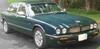
I have a 99 Jaguar xj8 vdp and problem is....
1) When i lock the car using the key fob...the gas door and trunk will lock but none of the doors.
2) When i lock the car using the actual key...the driver's door, gas, and trunk will lock but none of the passenger doors will
3) With the car running...when i push on the dash lock/unlock button nothing happens but when i hold it down for a sec...i can hear a click sound at each door but doors will not lock.
4) I can manually push down and pull up lock at each door.
If someone can please help me with this issue it would be greatly appreciated. Thanks
Thanks for the reply dean...
What exactly is a hard reset?
I just pulled the battery out for about 2 hours and replaced it with a brand new one if that helps with anything...
You can research the forum for more information but it basically reboots the computers. The reset can be done by removing the ground strap from the negative post of the battery and touching it to the positive post on the battery for approximately 30 seconds. You probably will loose some memory settings for things like the seats and mirrors but you can reprogram them.
Last edited by deancantrell; Mar 25, 2016 at 07:44 PM.
Reason: Added information
You can research the forum for more information but it basically reboots the computers. The reset can be done by removing the ground strap from the negative post of the battery and touching it to the positive post on the battery for approximately 30 seconds.
Ok....i'll go ahead and try it tomorrow. Hopefully it'll fix my problem
Here is a copy of probably the best DIY on hard reset post (created by forum member SuperSport) Proper Reset
This is the post contents:
While a Hard Reset is very easy to do, getting the connections wrong can have catastrophic/dangerous results, so here is how it's done safely.
1. Turn Key OFF
2. Remove Negative Battery Terminal from the Negative Battery Post (10mm Wrench)
3. Turn Key ON
4. Touch Negative Terminal End to Positive Terminal End and hold there for 15 'ish seconds (Positive Terminal will still be connected to Positive Battery Post)
5. Turn Key OFF
6. Reconnect Negative Battery Terminal back to Negative Battery Post
NOTICE: On First Start after the Hard Reset, let the car idle for a minute or two without touching throttle. This allows the computers to recalculate the throttle position, etc... Also, the car may drive differently for an hour or so while it's relearning your driving habits.
See Attached Photo showing Correct Short for Hard Reset NOTICE: NOTHING CONNECTED TO NEGATIVE TERMINAL
actual full - webpage address (you will need to add the www. before the jaguarforums)
***jaguarforums.com/forum/xj-xj8-xjr-x308-27/hard-reset-38112/#post702404
hope this helps
Jim Lombardi
ps - if you cannot view the photo, you can use the following weblink to my dropbox to view it: (note when dropbox opens - if it asks you to join dropbox - just use the option to view the photo file on the lower section of the webpage)
Here is a copy of probably the best DIY on hard reset post (created by forum member SuperSport) Proper Reset
This is the post contents:
While a Hard Reset is very easy to do, getting the connections wrong can have catastrophic/dangerous results, so here is how it's done safely.
1. Turn Key OFF
2. Remove Negative Battery Terminal from the Negative Battery Post (10mm Wrench)
3. Turn Key ON
4. Touch Negative Terminal End to Positive Terminal End and hold there for 15 'ish seconds (Positive Terminal will still be connected to Positive Battery Post)
5. Turn Key OFF
6. Reconnect Negative Battery Terminal back to Negative Battery Post
NOTICE: On First Start after the Hard Reset, let the car idle for a minute or two without touching throttle. This allows the computers to recalculate the throttle position, etc... Also, the car may drive differently for an hour or so while it's relearning your driving habits.
See Attached Photo showing Correct Short for Hard Reset NOTICE: NOTHING CONNECTED TO NEGATIVE TERMINAL
actual full - webpage address (you will need to add the www. before the jaguarforums)
***jaguarforums.com/forum/xj-xj8-xjr-x308-27/hard-reset-38112/#post702404
hope this helps
Jim Lombardi
ps - if you cannot view the photo, you can use the following weblink to my dropbox to view it: (note when dropbox opens - if it asks you to join dropbox - just use the option to view the photo file on the lower section of the webpage)
actual full - webpage address (you will need to add the www. before the dropbox)
***dropbox.com/s/kpuec9oki60idck/hard%20reset%20photo.jpg?dl=0
Thanks a lot for the tip Jim...it was really helpful. So i did the hard reset and i still have the same problem. There's still the clicking sound at each door when locking/unlocking with the key/fob/dash button. Any other suggestions would be helpful please.
(Although the hard reset did have my trunk lights working again : )
Here is a copy of probably the best DIY on hard reset post (created by forum member SuperSport) Proper Reset
This is the post contents:
While a Hard Reset is very easy to do, getting the connections wrong can have catastrophic/dangerous results, so here is how it's done safely.
1. Turn Key OFF
2. Remove Negative Battery Terminal from the Negative Battery Post (10mm Wrench)
3. Turn Key ON
4. Touch Negative Terminal End to Positive Terminal End and hold there for 15 'ish seconds (Positive Terminal will still be connected to Positive Battery Post)
5. Turn Key OFF
6. Reconnect Negative Battery Terminal back to Negative Battery Post
NOTICE: On First Start after the Hard Reset, let the car idle for a minute or two without touching throttle. This allows the computers to recalculate the throttle position, etc... Also, the car may drive differently for an hour or so while it's relearning your driving habits.
See Attached Photo showing Correct Short for Hard Reset NOTICE: NOTHING CONNECTED TO NEGATIVE TERMINAL
actual full - webpage address (you will need to add the www. before the jaguarforums)
***jaguarforums.com/forum/xj-xj8-xjr-x308-27/hard-reset-38112/#post702404
hope this helps
Jim Lombardi
ps - if you cannot view the photo, you can use the following weblink to my dropbox to view it: (note when dropbox opens - if it asks you to join dropbox - just use the option to view the photo file on the lower section of the webpage)
actual full - webpage address (you will need to add the www. before the dropbox)
***dropbox.com/s/kpuec9oki60idck/hard%20reset%20photo.jpg?dl=0
Thanks for the tip Jim. So i've done the hard reset and still...the problem is the same. Although it did get the trunk lights workin again. Would it be the lock actuators? Im not sure what to do next.
There is a door lock relay that might be the issue. It is located in the LH Heelboard. Behind the left-hand side rear seat heelboard -Door lock: micro-relay.
There is a door lock relay that might be the issue. It is located in the LH Heelboard. Behind the left-hand side rear seat heelboard -Door lock: micro-relay.
Here is also a fuse for the door lock relay and door locking actuator - located in the rear compartment - right hand heelboard
Fuse #2 15 amp
Thanks again Jim. I'm an idiot for not checking the fuse in rh heelboard....i pulled it and sure enough it was burnt. I replaced it and power door locks are working. The driver's and rear passenger lock/unlock fine but for some reason the passenger front and driver rear won't lock. I actually hear the lock actuator working on the driver rear but no sound from the passenger front. I also locked the driver rear manually and unlocked with the fob and it actually unlocks. I just wanna thank everyone for their input.
I know this is an old post but hoping it’s still being viewed…
my wife’s 1998 XJ8 VDP has the same issue with all door locks and the fuel door. Remote FOB actuates locking and unlocking of the trunk and the security system. I’ve tried the rest as described above with no results. I did replace the 15amp starboard heel fuse box associated with the locks. It was blown. I replaced it and again, no results. That’s kind of strange but it was the first thing I did. Conditions remain as it was originally. The dash message at the speedometer window says “BOOT OPEN” but I have triple checked to insure everything is cinched up and closed tight.
she can use the car and can lock/unlock manually but it’s a PITA.
ANY HELP IS CERTAINLY APPRECIATED.
It’s possible given the age of your car that all the door locks need to be pulled out of the doors and throughly cleaned and lubricated. I’m not saying that’s exactly your issue but one worth looking into. I know there’s a microswitch that can also get stuck in the door locks and not turn on the puddle lights with the doors open. Same scenario, needs cleaned and lubricated.
With a boot open signal, I would open the trunk (boot to some of you), and examine carefully all the wiring in the loom running along the right side trunk hinge.
Khartz, thanks for the feedback. I will make it a point to check the harness. I did a search for a “Boot” micro switch or other sensor that disconnected or inop to no avail. Can you tell me where the Boot switch or sensor is located?
Thanks again.
If I new where the switch is, I’d be able to check connection to the switch which would (to me) be the most obvious location of possible connection failure.



 Need help with door locks PLEASE...