


New JTIS21 CD download with download instructions


Thread Starter
|
Veteran Member


Joined: Aug 2010
Posts: 2,636
Likes: 1,636
From: Southington CT

Bob
It looks like you must have a second jjtis.ini file or several jjtis.ini files on your PC for this to be happening.
Do a search of your C drive for all the jjtis.ini files and look at the contents of each of them.
Jim Lombardi
It looks like you must have a second jjtis.ini file or several jjtis.ini files on your PC for this to be happening.
Do a search of your C drive for all the jjtis.ini files and look at the contents of each of them.
Jim Lombardi
Last edited by jimlombardi; Jan 4, 2013 at 08:04 AM.


Member
Joined: Nov 2011
Posts: 49
Likes: 2
From: Pennsylvania, USA
Jim,
I found two jjtis.ini files in different locations within the Windows folder. I also found a shortcut with the same name??
Anyway, I disabled the shortcut and one of the .ini files. It now seems to be working.
Thanks for your help and patience!!!!!!!!
I found two jjtis.ini files in different locations within the Windows folder. I also found a shortcut with the same name??
Anyway, I disabled the shortcut and one of the .ini files. It now seems to be working.
Thanks for your help and patience!!!!!!!!


Senior Member
Joined: Feb 2009
Posts: 629
Likes: 120
From: California, USA
I've uploaded the files to multiple sharing sites. My favorite is GameFront, just because it's fast. They are a pain to use, but FREE. You can get to the files here:
Download links for JTIS_21_CD.part1.exe - Mirrorcreator - Upload files to multiple hosts
Download links for JTIS_21_CD.part2.rar - Mirrorcreator - Upload files to multiple hosts
Download links for JTIS_21_CD.part3.rar - Mirrorcreator - Upload files to multiple hosts
After clicking above links, give that page a moment to load the other links. They will show up at the bottom of the page.
Use any combination of the sites since all three files are the same on any of the servers.
Sorry about all the ads and pop ups, but that's the world of FREE file hosting. Make sure your popup blocker is turned on, and even then, some get by.
PS: Be careful NOT to download or install ANYTHING listed on any of those pages. ONLY download the file you are looking for.
When you see the following screen, hold the shift key when clicking the link. That will allow it past the PopUp blocker.

Download links for JTIS_21_CD.part1.exe - Mirrorcreator - Upload files to multiple hosts
Download links for JTIS_21_CD.part2.rar - Mirrorcreator - Upload files to multiple hosts
Download links for JTIS_21_CD.part3.rar - Mirrorcreator - Upload files to multiple hosts
After clicking above links, give that page a moment to load the other links. They will show up at the bottom of the page.
Use any combination of the sites since all three files are the same on any of the servers.
Sorry about all the ads and pop ups, but that's the world of FREE file hosting. Make sure your popup blocker is turned on, and even then, some get by.
PS: Be careful NOT to download or install ANYTHING listed on any of those pages. ONLY download the file you are looking for.
When you see the following screen, hold the shift key when clicking the link. That will allow it past the PopUp blocker.
Last edited by SuperSport; Mar 15, 2013 at 02:42 PM.
Thread Starter
|
Veteran Member
Joined: Aug 2010
Posts: 2,636
Likes: 1,636
From: Southington CT
I put the JTIS archive files up on my dropbox account. I have had no problems with the downloads on the dropbox.com site.
When the dropbox webpage opens, just click on the download button and use the run option on the popup.
Here are the weblinks to the all models (JTIS21) archives files.
Part1.exe is 190 mb (195313 kb)
https://www.dropbox.com/s/fvdg6rsl63...20CD.part1.exe
Part2.rar is 190 mb (195313 kb)
https://www.dropbox.com/s/bwx4uch8m9...20CD.part2.rar
Part3.rar is 58.9 mb (60318 kb)
https://www.dropbox.com/s/xk49mq38ch...20CD.part3.rar
Jim Lombardi
When the dropbox webpage opens, just click on the download button and use the run option on the popup.
Here are the weblinks to the all models (JTIS21) archives files.
Part1.exe is 190 mb (195313 kb)
https://www.dropbox.com/s/fvdg6rsl63...20CD.part1.exe
Part2.rar is 190 mb (195313 kb)
https://www.dropbox.com/s/bwx4uch8m9...20CD.part2.rar
Part3.rar is 58.9 mb (60318 kb)
https://www.dropbox.com/s/xk49mq38ch...20CD.part3.rar
Jim Lombardi
Last edited by jimlombardi; Mar 20, 2013 at 02:05 PM. Reason: Fixed weblink to Part3.rar to download file


Senior Member
Joined: Feb 2009
Posts: 629
Likes: 120
From: California, USA
I believe it was admin and 123
EDIT: Sorry, I was thinking of The VW parts Catalogue. I don't remember JTIS having a user or password to use it. The Jaguar Parts Catalogue might though.
EDIT: Sorry, I was thinking of The VW parts Catalogue. I don't remember JTIS having a user or password to use it. The Jaguar Parts Catalogue might though.
Last edited by SuperSport; Mar 20, 2013 at 12:06 PM.

Senior Member
Joined: Jan 2013
Posts: 296
Likes: 43
From: Charleston SC
Am I the only one getting this?
The Part 1 and Part 2 worked fine.
Thread Starter
|
Veteran Member
Joined: Aug 2010
Posts: 2,636
Likes: 1,636
From: Southington CT
Robert
I fixed the weblink for Part 3 in post# 70 a minute ago.
Here is the corrected weblink:
https://www.dropbox.com/s/xk49mq38ch...20CD.part3.rar
Jim Lombardi
I fixed the weblink for Part 3 in post# 70 a minute ago.
Here is the corrected weblink:
https://www.dropbox.com/s/xk49mq38ch...20CD.part3.rar
Jim Lombardi

Senior Member
Joined: Apr 2013
Posts: 250
Likes: 10
From: memphis tn
jim i downloaded the files to drop box and now i can't get them to open cause my machine doesn't open rar files . i got widows xp pro on a HP.also i have the jtis cd and can't get it to work either. maybe i'm too dumb or something
Senior Member
Joined: Feb 2009
Posts: 629
Likes: 120
From: California, USA
Thread Starter
|
Veteran Member
Joined: Aug 2010
Posts: 2,636
Likes: 1,636
From: Southington CT
Method to determine Windows XP 32 bit or 64 bit
Hi Jon
You do not need a program to open theses JTIS archive files, the first JTIS archive file has a exe file extension. You just click on it to run it and it extracts all the files in the 3 JTIS archive files.
You need to determine if your PC with Windows XP PRO has a (Microsoft) 32 bit or 64 bit operation system
Windows XP has a command that will open a system info utilty that has the operating system info.
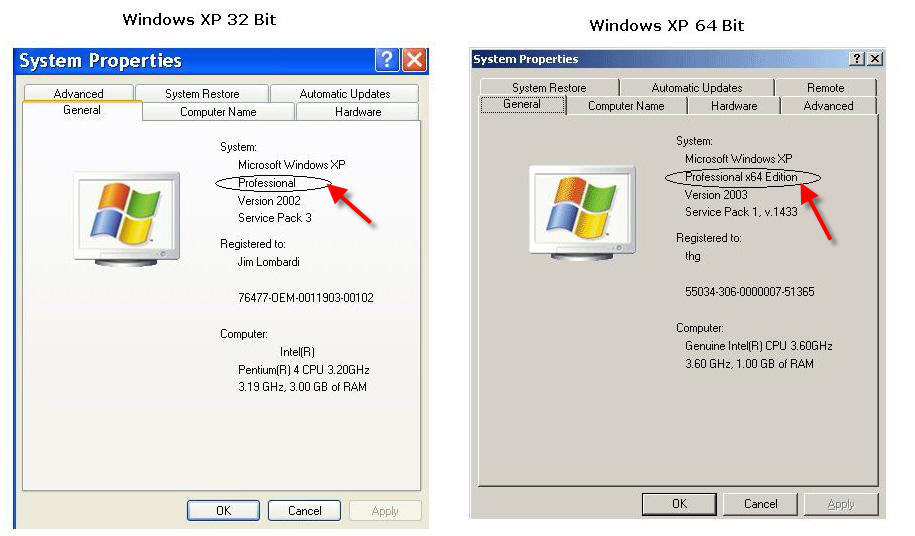
Here are the instructions on how to run it:
Microsoft Windows XP Professional
1. Click Start, click Run, type sysdm.cpl, and then click OK.
2. Click the General tab. The operating system appears as follows:
• For a 64-bit version operating system: Microsoft Windows XP Professional x64 Edition Version < Year> appears under System.
bit version operating system: Microsoft Windows XP Professional Version< Year> appears under System.
Note <Year> is a placeholder for a year.
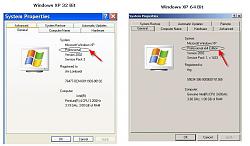
Here is a JPEG file I created that shows the screenshots 32 bit and 64 bit (System Utility Genearal tab opened) Just on the small image below to open the attachment to a sharper better view of it:
Jim Lombardi
You do not need a program to open theses JTIS archive files, the first JTIS archive file has a exe file extension. You just click on it to run it and it extracts all the files in the 3 JTIS archive files.
You need to determine if your PC with Windows XP PRO has a (Microsoft) 32 bit or 64 bit operation system
Windows XP has a command that will open a system info utilty that has the operating system info.
Here are the instructions on how to run it:
Microsoft Windows XP Professional
1. Click Start, click Run, type sysdm.cpl, and then click OK.
2. Click the General tab. The operating system appears as follows:
• For a 64-bit version operating system: Microsoft Windows XP Professional x64 Edition Version < Year> appears under System.
bit version operating system: Microsoft Windows XP Professional Version< Year> appears under System.
Note <Year> is a placeholder for a year.
Here is a JPEG file I created that shows the screenshots 32 bit and 64 bit (System Utility Genearal tab opened) Just on the small image below to open the attachment to a sharper better view of it:
Jim Lombardi
Last edited by jimlombardi; Apr 20, 2013 at 06:15 AM.
Thread Starter
|
Veteran Member
Joined: Aug 2010
Posts: 2,636
Likes: 1,636
From: Southington CT
Here is what you need to know before you download and install the JTIS21 software
First you need to determine whether your PC has a 32 bit or 64 bit Operating System.
Update: here is a keyboard shortcut - hold down the window logo key then press the break key -- it will bring up the PC system screen
Method to determine Windows XP 32 bit or 64 bit
Look at this JPEG (has instructions/illustrations) Click on the image when the dropbox webpage to get a better view:
https://www.dropbox.com/s/0zo00wh83i...20bit%20OS.jpg
Method to determine Windows 7 (32 bit or 64 bit Operating System):
Look at this JPEG (has instructions/illustrations) Click on the image when the dropbox webpage to get a better view:
https://www.dropbox.com/s/khcyplnz98...20bit%20OS.jpg
This PDF covers install on a 64 bit Windows 7 Operating System (also the other windows 64 bit OS - Windows 8, Windows 8.1, XP, and Vista):
https://www.dropbox.com/s/fe6jkw5py3...bit%20v1.6.pdf
If you have windows 8 64 bit you may have to download the microsoft 32 bit help software for windows 8
https://www.dropbox.com/s/0wtvz3ux3s...917607-x64.msu
If you have windows 8.1 64 bit you may have to download the microsoft 32 bit help software for windows 8.1
https://www.dropbox.com/s/fehtnmqpc9...917607-x64.msu
PDF file for JTIS21 install on 32 bit Windows Operating systems (Windows 8, Windows 7, XP, and Vista):
https://www.dropbox.com/s/j6wjvc5esl...%20systems.pdf
I put the JTIS archive files up on my dropbox account. I have had no problems with the downloads on the dropbox.com site.
When the dropbox webpage opens, just click on the download button and use the run option on the popup.
Here are the weblinks to the all models (JTIS21) archives files.
Part1.exe is 190 mb (195313 kb)
https://www.dropbox.com/s/fvdg6rsl63...CD.part1.exe?m
Part2.rar is 190 mb (195313 kb)
https://www.dropbox.com/s/bwx4uch8m9...CD.part2.rar?m
Part3.rar is 58.9 mb (60318 kb)
https://www.dropbox.com/s/xk49mq38ch...CD.part3.rar?m
Decide where to place the JTIS files after they are extracted (CD or on PC hard drive).
This PDF describes both the CD and Hard drive processes:
https://www.dropbox.com/s/dt47u5qcx5...structions.pdf
Jim Lombardi
First you need to determine whether your PC has a 32 bit or 64 bit Operating System.
Update: here is a keyboard shortcut - hold down the window logo key then press the break key -- it will bring up the PC system screen
Method to determine Windows XP 32 bit or 64 bit
Look at this JPEG (has instructions/illustrations) Click on the image when the dropbox webpage to get a better view:
https://www.dropbox.com/s/0zo00wh83i...20bit%20OS.jpg
Method to determine Windows 7 (32 bit or 64 bit Operating System):
Look at this JPEG (has instructions/illustrations) Click on the image when the dropbox webpage to get a better view:
https://www.dropbox.com/s/khcyplnz98...20bit%20OS.jpg
This PDF covers install on a 64 bit Windows 7 Operating System (also the other windows 64 bit OS - Windows 8, Windows 8.1, XP, and Vista):
https://www.dropbox.com/s/fe6jkw5py3...bit%20v1.6.pdf
If you have windows 8 64 bit you may have to download the microsoft 32 bit help software for windows 8
https://www.dropbox.com/s/0wtvz3ux3s...917607-x64.msu
If you have windows 8.1 64 bit you may have to download the microsoft 32 bit help software for windows 8.1
https://www.dropbox.com/s/fehtnmqpc9...917607-x64.msu
PDF file for JTIS21 install on 32 bit Windows Operating systems (Windows 8, Windows 7, XP, and Vista):
https://www.dropbox.com/s/j6wjvc5esl...%20systems.pdf
I put the JTIS archive files up on my dropbox account. I have had no problems with the downloads on the dropbox.com site.
When the dropbox webpage opens, just click on the download button and use the run option on the popup.
Here are the weblinks to the all models (JTIS21) archives files.
Part1.exe is 190 mb (195313 kb)
https://www.dropbox.com/s/fvdg6rsl63...CD.part1.exe?m
Part2.rar is 190 mb (195313 kb)
https://www.dropbox.com/s/bwx4uch8m9...CD.part2.rar?m
Part3.rar is 58.9 mb (60318 kb)
https://www.dropbox.com/s/xk49mq38ch...CD.part3.rar?m
Decide where to place the JTIS files after they are extracted (CD or on PC hard drive).
This PDF describes both the CD and Hard drive processes:
https://www.dropbox.com/s/dt47u5qcx5...structions.pdf
Jim Lombardi
Last edited by jimlombardi; Feb 20, 2014 at 01:32 PM.

