


Any info on this! (reverse camera)


Thread Starter
|
Veteran Member
Joined: Apr 2014
Posts: 2,228
Likes: 599
From: Ireland
 Any info on this! (reverse camera)
Came across this video on a guy fitting a rear backup camera to a xkr, he explains how it works and shows where he mounted the camera and where the camera wire is going. He however doesn't tell how to connect the camera to the navigation box to work it, any clues, will this work on early models

Veteran Member


Joined: Jul 2016
Posts: 1,435
Likes: 837
From: Vancouver BC
It's not obvious -
I checked the wiring diagram for any signs of a video signal system - not found anything yet
This is from the service manwell (nav computer next to the DVD in the trunk)
The navigation computer incorporates the following:
· GPS receiver
· VICS receiver (Japan only)
· Traffic Message Channel (TMC) receiver
The navigation computer is connected to the MOST bus. The navigation computer generates its own graphics and transmits them to the TSD on a dedicated GVIF (Gigabyte video Interface) bus.
From Wiki:
Gigabit Video Interface (GVIF) is a digital video serial interface developed by Sony in 1996 for high quality uncompressed video transmission from digital video.
One would assume the backup camera uses the GVIF system.
He does give a number to contact.
I checked the wiring diagram for any signs of a video signal system - not found anything yet
This is from the service manwell (nav computer next to the DVD in the trunk)
The navigation computer incorporates the following:
· GPS receiver
· VICS receiver (Japan only)
· Traffic Message Channel (TMC) receiver
The navigation computer is connected to the MOST bus. The navigation computer generates its own graphics and transmits them to the TSD on a dedicated GVIF (Gigabyte video Interface) bus.
From Wiki:
Gigabit Video Interface (GVIF) is a digital video serial interface developed by Sony in 1996 for high quality uncompressed video transmission from digital video.
One would assume the backup camera uses the GVIF system.
He does give a number to contact.
Veteran Member
Joined: Jul 2016
Posts: 1,435
Likes: 837
From: Vancouver BC
Found this on GVIF for Jag/LR
https://pdf.ampire.de/caraudiosystem...g_VL2-GVIF.pdf
How to install GVIF v7.2 to a Range Rover Sport SC '05-'09
https://pdf.ampire.de/caraudiosystem...g_VL2-GVIF.pdf
How to install GVIF v7.2 to a Range Rover Sport SC '05-'09
Thread Starter
|
Veteran Member
Joined: Apr 2014
Posts: 2,228
Likes: 599
From: Ireland
It's not obvious -
I checked the wiring diagram for any signs of a video signal system - not found anything yet
This is from the service manwell (nav computer next to the DVD in the trunk)
The navigation computer incorporates the following:
· GPS receiver
· VICS receiver (Japan only)
· Traffic Message Channel (TMC) receiver
The navigation computer is connected to the MOST bus. The navigation computer generates its own graphics and transmits them to the TSD on a dedicated GVIF (Gigabyte video Interface) bus.
From Wiki:
Gigabit Video Interface (GVIF) is a digital video serial interface developed by Sony in 1996 for high quality uncompressed video transmission from digital video.
One would assume the backup camera uses the GVIF system.
He does give a number to contact.
I checked the wiring diagram for any signs of a video signal system - not found anything yet
This is from the service manwell (nav computer next to the DVD in the trunk)
The navigation computer incorporates the following:
· GPS receiver
· VICS receiver (Japan only)
· Traffic Message Channel (TMC) receiver
The navigation computer is connected to the MOST bus. The navigation computer generates its own graphics and transmits them to the TSD on a dedicated GVIF (Gigabyte video Interface) bus.
From Wiki:
Gigabit Video Interface (GVIF) is a digital video serial interface developed by Sony in 1996 for high quality uncompressed video transmission from digital video.
One would assume the backup camera uses the GVIF system.
He does give a number to contact.

Veteran Member

Joined: Apr 2013
Posts: 11,831
Likes: 6,324
From: Kaysville, Utah, US
I'm still going to wait for white_xkr's version, IF he ever finishes it. I don't want to muck about changing screens and all that nonsense. Who knows, maybe I'll never get a BUC for both those reasons.


Veteran Member
Joined: Jan 2015
Posts: 5,281
Likes: 2,555
From: Naperville, Illinois USA
See this thread:
https://www.jaguarforums.com/forum/xk-xkr-x150-33/hks-camp2-gvif-install-138621/
'flyc2c' gives a great description of his installation of a GVIF for use with an HKS Camp2.
I followed that, and then added a backup camera, as the GVIF used has multiple inputs, one dedicated for a backup camera.
https://www.jaguarforums.com/forum/xk-xkr-x150-33/hks-camp2-gvif-install-138621/
'flyc2c' gives a great description of his installation of a GVIF for use with an HKS Camp2.
I followed that, and then added a backup camera, as the GVIF used has multiple inputs, one dedicated for a backup camera.
Veteran Member
Joined: Jul 2016
Posts: 1,435
Likes: 837
From: Vancouver BC
See this thread:
https://www.jaguarforums.com/forum/x...nstall-138621/
'flyc2c' gives a great description of his installation of a GVIF for use with an HKS Camp2.
I followed that, and then added a backup camera, as the GVIF used has multiple inputs, one dedicated for a backup camera.
https://www.jaguarforums.com/forum/x...nstall-138621/
'flyc2c' gives a great description of his installation of a GVIF for use with an HKS Camp2.
I followed that, and then added a backup camera, as the GVIF used has multiple inputs, one dedicated for a backup camera.

Trending Topics


The touchscreen in the X150 XK it's supposed to be the "same" as the X250 XF and the L359 LR2.
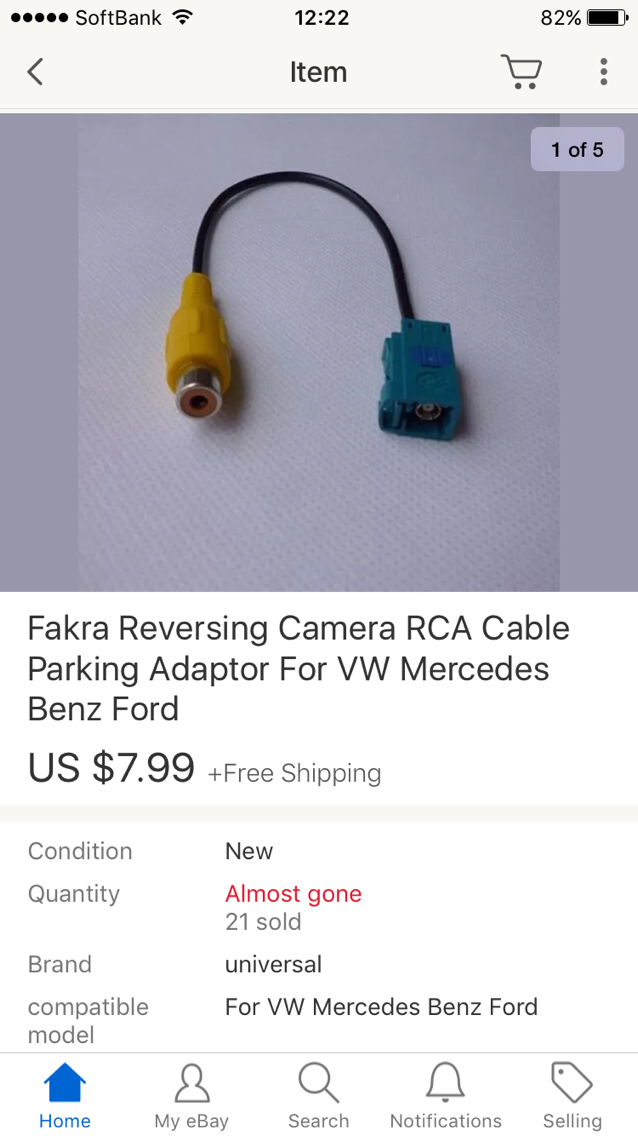
I've checked the physical screen used in the LR2 and it's got a video in connection (Fakra connector) for a reversing camera, even though it was never offered from the factory. The XF did have a reverse camera option.
I'm 99% sure we could connect a factory style camera (any one used in a Jag or Land Rover) to the screen and get it working just by editing the CCF so that the reverse camera is "enabled"
I'm hoping that sooner or later I get hold of Steve_k_xk's car and test this theory out...
EDIT
I just checked out a screen that was pulled from a 2007 X150 XK, it has the Fakra connection for the camera in the back of it just like XF and LR2... first chance I get i'll be trying this out...
I've checked the physical screen used in the LR2 and it's got a video in connection (Fakra connector) for a reversing camera, even though it was never offered from the factory. The XF did have a reverse camera option.
I'm 99% sure we could connect a factory style camera (any one used in a Jag or Land Rover) to the screen and get it working just by editing the CCF so that the reverse camera is "enabled"
I'm hoping that sooner or later I get hold of Steve_k_xk's car and test this theory out...
EDIT
I just checked out a screen that was pulled from a 2007 X150 XK, it has the Fakra connection for the camera in the back of it just like XF and LR2... first chance I get i'll be trying this out...
Last edited by Cambo; Oct 31, 2016 at 08:26 AM.


Veteran Member

Joined: Dec 2008
Posts: 6,451
Likes: 2,582
From: Florida
The touchscreen in the X150 XK it's supposed to be the "same" as the X250 XF and the L359 LR2.
I've checked the physical screen used in the LR2 and it's got a video in connection (Fakra connector) for a reversing camera, even though it was never offered from the factory. The XF did have a reverse camera option.
I'm 99% sure we could connect a factory style camera (any one used in a Jag or Land Rover) to the screen and get it working just by editing the CCF so that the reverse camera is "enabled"
I'm hoping that sooner or later I get hold of Steve_k_xk's car and test this theory out...
EDIT
I just checked out a screen that was pulled from a 2007 X150 XK, it has the Fakra connection for the camera in the back of it just like XF and LR2... first chance I get i'll be trying this out...
I've checked the physical screen used in the LR2 and it's got a video in connection (Fakra connector) for a reversing camera, even though it was never offered from the factory. The XF did have a reverse camera option.
I'm 99% sure we could connect a factory style camera (any one used in a Jag or Land Rover) to the screen and get it working just by editing the CCF so that the reverse camera is "enabled"
I'm hoping that sooner or later I get hold of Steve_k_xk's car and test this theory out...
EDIT
I just checked out a screen that was pulled from a 2007 X150 XK, it has the Fakra connection for the camera in the back of it just like XF and LR2... first chance I get i'll be trying this out...
The cables won't be there in the harness, that's for sure, but running an extra cable is no issue. I helped a guy retrofit a reversing camera to his 2014 LR2 recently, just ran a cable separately, activated the camera in the CCF and bam! reverse camera working.
To edit the CCF you need the dealers diagnostic tool IDS or SDD, and a suitable interface to work with it like a VCM. The later versions of SDD are "locked" that you cannot edit the CCF without a password to activate the Engineering Mode, but there are ways around this.
The CCF is basically all list of the feature and option configurations of the car; everything from the type of engine fitted, to having the mirrors fold in/out. It's how i upgraded the sound system in my LR2 to the Premium Surround, added the bluetooth phone, added DAB digital radio, added the heated seats, etc...
If someone wants to go down this road, 1st of all get hold of the wiring diagrams from the XF, this will show you how the camera is wired up. For the CCF editing there are a number of forum members in the US, UK and elsewhere in the world who have the required equipment to do this.
Have a look at this touchscreen that came out of an XK http://www.ebay.com/itm/09-Jaguar-XK...NXX~6-&vxp=mtr you see the three Fakra connectors in the corner on the back of the screen, one of those is for the camera input.
To edit the CCF you need the dealers diagnostic tool IDS or SDD, and a suitable interface to work with it like a VCM. The later versions of SDD are "locked" that you cannot edit the CCF without a password to activate the Engineering Mode, but there are ways around this.
The CCF is basically all list of the feature and option configurations of the car; everything from the type of engine fitted, to having the mirrors fold in/out. It's how i upgraded the sound system in my LR2 to the Premium Surround, added the bluetooth phone, added DAB digital radio, added the heated seats, etc...
If someone wants to go down this road, 1st of all get hold of the wiring diagrams from the XF, this will show you how the camera is wired up. For the CCF editing there are a number of forum members in the US, UK and elsewhere in the world who have the required equipment to do this.
Have a look at this touchscreen that came out of an XK http://www.ebay.com/itm/09-Jaguar-XK...NXX~6-&vxp=mtr you see the three Fakra connectors in the corner on the back of the screen, one of those is for the camera input.
Last edited by Cambo; Oct 31, 2016 at 05:58 PM.

Veteran Member
Joined: May 2013
Posts: 1,368
Likes: 636
From: tampa, fl
Cambo, you are very knowledgeable! I am fortunate to already have a backup camera on my model.
Question, for my '12 XK the drl is not active. I have sdd loaded and operational but don't know how to turn the led front corners on, read that I have to be switch car to Canadian?
Question, for my '12 XK the drl is not active. I have sdd loaded and operational but don't know how to turn the led front corners on, read that I have to be switch car to Canadian?




Veteran Member
Joined: Apr 2010
Posts: 7,657
Likes: 3,018
From: Arlington VA USA
I spent some time a while back going down this road and could not get it to work. That is not to say it can't be done, I did not determine definitively. I am rooting for you, since I have not delivered on this one.
Veteran Member
Joined: Apr 2013
Posts: 11,831
Likes: 6,324
From: Kaysville, Utah, US
This makes me sad.
Veteran Member
Joined: Dec 2008
Posts: 6,451
Likes: 2,582
From: Florida
Do you know if the option can even be enabled with IDS?