


CarPC installed


Thread Starter
|
Senior Member
Joined: Jul 2011
Posts: 568
Likes: 192
From: Jacksonville
 CarPC installed
Warning, this is a long post, but I thought this might be of interest to many of you, so I included a lot of detail.
I have completed (mostly) the build and installation of my in-car infotainment system, or Car PC. Essentially, I removed the factory head unit, 6 disc CD changer, and amplifier, and installed a computer system which hosts and integrates many entertainment and information functions all within a single interface, with touch screen capability.
Below is a detailed description of the system. I will say up front, this is not for everyone. From the perspective of changing the factory look and configuration of a stock Jaguar, many people would not want to do this, and I understand and appreciate that. Also, this was a LOT of work. I spent about 20 hours of time in prepping the installation, which included: researching software & hardware options, purchasing, and then building the hardware and installing the software, and getting it all configured the way I wanted. I then spent about 12 hours removing the factory stereo, amplifier, cd changer, necessary interior trim, then installing the wiring (VGA/USB & misc cables from trunk to dash) wiring the amps and power etc., and relocating the center console switch panel (I will explain later), and finally, about 5 hours of building from scratch a new “bezel” for the center console. I would say I spent at least 40 hours on this. And BTW, total cost: approx. $1000, possibly more, I don’t really want to add up all the $.
There are several hardware options for such a system, but the 2 main categories are “PC” and “Tablet”. I chose PC mainly because of the flexibility and “front end” integration. This was a personal choice I made. I am sure many people would choose to go with a tablet based system for many reasons, especially ease of installation. As well, I believe that the future of such systems will likely include more functionality from software vendors for tablets, and tablet systems will become more prevalent than they are today.
My PC is built with an Intel Atom system board with built-in everything (VGA, SATA IDE, wired Ethernet, 6 USB ports, High Definition Audio, and more). This is a mini-ITX system board, which is housed in a case approx. 11 inches long, 8 inches wide, 2 inches tall. I have 2 gig ram and an 80 gig SSD hard drive (SSD is more expensive, but much faster, and more durable since there are no moving parts like traditional hard drives). I use a 12 volt to 12 volt intelligent power supply made for car PC’s. This power supply can operate with input voltages from 6 volts to 24 volts; and is designed to handle power spikes. Also, the supply has an input sensor, which when wired to an “ignition on” source, will power up the computer, and when the ignition switch is off, will send a signal to the system board to either gracefully shut down Windows (I am running Windows7) or will go into sleep or hibernation mode, depending on system settings. When in hibernation or sleep mode, the supply also monitors the cars’ battery voltage, and if it drops below a certain level it will force the system board into shutdown and will completely power off the PC to avoid draining the car battery. I have my system set to shut down Windows when the ignition switch is turned off. The power supply has a configurable delay option. Mine is set to wait 20 seconds when the ignition switch is turned off, then it sends a shutdown signal and Windows shuts down normally, and then then the power supply shuts off. I have it set this way because I have been able to configure the PC to be on and working fully in about 17 seconds, which I think is quite reasonable.
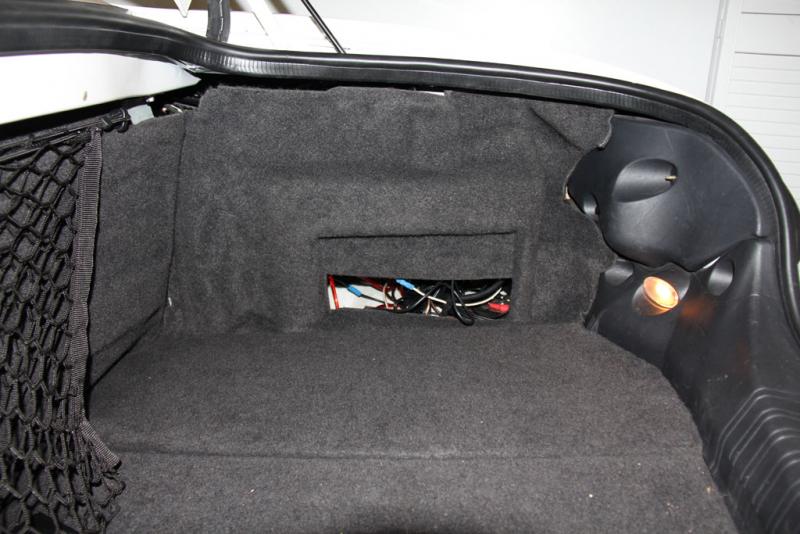
For the radio, I use an HQCT-i USB AM/FM radio. This is a hardware piece mounted inside the PC case and uses one of the internal USB ports. It is not a typical external USB device. I also installed a Garmin 18X USB satellite antenna for GPS, and Garmin Mobile PC software on the PC. Oh, and I had to replace the factory Alpine amplifier in the trunk. I installed two, 200 watt amplifiers, one for the 6 front speakers (2 lower door, 2 dash, 2 tweeters on the doors), and the other amp for the 2 rear speakers. I chose 2 amps so that I have the flexibility to adjust balance front to back, and the amps have I used have built in low pass filters (switchable from normal to low pass). I use the low pass for the rear speakers. Lastly, I used a Lilliput 7 inch 450nit touch screen monitor.
The “front end” software is what integrates all of the application functions into one system, rather than using “windows” to run various functions. I chose to use Centrafuse. There are a few front-end systems out there to choose from. Centrafuse is a combination of several functions into one, for instance: it has a built-in media player, which plays MP3’s (and other music formats) and video. It controls volume and screen brightness. It controls how Windows will act when the ignition switch is off. It also has built-in functionality for Bluetooth support, including hands free phone integration. Centrafuse also integrates many shelf software, such a Garmin Mobile GPS (Centrafuse can be purchased with a NAV module – but I chose to use Garmin). One of the key features of Centrafuse and the integration it offers with these different systems, is that it auto-switches between the different functions as needed. For example, when listening to music, either radio or MP3 etc., and a phone call comes in, it auto-mutes the music, pops up the phone screen showing who is calling (integration to the phone’s address book available) and allows the call to be ignored or answered. If answered, the audio comes through the car speakers. The same thing happens with the GPS. If in navigation mode and the GPS voice routing comes on, Centrafuse mutes all other audio, and pops up the GPS map screen.
Other functions of Centrafuse: with 3G or 4G internet connectivity, it can be set up to read (TTS text to speech) email, txt messaging, etc.; voice commands to control Centrafuse; Integration into a Bluetooth ODBII interface; and much more capability.
As you can see in the photo of the dash where the touch screen is installed, it is located in the space where the factory radio was installed; but also, above the radio is a row of buttons for traction control/heated seats/fog lights, and emergency flashers. That button panel has been relocated to the glove box. Again, I know this may turn off many people, but I felt this was the best option for me. The relocation required me to extend the 19 wire harness by about 18 inches. One by one I spliced in the extension. It took about 2 hours. I don’t mind the switches in the glove box as I don’t use these (although occasionally I would use the fog lights – maybe I can wire these to come on with the headlights).
One question I think may come up...Why didn't I put the screen in the same location as the factory NAV screen? I don't have factory NAV, I have the 3 gauges, which I like. I did purchase from a forum member a factory nav wood bezel, thinking I would install my screen in that location. I even spent the considerable time cutting out that bezel so my screen would fit, however, during the installation/removal of the factory radio, I decided I didn't want my screen that high up. I also thought that the brightness at night may be annoying (even though I can adjust it).
That’s about all for now. I imagine there will be questions, please feel free to ask. Oh, BTW, please don’t beat me up on the cable management in the trunk…I plan to neaten this up once I have everything settled. Also, I will be placing a screen over the cd changer opening (from the inside) of the carpet covering, and I think I will install a 12 volt fan to vent into the trunk.
At youtube, carpc bootup - YouTube I uploaded a movie of the boot up process/time if you want to see it... sorry that the movie is blurry. Also, attached are some pics, one of which is the Centrafuse main startup screen when the Jaguar roar sound comes on. I made this screen, and I customized the primary Centrafuse screen where it says "Jaguar" at the center bottom.

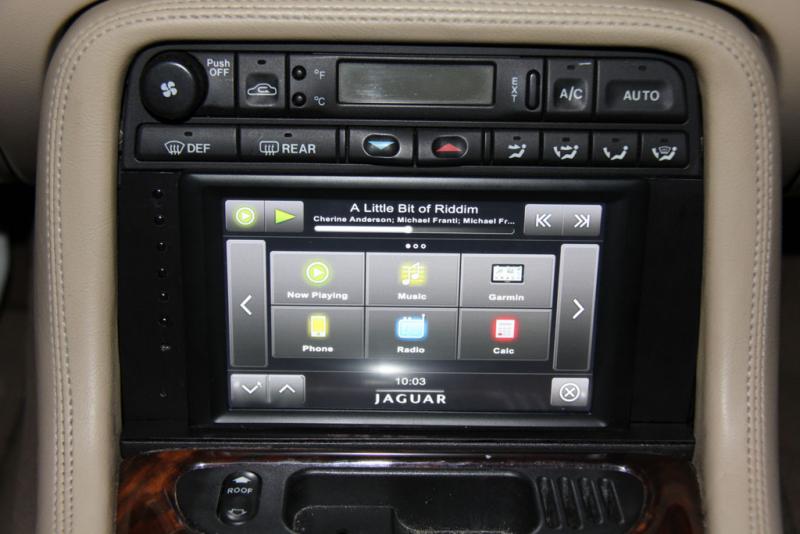

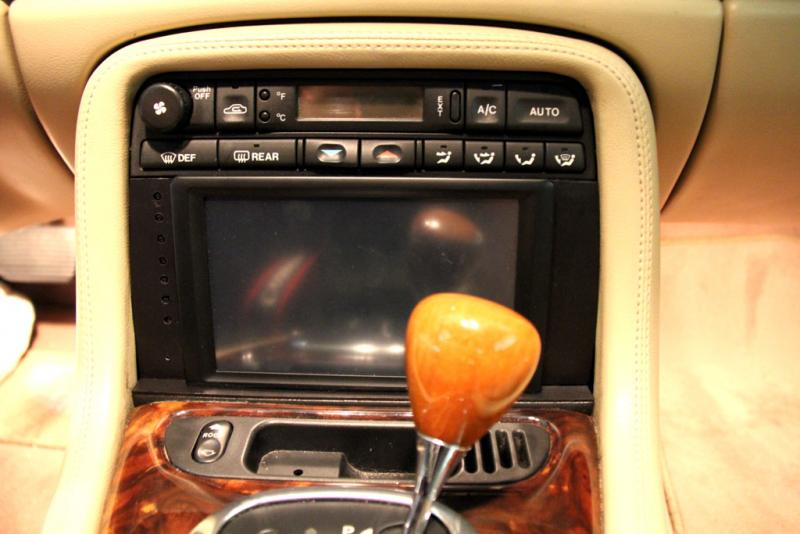
I have completed (mostly) the build and installation of my in-car infotainment system, or Car PC. Essentially, I removed the factory head unit, 6 disc CD changer, and amplifier, and installed a computer system which hosts and integrates many entertainment and information functions all within a single interface, with touch screen capability.
Below is a detailed description of the system. I will say up front, this is not for everyone. From the perspective of changing the factory look and configuration of a stock Jaguar, many people would not want to do this, and I understand and appreciate that. Also, this was a LOT of work. I spent about 20 hours of time in prepping the installation, which included: researching software & hardware options, purchasing, and then building the hardware and installing the software, and getting it all configured the way I wanted. I then spent about 12 hours removing the factory stereo, amplifier, cd changer, necessary interior trim, then installing the wiring (VGA/USB & misc cables from trunk to dash) wiring the amps and power etc., and relocating the center console switch panel (I will explain later), and finally, about 5 hours of building from scratch a new “bezel” for the center console. I would say I spent at least 40 hours on this. And BTW, total cost: approx. $1000, possibly more, I don’t really want to add up all the $.
There are several hardware options for such a system, but the 2 main categories are “PC” and “Tablet”. I chose PC mainly because of the flexibility and “front end” integration. This was a personal choice I made. I am sure many people would choose to go with a tablet based system for many reasons, especially ease of installation. As well, I believe that the future of such systems will likely include more functionality from software vendors for tablets, and tablet systems will become more prevalent than they are today.
My PC is built with an Intel Atom system board with built-in everything (VGA, SATA IDE, wired Ethernet, 6 USB ports, High Definition Audio, and more). This is a mini-ITX system board, which is housed in a case approx. 11 inches long, 8 inches wide, 2 inches tall. I have 2 gig ram and an 80 gig SSD hard drive (SSD is more expensive, but much faster, and more durable since there are no moving parts like traditional hard drives). I use a 12 volt to 12 volt intelligent power supply made for car PC’s. This power supply can operate with input voltages from 6 volts to 24 volts; and is designed to handle power spikes. Also, the supply has an input sensor, which when wired to an “ignition on” source, will power up the computer, and when the ignition switch is off, will send a signal to the system board to either gracefully shut down Windows (I am running Windows7) or will go into sleep or hibernation mode, depending on system settings. When in hibernation or sleep mode, the supply also monitors the cars’ battery voltage, and if it drops below a certain level it will force the system board into shutdown and will completely power off the PC to avoid draining the car battery. I have my system set to shut down Windows when the ignition switch is turned off. The power supply has a configurable delay option. Mine is set to wait 20 seconds when the ignition switch is turned off, then it sends a shutdown signal and Windows shuts down normally, and then then the power supply shuts off. I have it set this way because I have been able to configure the PC to be on and working fully in about 17 seconds, which I think is quite reasonable.
For the radio, I use an HQCT-i USB AM/FM radio. This is a hardware piece mounted inside the PC case and uses one of the internal USB ports. It is not a typical external USB device. I also installed a Garmin 18X USB satellite antenna for GPS, and Garmin Mobile PC software on the PC. Oh, and I had to replace the factory Alpine amplifier in the trunk. I installed two, 200 watt amplifiers, one for the 6 front speakers (2 lower door, 2 dash, 2 tweeters on the doors), and the other amp for the 2 rear speakers. I chose 2 amps so that I have the flexibility to adjust balance front to back, and the amps have I used have built in low pass filters (switchable from normal to low pass). I use the low pass for the rear speakers. Lastly, I used a Lilliput 7 inch 450nit touch screen monitor.
The “front end” software is what integrates all of the application functions into one system, rather than using “windows” to run various functions. I chose to use Centrafuse. There are a few front-end systems out there to choose from. Centrafuse is a combination of several functions into one, for instance: it has a built-in media player, which plays MP3’s (and other music formats) and video. It controls volume and screen brightness. It controls how Windows will act when the ignition switch is off. It also has built-in functionality for Bluetooth support, including hands free phone integration. Centrafuse also integrates many shelf software, such a Garmin Mobile GPS (Centrafuse can be purchased with a NAV module – but I chose to use Garmin). One of the key features of Centrafuse and the integration it offers with these different systems, is that it auto-switches between the different functions as needed. For example, when listening to music, either radio or MP3 etc., and a phone call comes in, it auto-mutes the music, pops up the phone screen showing who is calling (integration to the phone’s address book available) and allows the call to be ignored or answered. If answered, the audio comes through the car speakers. The same thing happens with the GPS. If in navigation mode and the GPS voice routing comes on, Centrafuse mutes all other audio, and pops up the GPS map screen.
Other functions of Centrafuse: with 3G or 4G internet connectivity, it can be set up to read (TTS text to speech) email, txt messaging, etc.; voice commands to control Centrafuse; Integration into a Bluetooth ODBII interface; and much more capability.
As you can see in the photo of the dash where the touch screen is installed, it is located in the space where the factory radio was installed; but also, above the radio is a row of buttons for traction control/heated seats/fog lights, and emergency flashers. That button panel has been relocated to the glove box. Again, I know this may turn off many people, but I felt this was the best option for me. The relocation required me to extend the 19 wire harness by about 18 inches. One by one I spliced in the extension. It took about 2 hours. I don’t mind the switches in the glove box as I don’t use these (although occasionally I would use the fog lights – maybe I can wire these to come on with the headlights).
One question I think may come up...Why didn't I put the screen in the same location as the factory NAV screen? I don't have factory NAV, I have the 3 gauges, which I like. I did purchase from a forum member a factory nav wood bezel, thinking I would install my screen in that location. I even spent the considerable time cutting out that bezel so my screen would fit, however, during the installation/removal of the factory radio, I decided I didn't want my screen that high up. I also thought that the brightness at night may be annoying (even though I can adjust it).
That’s about all for now. I imagine there will be questions, please feel free to ask. Oh, BTW, please don’t beat me up on the cable management in the trunk…I plan to neaten this up once I have everything settled. Also, I will be placing a screen over the cd changer opening (from the inside) of the carpet covering, and I think I will install a 12 volt fan to vent into the trunk.
At youtube, carpc bootup - YouTube I uploaded a movie of the boot up process/time if you want to see it... sorry that the movie is blurry. Also, attached are some pics, one of which is the Centrafuse main startup screen when the Jaguar roar sound comes on. I made this screen, and I customized the primary Centrafuse screen where it says "Jaguar" at the center bottom.
Last edited by H20boy; Nov 5, 2011 at 01:37 AM. Reason: big pics made from your thumbnails






Veteran member
Joined: Jan 2011
Posts: 1,638
Likes: 173
From: France (UK expat)
Wow, that's some impressive engineering. Pity you couldn't use my veneer panel after all, but I can understand why you thought the screen would be nicer lower down.
You will now be able to read these threads while actually driving your Jag
You will now be able to read these threads while actually driving your Jag


Veteran Member


Joined: May 2010
Posts: 4,114
Likes: 1,274
From: North Carolina
That's wicked groovy. I've been wanting to do something like that, I just need to find the time (and motivation). When I get around to doing it I'll definitely be PMing you for advice.
Where'd you find all of the info on how to do it? I've done a little research on mp3car.com, but their info isn't the easiest to sift through.
Where'd you find all of the info on how to do it? I've done a little research on mp3car.com, but their info isn't the easiest to sift through.

Senior Member
Joined: Jun 2009
Posts: 346
Likes: 82
From: Lake Oswego, OR
Nice. I've been completely reluctant to change my radio because I didn't want to mess up the original factory look. I think I've just changed my mind.
There are lots of PC based OBD-II programs you could run.
I haven't fiddled with Win7 yet. Is your load like a Windows CE or a standard Win7. Did you just strip the registry down to minimum required to get it to start up that fast?
Thx,
Mike
There are lots of PC based OBD-II programs you could run.
I haven't fiddled with Win7 yet. Is your load like a Windows CE or a standard Win7. Did you just strip the registry down to minimum required to get it to start up that fast?
Thx,
Mike
Trending Topics
Thread Starter
|
Senior Member
Joined: Jul 2011
Posts: 568
Likes: 192
From: Jacksonville
That's wicked groovy. I've been wanting to do something like that, I just need to find the time (and motivation). When I get around to doing it I'll definitely be PMing you for advice.
Where'd you find all of the info on how to do it? I've done a little research on mp3car.com, but their info isn't the easiest to sift through.
Where'd you find all of the info on how to do it? I've done a little research on mp3car.com, but their info isn't the easiest to sift through.
Thread Starter
|
Senior Member
Joined: Jul 2011
Posts: 568
Likes: 192
From: Jacksonville
Nice. I've been completely reluctant to change my radio because I didn't want to mess up the original factory look. I think I've just changed my mind.
There are lots of PC based OBD-II programs you could run.
I haven't fiddled with Win7 yet. Is your load like a Windows CE or a standard Win7. Did you just strip the registry down to minimum required to get it to start up that fast?
Thx,
Mike
There are lots of PC based OBD-II programs you could run.
I haven't fiddled with Win7 yet. Is your load like a Windows CE or a standard Win7. Did you just strip the registry down to minimum required to get it to start up that fast?
Thx,
Mike
Last edited by SteveJacks; Nov 3, 2011 at 06:21 AM.








Thread
Thread Starter
Forum
Replies
Last Post
aholbro1
XJ XJ6 / XJR6 ( X300 )
18
Dec 29, 2024 06:46 PM
philwarner
XJ XJ6 / XJ8 / XJR ( X350 & X358 )
44
Nov 5, 2024 06:29 PM

Currently Active Users Viewing This Thread: 1 (0 members and 1 guests)