


where is emergency key slot for when fob battery is dead?


 where is emergency key slot for when fob battery is dead?
Where is the emergency key slot for when the key fob battery dies? I remember the XF used to have it under the trunk release button near the drivers left knee.

Member
Joined: May 2011
Posts: 48
Likes: 14
From: Los Angeles, CA
This is yet another subject where the Owner's Handbook is rather vague. I think the principle remains the same for the XJ, but where the XF had that dedicated slot, with the XJ you hold the "Smart Key" close to the auxiliary switch pack (below the fog light switch) and start the car.
As I recall in my 2009 XF, the slot was just a holder; proximity was important, but there was no electrical contact.
As I recall in my 2009 XF, the slot was just a holder; proximity was important, but there was no electrical contact.

Junior Member
Joined: Dec 2012
Posts: 16
Likes: 3
From: Montreal
The emergency key slot is in the handle of the driver's door. You just pull on the cover beside the handle (to the right of the actual handle), and it easily comes out and then you will see the key hole in it.
thank you. I already know about that one.
Im talking about the emergency slot to start the engine.
As Diablo said, it might just be under the trunk button, no slot, just proximity
Im talking about the emergency slot to start the engine.
As Diablo said, it might just be under the trunk button, no slot, just proximity
Junior Member
Joined: Dec 2012
Posts: 16
Likes: 3
From: Montreal
Sorry I misunderstood. I do not think there is any emergency key slot to start the engine in that car. My keyfob was dropped in the water by a valet parking attendant last June. It completely broke the key fob (major short circuit). I put the key fob on the dash area 1) where the parking button is and 2) where the start button is, and it did not work both times as the key fob was completely broken. I guess it could work if you have a little bit of battery left in your key fob. Otherwise it is just easier to change the battery in the key fob. For me Jaguar came to tow the car in less than 2 hours after I called the 1800 number and they replaced the key fob with a new one. They did not charge anything even though it was not the fault of the car, but the fault of the valet parking attendant. It was great service, much better than I used to get with my 7 series BMW.
thats what I was afraid of. thats a horrible user experience.
in my infiniti when the battery died, i put the key in the slot and started the car.
id love to know which monkey at jaguar thought this would be a great idea to not have a slot
in my infiniti when the battery died, i put the key in the slot and started the car.
id love to know which monkey at jaguar thought this would be a great idea to not have a slot
Trending Topics
Member
Joined: May 2011
Posts: 48
Likes: 14
From: Los Angeles, CA
Wanting a definitive answer whether or not the car will start with lifeless Smart Key, I removed the battery from the key fob and tried to start the car by placing the key fob as shown in the Owner's Handbook - the car will NOT start.
To be fair, the Handbook says nothing about starting the car - the procedure is used to deactivate the alarm if the car was unlocked using the emergency key. Looking at my old XF Handbook, the procedure is used for the same function (though XF has a docking slot).
It might be a good idea to keep a couple of spare batteries in the glove box to save yourself a major inconvenience, as it's been my experience that the battery doesn't last long after the "Smart Key Battery Low" message flashes. Last time I saw the warning, I had enough time to stop to pick up a fresh battery; returning from the store there was just enough juice to unlock the car but not enough to start it.
The Smart Key activates a number of systems when the car is unlocked; a diminished capacity battery in the fob may have some other unwanted consequences. About a day or two before the low battery warning flashed, my backup camera image and navigation image disappeared (the overlays were still visible). After replacing the battery, the problem was resolved - perhaps this was just a coincidence, but maybe not.
To be fair, the Handbook says nothing about starting the car - the procedure is used to deactivate the alarm if the car was unlocked using the emergency key. Looking at my old XF Handbook, the procedure is used for the same function (though XF has a docking slot).
It might be a good idea to keep a couple of spare batteries in the glove box to save yourself a major inconvenience, as it's been my experience that the battery doesn't last long after the "Smart Key Battery Low" message flashes. Last time I saw the warning, I had enough time to stop to pick up a fresh battery; returning from the store there was just enough juice to unlock the car but not enough to start it.
The Smart Key activates a number of systems when the car is unlocked; a diminished capacity battery in the fob may have some other unwanted consequences. About a day or two before the low battery warning flashed, my backup camera image and navigation image disappeared (the overlays were still visible). After replacing the battery, the problem was resolved - perhaps this was just a coincidence, but maybe not.

Junior Member
Joined: Sep 2015
Posts: 1
Likes: 0
Success
With a totally dead key fob we were able to place the fob into a slot by the drivers left leg. With the fob in this compartment the car will start. Not sure if the car is looking for an rfid chip in the fob or just the physical presence in the slot alone but it worked.

Veteran Member


Joined: Aug 2010
Posts: 10,116
Likes: 7,123
From: Atlanta suburbs
Here's How To Do It!

JJM 10 02 34 131 - XJ Owner?s Handbook 2013 (Issue 1) | TOPIx
"KEYLESS START BACKUP
If the vehicle has been unlocked using the emergency key blade or the Smart Key is not detected by the vehicle, it will be necessary to use the keyless start backup to disarm the alarm and start the engine.
The keyless start backup can only be used when the message Smart Key Not Found - Refer to Handbook is displayed in the message centre.
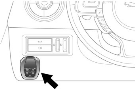
1.Position the Smart Key flat against the fascia below the auxiliary switch pack in the position shown.
2. Firmly depress the brake pedal.
3.Press and release the engine START/STOP button.
Once the engine has started, the brake pedal can be released if it is safe to do so.
If the Smart Key is not recognised, or the engine still fails to start, consult a Dealer/Authorised Repairer."
If the vehicle has been unlocked using the emergency key blade or the Smart Key is not detected by the vehicle, it will be necessary to use the keyless start backup to disarm the alarm and start the engine.
The keyless start backup can only be used when the message Smart Key Not Found - Refer to Handbook is displayed in the message centre.
1.Position the Smart Key flat against the fascia below the auxiliary switch pack in the position shown.
2. Firmly depress the brake pedal.
3.Press and release the engine START/STOP button.
Once the engine has started, the brake pedal can be released if it is safe to do so.
If the Smart Key is not recognised, or the engine still fails to start, consult a Dealer/Authorised Repairer."
 at the bottom right.
Stuart
Last edited by Stuart S; Sep 16, 2015 at 12:17 AM.



Senior Member


Joined: Apr 2013
Posts: 104
Likes: 24
From: An archipelago tropical chain of islands
Not an XJ
Wernerj21 I do not believe your Mother ‘has’ a Jaguar X351 or XJ as the IS NO KEY ‘SLOT’ on an XJ. I believe only on the XF but haven’t seen (In person) the other models (Besides XF & XJ) around those years.
I think they should’ve stuck with it unless there were ‘unforeseen’ security issues. (Like could someone else’s ‘dead’ clamshell fob start her XF?
I think they should’ve stuck with it unless there were ‘unforeseen’ security issues. (Like could someone else’s ‘dead’ clamshell fob start her XF?

Junior Member
Joined: Apr 2023
Posts: 1
Likes: 3
JJM 10 02 34 131 - XJ Owner?s Handbook 2013 (Issue 1) | TOPIx
"KEYLESS START BACKUP
If the vehicle has been unlocked using the emergency key blade or the Smart Key is not detected by the vehicle, it will be necessary to use the keyless start backup to disarm the alarm and start the engine.
The keyless start backup can only be used when the message Smart Key Not Found - Refer to Handbook is displayed in the message centre.
1.Position the Smart Key flat against the fascia below the auxiliary switch pack in the position shown.
2. Firmly depress the brake pedal.
3.Press and release the engine START/STOP button.
Once the engine has started, the brake pedal can be released if it is safe to do so.
If the Smart Key is not recognised, or the engine still fails to start, consult a Dealer/Authorised Repairer."
If this was helpful, please press If the vehicle has been unlocked using the emergency key blade or the Smart Key is not detected by the vehicle, it will be necessary to use the keyless start backup to disarm the alarm and start the engine.
The keyless start backup can only be used when the message Smart Key Not Found - Refer to Handbook is displayed in the message centre.
1.Position the Smart Key flat against the fascia below the auxiliary switch pack in the position shown.
2. Firmly depress the brake pedal.
3.Press and release the engine START/STOP button.
Once the engine has started, the brake pedal can be released if it is safe to do so.
If the Smart Key is not recognised, or the engine still fails to start, consult a Dealer/Authorised Repairer."
at the bottom right.Stuart
YOU LITERALLY SAVE OUR LIFES today! Thank you for posting that tip! We were stranded on the side of the road for 2h at night, our smart key decided to stop working and miraculously found this post after trying to call everyone (service included) i could for help. And it worked 🥲 thank you!!!



Veteran Member

Joined: May 2009
Posts: 12,097
Likes: 3,371
From: home
With the problems you have had PLEASE make sure you have 2 operating keys/FOBS. So many buy these cars used with one key and then wait until disaster strikes!
Glad to see your up and running with a zero cost fix too.
.
.
.
Glad to see your up and running with a zero cost fix too.
.
.
.
Veteran Member
Joined: Aug 2010
Posts: 10,116
Likes: 7,123
From: Atlanta suburbs
One more thing ... Keep a spare CR2032 battery for your Smartkey in your glove box. Make sure it's a brand name with a "Best Before" date.

Senior Member

Joined: Sep 2019
Posts: 389
Likes: 115
- how to open the trunk with a dead battery (covered in a "sticky")
- proper jump-starting procedures
- jacking up the car without seriously damaging it
- shifting the transmission of an electrically-dead X351 into neutral so it can me moved or towed



Thread
Thread Starter
Forum
Replies
Last Post

Currently Active Users Viewing This Thread: 1 (0 members and 1 guests)