


CDs in trunk are stuck:(


Thread Starter
|
Junior Member
Joined: Oct 2010
Posts: 25
Likes: 0
From: Tampa, Fl
 CDs in trunk are stuck:(
I have a 2006 xkr and this i the third time this has happened to me.. The cd deck in the trunk won't play the CDs and I can see that it is actually stuck not closing for eject. Normally it fixes itself and eventually pops out but this time the bit.h won't budge. Idkwtf to do
Senior Member
Joined: May 2010
Posts: 948
Likes: 317
From: Ireland

A search of the archives may help as this seems to be a not too infrequent problem. Sometimes the head unit doesn't recognise the cd unit but even failing that, a simple mechanical failure can have the same effect. I remember reaading on here somewhere about someone using a credit card, inserted in alongside the actual cd holder/ cartridge to trip the mechanism and release same. maybe a search using " cd credit card" may yield results?
Hope you get some joy.
Hope you get some joy.

Veteran member


Joined: Mar 2007
Posts: 11,344
Likes: 1,163
From: Oak Ridge, TN
also try searching for 'changer' in the xk8-xkr section, someone mentioned opening up the changer and cleaning the guts, helps with the Error codes and spins better. Perhaps help your ejecting problem too. Its not too much of a pain to get to it, pull the battery boot cover, undo that one corner taillight cover, then pull that carpet out of the corner. "Its right there, ready to be pulled/disconnected.

Veteran Member


Joined: Aug 2010
Posts: 2,636
Likes: 1,636
From: Southington CT
Hi
I also have had this problem with the cassette getting stuck and not ejecting.
The first time it happened the Jaguar dealer replaced the cd player and cassette under our 3rd party extended warrantee.
That was a few years ago.
Although it doesn’t happen very often now.
When it does happen I take a large flat blade screwdriver (just a couple of sizes larger than a regular screwdriver) and push it gently into the left side of the cd player between the cassette and the player and only far enough to get the cassette to move.
Most times the player will release cassette when I start pushing the screwdriver in.
If it does not release, then I gently move the screwdriver with a very slow motion back and forward (prying the cassette out). Here again once the cassette starts to move, the player will usually release the cassette.
Just be careful not to use too much force. You do not want to have to replace the cd player or the cassette.
I thought the problem was the cassette so I bought a new cassette on Ebay. I still have the other cassette as a spare.
We noticed when we tried to push the button for the player to go to the next cd several times in succession the cassette got stuck in the player.
Well I hope this helps. Sharing past experiences is what the forum is all about.
Jim Lombardi
I also have had this problem with the cassette getting stuck and not ejecting.
The first time it happened the Jaguar dealer replaced the cd player and cassette under our 3rd party extended warrantee.
That was a few years ago.
Although it doesn’t happen very often now.
When it does happen I take a large flat blade screwdriver (just a couple of sizes larger than a regular screwdriver) and push it gently into the left side of the cd player between the cassette and the player and only far enough to get the cassette to move.
Most times the player will release cassette when I start pushing the screwdriver in.
If it does not release, then I gently move the screwdriver with a very slow motion back and forward (prying the cassette out). Here again once the cassette starts to move, the player will usually release the cassette.
Just be careful not to use too much force. You do not want to have to replace the cd player or the cassette.
I thought the problem was the cassette so I bought a new cassette on Ebay. I still have the other cassette as a spare.
We noticed when we tried to push the button for the player to go to the next cd several times in succession the cassette got stuck in the player.
Well I hope this helps. Sharing past experiences is what the forum is all about.
Jim Lombardi
Last edited by jimlombardi; Dec 12, 2010 at 08:05 AM.
Veteran Member
Joined: Aug 2010
Posts: 2,636
Likes: 1,636
From: Southington CT
Found a Post about Alpine cd changer fix
Hi
I found this post on the ecoustics.com forum dated 4/15/05. A guest on that forum had the "no disk" problem with his Alphine cd changer.
The cd loader was not working and he disassembled the unit. Then he removed anti-vibration mounts and springs. Then the article goes on to say:
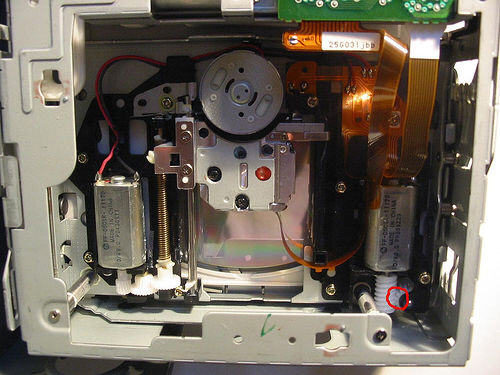
Once you have unit apart turn upside down and you will see two motors and drive gears. One drives the magazine loader the other the CD loader. On my unit I noticed a slight misalignment of the worm / wheel drive gears causing them to jam and cease the drive hence the problem everyone is experiencing. Gently using a screw driver I realigned the gear meshing. Immediately the unit started working. However, it failed again on multiple testing. once again, I released but this time I checked the tightness of the gear mount and found it loose. I realigned worm & wheeel gears and retensioned monting screw. This time I tested unit numerous times and all worked fine. I reassembled unit and reinstalled. So far so good unit back in action. Here is a picture of the unit misaligned worm/wheel drive gears (has a red circle around them). Place your mouse pointer on top of the picture to make it larger:
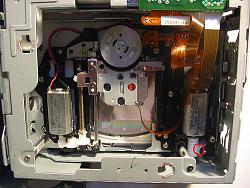
I don't know if this is part of the problem you are having or not. But it might have been the problem we had with the first cd changer.
I found this post on the ecoustics.com forum dated 4/15/05. A guest on that forum had the "no disk" problem with his Alphine cd changer.
The cd loader was not working and he disassembled the unit. Then he removed anti-vibration mounts and springs. Then the article goes on to say:
Once you have unit apart turn upside down and you will see two motors and drive gears. One drives the magazine loader the other the CD loader. On my unit I noticed a slight misalignment of the worm / wheel drive gears causing them to jam and cease the drive hence the problem everyone is experiencing. Gently using a screw driver I realigned the gear meshing. Immediately the unit started working. However, it failed again on multiple testing. once again, I released but this time I checked the tightness of the gear mount and found it loose. I realigned worm & wheeel gears and retensioned monting screw. This time I tested unit numerous times and all worked fine. I reassembled unit and reinstalled. So far so good unit back in action. Here is a picture of the unit misaligned worm/wheel drive gears (has a red circle around them). Place your mouse pointer on top of the picture to make it larger:
I don't know if this is part of the problem you are having or not. But it might have been the problem we had with the first cd changer.


Veteran Member
Joined: Feb 2011
Posts: 9,733
Likes: 2,201
From: on-the-edge
two notes:
1. there are at least two cassette styles because the changers were made in two countries ... they look almost identical except on the bottom where all the latching is done ... mismatching the cassettes aggravates the situation.
2. rapid cycling between discs aggravates the situation because the mechanicals don't keep up with the command logic
1. there are at least two cassette styles because the changers were made in two countries ... they look almost identical except on the bottom where all the latching is done ... mismatching the cassettes aggravates the situation.
2. rapid cycling between discs aggravates the situation because the mechanicals don't keep up with the command logic
Trending Topics




Junior Member
Joined: Jul 2018
Posts: 1
Likes: 1
Easy fix
Take a filet knife insert it on the bottom of CD holder in the middle straight back 3 inches,move knife left toward the eject button. It will hit the tab and move it to the left. It should pop right out.Look at the bottom of the CD holder and you'll see how it works. my eject button wouldn't engage the tab to let the CD holder out.


Veteran Member
Joined: Nov 2013
Posts: 1,286
Likes: 456
From: Malvern, England
Here you go. This is how I removed mine. https://www.jaguarforum.com/showthre...l=1#post770663
If you cannot see the photos in the link, and they are there, you may also need the photobucket fix. Again click here.https://www.jaguarforum.com/showthre...=1#post1029300 for a solution. Good luck!
If you cannot see the photos in the link, and they are there, you may also need the photobucket fix. Again click here.https://www.jaguarforum.com/showthre...=1#post1029300 for a solution. Good luck!

Junior Member
Joined: Jul 2021
Posts: 4
Likes: 1
From: KS
 I used a thin spatula
Take a filet knife insert it on the bottom of CD holder in the middle straight back 3 inches,move knife left toward the eject button. It will hit the tab and move it to the left. It should pop right out.Look at the bottom of the CD holder and you'll see how it works. my eject button wouldn't engage the tab to let the CD holder out.


Senior Member

Joined: Jan 2020
Posts: 473
Likes: 321
From: Maineville, Ohio
Glad this discussion came up. Yet again another helpful batch of information. Mine has been stuck since I got it, almost embarrassed that I haven't addressed this yet. But the thing is such a pleasure to drive I don't really think about the CD player that much. Maybe this weekend I will try some of these tips. Thanks, TM

Veteran Member
Joined: Jan 2018
Posts: 3,675
Likes: 2,279
From: on the road in NE Oklahoma
Before resorting to the thin blade approach, just try a light to medium tap on the audio rack / CD holder. That no-tech approach has worked wonders for me in freeing up the eject mechanism…..
Z
Z

Thread
Thread Starter
Forum
Replies
Last Post

Currently Active Users Viewing This Thread: 1 (0 members and 1 guests)