


Nav system thinks I’m in Canada


Thread Starter
|
Veteran Member


Joined: Oct 2012
Posts: 3,755
Likes: 1,619
From: Puerto Rico
 Nav system thinks I’m in Canada
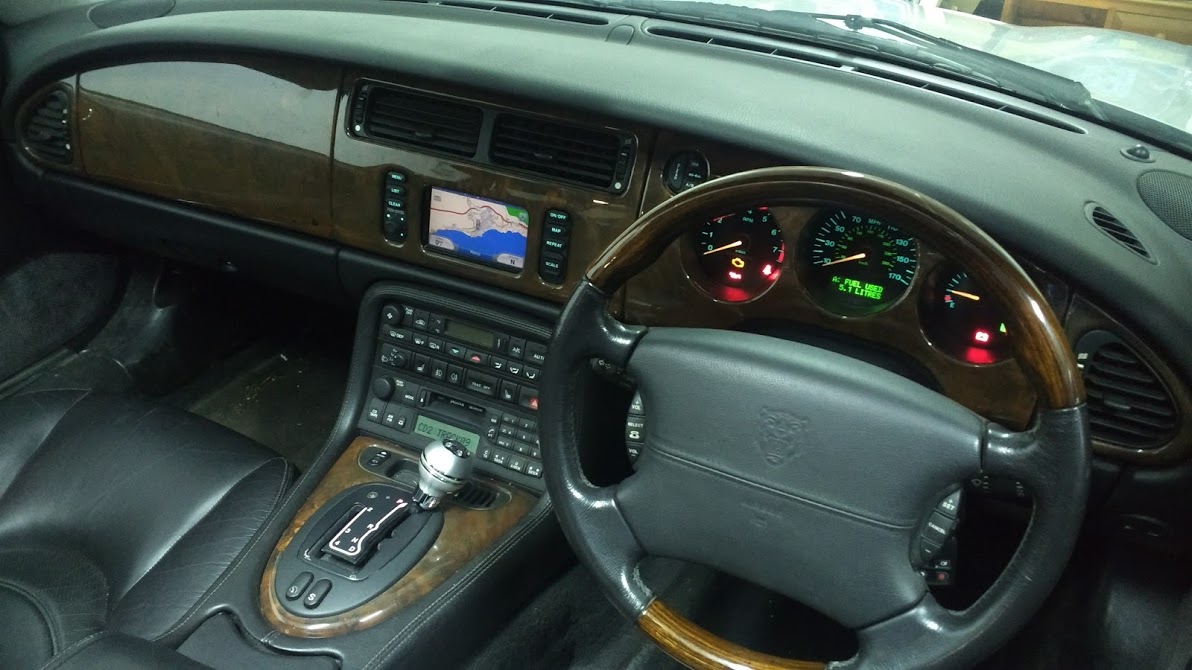
The screen in my nav system in my XKR had delaminated and needed to be replaced. It was completed unreadable.
As SamtheSham was going about his conversion to the 3 gauges, I sent him a PM asking if he was willing to sell his. For a modest amount and a Piña Colada the deal was agreed and he sent me the screen. I finally had some time to install it today. The unit is in immaculate conditions and works perfectly. (Thanks Sam!)
However, even though I know the system should be terribly outdated, I would at least like to have it working as it should.
Imagine my surprise when it seems the gps thinks I’m in Toronto Canada instead of Puerto Rico and does not display anything on the map other than the cursor.
Does anyone know how I can set it to the correct location?
As SamtheSham was going about his conversion to the 3 gauges, I sent him a PM asking if he was willing to sell his. For a modest amount and a Piña Colada the deal was agreed and he sent me the screen. I finally had some time to install it today. The unit is in immaculate conditions and works perfectly. (Thanks Sam!)
However, even though I know the system should be terribly outdated, I would at least like to have it working as it should.
Imagine my surprise when it seems the gps thinks I’m in Toronto Canada instead of Puerto Rico and does not display anything on the map other than the cursor.
Does anyone know how I can set it to the correct location?




Joined: Dec 2009
Posts: 13,636
Likes: 9,573
From: Wise County,TX
I did PDIs when I worked at the dealer. The cars came from Coventry and when the NAV system 'woke-up' here in Texas, it did NOT know where it was.
I don't remember exactly what I used to do but I think I would scan out to the entire continental US and then move the location pointer to Fort Worth TX and then maybe reboot the system?
It's been more than 15 years since I did these cars but if you play around with the settings you will eventually get to to the correct location IF the correct DVD is in the unit.
You might find yourself driving on NOTHING with roads next to you if the DVD is outdated and NEW roads have been built??
Sorry I don't remember the exact sequence. Been too long.
bob
I don't remember exactly what I used to do but I think I would scan out to the entire continental US and then move the location pointer to Fort Worth TX and then maybe reboot the system?
It's been more than 15 years since I did these cars but if you play around with the settings you will eventually get to to the correct location IF the correct DVD is in the unit.
You might find yourself driving on NOTHING with roads next to you if the DVD is outdated and NEW roads have been built??
Sorry I don't remember the exact sequence. Been too long.
bob

Veteran Member
Joined: Jan 2019
Posts: 1,907
Likes: 1,427
From: Bahrain
Why did he convert to 3 Gauges?
Maybe you found the reason Samthesham converted to a 3 gauge set up. LOL!
As smartphones are so good nowadays, car satnav systems are a bit obsolete esp. ones with built in DVDs. Even my rental cars nowadays have continual updates to a portable unit. Whatsapp’s Shared Location on google maps is a Genius invention... and free!
Maybe time to follow Samthesham’s example.
As smartphones are so good nowadays, car satnav systems are a bit obsolete esp. ones with built in DVDs. Even my rental cars nowadays have continual updates to a portable unit. Whatsapp’s Shared Location on google maps is a Genius invention... and free!
Maybe time to follow Samthesham’s example.
Thread Starter
|
Veteran Member
Joined: Oct 2012
Posts: 3,755
Likes: 1,619
From: Puerto Rico
Maybe you found the reason Samthesham converted to a 3 gauge set up. LOL!
As smartphones are so good nowadays, car satnav systems are a bit obsolete esp. ones with built in DVDs. Even my rental cars nowadays have continual updates to a portable unit. Whatsapp’s Shared Location on google maps is a Genius invention... and free!
Maybe time to follow Samthesham’s example.
As smartphones are so good nowadays, car satnav systems are a bit obsolete esp. ones with built in DVDs. Even my rental cars nowadays have continual updates to a portable unit. Whatsapp’s Shared Location on google maps is a Genius invention... and free!
Maybe time to follow Samthesham’s example.
David, I only swapped the screens, not the entire system. It was definitely doing this behavior before I put in Sam's screen. I vaguely remember playing with it when the screen was a little bit more readable and I think by then it already had the Canada location problem.
Motorcarman, by scan out, do you mean zoom out? I'll check the DVD, I don't know which one is in there.

Veteran Member
Joined: Oct 2010
Posts: 2,036
Likes: 985
From: Spain
I had the same problem with my OEM sat nav - it was working fine but the map data didn't exist for Spain. My solution was to replace the OEM sat nav with a Garmin 5.2" unit - you can now get a 5.5" Garmin which is very near the exact same screen size as the OEM. You will get an up to date modern touch screen sat nav, with speed camera warnings and a back up camera if you want. On mine I kept the original buttons, connected up the backlights so they come on with the rest of the dashboard and wired the on/off switch to power the Garmin. All the connections were made to the original wiring harness using the connector from the OEM satnav.
Thread Starter
|
Veteran Member
Joined: Oct 2012
Posts: 3,755
Likes: 1,619
From: Puerto Rico
Got the system to change its location to Florida, but that is still wrong. I wondered why Puerto Rico wouldn’t show up. When I checked in the trunk, there is no DVD inside the DVD player.
Well, at least I now have a nice digital analog clock.
Does anyone know if it’s possible to download the software and rip it to a DVD?
Well, at least I now have a nice digital analog clock.
Does anyone know if it’s possible to download the software and rip it to a DVD?
Last edited by giandanielxk8; Oct 7, 2019 at 09:10 PM.

Veteran Member

Joined: Jul 2013
Posts: 1,105
Likes: 328
From: Northern Virginia
Trending Topics
Thread Starter
|
Veteran Member
Joined: Oct 2012
Posts: 3,755
Likes: 1,619
From: Puerto Rico
Perfect, that is easily within my skill set. Just point me to a download link for the ISO and I’m good to go.
Veteran Member
Joined: Jul 2013
Posts: 1,105
Likes: 328
From: Northern Virginia
https://www.jaguarforums.com/forum/x...e6/#post550533
Read the entire thread if you have any issues.
Read the entire thread if you have any issues.
Thread Starter
|
Veteran Member
Joined: Oct 2012
Posts: 3,755
Likes: 1,619
From: Puerto Rico
https://www.jaguarforums.com/forum/x...e6/#post550533
Read the entire thread if you have any issues.
Read the entire thread if you have any issues.
Thanks! I'm burning the image as we speak. I'm using the slowest speed that macOS allows. I will report back with the results.
Thread Starter
|
Veteran Member
Joined: Oct 2012
Posts: 3,755
Likes: 1,619
From: Puerto Rico
Well, I tried the new DVD and the system updated. However, unfortunately for me, it does not include Puerto Rico. Perhaps I need a latin america version of the iso. Does anyone know where I can find that?

Thread
Thread Starter
Forum
Replies
Last Post
Staatsof
S-Type / S type R Supercharged V8 ( X200 )
10
Jun 14, 2010 03:23 PM
Currently Active Users Viewing This Thread: 1 (0 members and 1 guests)