


Need info from JTIS,


 Need info from JTIS,
Sorry guys, I just can't get JTIS to work on my 64 bit Windows 7.
What is the driveshaft bolt torque figure? I'm talking about the driveshaft to differential bolts. Thanks. Oh, also the centre bearing carrier plate has 4 bolts. How tight are they supposed to be?
What is the driveshaft bolt torque figure? I'm talking about the driveshaft to differential bolts. Thanks. Oh, also the centre bearing carrier plate has 4 bolts. How tight are they supposed to be?

Veteran Member


Joined: Dec 2010
Posts: 8,835
Likes: 2,924
From: Douglasville Ga.
As of yesterday, there is a mediafire download in the DIY sticky. Scroll all the way to the bottom and download the 99 version.
https://www.jaguarforums.com/forum/x...ts-data-29800/
https://www.jaguarforums.com/forum/x...ts-data-29800/




Joined: Feb 2014
Posts: 20,503
Likes: 15,276
From: Crossroads of America
Hi Rob,
Sorry for the delay, but I tried to find the torque figures in JTIS last night but couldn't find the driveshaft section. Just found it in the Chassis section, and here are the only torque figures it gives (these from the '98 XJ Chassis/Propshaft/Specifications section):
Bolt M12 - Jurid flexible coupling to transmission and final drive flanges: 75 - 88 Nm
Screw - Centre bearing to underbody: 19,5 - 26,5 Nm
Screw - Parking brake relay mounting bracket to underbody: 19,5 - 26,5 Nm
If you work in pound-feet like I do, it's easy to find an online converter via google search.
Cheers,
Don
Last edited by Don B; Aug 1, 2014 at 01:35 PM.

Joined: Feb 2014
Posts: 20,503
Likes: 15,276
From: Crossroads of America
Jim,
A beautiful post! Would you be willing to explain how you grabbed those images from JTIS, assembled them and converted them to jpg? I have very little experience with JTIS, and when I right-click on an image, I don't get a menu with "copy image" or any other options. Thanks for any insights you're willing to share!
Cheers,
Don
Trending Topics

Veteran Member
Joined: Aug 2010
Posts: 2,636
Likes: 1,636
From: Southington CT
Hi Don
Thanks for all your compliments.
I use windows 7 Snipping Tool or PrtScn (Print Screen) button on keyboard after I have found the JTIS illustration and/or procedure I want to copy.
Here is a JPEG file showing how to copy/paste/save using Microsoft Windows PrtScn, Snipping Tool, and Paint ---- right click on the image and use open link in new tab, then go to the new tab and left click on that image to get a larger view --- you could also just use your web browser zoom feature to increase from 100% to 200%:
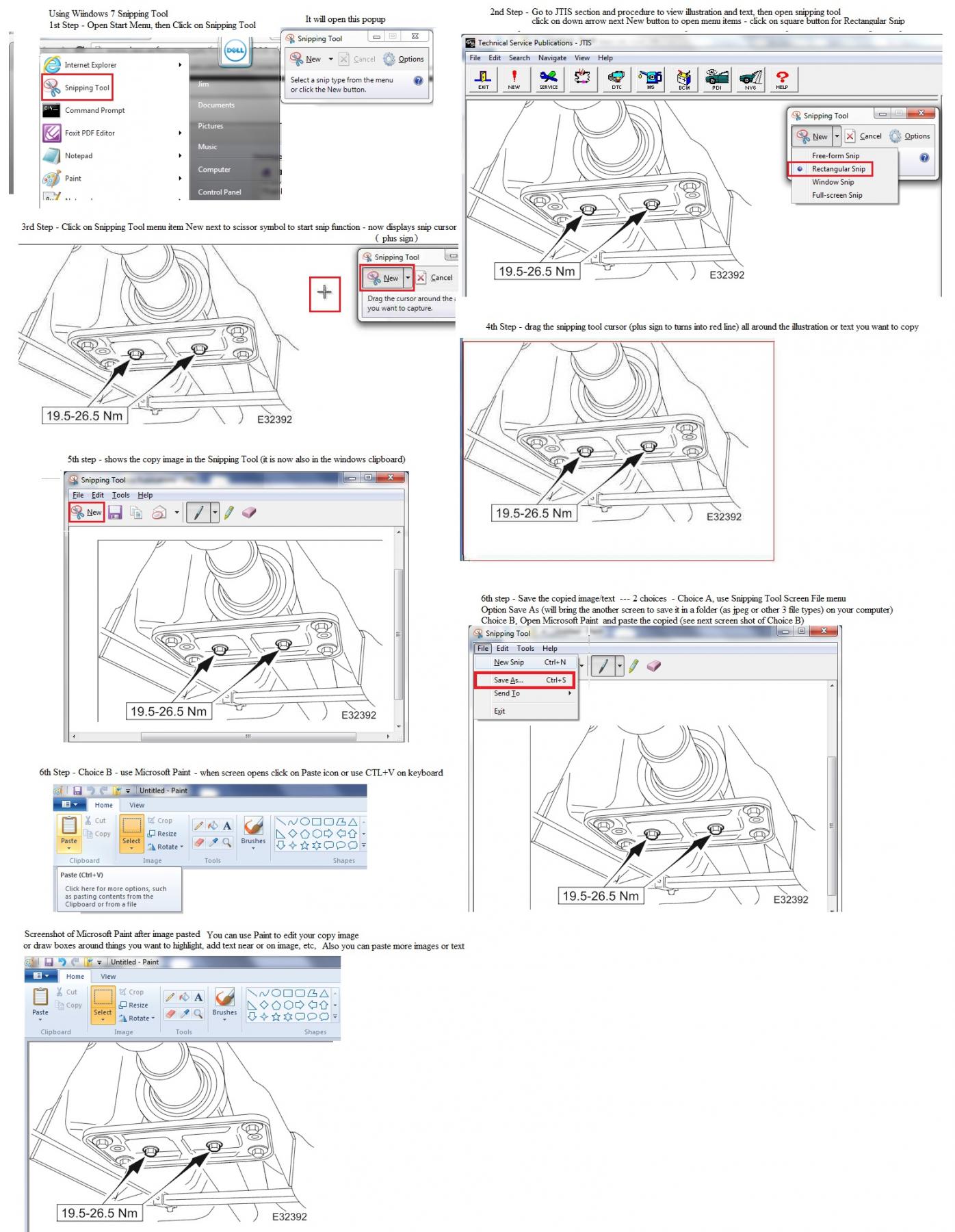
I usually save these JPEG files in my documents folder.
When I want to post the JPEG files in Jaguar Forum, I use the Advanced Reply so I can add the JPEG file as an attachment (Attachment option - Manage Attachments, Choose File, Upload).
Then I close the Manage Attachments, then place my cursor where I want to put the file attachment, then open the Attachment option and click on the uploaded file attachment (it then shows up as an attachment ID number.
Then I use the Preview Post and when the new screen opens I right click on the image to bring up the options menu and click on the "open link as new tab", then I go to the new tab
and copy the web address "//www.jaguarforums.com/forum/newreply.php?do=postreply&t=123233" by highlighting it (hold down the left mouse button and drag across the internet web address the right click and use copy menu option.
Then I go back to the tab where I am posting the reply and delete the line that has the attachment number and the I use the Insert Image option (yellow icon) and paste the copied web address there.
This gives the desired result - a large view of the images and text that is in the jpeg file.
Let me know if you need help to find your web browser zoom options (just mention which ones you use).
Jim Lombardi
Thanks for all your compliments.
I use windows 7 Snipping Tool or PrtScn (Print Screen) button on keyboard after I have found the JTIS illustration and/or procedure I want to copy.
Here is a JPEG file showing how to copy/paste/save using Microsoft Windows PrtScn, Snipping Tool, and Paint ---- right click on the image and use open link in new tab, then go to the new tab and left click on that image to get a larger view --- you could also just use your web browser zoom feature to increase from 100% to 200%:
I usually save these JPEG files in my documents folder.
When I want to post the JPEG files in Jaguar Forum, I use the Advanced Reply so I can add the JPEG file as an attachment (Attachment option - Manage Attachments, Choose File, Upload).
Then I close the Manage Attachments, then place my cursor where I want to put the file attachment, then open the Attachment option and click on the uploaded file attachment (it then shows up as an attachment ID number.
Then I use the Preview Post and when the new screen opens I right click on the image to bring up the options menu and click on the "open link as new tab", then I go to the new tab
and copy the web address "//www.jaguarforums.com/forum/newreply.php?do=postreply&t=123233" by highlighting it (hold down the left mouse button and drag across the internet web address the right click and use copy menu option.
Then I go back to the tab where I am posting the reply and delete the line that has the attachment number and the I use the Insert Image option (yellow icon) and paste the copied web address there.
This gives the desired result - a large view of the images and text that is in the jpeg file.
Let me know if you need help to find your web browser zoom options (just mention which ones you use).
Jim Lombardi
Last edited by jimlombardi; Aug 1, 2014 at 04:43 PM.

Joined: Feb 2014
Posts: 20,503
Likes: 15,276
From: Crossroads of America
Jim,
Your instructions are perfectly clear and thorough as usual! Thanks for taking the time to explain the process. This will be extremely helpful to me and other members for years to come!
In grateful appreciation,
Don
Your instructions are perfectly clear and thorough as usual! Thanks for taking the time to explain the process. This will be extremely helpful to me and other members for years to come!
In grateful appreciation,
Don

Veteran Member
Joined: Aug 2010
Posts: 2,636
Likes: 1,636
From: Southington CT
Don
You are welcome.
If you want to know more about using the snipping software, microsoft paint and PrtScn functions, then here are some weblinks to look at:
Here are weblinks on how to use Microsoft windows 7 snipping tool"
How to Use the Snipping Tool in Vista
Here is a nice detailed video on using all the snipping tool features:
Here are weblinks on how to use Microsoft Paint Windows 7
Getting Started with Paint:
Getting started with Paint
Using Paint:
http://fay.iniminimo.com/paint7.html
Using Paint - Windows Help
Screenshot with Paint - Windows 7 Help Forums
Here are weblinks to a PrtScn:
Microsoft instructions and video:
Take a screen capture (print your screen) - Windows Help
Good Youtube video:
How to print screen on Windows 7
Hope this helps.
Jim Lombardi
You are welcome.
If you want to know more about using the snipping software, microsoft paint and PrtScn functions, then here are some weblinks to look at:
Here are weblinks on how to use Microsoft windows 7 snipping tool"
How to Use the Snipping Tool in Vista
Here is a nice detailed video on using all the snipping tool features:
Here are weblinks on how to use Microsoft Paint Windows 7
Getting Started with Paint:
Getting started with Paint
Using Paint:
http://fay.iniminimo.com/paint7.html
Using Paint - Windows Help
Screenshot with Paint - Windows 7 Help Forums
Here are weblinks to a PrtScn:
Microsoft instructions and video:
Take a screen capture (print your screen) - Windows Help
Good Youtube video:
How to print screen on Windows 7
Hope this helps.
Jim Lombardi
Last edited by jimlombardi; Aug 1, 2014 at 06:47 PM.
Veteran Member
Joined: Aug 2010
Posts: 2,636
Likes: 1,636
From: Southington CT
Here is another way to get the JTIS graphic image (illustration) - Use the numbered graphic id that is located at the bottom right-hand side of the image
The E32385 number is the reference GIF file in the JTIS Graphic folder
C:\JTIS21\DATA\Graphic\E32392.GIF
Here is a JPEG I created showing how to use Paint paste option "Paste From" that will open and copy the contents of the E32385.GIF file:

The more I use JTIS and look at where the content comes from, I get a better understanding on how it works.
Jim Lombardi
The E32385 number is the reference GIF file in the JTIS Graphic folder
C:\JTIS21\DATA\Graphic\E32392.GIF
Here is a JPEG I created showing how to use Paint paste option "Paste From" that will open and copy the contents of the E32385.GIF file:
The more I use JTIS and look at where the content comes from, I get a better understanding on how it works.
Jim Lombardi
Last edited by jimlombardi; Aug 1, 2014 at 08:29 PM.

Member
Joined: Jan 2013
Posts: 50
Likes: 0
From: Freeport Illinois USA
Info from JTIS
Bravo, you guys are incredible once again with the advice. I have a JTIS disc but it is not compatible with Windows 8. Win 7 is the latest version it will run on.If i can't get it to run on my pc i may have to donate it to a good home.

Thread
Thread Starter
Forum
Replies
Last Post
UKnFor-dluv-expat
X-Type ( X400 )
1
Sep 26, 2015 08:40 PM
Currently Active Users Viewing This Thread: 1 (0 members and 1 guests)