


Actron CP 9589 scanner - RESOLVED





Joined: Dec 2011
Posts: 120,439
Likes: 17,009
From: Durham, UK

How far have you got with it - powered up / connected / established communication with vehicle .......... ?
I haven't used this particular brand but with any scanner that doesn't list the specific vehicle required then there's usually something like a Global or Generic OBD11 setting that works.
Graham
I haven't used this particular brand but with any scanner that doesn't list the specific vehicle required then there's usually something like a Global or Generic OBD11 setting that works.
Graham
Joined: Dec 2011
Posts: 120,439
Likes: 17,009
From: Durham, UK
I've downloaded the User Manual to check how to set it up.
In the Vehicle selection menu go down to European Vehicles and press enter.
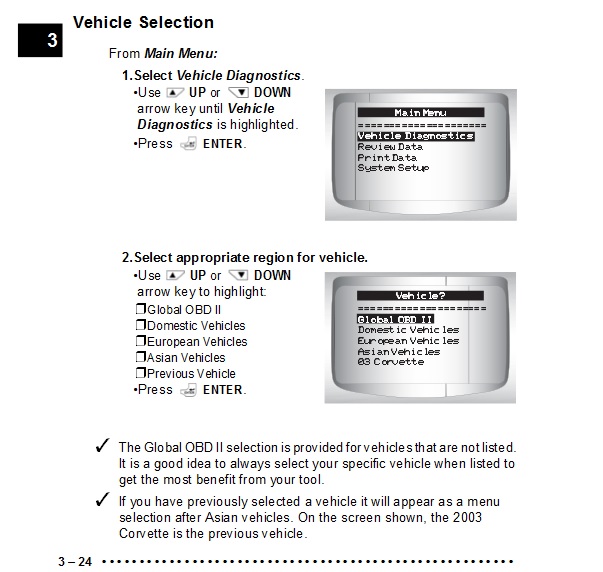
If Jaguar is not listed then follow the instruction at the bottom of the page regarding the Global category. Go back to the Vehicle selection menu screen and use Global OBD11 instead.
Graham
In the Vehicle selection menu go down to European Vehicles and press enter.
If Jaguar is not listed then follow the instruction at the bottom of the page regarding the Global category. Go back to the Vehicle selection menu screen and use Global OBD11 instead.
Graham

Thread Starter
|
Senior Member
Joined: Feb 2013
Posts: 194
Likes: 22
From: andover
Trending Topics
Joined: Dec 2011
Posts: 120,439
Likes: 17,009
From: Durham, UK
That doesn't sound good. Have you checked through the https://www.jaguarforums.com/forum/g...-%2A%2A-33347/ thread to see if anyone else has had issues connecting to a 4.2 with this scanner?
Graham
Graham
Thread Starter
|
Senior Member
Joined: Feb 2013
Posts: 194
Likes: 22
From: andover
no, but i will speak to the supplier tom. and ask them to talk me through it as i think it is me and not the device,but i need a rest from it before i lose my rag will speak again tom.and thanks

Veteran Member
Joined: Aug 2009
Posts: 1,205
Likes: 434
From: Milwaukee, WI
My CP 9580 works fine on my 2000 4.0 liter. After selecting Europe, It asked for Jaguar and the year and after selecting 2000 it only listed 4.0 liter
If I "Lie" and say it is a 2003 XK8, it shows a 4.2 liter.
It then saves the Info and next time you use it it will Show saved vehicles to select from.
The Software version on my Scanner is 4A14 (Main Menu, System Setup, Tool Information)
Also: Your 2002 should still be a 4.0 Liter.
If I "Lie" and say it is a 2003 XK8, it shows a 4.2 liter.
It then saves the Info and next time you use it it will Show saved vehicles to select from.
The Software version on my Scanner is 4A14 (Main Menu, System Setup, Tool Information)
Also: Your 2002 should still be a 4.0 Liter.
Last edited by Paul Pavlik; Apr 30, 2013 at 03:56 PM.
Joined: Dec 2011
Posts: 120,439
Likes: 17,009
From: Durham, UK
Nor surprised. The Actron User Manual is about three times the size of my AutoEnginuity User Manual!
Any particular reason you didn't go down the Torque Android route for code reading? I leave my BlueTooth adaptor in the car so it's always available in an emergency but cheap enough not to worry if it gets lost or damaged.
Graham
Any particular reason you didn't go down the Torque Android route for code reading? I leave my BlueTooth adaptor in the car so it's always available in an emergency but cheap enough not to worry if it gets lost or damaged.
Graham

Thread
Thread Starter
Forum
Replies
Last Post

Currently Active Users Viewing This Thread: 1 (0 members and 1 guests)

