


Instrument backlights not working


Thread Starter
|
Member
Joined: Oct 2024
Posts: 73
Likes: 13
From: Los Angeles
 Instrument backlights not working
1986 XJ6 SIII:
Hi everyone Last night, I was driving and my instrument back lights turned off. The headlights and exterior lights remained on, but all the gauge back lights turned off, and the digital clock brightened as if the headlights were turned off. They eventually came back on for a bit and then went back off. Is anyone familiar with this issue? I immediately thought it could be the dimmer switch or headlight switch, though considering the exterior lights are unaffected, I’m less inclined to believe it’s the headlight switch. Maybe it’s neither of those. Not sure if this is a common issue.
Any ideas on what it could be?
Hi everyone Last night, I was driving and my instrument back lights turned off. The headlights and exterior lights remained on, but all the gauge back lights turned off, and the digital clock brightened as if the headlights were turned off. They eventually came back on for a bit and then went back off. Is anyone familiar with this issue? I immediately thought it could be the dimmer switch or headlight switch, though considering the exterior lights are unaffected, I’m less inclined to believe it’s the headlight switch. Maybe it’s neither of those. Not sure if this is a common issue.
Any ideas on what it could be?

Veteran Member


Joined: Mar 2008
Posts: 25,519
Likes: 11,711
From: Pacific Northwest USA
Check your #8 fuse in the LH fuse box. It might be blown.....or corroded.
You might have a problem with loose wires at the instrument panel grounding tabs. They're circled in blue in this pic but I think I've seen some closer to the where the yellow circles are:
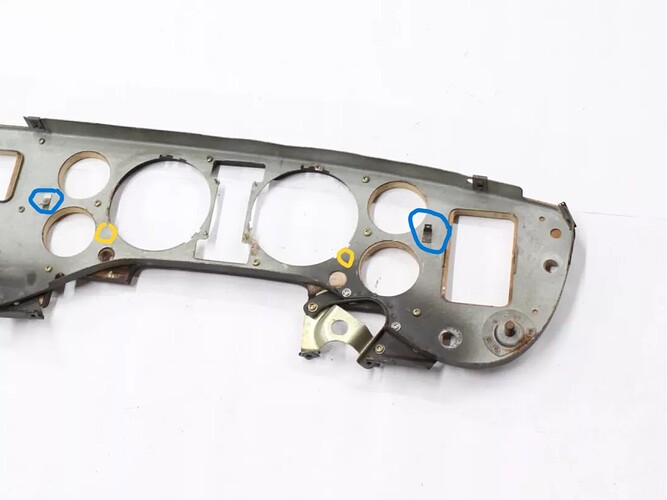
Also, the panel light rheostat can give problems. Some electrical contact cleaner might help. Or remove all the wires from the rheostat and jumper them together and see what happens.
Cheers
DD
You might have a problem with loose wires at the instrument panel grounding tabs. They're circled in blue in this pic but I think I've seen some closer to the where the yellow circles are:
Also, the panel light rheostat can give problems. Some electrical contact cleaner might help. Or remove all the wires from the rheostat and jumper them together and see what happens.
Cheers
DD


Junior Member
Joined: Mar 2025
Posts: 15
Likes: 6
From: Kent, England
Check your #8 fuse in the LH fuse box. It might be blown.....or corroded.
You might have a problem with loose wires at the instrument panel grounding tabs. They're circled in blue in this pic but I think I've seen some closer to the where the yellow circles are:
Also, the panel light rheostat can give problems. Some electrical contact cleaner might help. Or remove all the wires from the rheostat and jumper them together and see what happens.
Cheers
DD
You might have a problem with loose wires at the instrument panel grounding tabs. They're circled in blue in this pic but I think I've seen some closer to the where the yellow circles are:
Also, the panel light rheostat can give problems. Some electrical contact cleaner might help. Or remove all the wires from the rheostat and jumper them together and see what happens.
Cheers
DD


Veteran Member

Joined: Mar 2007
Posts: 9,134
Likes: 2,656
From: Florida
the dimmer sometimes rests on a dead spot and lights go out.
Rotating it usually cleans any dead spot.
Same idea as rotating a scratchy volume control back and forth a number of times.
Rotating it usually cleans any dead spot.
Same idea as rotating a scratchy volume control back and forth a number of times.
Last edited by Jose; May 8, 2025 at 06:39 AM.

Veteran Member

Joined: Mar 2014
Posts: 26,724
Likes: 10,282
From: Tehama County, California, USA
And how many other dash- lighting problems disappeared.
(';')
Thread Starter
|
Member
Joined: Oct 2024
Posts: 73
Likes: 13
From: Los Angeles
can anyone guide me on removing the wood dash to get to the rheostat ?
Trending Topics

Senior Member
Joined: Jan 2016
Posts: 215
Likes: 190
From: Eugene Oregon
I'm not sure it's just the dimmer here. The trip computer lights brightening is interesting. I attached the schematic for the panel lighting; note that main fuse panel #8 is what powers all the panel lights, and also provides the 12v signal that tells the trip computer that it's night time, the lights are on. If that fuse is intermittent or open, the panel lights will go off and the trip computer will brighten. ,
Thread Starter
|
Member
Joined: Oct 2024
Posts: 73
Likes: 13
From: Los Angeles
I'm not sure it's just the dimmer here. The trip computer lights brightening is interesting. I attached the schematic for the panel lighting; note that main fuse panel #8 is what powers all the panel lights, and also provides the 12v signal that tells the trip computer that it's night time, the lights are on. If that fuse is intermittent or open, the panel lights will go off and the trip computer will brighten. ,
this makes sense I’ll check the fuse condition moving the rheostat doesn’t make them come back on or even flicker. Thank you!

Thread
Thread Starter
Forum
Replies
Last Post
Currently Active Users Viewing This Thread: 1 (0 members and 1 guests)

